

AI is reshaping social media work in real time. Nearly all marketing leaders agree (97%) that it’s crucial for marketers to know how to use AI, according to The 2025 Sprout Social Index™. And as AI becomes woven into everyday workflows, the ability to write strong AI prompts for social media is becoming a core skill.
Even though AI social media tools are becoming more user-friendly, it’s still important to know how to write clear, well-crafted prompts to produce useful outputs. A few strategic details in your prompt can be the difference between a generic response and something you can publish or act on immediately.
We’ll help you navigate this learning curve so you can write effective prompts that align with your different social media marketing needs. Read on to understand the mechanics of writing AI prompts and how to craft them for the best results. Plus, explore different types of prompts and use cases.
What is an AI social media prompt?
AI social media prompts are the instructions or inputs you give an AI tool to guide the type of output you want it to generate.
Writing AI prompts for social media is an art and a science. Human reasoning and creativity are required to formulate the right query and combination of elements necessary to fully utilize your AI tool and get the insights and ideas you need.
Here are some things that effective social media AI prompts can help you accomplish:
- Offload time-consuming tasks
- Extract key information from social listening and customer experience data
- Ideate and draft compelling social media content
- Customize social media content for a global audience
- Adapt the tone and style of your social media copywriting based on the situation
With that context in mind, let’s take a look at the different types of AI writing prompts needed to complete these tasks.
Bonus Resource: Get our top five AI social media marketing resources in one convenient toolkit. Download it for customizable templates and tips to drive smart AI adoption in your role and across your organization.
Why mastering social media prompts is becoming a core skill for social media managers
Social workloads are growing and social teams are feeling it. The Social Media Productivity Report found that nearly half (48%) of social media marketers feel they sometimes or rarely have enough time to get their work done, and 63% report feeling burned out. AI can help ease that pressure by speeding up repetitive tasks and simplifying daily workflows, but input-based tools only save time when you give them effective prompts.
There’s also a clear push to get more value from AI tools. The 2025 Sprout Social Index™ found that half of marketing leaders planned to spend 2025 maximizing the AI tools they already have, and 48% planned to invest in more. As AI becomes a bigger part of social workflows, you need to be able to use it well.
That’s why mastering how to write AI prompts for social media is becoming a core skill. It’s how you unlock real value from external AI tools, reduce day-to-day strain on your workload and keep pace with rising expectations across the industry.
30 ways to write effective AI prompts for social media (with examples)
Understanding all the ways AI can support social media work is a key part of learning how to use AI for social media.
Because social teams manage so many different responsibilities, prompts fall into a range of categories, from content creation and UGC to polls, personalization, reporting and more. Each category helps you get more accurate, efficient outputs with less effort.
Here are 30 practical prompt scenarios you can use to simplify your workflow and strengthen your social media strategy.
Content creation prompts
Content creation ranks as marketers’ most time-consuming task, according to The Social Media Productivity Report. Content creation prompts are valuable because they can help with heavy-lift upstream work that supports your social content, like idea generation, outlining and identifying key messages.
However, AI-generated ideas, outlines and copy all still need human review and vetting, especially given that audiences are skeptical of undisclosed AI content from brands, per our Q3 2025 Pulse Survey.
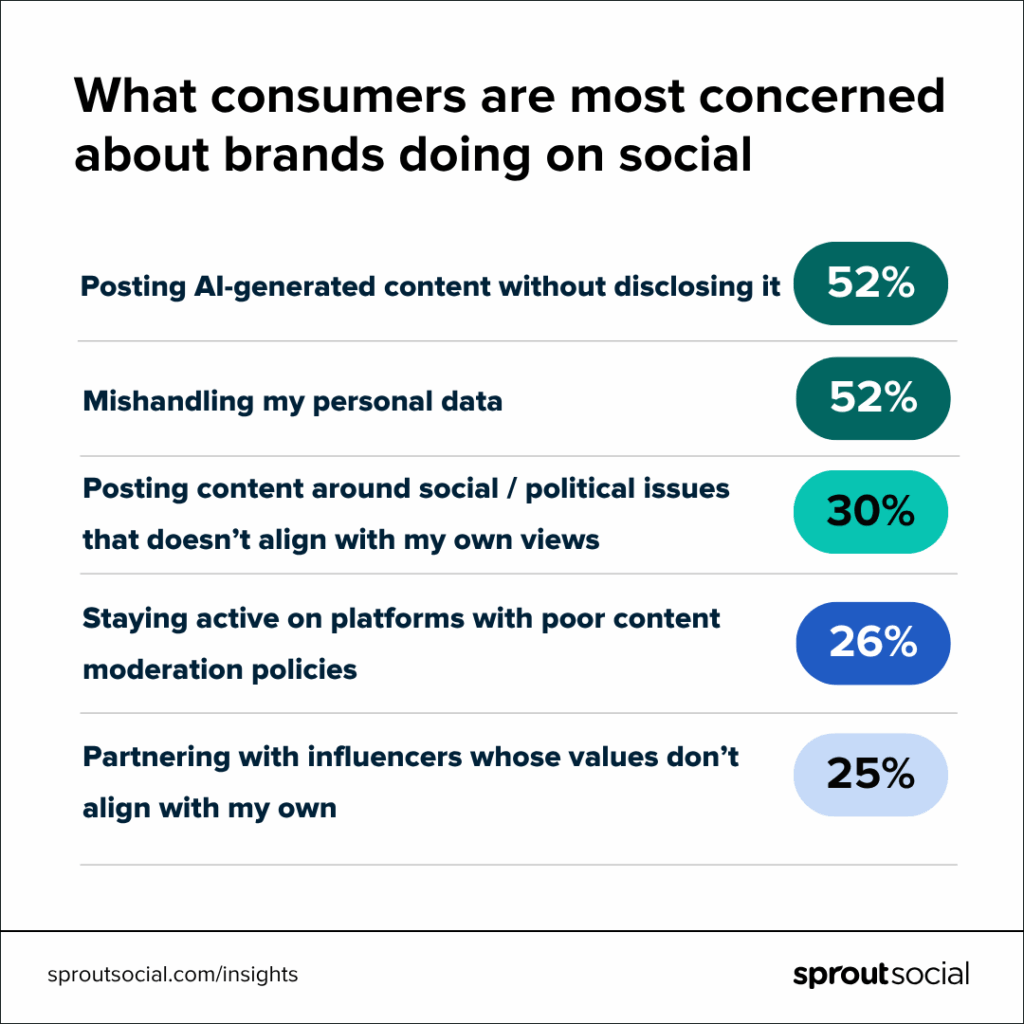
Use content creation prompts for brainstorming, outlining, identifying key messages and finding angles. Check out these examples:
1. Thought leadership prompt for content ideation
Example prompt: “List three emerging digital privacy trends we can build social content around next month. Focus on the ones with the biggest potential impact on B2B decision-makers.”
2. Key message prompt for LinkedIn carousels
Example prompt: “Identify three social-ready key messages from these attached product release notes that spotlight the customer benefits. The goal is to turn them into a LinkedIn carousel.”
3. Cross-network monthly social content calendar prompt
Example prompt: “Map out a one-month social media content calendar for Instagram, Facebook and LinkedIn based on these themes: product education, behind-the-scenes content and customer stories. Include ideal content formats and a suggested publishing cadence.”
AI prompts for social media posts
Writing social posts is one of the fastest-moving parts of a social marketer’s job, and it often requires network-specific messaging. AI prompts for social media posts give the AI clear direction to draft copy for images, carousels or captions, helping you work faster without losing quality or consistency.
For example, Sprout’s Suggestions by AI Assist capability makes it easy to create content that resonates and performs. The tool’s built-in prompt logic generates three post options based on your topic or existing caption and enables you to make edits as you deem fit.
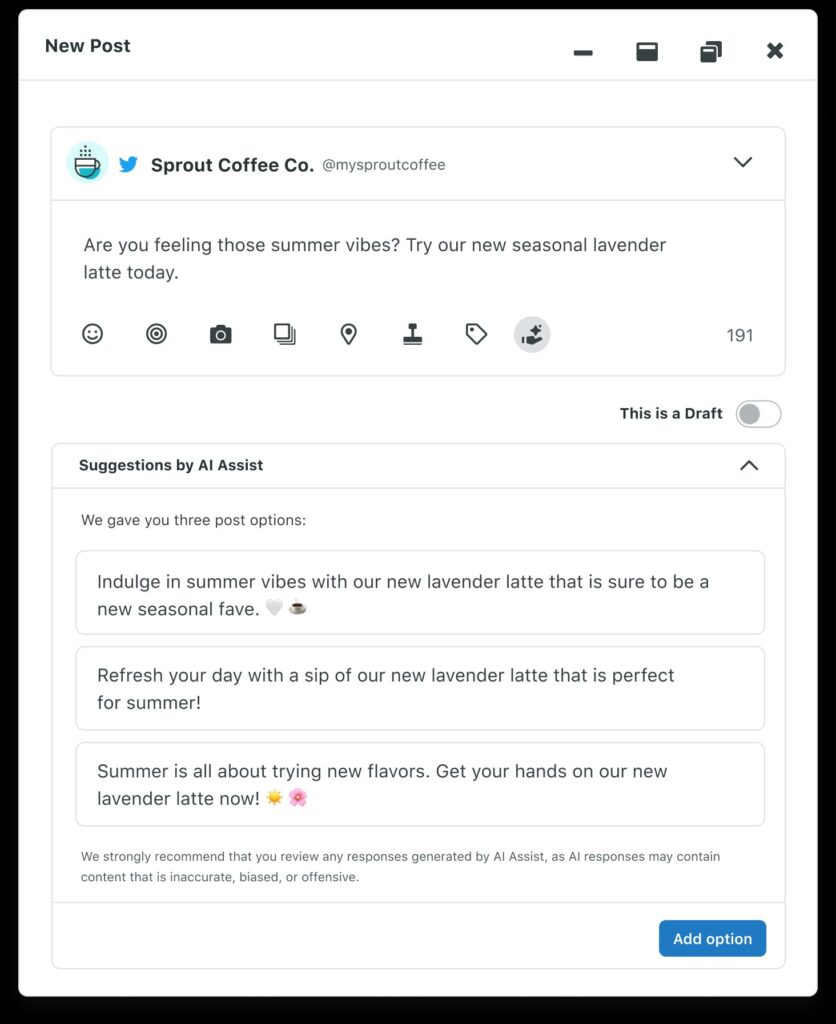
External AI tools like ChatGPT or Gemini will require more in-depth prompts than built-in tools like AI Assist, so here are three prompts to get you started:
4. LinkedIn thought leadership post prompt
Example prompt: “Write a thought leadership post for LinkedIn explaining why B2B buyers now expect the same level of immediacy and personalization they get from consumer apps. Incorporate data to strengthen the argument. Close with a clear takeaway and call-to-action to leave a comment.”
5. Facebook announcement post prompt
Example prompt: “Write a short Facebook post announcing our upcoming product release, based on the attached file. Explain what’s launching, who it helps and when it will be available. Keep the tone friendly and straightforward.”
6. Instagram feature focus caption prompt
Example prompt: “Write a friendly, benefit-first Instagram caption about our AI scheduling feature based on the uploaded resources. Make it playful but not cheesy. End with a soft CTA to try the beta.”
UGC prompts
Tap into the content your community is already creating with user-generated content (UGC) prompts. UGC prompts help you shape tagged photos, reviews and creator posts into authentic content that supports brand trust and engagement.
Here are a few example prompts to help you put this into practice:
7. Review-based UGC prompt for Instagram
Example prompt: “Write an Instagram caption that’s under 50 words about the customer testimonial below. Highlight the main benefit the customer mentions and include a CTA to learn more at our link in bio. The testimonial text appears in the graphic, so don’t repeat it.”

8. Instagram repost prompt
Example prompt: “Suggest three storytelling angles for an Instagram post that features these tagged customer photos.”
9. Facebook community spotlight series prompt
Example prompt: “Brainstorm five Facebook series concepts that tell short, human stories from our customer community.”
Social poll prompts
Social polls are available on X, Facebook, Instagram and LinkedIn, and they’re one of the easiest ways to gather sentiment, test content themes and understand what your audience cares about.
They work best when they’re timely, relevant and tailored to the people you’re trying to reach. However, coming up with engaging poll ideas quickly can be a challenge. AI poll prompts help you generate clear, engaging questions and answer options faster, so you can spark meaningful interactions and learn from your audience in real time. For example, these:
10. LinkedIn poll question prompt
Example prompt: “Generate five LinkedIn poll questions about the biggest challenges social media professionals face when adopting AI. Write each question from a different angle so I have a variety to choose from. Tailor them to social media managers to surface their real barriers.”

11. Instagram poll answer prompt
Example prompt: “Create four concise answer options for the attached Instagram Story poll question that will fit naturally in the tap-to-select stickers.”
Multi-format transformation prompts
Turning a blog post into a carousel, or a long-form video into a short clip for social can be time-consuming. Fortunately, multi-format transformation prompts can help you repurpose content quickly by directing AI to adapt existing assets for new formats.
The result is faster production, more consistent messaging and the ability to scale stories across social networks while maintaining quality. Here are a few example prompts to show you what’s possible:
12. Instagram-to-LinkedIn caption transformation prompt
Example prompt: “Adapt this Instagram caption into a LinkedIn post. Keep the core message and CTA the same, but adjust the tone and structure to fit a professional audience.”
13. Webinar-to-video content extraction prompt
Example prompt: “Identify three self-contained pull quotes from this webinar transcript that would work as standalone clips for a short social video.”
Optimization and enhancement prompts
Optimization and enhancement prompts help you refine social content to perform better on each network.
They’re especially useful when you already have a draft but need a sharper hook, clearer structure or a tone that resonates with a specific audience. Use these to elevate your drafts, align them with network best practices and publish with more confidence. For instance:
14. Messaging clarity refinement prompt for Instagram
Example prompt: “Edit this Instagram caption to make it clearer and easier to skim. Keep the original key message and the tone, but improve the flow and readability.”
15. Hook enhancement prompt for TikTok
Example prompt: “Suggest three short spoken opening hooks for this TikTok script. The goal is to capture attention in the first few seconds.”
16. Tone refinement prompt for X
Example prompt: “Rewrite this X caption in a more enthusiatic tone without changing the core meaning or length.”
Automation & workflow prompts (agentic AI)
AI social media assistants can handle research, analysis and operational tasks that typically slow teams down. Instead of manually digging through data or switching between tools, you can prompt agentic AI to surface insights and support decision-making.
For example, Sprout’s agentic AI, Trellis, enables you to ask questions and deep-dive into your Sprout Social Listening data. This AI listening agent can provide insights into things like campaign performance, topic-focused trends and brand health, giving you the intelligence you need to refine your strategy in real time.

Here are a few agentic AI prompt examples inspired by our tips for writing Trellis prompts:
17. Campaign analysis prompt
Example prompt: “In the drinks topic, how did sentiment and volume change during our holiday drink campaign launch week compared to the week before? Please focus on messages about our campaign.”
18. Trend detection prompt
Example prompt: “Identify the 50 most viral posts in the drinks topic from the past month. What formats or visual styles are driving engagement, and how can we apply those insights to our next campaign? Explain your thought process.”
Audience targeting prompts
Audience targeting prompts help you tailor social content to the people you want to reach most.
When you’re writing for specific demographics or customer segments, these prompts guide AI to adjust tone, examples and messaging so your posts feel more relevant.
With consumers increasingly expecting brands to understand their needs (as Salesforce’s State of the Connected Consumer report shows), this kind of social media personalization helps make your social content more timely, meaningful and effective.
Here’s what an audience targeting prompt can look like:
19. Audience segment prompt for LinkedIn
Example prompt: “Rewrite this LinkedIn post for an audience of mid-level IT managers. Keep the core message, but adjust the examples and vocabulary to match their day-to-day responsibilities.”
Strategy prompts
Strategy prompts help you step back from day-to-day publishing and look at the bigger picture. They’re useful when you need to clarify what your content should accomplish, explore new campaign angles or decide which themes are worth investing in.
To make the responses to your social media strategy prompts even more accurate, add context from Sprout Social Listening. It helps the AI ground its suggestions in real audience conversations, emerging trends and the topics that matter most to your community.
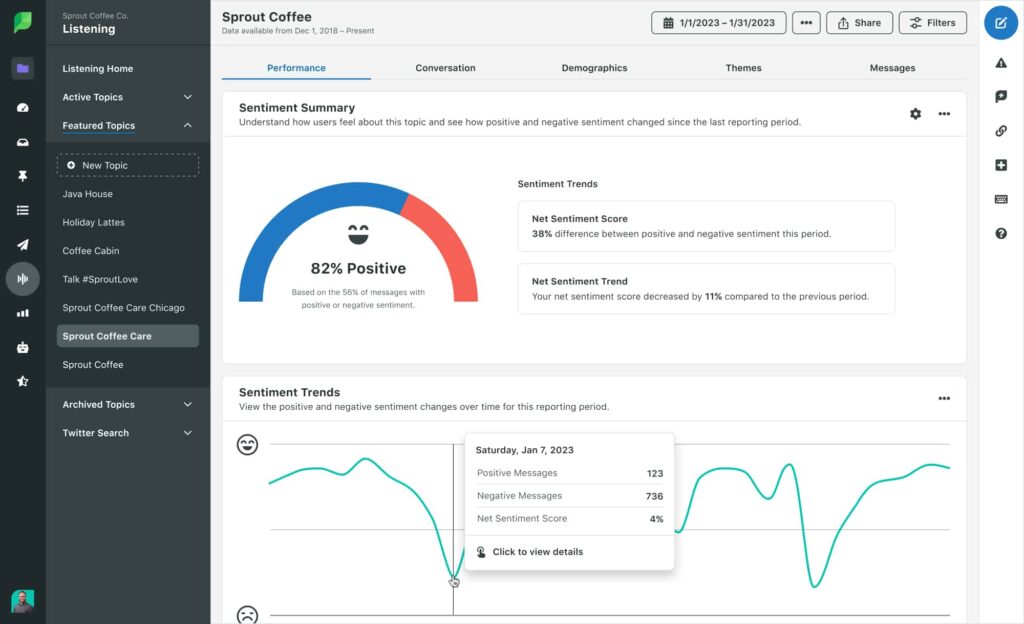
These examples show different ways to write prompts that help with your social strategy:
20. Content-pillar development prompt for TikTok and Instagram
Example prompt: “Review our brand mission and the attached social content calendar for TikTok and Instagram. Suggest three content pillar ideas that would help us stay consistent while expanding into new themes across both channels.”
21. Campaign concept prompt for X, Instagram and Facebook
Example prompt: “Here’s our campaign goal and the key message. Propose two campaign concepts that could bring this to life across X, Instagram and Facebook.”
Social engagement prompts
Social engagement prompts help you create replies and interaction points that feel natural and individualized. Input one of these prompts into an AI tool when you’re looking to keep conversations active, acknowledge your audience in a meaningful way or encourage followers to share more.
Below are some practical examples:
22. Instagram comment response prompt
Example prompt: “Write a short, playful reply to this Instagram comment about someone uploading a low-quality photo on their first day as a social media marketer and being roasted for it. Keep it supportive and lighthearted.”
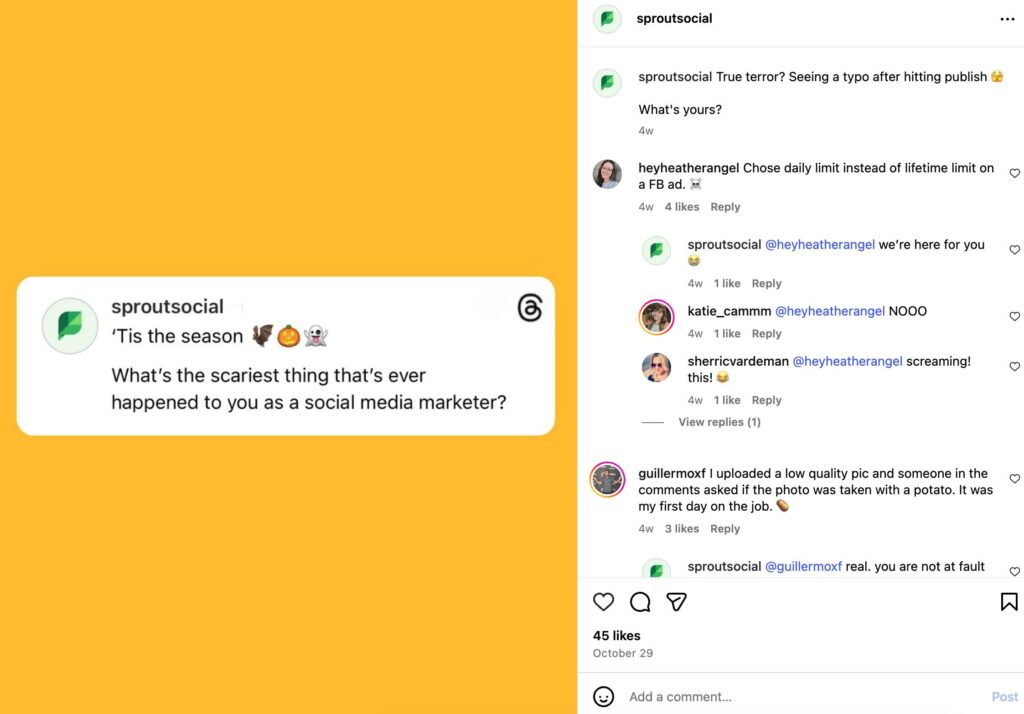
23. Engagement-generating comment prompt for TikTok
Example prompt: “Suggest three short follow-up replies we can use in the comments on this TikTok video that’s gaining traction to encourage more people to join the conversation. Keep them on-brand and non-repetitive.”
H3: Community management prompts
Community management prompts help you handle the conversations that happen on social every day. AI can support the work of replying to inbound messages, moderating comments and answering repeat questions without slowing you down or diluting your voice.
Having help with this is good, because speed matters. The 2025 Sprout Social Index™ found that most consumers expect brands to respond within 24 hours or sooner, and 73% say they’ll buy from a competitor if a brand doesn’t respond. These prompts give AI the direction it needs to draft clear, on-brand replies so you can manage your community efficiently and keep your audience feeling heard.
Check out these examples:
23. Customer refund response prompt
Example prompt: “Draft a clear response to this customer asking why their refund hasn’t been processed yet. Confirm that we’re looking into it, set expectations for timing and point them to the correct support channel for follow-up.”
24. Prompt for correcting inaccurate information in comments
Example prompt: “Create a polite response to this inaccurate comment (see screenshot attached), correcting the misinformation without escalating the tone. Keep it concise and invite the commenter to DM us if they have more questions.”
Crisis management prompts
Crisis management prompts help social teams respond quickly and responsibly when conversations take a negative turn.
The 2025 Sprout Social Index™ reports that 93% of consumers want brands to do more to combat misinformation on social. AI can help you draft factual responses that calm the situation instead of escalating it, but keep in mind these prompts work best alongside a social media crisis management strategy. AI is meant to support your response, not replace the strategy behind it.
The following examples illustrate how crisis management prompts can be written and used:
25. Crisis response prompt for TikTok
Example prompt: “Draft a holding statement script for a video response to a sudden wave of negative comments on our TikTok video. Acknowledge the issue, let people know we’re investigating and avoid speculation until details are verified.”
26. Risk assessment prompt for Instagram
Example prompt: “Review these comments that started appearing on our latest Instagram post and assess whether they show early signs of a potential crisis. Summarize the risk level and flag any themes we should escalate to our comms team.”
Reputation management prompts
Many consumers now treat social media as a primary source of information about brands. In Sprout’s Q3 2025 Pulse Survey, 52% of Gen Zers are more likely to trust info about a brand or products found on social compared to info found through other forms of search, like Google or AI chatbots.
Reputation management prompts support the day-to-day work of managing how your brand shows up in those moments. They help you acknowledge feedback, reinforce brand values and address concerns before they grow. Here’s what these prompts can look like:
27. Google review response prompt
Example prompt: “A customer left a 2-star Google review about slow customer support. Compose a response that acknowledges their experience first, then clarifies how we’re improving wait times. Close by giving them the support lead’s email if they want to reach out. Keep neutral and short.”
28. LinkedIn FAQ prompt
Example prompt: “Create a short reply to this question that keeps coming up on LinkedIn about our new pricing structure. Keep the tone reassuring, explain the change in simple terms and direct people to go to our FAQ page for more information.”
Social media analytics and reporting prompts
Social teams are under constant pressure to translate data into decisions, but pulling insights from multiple networks, filtering noise and turning metrics into a clear story can be time-consuming.
Social media analytics and reporting prompts ask AI to summarize or provide insights into your social metrics. If you’re using external AI tools, your best bet is to upload your data as a spreadsheet or PDF so the AI can base its summaries or explanations on real data.
Inside Sprout, built-in features like Analyze Charts by AI Assist can surface summaries and insights directly from your My Reports dashboards (no file uploads required). This lets you spend less time digging through charts and more time acting on what matters.
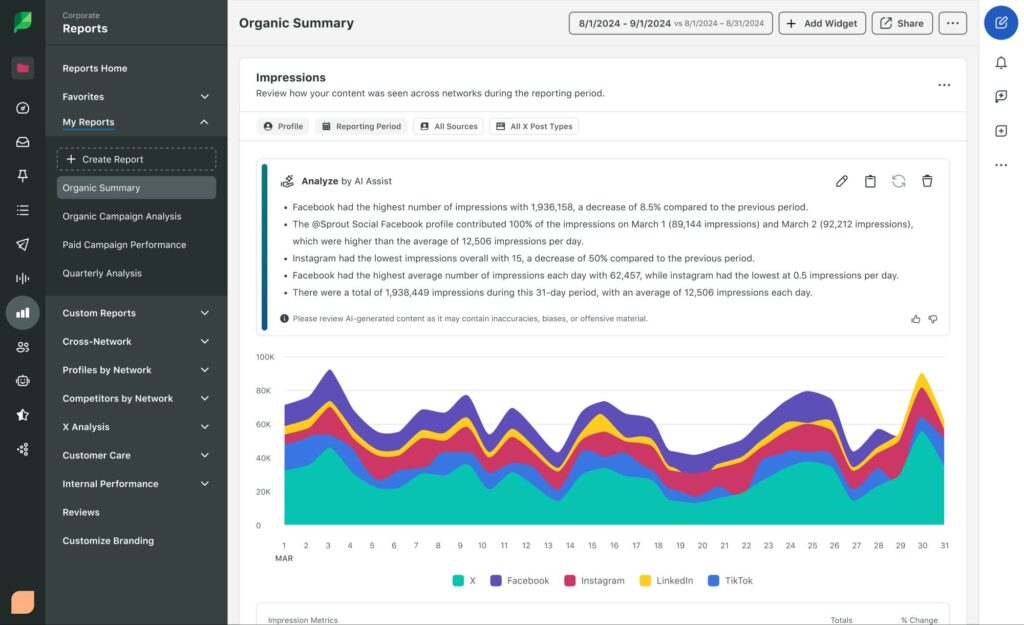
Here are some examples to assist your prompt writing:
29. Facebook performance summary prompt
Example prompt: “Review the attached Facebook analytics PDF and summarize the most significant month-over-month changes. Focus only on the biggest shifts in impressions, engagements and audience growth.”
30. KPI explanation prompt
Example prompt: “Explain these month-over-month KPI changes in plain language: engagement rate increased from 2.1% to 3.4%, reach grew by 18% and comments declined by 9%. Describe what might have contributed to each shift and how we should adjust our goals for next month.”
How AI social media prompts work behind the scenes
AI tools may feel conversational on the surface, but there’s a lot happening every time you prompt. Understanding the basics can help you write prompts that generate clearer insights, better content and more accurate recommendations for your social workflow.
Here’s a simple breakdown of what happens behind the scenes each time you prompt an AI tool.
Asking your question clearly
When you enter a prompt, the AI tool breaks it down to figure out what you’re asking.
It looks for details such as the topic, the action you want it to take, and the format you expect. This means the AI is trying to understand whether you need a caption, a customer care response, a data summary, or something entirely different. That’s why the more direct your prompt is, the easier it is for the tool to identify the context and give the right answer.
How AI interprets your intent
Once the AI understands the prompt, it starts looking for signals that explain how you want the output delivered. It scans your prompt for details such as audience (millennial home chefs), the task (write a Facebook post), style (creative/formal) or word count (100), to figure out what kind of response you’re expecting.
The tool also analyzes the sentiment you’re aiming for and adjusts its phrasing, word choice and pacing to match. This is why telling the tool you want something “friendly,” “formal” or “reassuring” can dramatically change the output.
Generating the response
After understanding your prompt, the AI pulls together the details you provided to produce a response that aligns with your goal.
Within a single conversation, the tool keeps track of what you’ve already said so it can maintain consistency from one question to the next. That’s why you’re able to refine a post, ask for adjustments or request deeper analysis without needing to restate your original prompt.
In the end, the AI’s output is shaped by the clarity of your prompt: the tone you specify, the task you outline, the audience you define and the details you provide.
This is why the more guidance you give upfront in a prompt, the stronger and more reliable the output will be.
Tips on writing effective AI prompts for social media
AI writing prompts must be clear, concise and direct to ensure the tool accurately understands the task. Each query must be finely tuned, considering factors like topic relevance, keyword selection, structural coherence and target audience, to elicit the best possible response. Let’s dive in.
Define your goal and task
Your prompt needs to tell the AI tool what you’re trying to accomplish. Are you trying to pull insights from your social data to complete a report? Write an X post? Change the tone on a social customer care reply? Since each of these content types has a particular style, the response generated will only be accurate if you focus it on the goal.
AI performs best when queries are focused, which is why complex asks, like drafting a caption, providing a list of hashtag variations and brainstorming visuals, should be broken into separate prompts. This approach results in cleaner outputs and gives you more control over each step of the process.
Add audience and context
Who is the intended audience of the output, and what context is it being used in? Adding these details to your prompts helps the AI tailor its recommendations, analysis or messaging to the people who need it.
Is your target audience between the ages of 30 and 40? Are you writing for a professional audience, such as lawyers or teachers? Or is your content aimed toward customers you wish to convert? Mention the persona you are writing for based on key traits, roles and responsibilities.
For example, an AI writing prompt aimed at executive audiences could say, “Write a blog for business leaders in the SaaS industry about data security”. Specifying the persona is important because it helps the AI tool choose the correct vocabulary from its database and use it contextually.
Context matters just as much. Sharing details like the post topic, the network you’re using, the challenge you’re trying to solve, or the sentiment of a customer conversation gives the AI a more straightforward path to follow.
Set tone, style and structure
Tone, style and structure are all elements that work together to make the response more polished rather than something you need to heavily rewrite.
Choosing the correct tone for your content makes it more compelling and engaging. Specifying a tone such as assertive, happy, empathetic or friendly is especially useful if you’re generating social media posts and social media customer care responses.
It also helps the sentiment analysis algorithms within the AI tool choose the appropriate words and phrasings in the response to ensure it matches the tone you specify.
Your social media management platform may even have built-in features, like Enhance by AI Assist, that enable you to tailor tone in both social posts and social customer care messages in a couple of clicks.
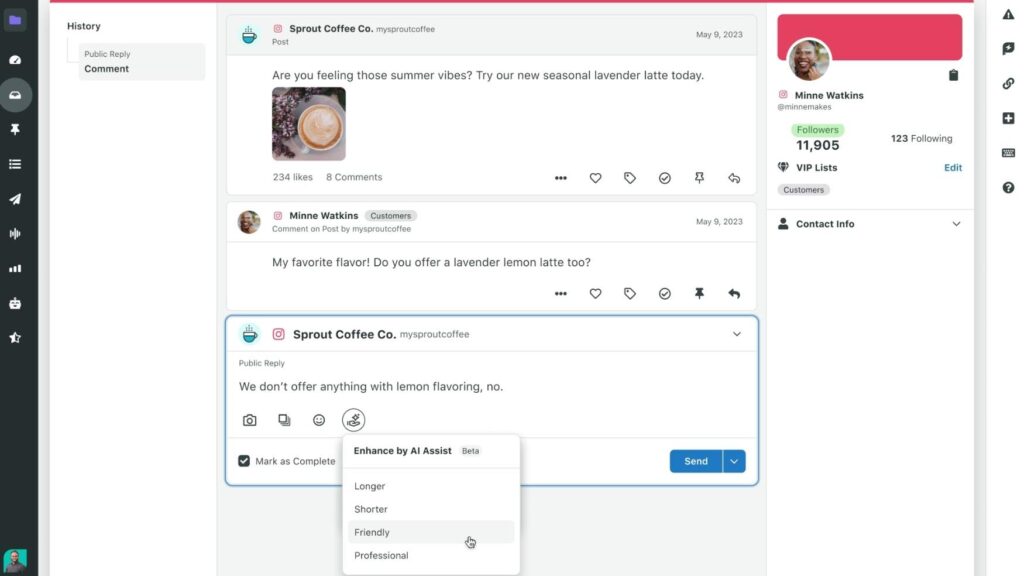
From there, specifying style and structure ensures the output fits the format you need. You can ask for a bulleted list, a short paragraph, or a more narrative approach. You can also ask ChatGPT not to do certain things; for instance, you can now tell it to omit em dashes.
Fine-tune keywords and length
Keywords act as anchors that tell the AI which details matter most. The more specific you are in your query, the more accurate the output will be.
Last but not least, define the word count. It helps the AI tool determine how long or short the response should be. In doing so, the tool can decide how much and which details to include in the response.
Combining as many of these elements in your prompt will help elicit the best response from your AI tool. Think of each of these elements as keywords and include or exclude them from your prompts as required.
5 common pitfalls when writing social media prompts (and how to avoid them)
Even though AI tools generate responses conversationally, they don’t always interpret nuance, intent or context the way humans do. That gap can lead to outputs that feel generic, incomplete or off-brand.
Social practitioners often run into the same prompt-writing challenges, and understanding these pitfalls makes it easier to guide AI toward the results you actually need. Here’s how to sidestep them.
1. You’re rushing because you’re busy, so you write incomplete prompts
Vague or unclear prompts lead to vague outputs. Specify the action you want it to complete, and any other relevant details to give the AI all the context you have.
2. The voice in the content it generates feels “off,” but the messaging is correct
AI needs detailed direction and, ideally, some reference copy. Provide examples, keywords or a short description of the personality you want. Iterating your prompt helps it get closer each time.
3. You ask a question and get an answer that’s too broad to be helpful
Broad questions lead to surface-level insights. Ask a closed-ended question if you’re looking for a specific answer, and call out the timeframe, goals or patterns you want the tool to analyze.
4. The AI entirely misses the point of what you’re trying to ask it to do
If the tool doesn’t know the “why,” it can’t shape the message effectively. Share what the content should accomplish, who it’s for and what outcome you’re driving toward. If you’re still not getting the response you want, try rephrasing your query.
5. Your prompt saved you time, but the AI still needs your oversight
AI speeds up drafting, but you’re still responsible for accuracy and originality. Review all outputs for correctness and make sure they align with your organization’s AI use policy.
The future of AI prompting in social media: Blending human creativity with AI
Writing AI prompts has become an essential skill for social practitioners. Well-written prompts enable you to explore audience insights, interpret performance trends and shape strategies faster and more easily. They can also help you turn ideas into posts, captions and scripts that are aligned with your goals across channels.
But the real value doesn’t come from the technology alone. It comes from how you guide it. Context-rich prompts tap into the strengths of AI while keeping your expertise at the center. As AI becomes more integrated into social media management, the practitioners who succeed will be the ones who know how to pair human judgment with AI efficiency.
Use these tips to write stellar prompts that make AI marketing tools your partner in delivering more impactful social content.
The post 30 ways to master AI prompts for social media: A marketer’s guide appeared first on Sprout Social.