
For more than a century, images have helped people decide what to buy without seeing the product in person.
In 1897, Sears told shoppers its catalog illustrations would let them “order intelligently… as well as if you were in our store selecting the goods from stock.” The picture stood in for the physical visit. By 1916, that visual strategy had scaled to 50 million catalogs a year.
Decades later, the Delia’s catalog proved the same rule. At its peak of 55 million mailings a year, photo producer Jim Trzaska noted that teenage girls “would use the book itself as a sales tool to sell their parents on the clothing by showing them a picture.” Social media eventually scaled that same trick to a feed of strangers.
Now the audience has changed. An AI answer engine can look at your photo, break it down into mathematical tokens, and interpret what it sees.
An image that once had to communicate clearly to a person now also has to communicate clearly to a machine — what’s in the frame, what it means, and whether the surrounding page supports that meaning.
That changes the job of image SEO. You need to consider whether the machine can read your image and interpret the message you want to send.
The image is a doorway that opens both the query and the answer
With users now running roughly 20 billion visual searches through Google Lens every month, the search bar is a text box and a camera.
On Pinterest, visual search already accounts for 30% of all searches and converts 62% better than text, because a camera finds the exact thing faster than words can describe it. Pinterest Lens alone handles 1.5 billion visual searches a month.
In China, Alibaba’s camera-first shopping has surpassed 10 million visual searches per day for years. Camera-to-cart is built, monetized, and mainstream.
Google holds a patent filed in 2023 and published in April 2026, describing an answer flow where the cited source is chosen by image match first, then the surrounding text is pulled in to build the answer.
Andy Chadwick, who identified the patent, highlights that this is a patent application, not confirmed production behavior. Google files thousands of these, and plenty never ship as described. But directionally, it’s the clearest public signal yet that the picture, not the paragraph, is what gets your page pulled into the answer.
Your product is now your landing page. A plumber, for example, might show pictures of leaky faucets on a website alongside text explaining what the problem is and how the service can help.
| Page | Type of image | Purpose (traditional) | Purpose (AI/multimodal GEO) |
| Homepage | High-quality, original brand images | First impression, brand identity | Give the answer engine an original, non-stock hero it can match. |
| Product pages | Multiple high-resolution, different angles | Carousels, 360, close-ups | Make packaging and product text OCR-legible so the AI reads the right attributes. |
| Blog/info | Infographics, diagrams | Inform, break up text | Any claim in the graphic must also exist as machine-readable text or alt so the engine can extract and quote it. |
| About/team | Portraits, office photos | Build trust | Feed entity and authorship signals (who, credentials) that tie the page to a known person for E-E-A-T and citation. |
| Service | Team/workplace, before-and-after | Clarify services | Control the co-occurrence: what sits in frame tells the AI a service story. |
| Contact | Location images, maps | Visual context | Reinforce location and local business signals the AI relies on. |
Dig deeper: How to make products machine-readable for multimodal AI search
See where your brand appears in AI search, where competitors are winning, and what it takes to become the answer AI recommends.
One image: Two questions, two audits
You know the machine reads your image and pulls it into answers. The next question is how you check whether yours holds up.
There are two ways to audit an image for this:
- Did AI correctly understand what’s in the image?
- Did you put the right things in the image to begin with?
What is factually in this image?
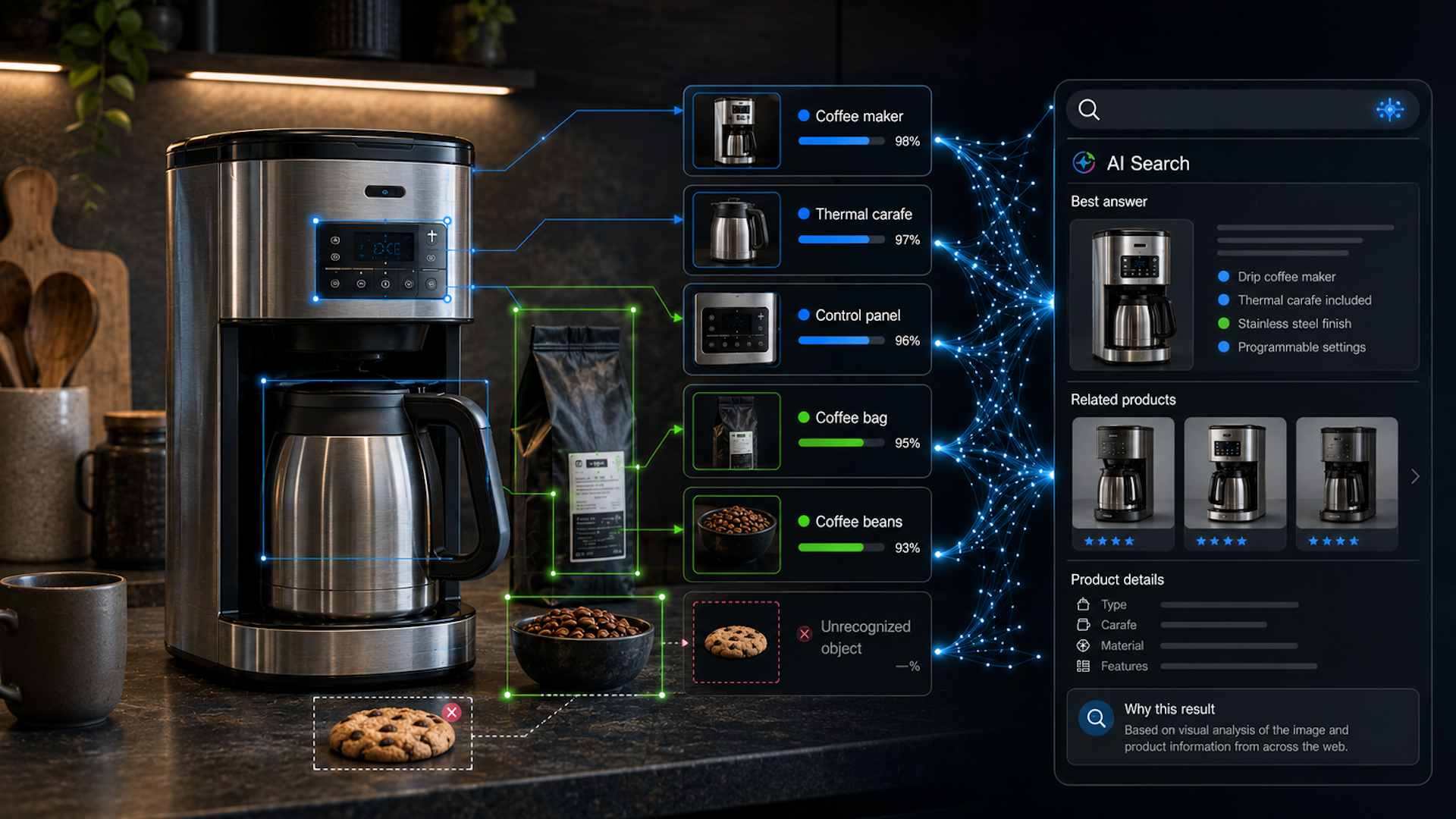
A stainless steel coffee maker with a thermal carafe. Is that object in the shot, and does the copy on the page name it? This is the denotation layer, and Metehan Yesilyurt’s visual query fan-out analysis maps it well.
It’s object-level, literal, and checkable. Most brands fail it anyway, because they wrote copy for a mood and shot a photo or picked a stock photo for a different vibe.
What does this image imply?
“A professional office setup for a team” isn’t an object you can point to. It’s a meaning the composition carries, or fails to carry, to a human and now to a machine.
This is the connotation layer that my co-occurrence audit measures. Did anyone brief the branding and the photography to build the intended meaning, and does that meaning survive when the machine strips the image down to its semantic residue?
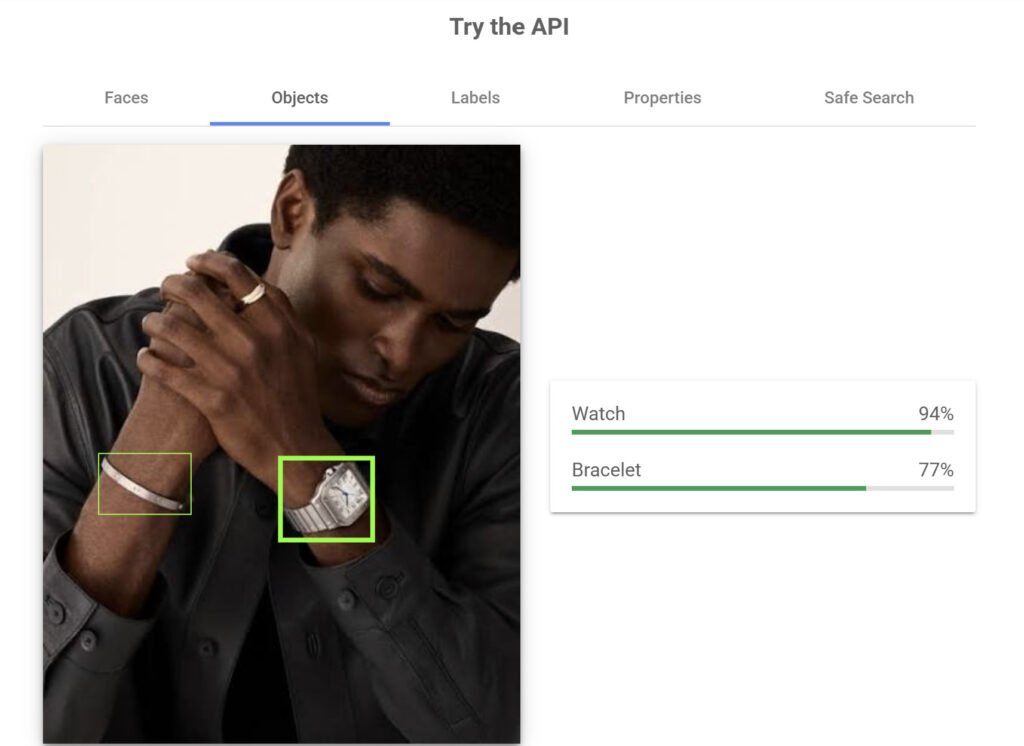
Visual query fan-out analysis asks whether you described what is there. Co-occurrence audits ask whether you put the right thing there in the first place. Both matter because what you intended to communicate isn’t necessarily what the machine can detect. Here, you can see that the bracelet and watch in the photo were detected, but the ring wasn’t.

The job has changed
| Image SEO’s old job | The multimodal image GEO job |
| Rank the image in Google Images | Get the image retrieved and cited by the answer engine |
| Match search intent for a human browsing | Give the machine the semantic residue it reads to build an answer |
| File naming for keywords | File naming plus in-image legibility, the AI reads the pixels, not just the filename |
| Alt text written for humans and accessibility | Alt text written as claims the engine can extract and quote, not keyword strings |
| Compression and Core Web Vitals for page speed | Compression that preserves legibility, so the model can still parse packaging and product text |
| File formats and lazy loading for load performance | Same hygiene, now in service of the image being machine-parseable at retrieval time |
| E-E-A-T signals around the page | Entity and authorship signals the AI ties to a known source when it decides what to cite |
| One image, one job: look good to a person | Co-occurrence control: what sits in frame tells the AI a brand story you may not have approved |
| Emotional resonance judged by a human eye | Sentiment alignment: what the vision model reads as emotion has to match your creative direction |
What to actually measure: The multimodal image GEO scorecard
Ownership rate
Share of hero images that are genuinely yours, not a duplicate, near-duplicate, or visually similar stand-in that half your category also uses.
How to measure
Use Google Cloud Vision API’s Web Detection feature. It returns four useful result types:
fullMatchingImages(fully matching images).partialMatchingImages(images that share key-point features, such as cropped versions).visuallySimilarImages(images that share some visual features).pagesWithMatchingImages(pages containing matching images).
Evidence
Google’s Visual Citations patent was filed in 2023 and published in April 2026. It describes an answer flow in which the image match is selected first, followed by the surrounding text. Chadwick, who surfaced the patent, notes that it’s a patent application, not confirmed production behavior.
Context match
Context match measures whether what sits next to your product in the frame tells the AI the brand story you approved.
How to measure
Use Google Cloud Vision’s OBJECT_LOCALIZATION to identify detected objects, including their names, mids, confidence scores, and bounding boxes. You can then assess the “visual neighbors” against your brand guidelines. The API doesn’t judge the context for you.
Sentiment alignment
Sentiment alignment measures whether the emotion the vision model reads from your lifestyle photography matches the creative direction you briefed.
How to measure
Use Google Cloud Vision’s FACE_DETECTION to review faceAnnotations and emotion enums ranging from UNKNOWN to VERY_UNLIKELY, UNLIKELY, POSSIBLE, LIKELY, and VERY_LIKELY. Target VERY_LIKELY.
Use detection confidence as a gate: Trust scores of 0.90 or higher, consider 0.70–0.89 acceptable for secondary shots, and discard anything under 0.60 as noise.
Legibility rate
Legibility rate measures the share of top product images where the machine correctly reads packaging copy, on-pack claims, product attributes, or anything written in the shot.
How to measure
Use Google Cloud Vision’s TEXT_DETECTION for OCR.
Failure thresholds from Cognex and arXiv literature, rather than Google’s own specifications, include character heights under ~30px, contrast under ~40 grayscale values, stylized fonts, and glare on reflective packaging.
Fan-out coverage (or content gap score)
Fan-out coverage measures the share of what your image visually shows or implies that your on-page text never actually confirms. One real buyer question can fan out into a dozen sub-questions, so coverage is important.
How to measure
Use the same visual query fan-out method with Screaming Frog and the OpenAI Vision API. The tool flags queries you could already win if the page text backed up what the photo shows.
Note: This is a qualitative metric.
Dig deeper: Image SEO for multimodal AI
Track your visibility across AI search, uncover missed opportunities, and grow your presence where customers are asking questions.
How to make your images work for AI
The audits tell you where your images are falling short. Start with the changes that have the biggest impact on what AI can see, understand, and retrieve.
- Shoot your own photos. The single highest-leverage move is replacing stock and shared hero images with photography that only you have. It fixes ownership rate and dedup survival in one shot, literally.
- Make the image legible.
- Put the answer next to the picture. The patent mechanism and plain sense both say the text adjacent to the retrieved image is what gets pulled into the answer. Caption it. Label it. Put the fact that the buyer needs directly under the image, not three scrolls away.
- Cover the fan-out, not the keyword. Several plain images answering several sub-questions on one page are a great way to do that.
The old job was to make an image that a human would stop and look at. The new job is to make an image a machine can read, tell apart from everyone else’s, and carry it into an answer.