Sophisticated cyber attacks are increasingly targeting Salesforce customers, which puts admins of these systems on the frontline of protecting their organization’s most critical data. Recent high-profile breaches have made one thing clear: general Information Security (InfoSec) tools may not be enough to protect Salesforce instances on their own. Security Incident & Event Monitoring (SIEM) systems and SaaS Security Posture Management (SSPM) solutions tend to have limited visibility into Salesforce security events, leaving a forensic gap, and they can’t proactively block threats on the platform. InfoSec teams also tend to lean on Identity and Access Management (IAM) as their main line of defense, creating an “M&M approach” to security: a hard shell built around a soft center. To really cover the full range of risk, from everyday user activity and configuration changes to deliberate malicious actions, InfoSec and Salesforce teams must work together, building security in layers instead of a single line of defense.
Treating security as an investment that saves money over time, not a discretionary expense, takes collaboration between Salesforce admins and InfoSec teams. Our four-part series of articles in InfoSecurity Magazine approaches Salesforce security as a partnership and shows how automation moves teams away from manual, error-prone processes toward a more proactive, AI-enhanced security posture.
| The Path to Agentic AI: Securing Salesforce data today is foundational to safely unlock the benefits of agentic AI tomorrow. Without a foundation of tight, collaborative security, AI agents can become liabilities rather than assets. |
The high cost of reactive security
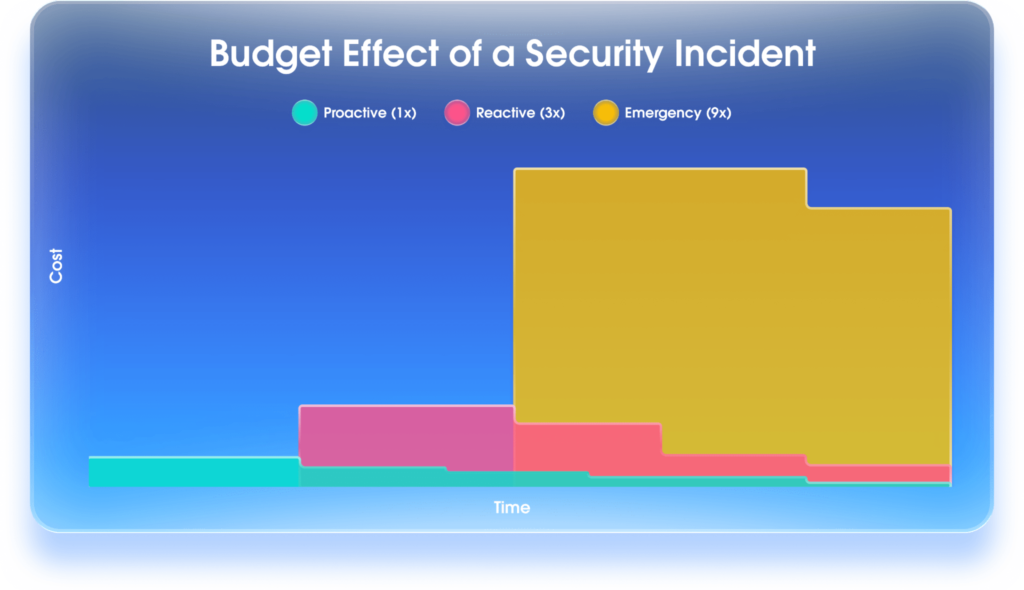
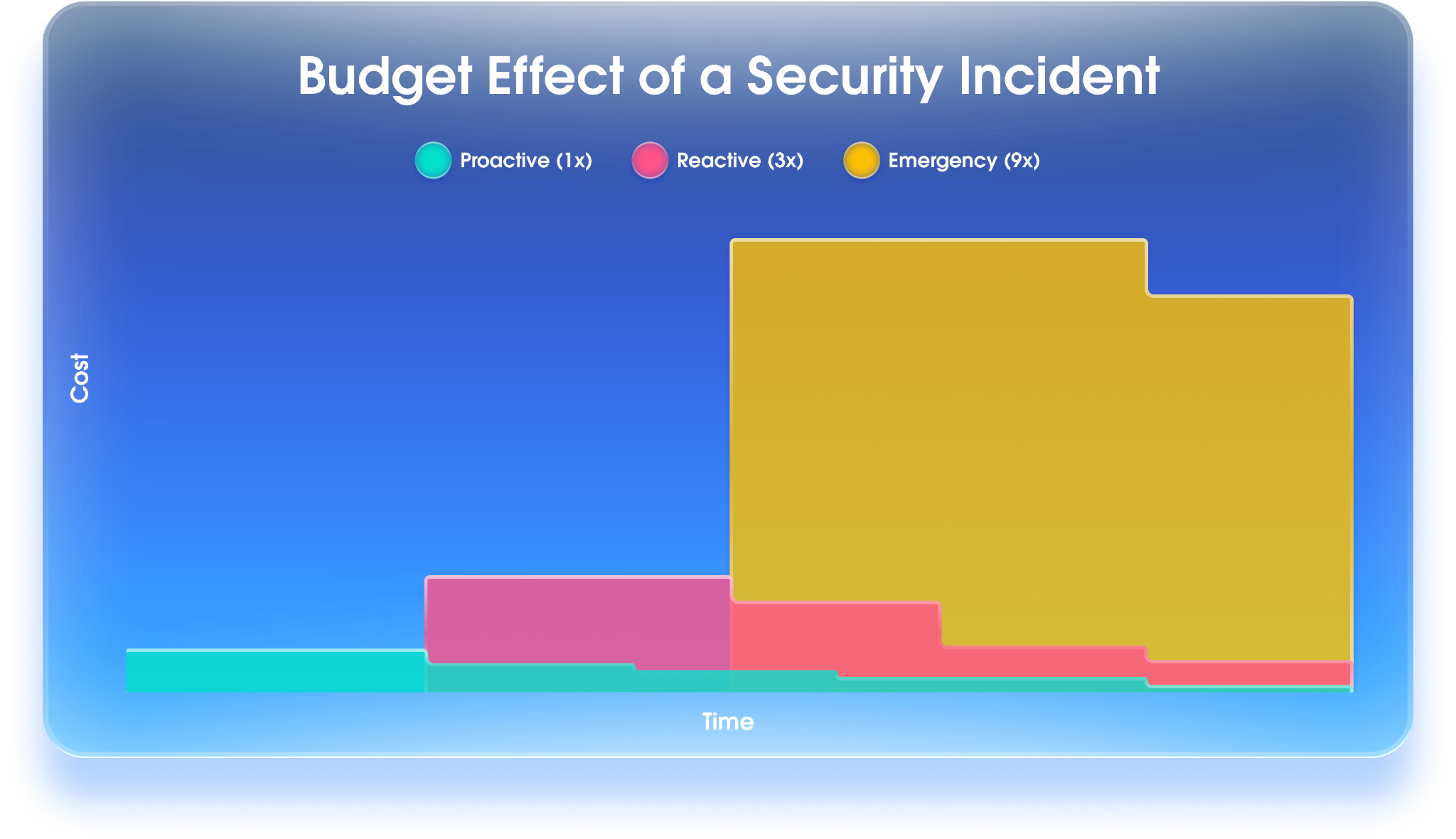
Organizations that wait until an incident impacts their SaaS data to invest in security solutions and training often find that the damage, loss, and recovery time cost far more than proactive data protection. They may lack the necessary information to determine what occurred and which specific Salesforce records were impacted. Without that information,legal teams must notify the entire database, which is more expensive than targeted notifications. In some cases involving loss or corruption of Salesforce records, the data is never recovered because the organization wasn’t prepared to restore it. On top of lost revenue, this kind of disruption can bring negative press, reputational harm, and even regulatory penalties. As a result, budgets can swing hard: little to no security spending before the incident, heavy investment after. We call this the “Budget Effect of a Security Incident.”
| Multiple customers have put off investing in stronger Salesforce security, even after independent audits flagged critical gaps. That changed once the Salesforce Security Office detected unauthorized connections into their instances, locked the affected account, and notified them, which made the need for broader security services impossible to ignore. In each case, the customer immediately invested in Salesforce Trusted Services solutions. Notably, the product itself didn’t cost more, but the compressed timeline did: rushed implementation and unplanned expenses pulled resources away from other priorities. Customers who plan ahead can save more by timing their purchase around pricing incentives (e.g., end of year incentives, product bundles, early renewal). |
The bottom line: putting off investment in security solutions costs more in the long run. After an incident impacts Salesforce data, the application owner often gains budget in the shadow of someone’s misfortune.
Keep in mind that purchasing a security solution without allocating resources to implement and monitor it will not protect you, much like buying a smoke detector and leaving it in the box. Strong Salesforce security requires three things working well together: well-practiced processes, properly trained personnel, and fit-for-purpose tools. All three matter, and any one of them fall short without the other. Some organizations embed a Salesforce security specialist within InfoSec or appoint a security liaison as a bridge between teams to foster cooperation and knowledge exchange.
Below, we outline the various areas of security where Salesforce administrators and InfoSec must focus, and how Salesforce security tools can help.
| Quote Article: The goal is to leverage the headlines for insight rather than becoming the news. When executives ask, “Could that happen here?”, the answer has historically been “probably not.” However, the threat landscape has changed. It’s no longer a question of IF it will occur, but WHEN. The answer is “yes,” and the discussion must immediately shift to the precise investments required to mitigate or minimize the damage. Capitalizing on the lessons learned by others is smart business, while repeating their mistakes is negligence. |
Cybersecurity regulations: A roadmap for security and resilience
Learning from the hard-learned lessons of other breached organizations is a mark of proactive Salesforce governance. iIgnoring the same security gaps in your own org is a failure of responsibility.
Cybersecurity regulations such as the EU Digital Operational Resilience Act (DORA), Canada’s OSFI Guidelines on Cyber Risk Management and Operational Resilience, NYDFS 23 NYCRR 500, and NIS2 are more than mere mandates. They represent a codified history of lessons learned from global security failures. Aligned with the foundational NIST Cyber Security Framework, they shift the focus from reactive configuration to proactive resilience. For Salesforce teams, following these frameworks helps bridge the InfoSec-SaaS divide and trade reactive firefighting for a structured “roadmap to success.” They also give you a concrete way to justify the budget for stronger Salesforce security.
Here is how Salesforce Trusted Services solutions support key security pillars:
- Robust risk management: Security Center delivers automated data-driven risk scoring, codified Salesforce security expertise, and one-click audit reports. It acts as an “efficiency engine” to manage risks more comprehensively and consistently across multiple orgs in a fraction of the time compared with manual configuration and ad hoc security audits. Capabilities like the ‘Who Sees What’ Explorer ensure a continuous least-privilege posture.
- Data classification: Both Security Center and Shield Data Detect speed up the discovery and tagging of Sensitive Personal Information (SPI) and Intellectual Property (IP) across thousands of objects, ensuring protection levels match the sensitivity of the data.
- Continuous Monitoring: Event Monitoring delivers real-time alerts and anomaly detection, catching things like bulk data exports or suspicious login patterns at far more granular level than standard logs. With Transaction Security Policies, you can respond to violations the moment they happen, blocking threats on-platform in real time.
- Business Continuity and Disaster Recovery (BCDR): Beyond simple backups, Salesforce Backup & Recover offers high-fidelity recovery options, allowing admins to “roll forward” by restoring specific records and complex relationships without overwriting current progress. Regulations set high standards here, requiring tested recovery capabilities with strict Recovery Time Objectives (RTO) and Recovery Point Objectives (RPO). Because this backup solution keeps recovery systems isolated from production, it supports true data resilience: the ‘roll forward’ approach repairs corrupted data precisely, without interrupting the business. They also satisfy the DOR requirement for validation to be performed. “When recovering from an ICT-related incident, financial entities shall perform necessary checks, including any multiple checks and reconciliations, in order to ensure that the highest level of data integrity is maintained.”
- Incident response: When a breach happens, Shield Event Monitoring and Field Audit Trail fill the forensic gap, providing the detailed information necessary to identify exactly what was accessed, modified, or deleted. With Agentforce built into Security Center, certain threat detection events are triaged automatically: it takes simple actions from an incident response playbook, escalates to a person when needed, and recommends next best actions to InfoSec. These powerful capabilities help bridge the InfoSec-SaaS divide, codifying expertise in Salesforce security and incident handling, and reducing “Mean Time to Recovery” (MTTR).
- Compliance evidence: Security Center simplifies the audit process by generating automated reports that provide documentary evidence of adherence to frameworks like HIPAA, GDPR, or SOC2, reducing audit prep time from weeks to days. Customers can use data recovery readiness assessments with Backup & Recover to demonstrate their SaaS resilience maturity level and to provide documentary evidence supporting compliance attestations.
To monetize or convert Salesforce security savings into business value, organizations must shift from viewing security as a cost center to an efficiency engine. When you reduce the hours spent on security configuration, manual audits, or even the downtime caused by data loss, you are recapturing innovation capacity for the business.
Security best practices
Curious about more ways to bolster the security of your Salesforce org? Check out our guide for additional guidance and resources



SaaS rolls forward, not backward
In the context of Salesforce data resilience, the traditional “restore from backup” mindset can do as much damage as the incident itself. When a security breach or a rogue automation corrupts records, “rolling backward” to a previous point-in-time snapshot forces the entire organization into reverse, wiping out every legitimate change made between that backup and the failure: new leads, closed deals, updated cases. Organizations that treat SaaS business continuity like traditional IT will face higher downtime costs and risk losing critical data forever.
To maintain true business continuity, Salesforce Admins and InfoSec teams must adopt a “roll forward” strategy instead. This approach uses surgical precision to identify and re-inject only the corrupted or missing data and metadata into the live production environment. Because the right tools understand how Salesforce objects relate to one another, teams can fix an incident and restore data integrity without the collateral data loss that comes with a full-system revert. Backup & Recover targets and restores only the lost or corrupted data, leaving the bulk of your “still good” data untouched.
| When customers deploy an update from their sandbox into production that corrupts critical data, a traditional recovery approach could take days or weeks, and may not restore relationships properly. Precision repair can fix damaged data and metadata in hours while employees and customers continue to use Salesforce. |
Threat detection and incident handling
Effective threat detection and incident handling in Salesforce requires more than just standard security logs. It demands a clear operational handshake between InfoSec professionals and Salesforce Admins. When those teams aren’t aligned, it creates a dangerous gap where technical anomalies go unnoticed or response times lag due to a lack of platform context. To resolve this, organizations can implement a simple RACI matrix (Responsible, Accountable, Consulted, Informed) that clearly defines roles. Salesforce Admins are Responsible for configuring platform-specific monitoring and providing the business context necessary to distinguish a legitimate bulk update from a data exfiltration attempt. InfoSec remains Accountable for the overarching security strategy and threat analysis.
With those roles defined ahead of time, the response to a detected threat is informed, immediate, coordinated, and effective.
Provable Compliance
Operational risk used to favor a quantitative approach, setting a capital requirement to cover ICT risk. Modern regulations take a different tack, prioritizing qualitative rules for the protection, detection, containment, recovery, and repair capabilities that guard against ICT-related incidents, along with reporting and digital testing capabilities. Producing documentary evidence of compliance with specialized technical solutions cuts audit documentation time by 90%, from weeks to days. The cost of a technical solution is easy to justify against the cost of doing these routine tasks by hand.
Conclusion
The Budget Effect of a Security Incident is a stark but avoidable financial reality. Delay proactive security investment and you’ll inevitably incur higher costs, greater damage, and longer recovery times than the predictable operational expense of being prepared. Organizations that aren’t actively bridging the InfoSec-SaaS divide are accruing compound interest on their Salesforce security debt and are more likely to experience costly disruptions to their business.
Build your business case for proactive investment today by taking these four essential steps:
- Quantify the financial risk: Put a dollar figure on a 4-hour Salesforce outage or a significant data breach.
- Assess security hygiene costs: Calculate the upfront cost of performing data classification and the ongoing cost of managing least privilege access to provide a foundation for future innovation.
- Audit your manual waste (ROI): Evaluate the time spent manually on routine security and compliance tasks to justify the return on investment (ROI) of automation.
- Invest strategically in AI: Implement AI-enhanced security solutions as a way to scale Salesforce data protection, speed up incident handling, and future-proof your organization.
By investing in these foundational controls today, you ensure provable compliance, drive operational efficiency, and permanently escape the financial fallout of the Budget Effect. Don’t wait for a crisis to define your budget.
Secure and protect your data in Salesforce