Slack was designed with one core idea in mind: To bring teams together and get business done. From day one, it has connected teams in communication, tools, and data — so work happens faster, decisions get made, and nothing slips through the cracks.
To get right to the point, this is everything for a business owner. Growing teams need a collaborative hub, not another meeting. They need a cohesive (and fun) place to build business, not more disconnected tools. In this post, we’ll walk through the Slack hacks that help startups stay aligned, move fast, and do more — without adding more to the calendar.
Why founders are rethinking multiple meetings
Meetings have a sneaky cost. For a five-person team, a 30-minute standup takes up 2.5 hours of collective focus time — every single day. And for small and medium businesses (SMBs), where every hour counts, that adds up fast.
According to a Slack survey, teams that use Slack are 49% more productive, and more than 90% of teams feel more connected. That’s not because they’re skipping collaboration — it’s because they’ve moved it into channels, threads, and automated workflows that don’t require everyone to be in the same room at the same time.
Use channels to replace standing meetings
The most straightforward Slack hack is the simplest one: Swap recurring status meetings for a dedicated channel. A #daily-standup channel where teammates post a quick update — what they did, what they’re working on, any blockers — gives everyone the same information without the scheduling overhead.
Channels also make it easy to organize work by project, team, or customer, so nothing gets buried in an inbox. You can learn how Slack acts as a central hub for small businesses in this Trailhead module, which walks through how to set up channels that match the way your team actually works.
Automate the busywork with Workflow Builder
One of the most underused Slack features for startups is Workflow Builder — a no-code tool that lets you automate repetitive tasks without writing a single line of code. You can build workflows that send automatic reminders, collect form responses from teammates, or trigger onboarding checklists when someone joins a channel.
Set up a daily standup workflow
Instead of manually nudging your team every morning, a standup workflow can prompt each person at a set time and collect their updates in one thread. It takes about 10 minutes to set up and saves a daily Slack meetings headache indefinitely. You can do it in 6 quick steps:
- Open your team’s Slack channel and click the ‘+’ button in the message bar, then select ‘Workflow’ to open Workflow Builder.
- Click ‘Create’ to start a new workflow.
- Select ‘Scheduled date & time’ as the trigger to set your daily standup time.
- Add a ‘Send a form’ step and add fields for ‘What is your main focus today?’, and ‘Do you have any blockers?’.
- Configure the workflow to post these responses directly to your #daily-standup channel so the whole team can see.
- Click ‘Publish’ to activate.
Automate approvals and handoffs
Approval processes — like signing off on a design, a budget request, or a client proposal — are a common meeting trigger. With Workflow Builder, you can route these requests automatically to the right person, complete with context and a simple approve/reject button. No meeting required.
Slack is where business gets done.
Bring your team, your customers, and your tools together to take your business to the next level with Slack — where business gets done.

Let Slackbot handle the questions your team keeps asking
If your team is spending time answering the same questions over and over — “What’s the latest update?” or “Where’s the Q2 roadmap?” — artificial intelligence (AI) can take that off your plate. Slackbot, Slack’s built-in AI assistant, can answer questions, set reminders, and surface relevant information right where your team is already working.
Customers using Slackbot report saving up to 90 minutes a day — the equivalent of more than two months of working hours back every year. For a startup founder, that’s time you could spend with customers, building products, or closing deals. Here’s a short list of things Slackbot can do to reduce meeting fatigue:
- Answer repetitive questions: Slackbot can provide instant answers to recurring internal questions like “Where’s the Q2 roadmap?” or “What’s the password for X?”, preventing the need for quick check-in meetings to clarify simple information.
- Surface project information: It surfaces relevant files, documents, and updates right where you’re working, so team members don’t have to call a meeting just to ask for a status update.
- Automate reminders: By handling task reminders and notifications, Slackbot keeps everyone on track with deadlines without requiring a recurring sync meeting to monitor progress.
Turn every call into pipeline progress
Founders close deals when everyone and everything is connected. Slack CRM keeps your entire customer pipeline alive inside Slack — so every meeting leads somewhere.
With Slack CRM, your team can:
Track your sales pipeline in one place: See every deal’s stage, owner, and last touchpoint in a live sales tracker — updated automatically as your team logs meetings and outcomes.
Capture meeting outcomes instantly: Tell Slackbot what was discussed and it logs the notes, updates the deal stage, and sets next steps — no manual entry, no lost context.
Prep for every call in seconds: Ask Slackbot for a quick brief on a contact or deal before you hop on — history, last touchpoint, and open items, right in Slack.
Follow up before you forget: Slackbot flags stalled deals and nudges you when a follow-up is overdue, so no conversation goes cold.
Draft follow-up emails on the spot: Right after a meeting, ask Slackbot to write a personalized recap or next-steps email — sent without leaving Slack.
Keep your whole team in sync: Meeting notes, deal updates, and customer requests live in shared Slack channels — no more hunting through inbox.
Use Slack meetings async for updates and decisions
Not every decision needs a live discussion. Slack’s threaded replies make it easy to run async discussions on proposals, designs, or plans — giving your team time to think before they respond. You can pin the final decision to the channel so it’s always findable, and use emoji reactions to quickly gauge consensus without scheduling a call.
This is especially useful for remote or distributed teams where time zones make real-time Slack meetings impractical. A well-structured async thread can replace a 45-minute meeting and produce a clearer, more documented decision.
Already using Salesforce? Huddle with Slack
If your team is already running on Salesforce, you don’t have to change a thing — just bring it into your meetings. Your CRM works where your conversations already happen.
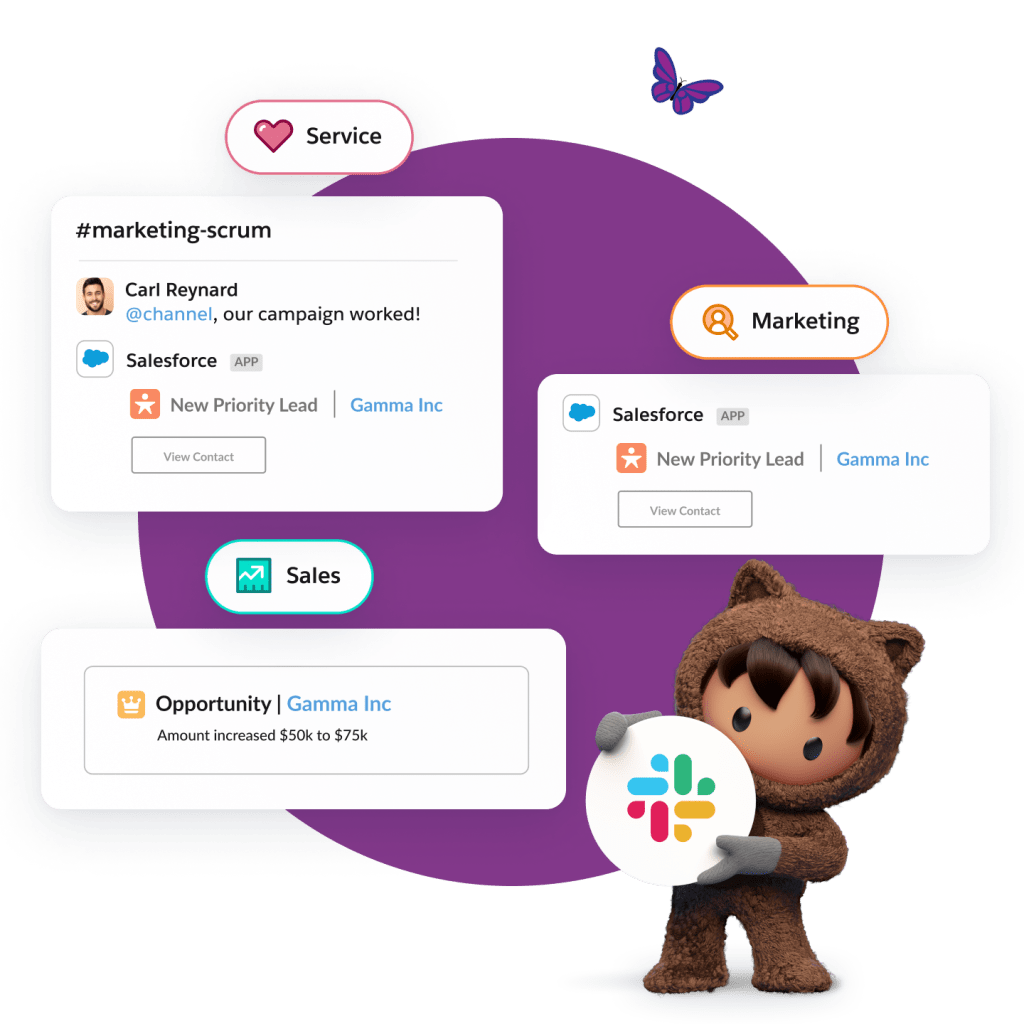
When you connect Salesforce to Slack, customer records and deal history surface right in the channel before every call — so no one has to switch tabs to get context.
Pull up a live Salesforce record or log an interaction right after a meeting. Update a stage, escalate a case, or close a deal — directly from a Slack message. Sync sales, marketing, and service data so every team member walks into every customer conversation with the same picture.
How Cloudfit scaled globally without slowing down
Cloudfit, a U.K. AI wellness startup, faced a familiar founder problem: As demand surged, their team was juggling client data across spreadsheets, WhatsApp, and email, with engineers in Indonesia and leadership in the U.K. struggling to stay in sync.
After adopting Starter Suite and Slack through Salesforce Launchpad, Cloudfit centralized all their client data and team collaboration into one place. What once took two days of back-and-forth is now done in 10 minutes. Customer engagement tracking is 5x faster, and new team members are onboarded in just 30 minutes.
“We focus on clients, not tools — Salesforce and Slack are the spine of our business,” says Kristian Phillips, CEO and Co-Founder of Cloudfit. Read the whole story here and see what’s possible for growing teams with Slack: CloudFit’s AI-Driven Wellness Meets Human Touch with Salesforce + Slack.
Get Slack for Small Business.
Growing teams can take business to the next level.

Become a Slack-first startup: Stay aligned with less meetings
The best startups aren’t the ones with the most meetings — they’re the ones with the clearest communication. Channels, workflows, automations, and AI mean you can keep every person on your team moving in the same direction without pulling everyone into a room to do it.
Get started with Slack in Salesforce Suites for free or activate Foundations to try out Agentforce today.
AI supported the writers and editors who created this article.
What is the best way to use Slack to reduce meetings for a small team?
Start by replacing your daily standup with a Slack channel where teammates post async updates each morning. Pair that with Workflow Builder automations to handle approvals and reminders, and you’ll eliminate a large chunk of recurring meetings quickly.
How does Slack help remote startup teams stay aligned?
Slack channels organize communication by project or topic, so everyone — regardless of time zone — has full context. Threaded conversations let distributed teams make decisions async, with a permanent record that’s searchable anytime.
Can a small business use Slack as a CRM?
Yes, Slack CRM is built directly into Slack and included in all Business+ plans, so if you’re already on Business+plan, you’re ready to go. Manage leads, track deals, and follow up with customers without a separate tool. Ask Slackbot to update records, move deals through your pipeline, or send a follow-up — all conversationally, right where your team already works.
What’s Workflow Builder and how can founders use it?
Workflow Builder is a no-code tool inside Slack that lets you automate repetitive tasks — like collecting standup updates, routing approvals, or sending onboarding checklists. No engineering background required, and most workflows take less than 15 minutes to set up.
What’s Agentforce and how does it help startups?
Agentforce is Salesforce’s agentic AI platform that lets you deploy AI agents directly in Slack. For startups, it means you can automate customer support, internal requests, and data tasks without adding headcount — letting your lean team stay focused on high-value work.