
When your data lives in Salesforce, building powerful Agentforce agents is straightforward with Apex, Flow, and prompts. But how do you extend those capabilities to external systems without compromising performance or security?
Traditional APIs have often been the best answer to that question, but two beta features for Agentforce, Model Context Protocol (MCP) and Agent2Agent (A2A) offer compelling capabilities specifically for agents.
When traditional APIs are the right choice for Agentforce
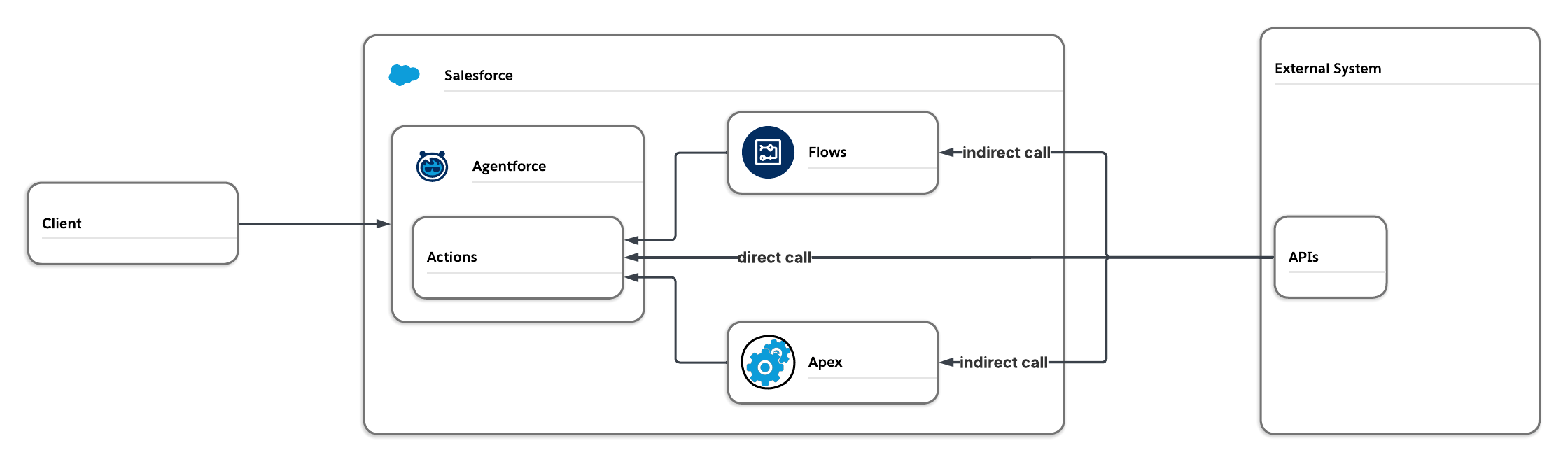
Traditional integrations are familiar territory to Salesforce Architects. You know exactly how they work, and years of proven best practices address most security concerns. While traditional APIs are the “gold standard” for data exchange, they aren’t always agent-ready out of the box.
Salesforce native integration options, such as Salesforce Connect, API, and Bulk API, are not inherently agentic. To enable agentic capabilities, these integrations often require additional flows or Apex code to accurately capture inputs and process results before they can be used as actions. This approach introduces extra effort, as each distinct agent interaction requires its own configuration.
Regardless of these drawbacks, traditional APIs still offer several advantages in your Salesforce org:
- Leverage existing work: You can reuse established credentials and Salesforce-specific code, if you have already configured the API as an invocable action for non-agentic use cases.
- High-volume transactions: Traditional APIs are built to handle massive scale and minimize latency. Using them for high-volume interactions allows your agent to trigger the API without bogging down its reasoning capabilities.
- Sensitive integrations: Traditional APIs can tightly control access to third-party data.
With the drawbacks and benefits of traditional APIs in mind, let’s look at how MCP compares.
Get started with Salesforce Integration Patterns
Most Salesforce implementations require connecting with other applications. This guide walks you through the most common integration patterns, a selection matrix, and best practices to help you choose the right approach for your scenario.



How Model Context Protocol (MCP) simplifies agent actions
The Model Context Protocol (MCP) is an open standard designed to make external data and tools self-describing for AI agents. Traditional APIs require you to manually map every input and output, while an MCP server tells the agent what capabilities it has and how to use them.
MCP shifts the traditional API paradigm by providing standardized, discoverable capabilities built specifically for agents. Instead of developers writing custom code, configuring API endpoints, and creating an agent action, MCP empowers your agent to safely discover tools, schemas, and instructions directly from an MCP server. It uses a client-server architecture where the agent (referred to as the host) connects to an MCP server through a standardized client (MCP client config).
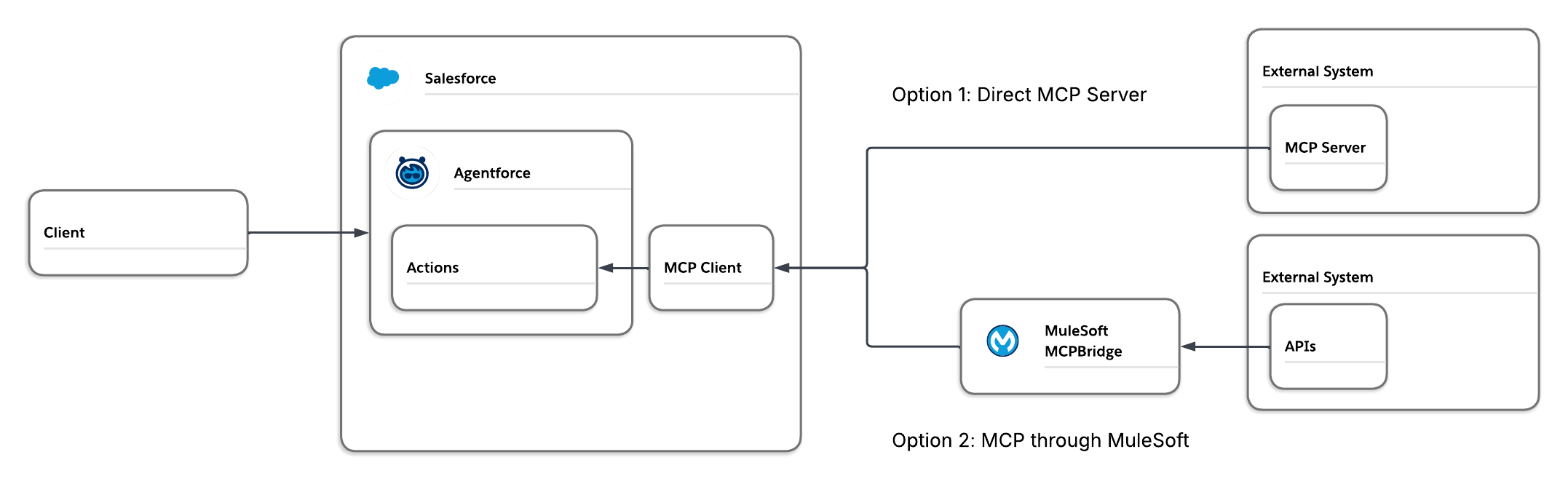
Here is how it works: An MCP server contains a configuration file (including name, description, input, and so on) about each of the server’s abilities (called tools in MCP). These tools can include various functions, for example, an MCP for an Enterprise Resource Planning (ERP) system might have tools for order submission, returns, and other related processes.
In typical industry implementation of MCP, the MCP client connects the agent to the MCP server. Using the MCP client, the agent initiates a call to the server to get the information about all of its tools.
In Agentforce the same applies, however there are additional built-in controls. Agentforce allows admins to select which tools they want to make available to the agent when configuring the MCP client. Additionally, if the server configuration that defines what the MCP server makes available is changed, Agentforce will reevaluate the tool descriptions and suspend use of any tool whose description has changed significantly until an admin has reviewed the changes.
Using MCP when no MCP server is available
While third-party vendors are rapidly adopting MCP, an MCP server may not be available for your integration. Internal proprietary systems typically do not have MCP capabilities out of the box.
If you encounter a gap, consider these architectural paths:
- Use existing MuleSoft APIs: If your integrations are already live in MuleSoft, you can use MCP Bridge to convert your integrations into an MCP Server.
- Write your own server: Developing a custom server is an option as well, but you must weigh the effort against the simplicity of a one-off API integration. When making the decision, consider future integrations between agents and the external system. If the MCP server has high potential for reuse then it is likely worth the effort.
- Reach out to your system vendor: If the external system you want to connect to is provided by a software vendor, you could ask them to create an MCP server for it. This would not only benefit you, but also all of their other customers that are building agentic solutions as well.
Why choose MCP?
Integrating via MCP offers several key advantages over the traditional API method:
- Reduced integration effort: MCP minimizes the manual configuration and “wrapper” logic required for setup.
- Dynamic discovery: Traditional APIs rely on static contracts. With MCP, if a developer adds new tools to the server, an admin can quickly discover and select them for use within the agent without code changes in Salesforce.
- Semantic understanding: Because MCP servers provide instructions for each tool, Agentforce can map those tools directly to its actions. This ensures the agent understands the intent and context of the tool immediately.
Agentforce MCP Beta Brings All the Power of Tool Calling, None of the Context Bloat
Your AI agent has a shiny new USB-C port. Don’t overexpose it.
Delegating tasks with Agent2Agent (A2A) integration
While API and MCP integrations are good ways to give a single agent access to external data, there is a limit to how much one agent should do. Overloading a single agent with too many disparate tools can clutter its context window, leading to slower reasoning or inaccurate results.
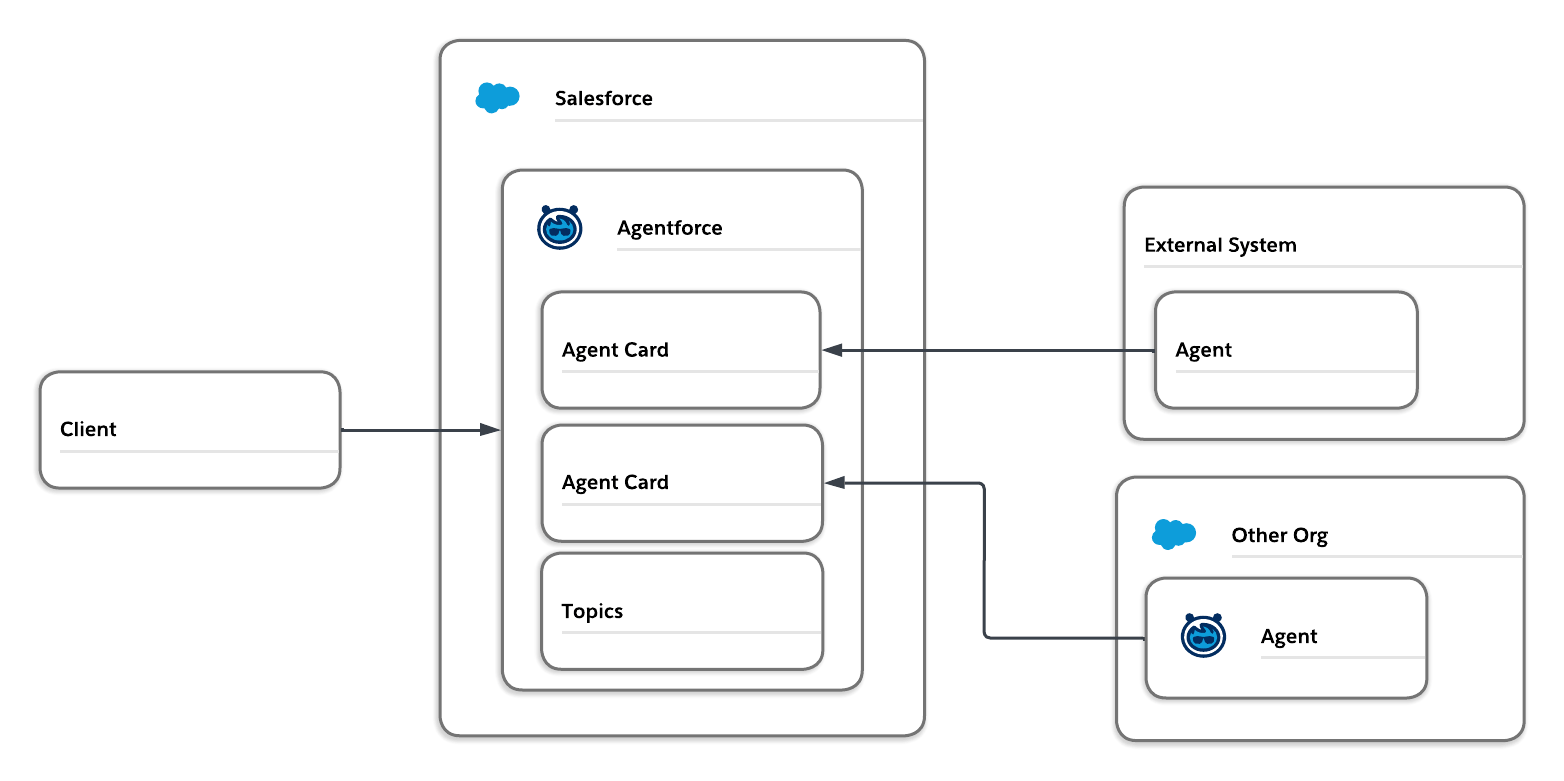
When your architectural requirements exceed the capacity of a single agent, Agent2Agent (A2A) integration allows you to distribute the workload across a team of specialized agents. A2A integration differs from API and MCP integration by making use of the reasoning abilities of a separate agent rather than relying solely on the Agentforce agent’s capabilities.
The A2A collaboration process begins with discovery via an Agent Card. This card specifies the agent’s supported communication protocols and skills. Agentforce uses this card to understand the agent’s capabilities, then establishes a secure handshake using OAuth 2.0 before initiating before establishing the connection for the main agent to use.
MCP and API integration requires a single agent to read the user’s request and determine which action to execute based on the topic’s instructions. This can reduce reasoning capability, particularly as the number of topics within the agent increases.
A2A offers a compelling alternative by allowing task delegation to specialized agents. These specialized agents can outperform a monolithic agent by focusing on specific tasks and accessing information from external systems directly.
The agents can be other Agentforce agents if you are looking for specialization on internal systems, or agents may be available for your third-party or SaaS applications via Agent Exchange.
Offloading to a specialized agent: order returns example
Consider a scenario in which a customer wants to return an order. Instead of building a single customer service agent to handle every request from a customer, you can create a specialized returns agent within Agentforce, or use an agent already provided by the ERP system. The specialized agent operates with its own set of instructions and guardrails and is able to handle a multitude of return requests.
The returns agent could, for instance, evaluate whether a return is available, determine if it is allowed to process the return, or identify options for the return type (in store or ship). This delegation ensures the specialized agent handles the complex reasoning without overloading the reasoning capabilities of the main customer service agent.
When to consider A2A
Using A2A can be beneficial when:
- A specialized agent is already available – If the external system you want to integrate already has a production-ready agent, then A2A eliminates the need to create a separate specialized agent.
- You want to segment a monolithic agent – To preserve the agent’s reasoning ability, limit the number of topics to fewer than 10. If an agent exceeds this limit, it should be segmented into specialized agents, with the main agent delegating tasks to other agents via A2A.




Determine which integration approach is right for your use case
As with any integration, selecting the optimal integration approach relies heavily on the capabilities of your external systems. If MCP or agent capabilities already exist with your external systems, it’s a good idea to use them.
A2A should be used when:
- An external agent for your use case is already available from the external system
- Specialization of agents is needed to reduce strain on the main interfacing agent.
MCP should be used when:
- The external system already has an MCP server that meets your needs.
- MuleSoft can be used as an MCP server, using MCP Bridge, or it can consolidate tool use to alleviate stress on the agent.
- A new custom built MCP server has high reuse potential.
APIs should be used when:
- APIs access sensitive information or require bulk processing.
- APIs are already configured in your Salesforce org, and flows or Apex have been developed to augment the API call
- API integrations are unique and significant reuse is not expected, or where the anticipated reuse is not high enough to warrant the development of a MCP server.
While this post provides a framework for choosing the right integration, a deeper understanding of these emerging patterns is essential for any architect who considers incorporating alternatives to API integration into their enterprise landscape. Take some time to explore the latest Salesforce documentation on Model Context Protocol and Agent2Agent capabilities.
Then, we highly recommend building a proof of concept (POC) for your specific use case to accurately gauge which approach best aligns with your performance and scalability requirements.

