

Keyword grouping is one of those SEO tasks that sounds simple until you’re staring at a spreadsheet with 12,000 rows and a “group by intent” column you’re filling in by hand.
Manual clustering doesn’t scale, and rule-based grouping misses the semantic overlap between phrases that don’t share a single word but clearly belong together.
I’ve refactored a keyword clustering script that I developed a few years ago. The framework uses TF-IDF vectorization to generate feature vectors, which are then clustered using HDBSCAN, a density-based clustering algorithm. You can find the script here.
The problem with keyword clustering
Keyword clustering is the catalyst for topic generation. Rather than briefing content writers with hundreds of individual keywords, clustering allows you to group semantically related queries into coherent topics, making it much easier to produce content that satisfies a wider range of search intent.
The result is a set of topics that can strengthen semantic relationships, topical authority, internal linking, and visibility across related queries.
There are two key challenges here: preprocessing the data and clustering the topics.
Preprocessing the data
SEO keyword exports are often noisy, especially if they come from your own databases. Removing stopwords and non-ASCII characters can’t be done manually, hence the need to automate data cleaning at scale.
Python is a straightforward solution because it provides the flexibility to build a pipeline that can clean, normalize, and transform large keyword datasets with minimal manual intervention.
Clustering the topics
When analyzing keyword data, you rarely know how many topical groups exist until you’ve explored the dataset. This makes algorithms such as k-means a poor fit, as they require you to specify the number of clusters in advance.
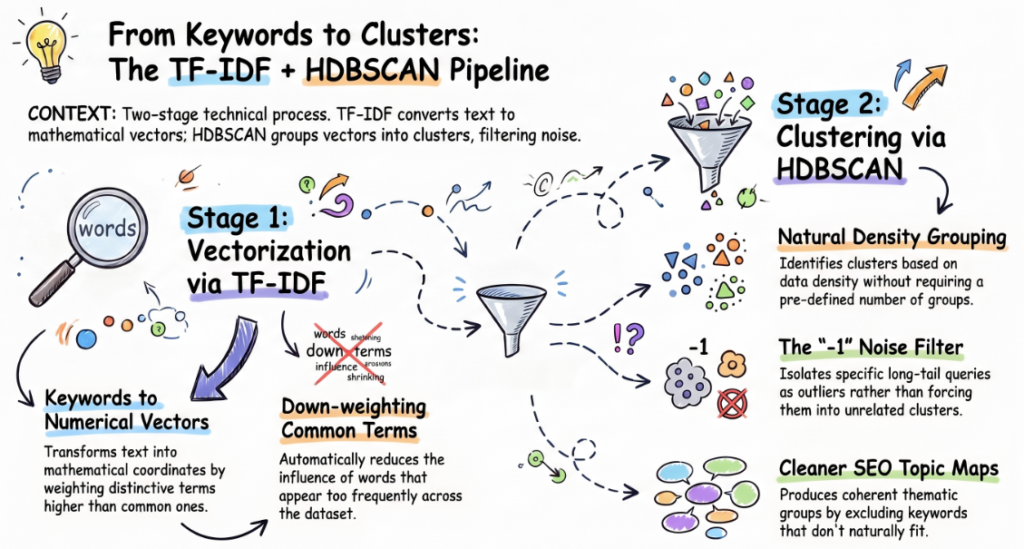
A combination of TF-IDF and HDBSCAN proves particularly effective. TF-IDF transforms each keyword into a numerical vector by assigning greater weight to terms that are distinctive within the dataset while down-weighting those that appear frequently across many keywords.
These vectors are then fed into HDBSCAN, a density-based clustering algorithm that identifies natural groupings without requiring the number of clusters to be defined in advance.
One of HDBSCAN’s key advantages is its ability to identify noise. Rather than forcing every keyword into a cluster, it assigns outliers to a -1 label, which means it excludes keywords that don’t belong to any topic.
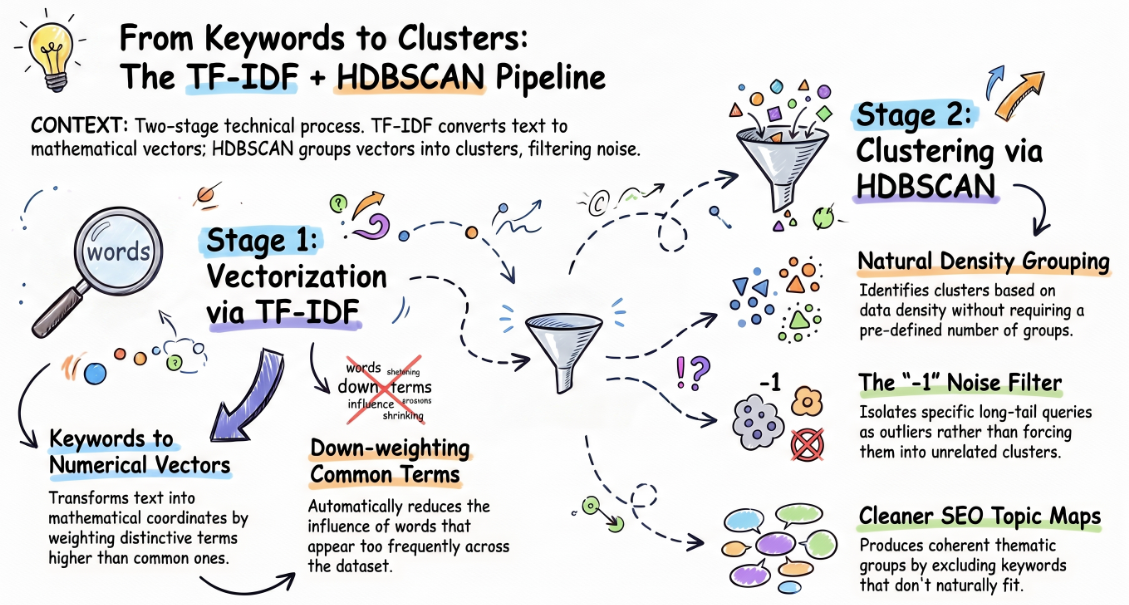
This is especially valuable for SEO datasets, where keyword exports often contain highly specific long-tail queries that don’t naturally fit into broader thematic groups.
Instead of degrading cluster quality by assigning these terms arbitrarily, HDBSCAN isolates them, producing cleaner and more coherent topical clusters.
Track, grow, and measure your visibility across Google, AI search, social, local, and every channel that influences buying decisions.
Sourcing the keyword list from BigQuery
Before any clustering happens, you need a keyword list — and if your Search Console property is already exporting to BigQuery, that’s a better source than the UI export, since it isn’t capped at 1,000 rows and isn’t sampled.
A simple pull against the standard GSC BigQuery export schema looks like this:

Export the result as a CSV, strip it down to a single query column, save it as a .txt file with one keyword per line, and that’s your clustering input.
If you don’t have BigQuery export set up, you can still work with Search Console data, but you’ll have a more limited dataset to work with.
In any case, you can export queries from the Search Console interface, as the notebook only cares that you feed it a list of keywords.
Prompting the AI
A few years ago, I would get along with a less polished version of this script.
AI made the following things easier when rebooting and fine-tuning the script for enhanced output.
Asking for tunable parameters, not hardcoded ones
Cluster sensitivity and minimum cluster size behave very differently depending on whether you’re clustering 50 keywords or 50,000. Requesting these as adjustable variables up top meant I could retune without touching the logic.
Specifying the environment
The first version was a plain Python script meant to run from a terminal. Since the actual workflow is “pull keywords, run notebook, hand a client a file,” I asked for a Google Colab-specific version, which changes the shape of the code (try/except blocks around Colab-only imports, no argparse) more than a small tweak would suggest. It also enabled better visualization by leveraging Plotly to the fullest.
Running the code
The gist of the script was and remains simple. It takes in a flat list of keywords and automatically groups them into topic clusters.
All you have to do is upload a .txt file with one keyword per line, and it cleans the text (stripping special characters, stopwords, and non-English entries).
Using tunable parameters is the key to the entire framework. Play around with the sensitivity and min_cluster_size parameters. Adjust them based on the size of your keyword list.

Once you’re happy with the number of clusters, TF-IDF is used to score how important each word is within the set. HDBSCAN then finishes the process.
Each cluster gets an auto-generated label based on its most distinctive terms, and the results are exported to an Excel file with both a grouped cluster view and a full keyword-by-keyword breakdown.

Where AI adds value
The decisions that actually matter, from choosing TF-IDF over word embeddings to selecting HDBSCAN because the number of topics is unknown, still require an understanding of how keyword clustering works.
What AI removed was the repetitive work of rebuilding boilerplate code, wiring libraries together, and refining the notebook into something reusable.
The final result is a lightweight clustering tool that can process thousands of keywords in minutes, producing a sensible first draft of your topical taxonomy. It won’t replace editorial judgment, but it will eliminate hours of manual grouping and give your content team a far more structured starting point.
If you already export Search Console data into BigQuery, this becomes a natural step in your workflow: extract your queries, run the notebook, review the clusters, and start planning content based on topics rather than isolated keywords.