Understanding the relationships within your data is crucial for uncovering hidden insights and building intelligent applications. However, managing operational (OLTP) and analytical (OLAP) graph workloads usually means wrestling with disconnected databases, building brittle data pipelines, and managing complex integrations. This fragmentation creates data silos, increases operational overhead, and limits scalability.
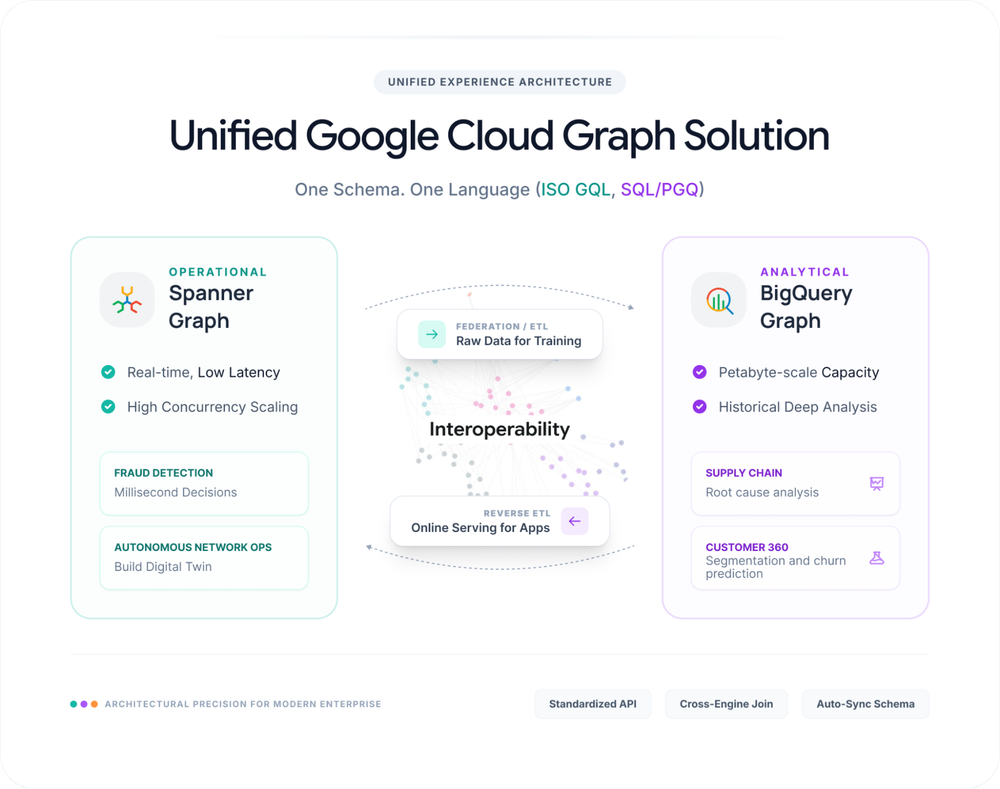
Today, we’re thrilled to introduce a unified graph database and analytics solution powered by Spanner Graph and BigQuery Graph. The solution consists of the two platforms, recommended blueprints for how to deploy them, and getting started guides for the most prominent use cases. In this blog, we review the solution’s components, provide an overview of the most common use cases, and hear from customers who have deployed the solution in the real world.
Spanner Graph for operational workloads
Spanner Graph reimagines graph data management, bringing together graph, relational, search, and generative AI capabilities into a single database. It is backed by Spanner’s signature unlimited scalability, high availability, and strong consistency.
With Spanner Graph, you get:
-
Integrated table-to-graph mapping: Define graphs directly over your existing Spanner relational tables, allowing you to view and query operational data as a graph without data duplication.
-
Interoperable graph and relational querying: Leverage an ISO-standard Graph Query Language (GQL) interface for intuitive pattern matching, and mix GQL with SQL in a single query to traverse both graph and tabular data together.
-
Advanced search and AI integration: Utilize built-in vector search, full-text search, and Vertex AI integration to retrieve data by semantic meaning and power intelligent applications directly within your database.
Customers are already using Spanner Graph to power high-throughput, low-latency applications – for identity resolution across millions of entities, identifying dependencies across vast complex environments, data lineage, customer 360 use-cases, and enhancing real-time fraud detection.
“Open Intelligence is our foundational intelligence layer that securely connects trillions of live data points from clients, partners and WPP in a privacy-first way and is now integrated and powers WPP’s agentic marketing platform, WPP Open. Enabled by Google Cloud’s Spanner Graph, Open Intelligence is a significant advancement in AI-driven marketing and we are excited about extending the use case for analytical graph workloads on BigQuery Graph.” – Rob Marshall, Head of Strategy, Data & Intelligence, WPP
BigQuery Graph for analytical workloads
While Spanner Graph handles your active operations, true large-scale analysis requires exploring relationships across billions of nodes and edges to identify patterns and query historical data. Just as SQL relies on distinct tools for databases and data warehouses, the graph landscape requires specialized tools for different workloads. That’s why we built BigQuery Graph.
BigQuery Graph brings connected data analytics directly into your data warehouse. You can map existing BigQuery data to a graph schema and query it with SQL or GQL to uncover hidden relationships in massive datasets – without moving any data.
Key capabilities include:
- Integrated table-to-graph mapping: Map your existing BigQuery tables to graphs instantly, uncovering hidden relationships in your data warehouse without building ETL pipelines or moving a single byte of data.
- Interoperable graph and relational querying: Apply the same expressive pattern matching of GQL to massive historical datasets, and mix SQL with GQL in a single query to combine the familiarity of your data warehouse with powerful graph traversal.
- Advanced search and AI integration: Leverage native integration with BigQuery AI for predictive analytics, alongside built-in vector search, full-text search, and geospatial functions to locate connected information across billions of records.
Spanner Graph and BigQuery Graph as a unified solution
While each platform is powerful on its own, their true value emerges when they are deployed together. By connecting your operational and analytical environments, you eliminate data silos and accelerate your time-to-insight without compromising database performance.
“Spanner Graph enables Yahoo to unify our data into a connected foundation at a global scale, powering real-time, intelligent decision-making across our agentic advertising platform. This enhances our AI-driven approaches that drive one of the largest digital advertising ecosystems, and we look forward to building on it with BigQuery Graph to unlock deeper analytics and predictive capabilities to power future innovation.” – Gabriel DeWitt, Head of Consumer Monetization, Yahoo

Take financial fraud detection as an example: your application can use Spanner Graph to instantly identify a suspicious connection and block a transaction at checkout. Meanwhile, BigQuery Graph can analyze petabytes of historical transaction data to expose the complex, long-term fraud ring that initiated it.
Here is how these two engines integrate to create an end-to-end graph workflow:
1) A unified graph query and schema experience
A core advantage of this solution is the consistent schema and GQL shared across both platforms. This shared language reduces development time and minimizes the friction of context-switching.
For example, to find potential fraud rings originating from a specific account in real-time, you would use this Spanner Graph query:
- code_block
- <ListValue: [StructValue([(‘code’, ‘GRAPH FinGraphrnMATCH p=(:Account {id: @accountId})-[:Transfers]->{2,5}(:Account)rnRETURN PATH_LENGTH(p) AS path_length, TO_JSON(p) AS full_path;’), (‘language’, ”), (‘caption’, <wagtail.rich_text.RichText object at 0x7f3d32e8f970>)])]>
To run that same analysis to find all accounts involved in historical fraud rings, the BigQuery Graph query is nearly identical:
- code_block
- <ListValue: [StructValue([(‘code’, ‘GRAPH bigquery.FinGraphrnMATCH p=(:Account)-[:Transfers]->{2,5}(:Account)rnRETURN PATH_LENGTH(p) AS path_length, TO_JSON(p) AS full_path;’), (‘language’, ”), (‘caption’, <wagtail.rich_text.RichText object at 0x7f3d32e8f820>)])]>
2) Query Spanner data in BigQuery Graph through Data Boost
With Data Boost, you can query Spanner Graph data directly from BigQuery without impacting performance of your transactional workloads. This allows you to build a “virtual graph” combining real-time operational data from Spanner with historical analytics in BigQuery – without moving any data.
For instance, you can combine real-time Account and User nodes from Spanner Graph with historical LogIn edges from BigQuery to identify suspicious login patterns across different devices.
To do this, you first connect BigQuery to Spanner using the CREATE EXTERNAL SCHEMA statement:
- code_block
- <ListValue: [StructValue([(‘code’, “CREATE EXTERNAL SCHEMA spannerrnOPTIONS (rn external_source = ‘google-cloudspanner:/projects/PROJECT_ID/instances/INSTANCE/databases/DATABASE’,rn location = ‘LOCATION’rn);”), (‘language’, ”), (‘caption’, <wagtail.rich_text.RichText object at 0x7f3d32e8f910>)])]>
Next, define a BigQuery Graph, incorporating tables from both Spanner and BigQuery:
- code_block
- <ListValue: [StructValue([(‘code’, ‘CREATE OR REPLACE PROPERTY GRAPH bigquery.FinGraphrn NODE TABLES (rn — Account and Person are stored in Spanner,rn — made available in BigQuery through the `CREATE EXTERNAL SCHEMA` statement.rn spanner.Account KEY (account_id),rn spanner.Person KEY (person_id),rn — Media is stored in BigQuery.rn bigquery.Media KEY (media_id)rn )rn EDGE TABLES (rn — Transfers and Owns are stored in Spanner.rn spanner.Transfers AS Transfersrn KEY (transfer_id)rn SOURCE KEY(account_id) REFERENCES Accountrn DESTINATION KEY(target_account_id) REFERENCES Account,rn spanner.Owns AS Ownsrn KEY (person_id, account_id)rn SOURCE KEY(person_id) REFERENCES Personrn DESTINATION KEY(account_id) REFERENCES Account,rn — LogIn is stored in BigQuery.rn bigquery.LogIn AS LogInrn KEY (login_id)rn SOURCE KEY(media_id) REFERENCES Mediarn DESTINATION KEY(account_id) REFERENCES Account,rn );’), (‘language’, ”), (‘caption’, <wagtail.rich_text.RichText object at 0x7f3d32e8fc40>)])]>
Finally, execute a query on BigQuery Graph to access data across both Spanner (accounts, users, transfers, owns) and BigQuery (logins, devices), identifying potentially suspicious login patterns:
- code_block
- <ListValue: [StructValue([(‘code’, ‘GRAPH bigquery.FinGraphrnMATCH p=(owner:Person)-[:Owns]->rn (:Account)<-[login:LogIn]-rn (media:Media {blocked: true})rnRETURN TO_JSON(p) AS full_pathrnORDER BY login.timernLIMIT 20;’), (‘language’, ”), (‘caption’, <wagtail.rich_text.RichText object at 0x7f3d32e8fa60>)])]>
3) Export BigQuery data into Spanner Graph through reverse ETL
When you need to bring analytical data back into Spanner for low-latency, real-time querying, you can use reverse ETL without additional pipelines. For example, you can import historical device data (IP addresses, device IDs) from BigQuery into Spanner Graph to enhance your real-time fraud detection operations:
- code_block
- <ListValue: [StructValue([(‘code’, ‘EXPORT DATArn OPTIONS (rn uri = ‘https://spanner.googleapis.com/projects/PROJECT_ID/instances/INSTANCE/databases/DATABASE’,rn format=’CLOUD_SPANNER’,rn spanner_options=”””{ “table”: “Media” }”””rn ) AS rnSELECT * FROM Media;’), (‘language’, ”), (‘caption’, <wagtail.rich_text.RichText object at 0x7f3d32e8f6d0>)])]>
4) Visualize your graph data
Visualizing connected data is core to analysis, explorations and investigations. With Spanner Studio and BigQuery Studio (coming soon), you can instantly visualize your graph data without leaving your familiar environment or setting up external tools. For deeper programmatic exploration, you can also leverage Spanner Graph notebook and BigQuery notebooks to render query results directly within your existing data science workflows.

5) Graph visualization partner integrations
Spanner Graph and BigQuery Graph also integrate with leading graph visualization partners to provide a comprehensive suite of exploration tools:
-
Kineviz: Combines cutting-edge visualization with advanced analytics via GraphXR.
-
Graphistry: Extracts meaningful insights from large datasets using a GPU-accelerated visual graph intelligence platform.
-
G.V(): Offers a quick-to-install client for high-performance visualization and no-code data exploration.
-
Linkurious: Detects and analyzes threats in large volumes of connected data via the Linkurious Enterprise platform.
One unified solution for all your graph needs
Together, Spanner Graph and BigQuery Graph provide a unified solution for operational and analytical needs across various use cases:
|
Domains |
Spanner Graph |
BigQuery Graph |
|
Financial Services |
Instantly blocks anomalous, suspicious transactions. |
Uncovers complex, long-term fraud rings. |
|
Retail & E-commerce |
Serves personalized product recommendations on the fly. |
Analyzes vast purchasing histories to predict demand. |
|
Cybersecurity |
Isolates active threats and traces attack origins instantly. |
Models historical vulnerabilities to strengthen defenses. |
|
Healthcare |
Powers clinical decision support systems at the point of care. |
Analyzes population health trends and disease risk factors. |
|
Supply Chain |
Tracks goods globally and alerts teams to immediate disruptions. |
Identifies systemic bottlenecks to optimize future routing. |
|
Telecommunications |
Creates a network digital twin for detecting anomalies, and root cause analysis in real-time. |
Analyzes traffic patterns at scale to plan future infrastructure upgrades. |
Get started with Spanner Graph and BigQuery Graph today
With Spanner Graph and BigQuery Graph, we’re excited to offer a unified graph data management experience across your operational and analytical needs.
Explore Spanner Graph’s use cases and setup guide for your operational workloads, and the BigQuery Graph overview and creation guide for your analytical needs. To experience the full power of this combination, check out our unified solution guide and try the codelab.