Imagine that you are an architect responsible for a Salesforce org that looks healthy six months before peak season, with no obvious warning signs in your system monitoring.
However, when peak demand arrives, you encounter a critical production incident after the org exceeds the asynchronous Apex execution limit. The org has processed millions of executions from batch Apex, future methods, and Queueable Apex over the last 24 hours.
What do you do?
One immediate step may be to restore the environment by temporarily increasing the limit for async executions. From there, priority shifts to triaging the incident to investigate, diagnose, and address the root causes.
This post walks through the process that follows, starting with reducing unnecessary async consumption. It also introduces the Async Framework and the architectural principles behind its three core components: a decision guide, a centralized limits monitor, and process-specific routing rules. You can apply the Async Framework in your own org by adapting its monitoring thresholds, decision criteria, and routing rules to your org’s workload and platform capacity.
Choose between more licenses or architectural redesign
One approach is to purchase additional licenses to increase the asynchronous Apex execution limit. However, if the incident occurs during peak season, the org may not need more capacity during standard usage periods. Another approach is to enable the elastic limits for asynchronous Apex jobs (beta) feature, which adds an elastic limit for Queueable Apex and future methods. Jobs that enter the elastic range may process more slowly, making this approach better suited to absorbing temporary spikes than addressing ongoing capacity needs.
What’s new with Apex elastic limits
Release notes covering elastic limits for batch Apex, including what changed and how it affects long-running jobs.



Rather than relying on additional capacity alone, another option is to redesign the org’s async architecture. This starts with reducing unnecessary async consumption, then applying and adapting the Async Framework as a longer-term solution.
Explore the Async Framework
The framework has three core components: a decision guide, a centralized limits monitor, and a set of process-specific routing rules for primary and alternate execution mechanisms.
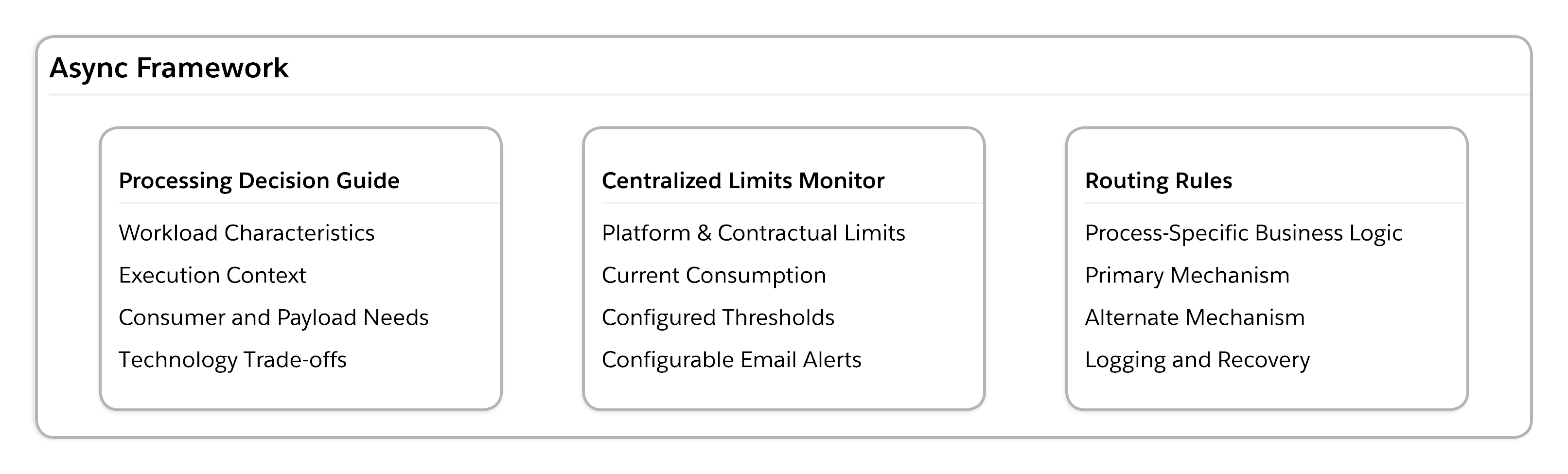
You can apply this framework in your own org by adapting the monitoring thresholds, decision criteria, and routing rules to your workload and platform capacity.
Follow the thought process behind the framework
The Async Framework emerged from a series of decisions about resource consumption, execution context, platform capacity, workload characteristics, and operational risk. The following considerations and objectives shaped the design of the Async Framework and its core components.
Understand how resources are consumed
An incident caused by exhausting async limits provides an ideal opportunity to understand how resources are being consumed and to review logs for async executions.
Ask key questions such as:
- Why are so many async resources being consumed in the first place?
- What are the highest-volume async processes?
- How are these processes being invoked?
- Do the processes need to be invoked in an async context?
- What async capabilities are in use?
- Do managed packages contribute to async consumption?
Use the findings from this analysis to take a phased approach that delivers fast improvements and reduces operational risk.
Reduce consumption before redesigning the architecture
One common anti-pattern occurs when processes validate entry criteria within the async capability, such as Queueable Apex. By moving that decision-making to earlier in the transaction lifecycle, you can reduce executions that ultimately perform no meaningful work.
Preserve the appropriate execution context
Another anti-pattern is invoking Queueable Apex from within a batch Apex execution when the remaining work is part of the same business process. Batch Apex already executes asynchronously and is designed to process large volumes of records. If additional processing is required after the batch completes, consider starting a new batch Apex job from the finish method.
Understand the batch Apex interface
Documentation on implementing the Batchable interface, covering execution phases and best practices for processing large data volumes.
Reducing unnecessary jobs can help conserve capacity in Salesforce orgs. When creating or refactoring processes, invoke them only for records that meet entry criteria, and intentionally evaluate whether additional actions require async processing.
Define the objectives of the Async Framework implementation
While the immediate fixes are being implemented, you can begin designing strategic architectural changes to meet these objectives:
- Determine how and when async processes are executed
- Minimize changes to existing business logic to reduce regression testing and associated risk
- Make async processes aware of relevant limits to reduce the risk of exceeding them
- Account for managed packages that also consume async limits and cannot be updated or changed
- Use modern async capabilities rather than standardizing exclusively on a single approach
- Gracefully handle limited capacity by running the process in sync mode when needed
Make async processes aware of platform capacity
Another anti-pattern is failing to check whether the platform capacity is available before invoking a system capability. Exceeding a limit can cause the system to fail, and this type of failure cannot be caught gracefully.
Within the Async Framework, the system first determines if a limit is exhausted before attempting to use that particular async capability. Additionally, managed packages may use significant async consumption that cannot be optimized by the team.
As a component of your async architecture, implement a batch Apex job to centralize monitoring of key platform limits, current consumption, and configurable alert thresholds. Rather than calling the OrgLimits class during every transaction, the batch job acts as the framework’s centralized limits monitor, periodically checking capacity and storing the information to be used across async processes.
This approach can reduce processing overhead, increase visibility into org limits that are not covered by other Salesforce alert mechanisms, and enable configurable thresholds that reserve capacity for managed packages. With this information, you can make informed decisions when the desired async capability is unavailable and notify admins and support team members about potential issues with org limits.
Separate business logic from the execution context
Design business logic so that it can execute independently of the asynchronous capability that invokes it. Avoid embedding business logic directly inside Queueable Apex, platform event subscribers, or Change Data Capture handlers.
This separation supports a composable system architecture. It allows the execution mechanism to change without changing what the process does. It also creates a more maintainable architecture that can adapt as platform capabilities evolve, workload characteristics change, or capacity becomes constrained.
Choose technologies based on workload characteristics
Instead of asking which single async capability should become the standard, ask: what technology best meets the business need?
Select the preferred execution mechanism based on the characteristics of the workload. The Salesforce Asynchronous Processing Decision Guide is an excellent resource for comparing the available capabilities, understanding their trade-offs, and selecting the recommended approach for each use case.
The Async Framework incorporates this decision-making process into an org-specific decision guide that helps the team select the capability that best aligns with its needs and current platform capacity. For each new business process that may require async execution, the team evaluates criteria such as expected volume and frequency, latency, execution context, payload and consumer requirements, error-handling and retry needs, and whether the work can safely execute synchronously.
When a process requires complex custom business logic, orchestration, or retries, consider Queueable Apex because the platform maintains the execution context and gives developers explicit control over chaining jobs and error handling. Platform events introduce an event-driven architecture with hourly limits and looser coupling, which may not be needed.
When the goal is to support custom payloads for independent consumers, platform events can provide a scalable approach. For processes that react to record changes without requiring the record’s prior state, Change Data Capture provides a simplified payload for the changes and shifts the workload onto a different platform allocation.
When capacity is limited by key platform or contractual limits, consider implementing a mechanism to gracefully shift to an alternative async capability or fall back to synchronous processing.
Design for an alternate execution capability when capacity is limited
Because volumes can fluctuate, async executions may consume available capacity quickly. The centralized limits monitor detects when a capability is approaching thresholds. The next question becomes: what should the system do when the preferred capability is unavailable?
Allowing the transaction to fail may trigger another incident. Instead, the Async Framework shifts the processing to an alternative execution mechanism for that business process when the primary execution mechanism reaches the configured threshold. When no viable alternate execution mechanism is available, the framework logs the incomplete process for recovery and retry.
Because the business logic is separated from the execution mechanism, you can select an alternate technology without changing what the process does. You may need to transform the payload for the alternate mechanism, but the business logic is reused.
This approach provides graceful degradation while preserving business functionality. The alternate mechanism may use another asynchronous capability or, when the workload is short-running and can safely remain within governor limits, execute synchronously.
Define routing rules
Define one routing rule for each business process. The rule specifies the process’s primary and alternate execution mechanisms. Multiple processes may share the same primary mechanism but have different alternate mechanisms.
The routing rule table below shows an example of one Salesforce org’s routing rules for async processing. Use it as a model for defining primary and alternate capabilities, then to build a version of the table that reflects your org’s contractual limits, workload characteristics, integrations, and business rules.
| Primary | Alternate | Reasoning |
| CDC for Apex and flow triggers | None | Non-CometD clients such as Apex triggers and flows do not consume CDC allocations, so an alternate capability is not needed. |
| CDC for external clients | Log and recover | Log the pending process or log an error for recovery.
When event-delivery allocation is unavailable, preserve the Salesforce transaction and record that external processing is incomplete. A separate recovery mechanism must detect and replay the missed work. |
| Platform event | Queueable | If the platform event reaches the hourly limit, Queueable Apex is a controlled fallback that preserves business functionality. |
| Platform event | Sync | Accept user-facing latency rather than dropping the process altogether. |
| Queueable / @Future | Sync | This is used if the process is short-running and has low risk of exceeding other governor limits. |




The routing rule table establishes a repeatable architectural capability within the org. As the org continues to evolve, you can apply the framework to new processes without requiring architectural design for every decision. This allows you to focus on evolving the routing rule table and solving new architectural challenges.
Build a resilient architecture for high-volume scale
The Async Framework brings these architectural decisions together through three core components: a decision guide, a centralized limits monitor, and process-specific routing rules. Together, they help each business process use an appropriate execution path, shift to an alternate path when capacity is constrained, and preserve incomplete work for recovery when no immediate option is available.
Sustainable capacity comes from making intentional architectural decisions, not from increasing limits or standardizing on specific async technologies. Whether you are responding to an incident or designing a new high-volume solution, begin by reducing unnecessary consumption and applying a consistent framework to how each business process executes.
You can implement this framework in your own org by retaining its core components and adapting the monitoring thresholds, decision criteria, and routing rules to your workload, contractual limits, integrations, and business requirements. As those conditions evolve, you can update the configurable parts without redesigning the underlying business logic.
Before the next demand spike, evaluate your async consumption; define the primary, alternate, and recovery path for each high-volume process; and establish the capacity thresholds that determine when each path is used.