

Most Salesforce environments don’t exist in isolation. They exchange data with custom applications, partner integrations, and internal enterprise services. For years, Connected Apps enabled external systems to authenticate with Salesforce and access APIs, supporting everything from partner integrations to custom applications. As Salesforce environments become more interconnected, the way external access is defined and governed has continued to evolve.
As of the Spring ’26 Release, External Client Apps (ECAs) are now the primary way to define inbound external integrations in Salesforce. They provide a structured approach to identifying external clients, configuring authentication, and governing access through configuration. For architects, this introduces a clearer model for managing external access.
This blog covers how ECAs fit into the integration model and how they work in practice. It covers when they are appropriate for inbound integrations, how to create and migrate them, and how to operate and govern them over time.
Table of contents
External client apps in the integration model
ECAs sit at the boundary between Salesforce and external systems. They establish trust by defining how an external application authenticates, which authentication protocols and flows are permitted, and what scopes determine the level of access granted.
ECAs support standard authentication protocols, including OAuth, SAML, and OpenID Connect, making them suitable for a wide range of inbound integration scenarios. However, it’s important for architects to distinguish between the purpose of these protocols. While SAML and OpenID Connect are primarily used to establish user identity (i.e. facilitating Single Sign-On for humans), the focus of this article is API Authorization via OAuth. In this model, the ECA handles authentication (establishing “Can I come in?”), while the mapped user context determines authorization (answering “Where can I go?”). The remainder of this article focuses on the OAuth flows that negotiate this relationship.
Architects familiar with Connected Apps will recognize core concepts like OAuth-based authentication and scope-driven access, though the model’s structure has changed. ECAs use a two-layer model that separates application settings from administrative policies. Application settings define the structure of the external client, including supported authentication protocols, callback URLs, and scopes. Administrative policies control how that client is allowed to operate within an org, including who can authorize it and under what conditions.
This architecture supports a ‘default closed’ security posture. Unlike Connected Apps, which are often globally discoverable by default, an external client app cannot be used to authenticate against an org unless you explicitly define it there or install it via a package. This eliminates the risk of ‘shadow’ connections where external tools could previously authenticate without an architect’s oversight.
This separation creates clearer ownership and more deliberate governance. Developers define what an external application is capable of, while administrators retain control over how and when access is granted. In practice, this makes inbound integrations easier to design, maintain, and update as requirements change.
ECAs are the appropriate choice when an external application needs to authenticate directly with Salesforce using OAuth- or SAML-based flows and operate without relying on an individual user’s credentials.




How external client apps work
ECAs formalize how Salesforce evaluates inbound requests from external systems by establishing a client identity and applying consistent authentication and authorization rules at the platform boundary. They define how trust is established, maintained, and enforced whenever an external application interacts with the platform.
Establish client identity
Client identity is the foundation of this model. An external client app identifies the external system itself, distinct from any individual user. This means authentication validates the application first, adding user context only when the specific authorization flow requires it. By treating the application as a primary identity, architects can enforce consistent security policies that persist regardless of which user is interacting with the integration.
This distinction is vital for API integrations. While Connected Apps supported clear app identification via consumer keys in OAuth and JWT flows, they also permitted the username-password flow, which could obscure the distinction between system identity and human credentials. ECAs strictly enforce the separation of system and user by removing support for these legacy password-based flows. By mandating the client identity (i.e. the application) as a first-class citizen, architects can authorize the integration itself to access the API. This ensures that even if a user’s context is used, the application is restricted to its own defined scopes.
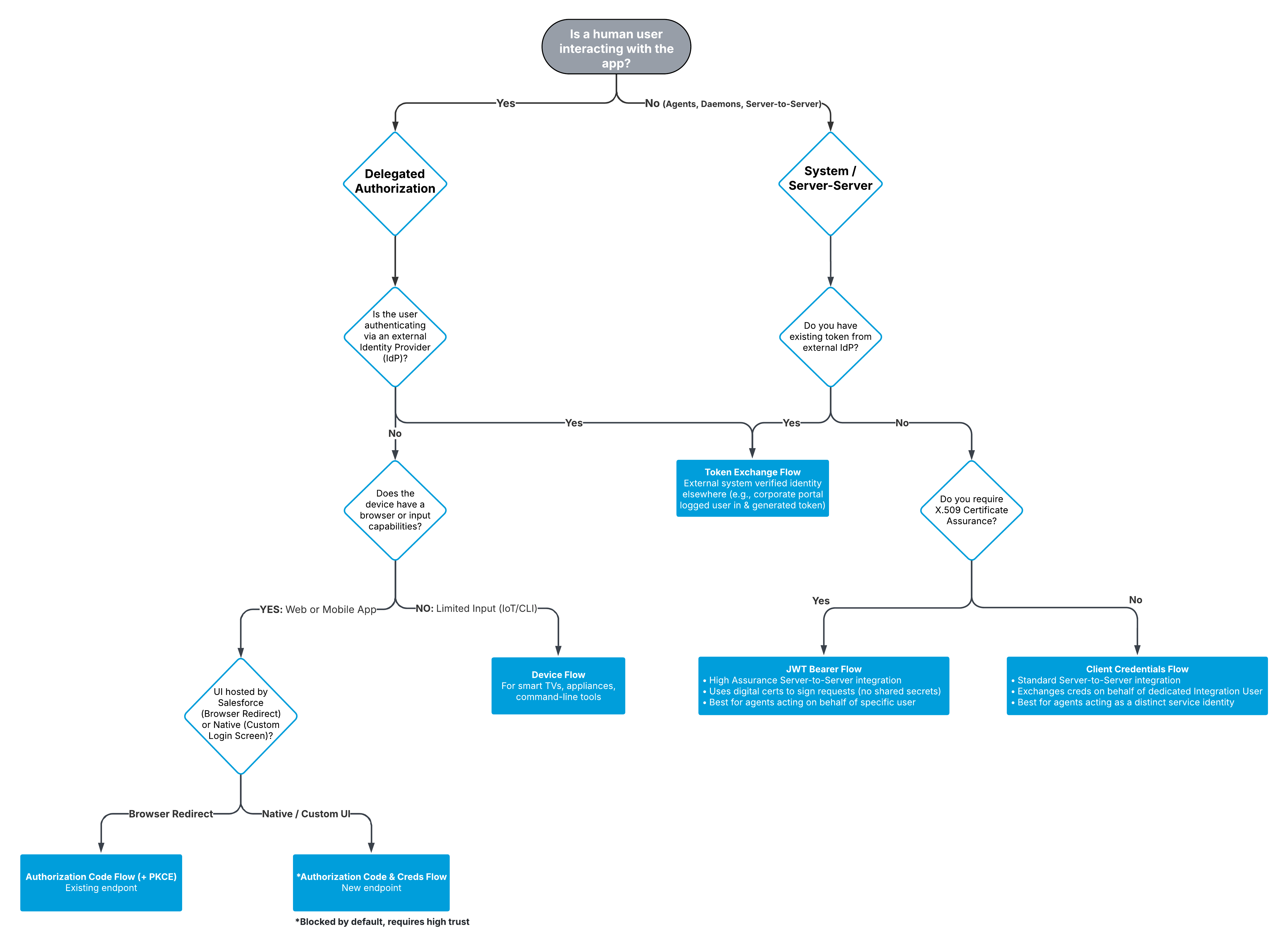
Select the appropriate authorization flow
Architects must choose the specific OAuth flow that matches how the external application operates:
- Client Credentials Flow is the standard for server-to-server integrations. It allows backend services to authenticate using their own credentials, mapped to a dedicated integration user, without requiring user interaction or managing password rotation.
- Authorization Code Flow is designed for applications acting on behalf of a user, such as custom web or mobile apps. It ensures users explicitly authorize access, utilizing Proof Key for Code Exchange (PKCE) to mitigate potential cryptographic failures (OWASP A04) by preventing authorization code interception during the exchange.
- Device Flow bridges the gap for hardware with limited input capabilities. It allows devices like command-line tools or IoT appliances to initiate authentication that is completed by the user on a secondary device, such as a laptop or phone.
- JWT Bearer Flow provides a high-assurance mechanism for server-side integration. By using digital certificates to sign requests, it enables trusted systems to assert identity and access data without interactive logins, relying on pre-authorized administrative approval.
- Token Exchange Flow supports complex architectures where identity is federated. It allows an external system to exchange a token from a third-party identity provider for a Salesforce access token, preserving the user’s identity across system boundaries.
Manage token behavior and scopes
Token behavior determines how access persists once authentication succeeds. Access tokens define the session’s duration and capabilities, while refresh tokens control whether that access can be renewed without reauthentication. This mechanism forces a trade-off between friction and security. Longer-lived tokens simplify unattended integrations, like background syncs, but increase the impact of a compromise. Short-lived tokens tighten control but introduce operational complexity if the integration’s refresh logic is not robust.
Scopes define what an external application is allowed to do, but they don’t replace the user security model. Broad scopes like ‘full’ can speed up early development, but they grant far more access than most integrations need. To follow the principle of least privilege, use narrower scopes and rely on user permissions for data access. For example, the ‘API’ scope enables API access, and permission sets on the integration user control the objects and fields that can be read or modified.
Structure configuration for governance
Finally, architects must be explicit about governance and ownership. ECAs separate application settings from administrative policies. That separation only adds value when responsibilities are clearly assigned. Architects should define who owns the application definition, who is authorized to approve or revoke access, and how changes are reviewed over time. Without that clarity, the model still works technically but loses much of its governance benefit.
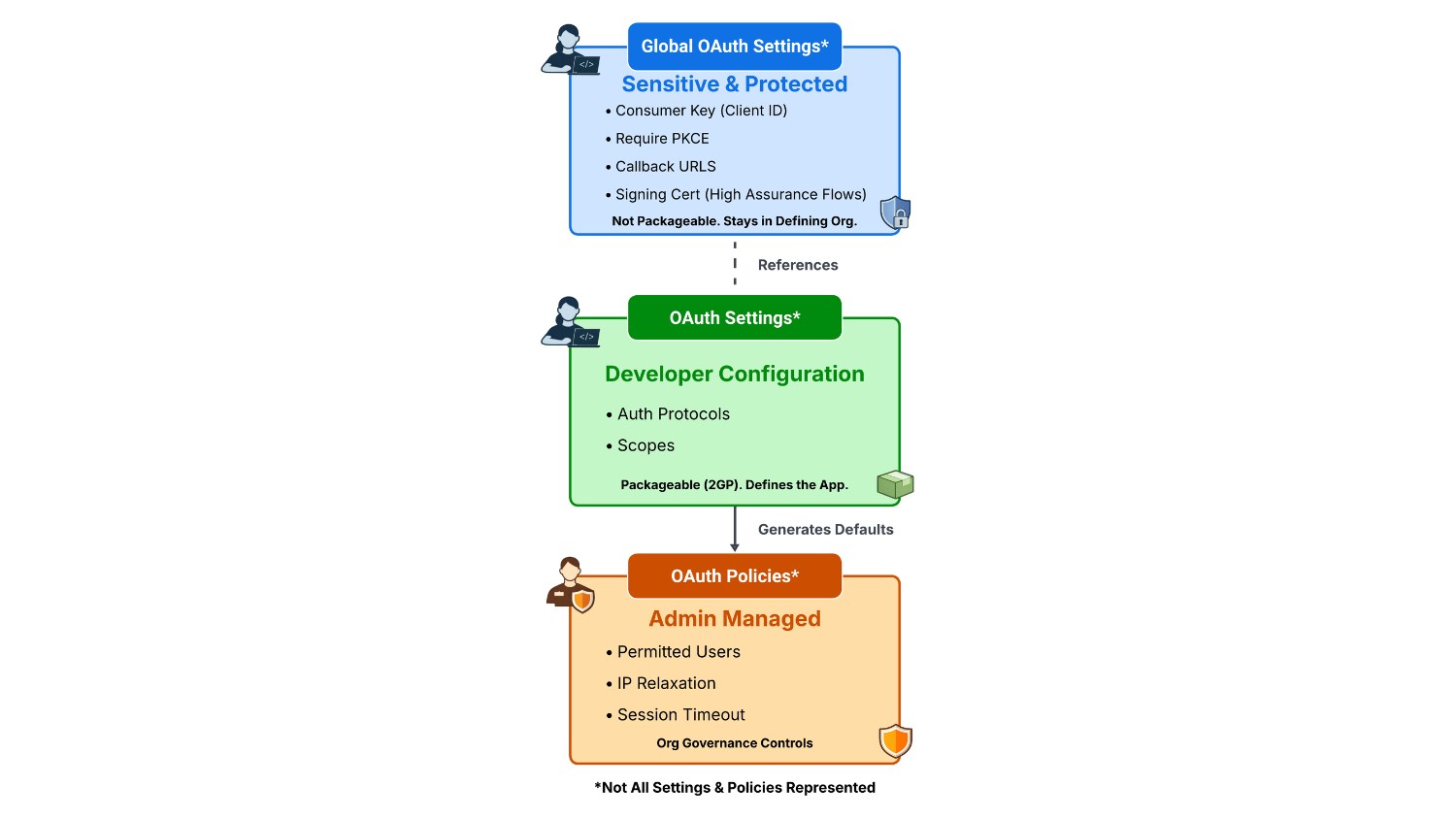
ECAs enforce a defense-in-depth strategy by structurally separating sensitive credentials from application behavior. Instead of a single artifact, they use a multi-layered model where Global Settings protect sensitive information from exposure, while independent Policies allow admins to layer additional security controls over the developer’s definition
- Global OAuth Settings File: contains private and sensitive OAuth consumer information that can’t be packaged and must not be added to source control, such as the OAuth consumer key, callback URLS, certificate string and other protected information.
- OAuth Settings File: defines the remaining client configuration, including supported authentication flows and scopes, which are less sensitive but still foundational to how the client operates.
- OAuth Policies File: automatically generated from the application’s settings when an ECA is deployed. This means that for delegated authorization flows, like the web server flow, there is no need to manually define policies during configuration. Instead, the system generates default enforcement rules that local administrators can immediately govern.
This structure reinforces clear ownership boundaries while keeping operational control with administrators.
Move away from legacy patterns
ECAs mark a clean break from legacy authentication patterns that were previously available through Connected Apps. To address potential identification and authentication failures (OWASP A07), flows such as the OAuth username-password flow and other credential-embedded approaches are no longer supported. These older patterns relied on static credentials and implicit trust, making it difficult to rotate access safely, isolate integrations from one another, or clearly understand who or what was responsible for a given access path. ECAs replace those patterns with explicit client identity, modern OAuth flows, and clearer separation between authentication, authorization, and policy enforcement.
With these mechanics in mind, the next step is understanding how to create ECAs in Setup and make the right architectural decisions around authentication models, access control, and governance. This is where most of the meaningful trade-offs come into play.
Creating external client apps
Creating an ECA requires architects to translate security requirements into a definitive boundary that shapes the integration’s operational behavior. By making intentional decisions regarding the identity model and authorization strategy upfront, configuration becomes a direct expression of architectural intent. This prevents the operational drift that can sometimes be found in iteratively-designed integrations.
Determine Distribution State
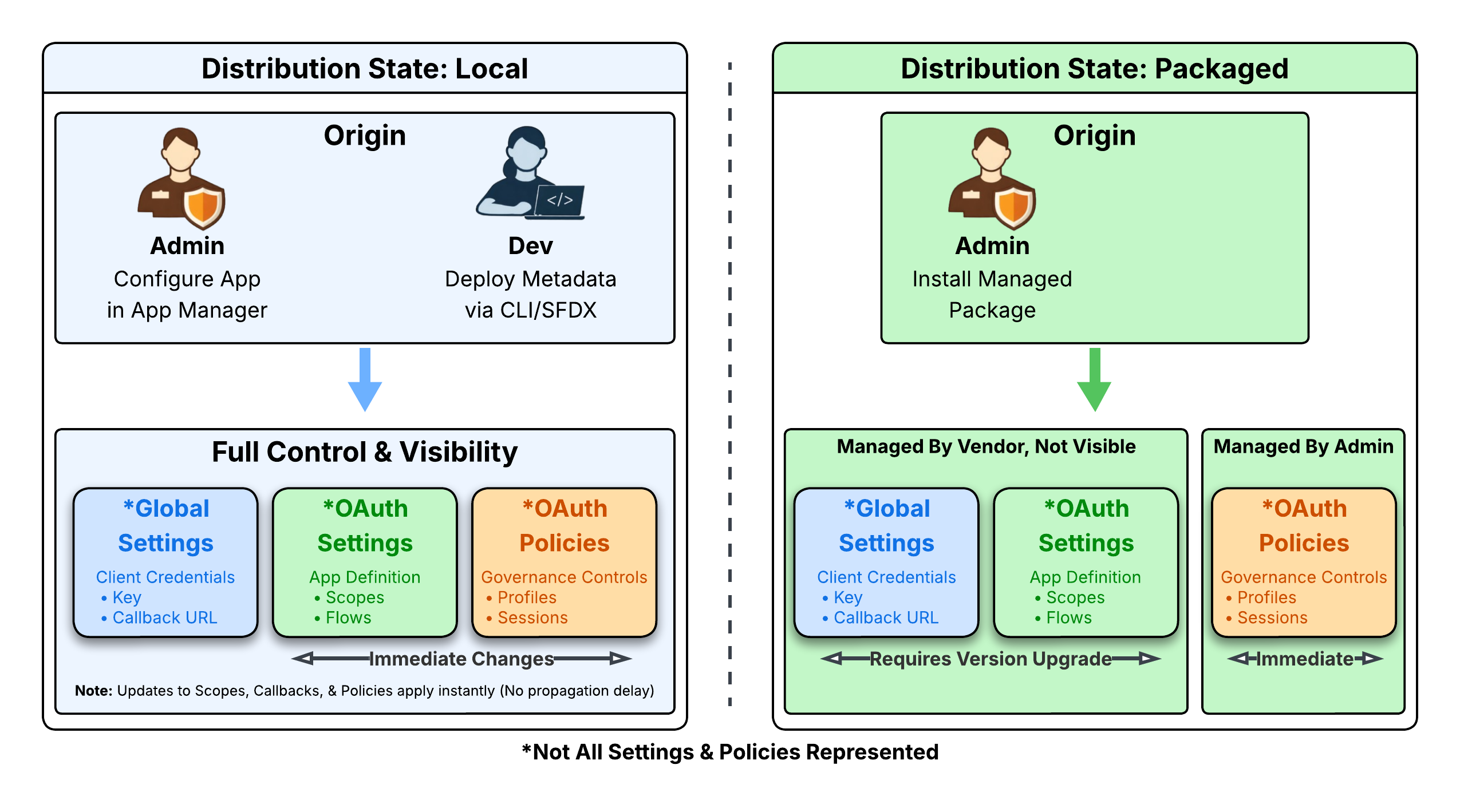
Start by selecting the Distribution State, Local or Packaged. This determines how the application is deployed, updated, and governed over time. Packaged apps are built for distribution through Second-Generation Packaging (2GP) and are required when an integration must be deployed across multiple orgs. For the single-org implementations discussed in this article, Local is the appropriate choice. A Local app exists only in the org where it’s created, allowing settings to be updated immediately without the overhead of a package release cycle.
Define the identity model
The next decision to be made is aligning on the identity model. Architects need to determine whether the integration should operate as a service identity or act on behalf of individual users. Service-oriented integrations are appropriate when a system performs consistent, repeatable actions without user involvement and should be isolated behind a single, tightly scoped identity. This is typically a dedicated integration user with permissions granted through scoped permission sets. User-centric integrations are appropriate when access needs to reflect individual user permissions and consent, such as applications that surface Salesforce data directly to end users. This choice determines how permissions are assigned, how access is reviewed, and how activity is attributed during audits or incident analysis.
Align authorization and token strategy
The following decision should focus on authorization flow selection, which should align directly to how the external system behaves. Interactive applications that require explicit user consent typically use a delegated authorization flow, such as Authorization Code Flow for users signing in through a web or mobile app. Automated, non-interactive systems generally align better with service authentication flows, such as Client Credentials Flow for scheduled backend integrations. Selecting a flow that doesn’t match the interaction model is an architectural anti-pattern that often forces compensating controls later, weakening the original design.
Token strategy is another foundational architectural decision. For interactive applications, enforce short-lived access tokens to align with OWASP session management guidelines, provided the external system can handle retries gracefully. For integrations requiring continuous operation, authorize refresh tokens but mitigate the risk by enabling Refresh Token Rotation. This setting invalidates the used refresh token immediately, preventing replay attacks while supporting the necessary renewable access.
Design scopes for least privilege
To enforce the principle of least privilege and prevent broken access control (OWASP A01), scope definition should be treated as a deliberate design step. Scopes should align to the integration’s specific responsibilities rather than broad functional areas. For example, an integration that exists solely to publish platform events or consume change data capture streams should not be granted scopes that allow it to invoke unrelated APIs. Keeping scopes tightly aligned to responsibilities makes integrations easier to review and reduces the likelihood of unintended expansion as use cases evolve.
Establish an integration standard
To ensure inbound integrations remain secure and manageable over time, architects must establish a clear integration standard for how external systems connect to Salesforce. This standard should frame consistent expectations around identity, access boundaries, and least-privilege enforcement, while ensuring system activity is clearly separated from human user behavior. The configuration guidance provided below illustrates this approach.
| Component | Standard |
| Identity | Create a dedicated Salesforce user for the specific integration (1:1 relationship). Don’t reuse existing users. |
| License | Use the Salesforce Integration license type to limit UI access and enforce API-only permissions. |
| Profile | Clone the “Salesforce API Only System Integrations” profile. Ensure specific IP Login Ranges are defined on the profile. |
| Access Policy | Set Permitted Users to “Admin approved users are pre-authorized” to enforce explicit assignment via Permission Sets. |
| IP Security | Set the ECA policy to “Enforce IP Restrictions.” Rely on the profile’s Login IP Ranges to define the trust boundary. |
The example below uses a service-oriented integration (i.e. streaming Event Monitoring data to Splunk) to illustrate how the guidance above can be put into practice. When applying this standard to your use case, structure the authorization using a Permission Set Group to bundle access. The same principles apply broadly to other inbound integration scenarios.
| Configuration | Value | Implementation Detail |
| Persona | Splunk Integration User | Dedicated user account was created using the Salesforce Integration user license. |
| Profile | Splunk Integration User | Cloned from “Minimum Access – API Only Integrations” profile, with strictly-defined Login IP Ranges. |
| Role | None | Integration user was not assigned a role. Only consider role assignment if required for record sharing hierarchies. |
| Permission Set Group | Splunk Integration User | Single group was assigned to the user that bundles the specific permission sets below. |
| Permission Sets | 1. Salesforce API Integration 2. Event Monitoring Access 3. Splunk ECA Access |
1. Base: Assigned Salesforce API Integration permission set license to allow standard object access. 2. Functional: Grants read access to Event Monitoring logs and objects. 3. Authorization: Explicitly grants access to the Splunk ECA. |
| Public Group | Splunk Integration User | Optional: Create only if Sharing Rules are required to open access to private records. |
To enforce least privilege effectively, architects should maintain a one-to-one relationship between each inbound integration, its integration user, and its permission set group. This ensures that every connection operates with a distinct identity and tightly scoped access. Profile strategy should then align with network architecture. Because profiles are the mechanism for enforcing login IP ranges, integrations connecting from different network locations require separate profiles to preserve isolation. When multiple integrations route through a centralized gateway such as MuleSoft and share a trusted IP range, architects can reduce metadata sprawl by assigning them to a shared system integration profile while using distinct permission set groups to enforce granular access controls.
Defining this architectural pattern helps establish a clear logical security model. By taking these considerations into account when creating ECAs, architects are better positioned to evaluate how existing integrations align with the new model. The next section examines how to approach migration from Connected Apps when needed, including patterns, risks, and tradeoffs involved in transitioning integrations without disrupting existing consumers.
Migrating from connected apps to external client apps
While existing Connected Apps will continue to function in the future, the move to ECAs makes migration planning a practical consideration for architects responsible for maintaining inbound integrations over time.
Assess integration readiness
Migration should begin with a clear evaluation of the existing integration landscape. ECAs do not offer strict feature parity with Connected Apps, since some legacy patterns are explicitly unsupported. Architects should inventory existing integrations and identify dependencies affecting migration feasibility, especially authentication flows and operational dependencies tied to Connected Apps.
Following are some considerations when conducting your readiness assessment:
- Unsupported Authorization Flows: ECAs do not support the Username-Password or User-Agent flows. If your existing integration relies on this pattern, the migration will likely fail. These integrations should be refactored to supported patterns, such as OAuth 2.0 Client Credentials for server-to-server integrations or Web Server flow with Proof Key for Code Exchange (PKCE) for user-facing apps.
- Push Notification Validity: If you’re migrating an app with push notifications configured, ensure your settings are valid. An expired P12 certificate for Apple or a deprecated Server Key configuration for Android will cause the migration process to fail.
- Distribution State: Determine if the app is defined locally or installed via a managed package. This dictates whether you can use the automated migration tool, must manually recreate the app, or need to install and harden the app as you wait for the ISV to release a new ECA version.
Migrate local apps automatically
For local Connected Apps, which are not distributed via packaging, Salesforce provides an automated migration path. By navigating to the App Manager, you can select ‘Migrate to External Client App’ to convert eligible OAuth and SAML-enabled Connected Apps.
This process preserves the existing OAuth Consumer Key and Secret. Unlike manually recreating an app, the automated tool allows the new ECA to adopt the existing identity, meaning you do not need to update the external integration with new credentials. The original Connected App is converted into a read-only state to prevent configuration conflicts. However, if you delete the new ECA, the original Connected App becomes active again, giving you the option to restore the previous configuration. Be aware that migrated apps may not immediately appear in Notification Delivery Settings or Briefcase assignments, requiring post-migration verification.
Select a cutover strategy
For distributed apps or complex architectures where the automated tool is not applicable, architects must choose a cutover strategy that balances speed with risk mitigation.
Incremental (Side-by-Side) Migration: This is the recommended pattern for critical, high-volume integrations, particularly those that require refactoring from the username-password flow. Because you can have both a Connected App and an ECA active simultaneously, you can deploy the ECA in parallel.
- Pros: Low risk. Allows you to validate new OAuth flows, such as testing the Client Credentials flow, in a sandbox before a full cutover. Allows time for an intentional, planned migration.
- Cons: Requires maintaining two sets of credentials temporarily and coordinating with the external system owner to swap credentials.
Big Bang Migration: In this scenario, the Connected App is deactivated immediately after the ECA is deployed and the external system is updated.This strategy is suitable for simple, low-volume integrations where brief downtime is acceptable, or for environments where immediate adherence to new security policies outweighs the risk of disruption.
- Pros: Rapid cleanup of technical debt and immediate adherence to new security policies.
- Cons: High risk. If the ECA is misconfigured, such as incorrect scopes or IP restrictions, the integration will fail immediately with no fallback.
Handling apps you can’t migrate
Not all Connected Apps fall under your direct control. Architects must distinguish between apps they define locally versus those provided by third-party vendors or Salesforce. The automated migration tool and above-mentioned manual recreation strategies apply only to local apps where you own the metadata.
- Managed packages and third-party apps: You can’t migrate Connected Apps installed via managed packages, or those connecting via global OAuth definitions (such as third-party ETL tools). Because the application metadata is owned by the Independent Software Vendor (ISV), you can’t convert these to External Client Apps yourself.
- Salesforce first-party apps: Standard tools such as the Salesforce CLI, Data Loader, and the Salesforce Mobile App rely on global Connected Apps managed by Salesforce. You don’t need to migrate these; Salesforce maintains their lifecycle.
Mitigation strategy: Install and harden
For third-party apps that can’t be migrated, architects should enforce ECA-style governance by “installing” the Connected App locally. Many external applications authenticate against an org using a global definition without ever being explicitly installed, which prevents admins from applying security policies.
To secure these connections:
- Install the app: Navigate to Connected Apps OAuth Usage in Setup. Identify Connected Apps currently in use that are not installed and click Install. This instantiates the app’s policies in your local org, allowing you to control who can access it.
- Enforce governance: Update the newly installed policies to match your integration standard:
- Access: Set Permitted Users to “Admin approved users are pre-authorized”. This removes the ability for users to self-authorize and requires you to explicitly grant access via Permission Sets.
- Network: Set IP Relaxation to “Enforce IP restrictions”. This ensures the integration respects the Login IP Ranges defined on the integration user’s profile.
Validate configuration and minimize disruption
When recreating an app manually, new consumer keys and secrets are generated, which introduces coordination risk with external system owners. In these cases, APIs such as the Staged Credentials API can be used to support controlled rotation, allowing new credentials to be tested before existing access is revoked. Regardless of whether you’re migrating to ECAs manually or via the automated App Manager method, it’s critical to ensure that you plan for credential (certificate/key) management and have a recurring review process in place.
Finally, to ensure a smooth transition, leverage the improved support for Local ECA testing in scratch orgs. Unlike Connected Apps, which struggle with ephemeral environments, ECAs are designed to support 2GP workflows. It is important to note that you cannot create an ECA directly in a scratch org; instead, you must define the app in a long-lived environment (such as a Dev Hub), pull the metadata to your local project, and then deploy it to your scratch orgs and/or sandboxes for testing. This allows you to validate deployment and authorization flows repeatedly without cluttering your production environment.
After cutover, architects should explicitly validate authentication behavior, scope enforcement, and token issuance under real usage conditions. Verifying access patterns and revocation behavior early helps confirm that the new ECA reflects the intended security and governance posture before decommissioning the original configuration.
Operating and governing external client apps
For architects, the deployment of an integration is not the end of its lifecycle; it’s the beginning of operations. Governance for ECAs shifts the focus from simple connectivity to active management. By strictly separating developer settings from administrative policies, the framework ensures that security controls and operational clarity are maintained over time
Manage credentials and rotation
A critical component of integration security is the lifecycle management of consumer secrets. Unlike the static credential model seen in legacy implementations, as mentioned above ECAs support a robust Staged Credentials API. This feature allows architects to implement zero-downtime rotation strategies by generating a new secret via API call and “staging” it alongside the active one.
Architects should design automated workflows to test staged credentials with the external system before promotion. This capability eliminates the “rip and replace” risks associated with key rotation. Additionally, for high-assurance environments you can integrate this process with a third-party secrets manager, ensuring that the client secret is never exposed in plain text during the rotation process.
Updates and versioning
As business requirements evolve, so must your integrations. Whether you need to expand OAuth scopes or update callback URLs, the operational workflow is dictated by your Distribution State. For packaged apps, installed from an ISV, developer settings are locked. Enabling new features or changing scopes requires the vendor to release a new package version that you must then install. For local apps, settings are updated directly in the environment, allowing for rapid iteration without the overhead of packaging.
The framework significantly improves responsiveness compared to legacy patterns. While global OAuth changes allow for a short propagation period, developer updates to settings generally take effect immediately within the local context. Additionally, administrative policies are strictly local to the org, allowing admins to apply immediate governance updates, such as rotating secrets or changing access levels, without redeploying the application.
Enforcing governance via policies
The most powerful tool for ongoing governance is the Policies layer. Because policies are local to the subscriber org and distinct from the packageable settings, local administrators maintain control over the security posture regardless of vendor updates.
Architects should establish a recurring governance review cadence to ensure policies continue to match the principle of least privilege:
- Permitted users: Shift from “All users may self-authorize” to “Admin approved users are pre-authorized” to explicitly control which profiles or permission sets can access the integration.
- Session security: Configure IP Relaxation and Session Timeout settings strictly within the policy file. These settings persist even if the underlying app metadata is updated by the developer, preventing accidental security regressions.
- Token validity: Define strict Refresh Token policies to expire access if a token has not been used for a specific time, reducing the attack surface of dormant integrations.
- Insecure flows: Proactively block the User-Agent and Username-Password flows in your org’s OAuth and OpenID Connect Settings. While External Client Apps inherently forbid these flows, existing Connected Apps and those installed via managed packages can still utilize them. Blocking them globally prevents developers from relying on insecure patterns or reusing legacy credentials to bypass your security architecture. These flows represent a security anti-pattern and will eventually be retired, so it’s a good idea to stop using them now.
Monitoring and revocation
To maintain visibility into active connections and satisfy security logging and monitoring best practices (OWASP A09), architects should utilize the External Client Apps OAuth Usage page in Setup to monitor access and refresh tokens. This enables granular revocation during security incidents or offboarding: you can revoke a specific token, all tokens for a specific user, or all access for the entire application. This precise level of control allows architects to neutralize threats immediately, without unnecessarily disrupting other integrations.
Audit your integration landscape to identify and mitigate risk
ECAs represent a modern approach to governing inbound integrations in Salesforce. By separating application definition from access policies, they give architects a clearer framework for enforcing least-privilege access and maintaining control as integrations evolve over time.
This shift encourages architects to approach external access as a long-lived architectural concern, grounded in explicit ownership, deliberate authorization models, and ongoing governance. Whether securing a single-org integration or supporting broader distribution patterns, the local-by-default model strengthens operational clarity and reduces unintended exposure as systems change.
Review your existing inbound integrations and assess how identity, access, and governance are defined today. ECAs provide a durable foundation for external access. When treated as a core part of the integration architecture, they support integrations that remain manageable, adaptable, and aligned with organizational security expectations over their full lifecycle.
Strengthen your security architecture strategy
Explore the Salesforce Architects Secure Guide to master authentication, authorization, and session management best practices for your integrations.




