
If you haven’t been minding your TikTok metrics, now’s the time to start.
Especially as the app booms as a brand discovery and shopping channel. From organic and paid promotions to influencers and TikTok Shop, tracking TikTok analytics is a must-do for marketers.
The problem? Content moves fast on TikTok and the algorithm demands a high volume of videos.
But that’s all the more reason to keep a better pulse on your performance!
By knowing what’s working and what’s not, you can optimize your videos and strategy with confidence. Below we break down which TikTok metrics to prioritize and how to track them.
What are TikTok metrics?
TikTok metrics are quantitative data points that track the performance of your content and account growth. They measure interactions such as qualified views, saves, shares and engagement rates. Marketers use these metrics to audit their TikTok marketing strategy, understand audience demographics and optimize for the TikTok algorithm.
Like most social media metrics, you can track them at two levels: Account-level analytics (overall profile growth) and Video-level analytics (individual post performance).
Here’s a snapshot of a few key TikTok metrics you can see natively in the app:

Growing and going viral on TikTok doesn’t happen totally by accident. Tracking performance goes hand in hand with higher engagement and understanding what viewers want from you.
What are the most valuable TikTok metrics for TikTok marketing?
Defining the best metrics depends on your specific goals, but in 2026, the algorithm prioritizes “Meaningful Engagement” over passive views. Below are the essential metrics every marketer should track. We’ll also highlight what these metrics look like when tracked using Sprout Social.
- Engagement rate. This video metric measures the ratio of views to interactions (likes, comments, replies, shares and saves). Increasing TikTok engagement goes hand-in-hand with greater reach and visibility within the app’s algorithm. Note: As of 2025, the algorithm heavily prioritizes “meaningful engagement,” specifically Saves (indicating intent to revisit) and off-platform Shares.

- Views. This metric measures the amount of times a video was watched. Keep in mind that TikTok views are counted as soon as a video starts or is automatically looped. Understanding which videos are earning the most views can highlight trending topics and future opportunities to create high-ranking content. For creators in the Rewards Program, focus on “Qualified Views” (unique views from the For You feed watched for at least 5 seconds). Increasing your engagement rate and getting more views on TikTok can create a snowball effect of greater reach.
- Followers growth. This account-level metric measures the rate at which your audience is growing based on the number of followers you’ve gained. While followers aren’t the most important TikTok metric on their own, increasing TikTok followers organically is a good sign. On the flip side, stagnant growth can be a signal to adjust your content strategy.

- Click-through rate. This TikTok ad metric reflects how many people are tapping through and engaging with your ads versus total viewer impressions. Low click-through rates can be a sign of poor campaign targeting or ad creatives. On the flip side, strong click-through rates mean your ads are resonating with your target audience.
- Shares. This metric tracks how often people repost your content or share videos independently with other users. Shares are a valuable TikTok metric for B2C brands by highlighting products featured in videos that are being bookmarked and discussed among viewers.
- Audience demographics. This is a collection of TikTok metrics that covers the demographics (including the age, location and gender) of your viewership. Your social media demographics should reflect your target audience.
- Trending hashtags. This metric measures how often hashtags are used on TikTok. For example, you can see which hashtags result in the most reach and engagement for your individual videos. You can also find trending hashtags in TikTok’s Creative Center to understand which topics are trending across the app.

How do I access TikTok analytics in the TikTok app?
TikTok has centralized its analytics into a dashboard called TikTok Studio to view account-level and video-level metrics. You can access it via the mobile app or desktop.
Steps to find TikTok Analytics on mobile:
- Go to your Profile.
- Tap the Menu (☰) in the top right corner.
- Select TikTok Studio (formerly Creator Tools).
- Tap Analytics.
From here, you can view data across three main tabs: Overview, Content and Followers.
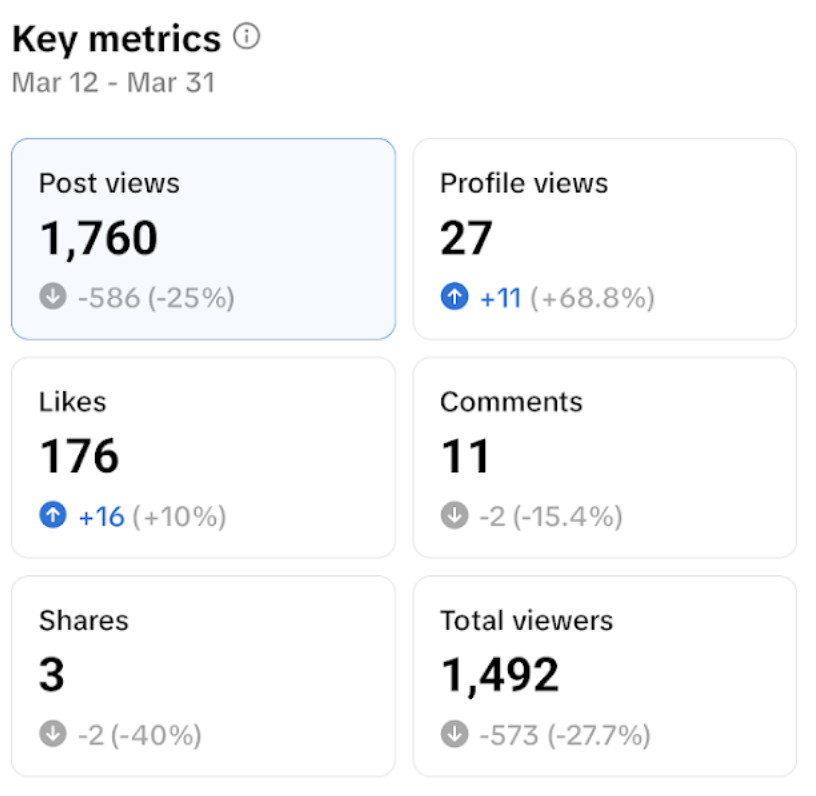
TikTok Key metrics
The Overview tab provides a high-level summary of your account health over the last 7, 28 or 60 days. Key metrics provide a big-picture overview of your account and recent content’s performance.

TikTok metrics covered in this section of your analytics include:
- Post views. How many times your posts were viewed.
- Profile views: How many people visited your profile page.
- Likes. The number of likes on your profile.
- Comments. The number of comments your posts received.
- Total views. The number of people who viewed your posts.
- Shares. The number of times your posts were shared.
TikTok Content metrics
TikTok content metrics provide a video-level overview of your content’s reach and performance.
Here’s how to access them within your TikTok profile:
- Go to your Profile.
- Tap the Menu (☰) in the top right corner.
- Select TikTok Studio (formerly Creator Tools).
- Tap Analytics and select the Content tab (to the right of Overview).
- You’ll see a list of videos titled Trending posts.
- According to TikTok: “These are the top 9 posts with the fastest growth within the last 7 days.”
- Select an individual video.
Under the “Video analysis” summary, you’ll see icons reflecting the following TikTok metrics for an individual video: likes, comments, shares and saves.

You can drill down even further for individual videos by selecting the “Overview” tab.

Here’s a snapshot of the TikTok content metrics you can find in this dashboard:
- Total play time. The cumulative amount of time viewers spent watching your video.
- Average watch time. The average time people spent watching your video.
- Watched full video % (Completion Rate): The percentage of people who finished your entire video. A high Completion Rate is now a critical signal for the algorithm, often outweighing simple watch time.
- New followers. This is the number of viewers who started following you after interacting with your video.
- Video views. This is the number of views your video earned. This is measured hourly for the first 48 hours up until 7 days after a video is posted. (Check for “Qualified Views” if you are monetizing).
- Retention rate. This is the percentage of your viewers who are still watching your video at a particular time (measured in a range of seconds).
- Traffic sources: This is where people find your video, including sources such as TikTok search or the “For You” page. Search is becoming a major traffic driver, so keep an eye on “Search Value” metrics.
By selecting the Viewers tab, you can dive into viewer-level analytics for a video.

- Total viewers. This is the total number of unique viewers for a video. This TikTok metric was formerly known as “Reached audience.”
- Viewer types (new vs returning viewers, non-followers vs. followers). This breaks down your audience into segments based on past engagement.
- Gender. This is the defined gender breakdown of a video’s viewers.
- Age. This is the defined age breakdown of a video’s viewers.
- Location. This is the defined geographic location breakdown of a video’s viewers.
Finally, you can find even more data under the “Engagement” tab:
- Top words used in comments. This measures most frequently words and phrases that appear in your TikTok comments.
- Likes. This measures the percentage of people who liked your videos at a particular point (measured in seconds) within a video.
TikTok Follower metrics
TikTok Follower metrics provide an overview of your account and audience growth over time.

Here’s how to access them within your TikTok account:
- Go to your Profile.
- Tap the Menu (☰) in the top right corner.
- Select TikTok Studio (formerly Creator Tools).
- Tap Analytics and select the Followers tab.
Here’s a snapshot of what you can see within your TikTok follower metrics. Keep in mind that you need at least 100 followers to have full access to this data:
- Total followers. This is the total number of people following your account for a specified period.
- Net followers. This shows the net number of followers gained in a selected date range and comparison with the previous period.
- Follower insights. This is a demographic breakdown of your followers.
- Most active times. This is the average time your followers are active on TikTok broken down by hours and days.
TikTok Shop metrics
If your brand uses TikTok Shop to sell products, these metrics are essential for tracking ROI:
- Gross merchandise value (GMV): The total revenue generated from your products.
- Video-to-click rate: The percentage of viewers who clicked the product anchor link in your video.
- Affiliate commissions: The amount paid to creators who successfully sold your product.
- Product impressions: How many times your products were displayed to users across the Shop tab and videos.
How to use TikTok metrics to improve your strategy
All of the data above can be eye-opening, especially when it comes to your audience and top-performing content, but useless without action.
Here is how to translate these metrics into better business results.
1. Identify your top-performing formats
Marketers have to experiment to figure out what works and what doesn’t. This means publishing videos of varying lengths and formats with different creative edits. For example, do your viewers engage with unpolished and off-the-cuff content? Do they prefer shorter-form or longer videos?
Analyze your Content tab to see which formats drive the most retention. Conduct a TikTok audit to assess your overall content strategy.
Don’t limit yourself to vertical video. Test Photo Mode (carousels) and longer-form Horizontal Video to see if they drive higher retention with your specific audience:
- Photo Mode (Carousels): Often drive higher engagement rates due to swipe interactions.
- Horizontal Video: TikTok now incentivizes landscape videos (over 1 minute) with boosted reach. Check if these are performing better with your audience than short clips.
2. Refine your posting frequency that maximizes reach and engagement
Compared to other platforms, TikTok’s content demands can feel aggressive and daunting.
Use the Follower Activity chart to stop guessing.
Native TikTok metrics and Sprout Social’s ViralPost feature are the best indicators for the best times to post on TikTok and how many videos per week earn the most engagement based on your individual audience.
Given how stretched marketing teams are right now, allocate your time and resources carefully. Rather than meet some arbitrary daily posting requirement, consider that you can earn as much (if not more) engagement by refining your posting frequency. You’ll never know until you look at your numbers.
3. Optimize for search on the app
Analyze your Traffic Sources to see if “Search” is driving views; if it is under 10%, you are missing out on long-term discovery.
To fix this, treat your content like a search engine listing by mastering TikTok SEO. Incorporate niche-specific keywords directly into your text overlays, captions, and spoken audio. This strategy helps you rank for specific user queries, driving “evergreen” views long after the initial viral spike.
Have you dug into your TikTok metrics yet?
Tracking TikTok metrics is still unexplored territory for many businesses and brands.
But there’s so much you can learn from your data if you take the time to dig into it. From driving leads to building awareness, a pulse on your numbers can help you move the needle ASAP.
If you haven’t already, check out how Sprout Social’s TikTok integration helps brands manage their TikTok analytics and content from end to end. Start a free trial today.
The post What TikTok metrics you need to track for TikTok marketing in 2026 appeared first on Sprout Social.