
Key Takeaways
Your website is the most powerful tool in your digital arsenal, so it’s worth taking the time to make something you’ll be proud of. The mistake that some web designers make is not realizing how long it takes to build from scratch, and that it isn’t a quick plug-and-play process. Getting started requires a good bit of legwork.
The good news? After learning the basics of web design and development, anyone can create a great website that attracts customers and keeps them coming back for more. In this beginner’s guide, we’ll show you how to do just that using either a content management system (CMS) or a website builder, as well as cover the basics so you can get started.
Quick recap: What is website development?
Website development refers to the process of planning, building, designing, and maintaining a website for your business. The website development process is split into two main sections: front-end and back-end.
Back-end development (web development)
The back end is the server-side part of your website that your customers don’t see. It’s all about how the site functions, how fast your pages load, and how easy your site is to use.
Backend web developers need to learn coding and generally how to make sure everything runs smoothly. This means being familiar with server-side languages like Python.
Front-end development (web design)
The front end is the customer-facing part of your website. This encompasses the visual elements that help your customer navigate your pages, as well as the graphics, layouts, navigation, and content. It often involves using programming languages like JavaScript to create seamless menus that help users navigate through your pages. May seem complicated, but it’s just a language to learn.
Front-end web developers have a lot in common with graphic designers. They spend a lot of time picking the perfect color palettes, deciding on the best graphics and selecting legible fonts. They may also need to consider the words included on a page.
Start with SMB Basics


Why should you build a website?
The world isn’t like it used to be. These days, customers aren’t content with visiting the first store they see and buying whatever’s sitting on the shelves. They want to do their own due diligence and find a business that aligns with their needs.
That’s why 81% of retail shoppers conduct online research before they visit a store. Your customers want to know what you offer, how you can help fix their problems, and how you stack up against the competition before they buy from your business.
Creating a website lets all of these customers find you online. It helps you market to a global audience around the clock. And most importantly, it allows you to control the entire customer journey from lead generation to conversion and loyalty.
However, it isn’t enough to buy a domain name and start uploading your products. Businesses create thousands of websites every day. If you actually want to stand out, you have to create a site that’s better than the rest. Consider these statistics:
- 73% to 83% of small businesses in the U.S. now have a website. The remaining ~20% often cite being “too small” or believing they don’t need one as the primary reason for staying offline.
- 84% of consumers believe a business with a website is more credible than one that only has a social media page.
- 97% of users check a business’s online presence before deciding to visit their physical location.
With so many websites online, consumers are spoiled for choice. So, to make sure they choose you, you need to focus on website personalization and making your site easy to use. With that said, let’s get into the complete guide. Here’s how to create a website from scratch, step-by-step.




How to create a website for your growing business
If this is your first time building a website, we strongly recommend you opt for a CMS or website builder to streamline the process. Here’s how to get started:
Step 1: Plan your project
Before you pick a theme or write any code, you’ll need to define your project and understand what you want to achieve. Here’s what to do.
Define the basics
First, work out all of the basic elements:
- Business essentials: Define what you offer, your unique value proposition, your mission, and your values.
- Stakeholders: Determine which key stakeholders will need to be involved in the web design process.
- Competition: Take the time to understand your competitors. These will be a valuable source of information, but you also need to understand how you can set yourself apart from the crowd.
Understand your target audience
You need to understand your audience before you begin designing your website. Start gathering information and create an ideal buyer persona to build an understanding of your perfect customer. You can carry out surveys to gather insights directly, or explore your competition to identify opportunities.
This knowledge will lay the foundation for everything from your website layout and graphics to font and color scheme. The more details you know at this stage, the better.
Identify your goals
Once you understand your audience and competition, define some goals that will underpin your development process. Here are some common objectives and what you’ll need to prioritize to achieve them.
- Generating leads: Create valuable content that people can download in exchange for email addresses or inquiries.
- Growing organic traffic: Prioritize search engine optimization (SEO) strategies to help visitors find your website online.
- Improving product sales: Create enticing product pages and a seamless eCommerce website checkout process.
- Improving brand image: Design a visually appealing website with first-class customer service options like live chat and FAQs.
Conduct keyword research
Search engine optimization (SEO) will help you improve your website’s position in the search results, helping more people find you online. You should spend some time in this preliminary stage researching keywords that you can target within your content.
Using keyword research tools like Semrush, and Google Keyword Planner, research your competitors to learn the words and phrases they’re ranking for. You can use this to create a list that you can refer back to when you begin writing content for your pages.
Consider the website elements to include
Lastly, you should think about the elements your site will feature based on your goals, competitor research and understanding of your audience. Common sections include:
- Homepage
- About Us
- Contact
- Blog
- Product pages
- FAQs
- Case studies
Once you’ve decided on your ideal pages, your planning is complete. You should now have everything in place to begin building your site.
Step 2: Choose your website domain name
First, in the web development process, you need to think about your domain name. This is the URL that your customers will associate with your website. A great choice can communicate your professionalism and even help with your SEO efforts. Here are some tips.
- Make it memorable: Don’t make your domain name too long. Two to four words are best. Also, try to make it catchy so it rolls off the tongue.
- Stick to words: Don’t include numbers or hyphens in your domain name, as these can make it harder for people to remember and type into a search bar.
- Make it relevant: Choose a domain name that aligns with your brand. It needs to resemble your brand’s core messaging and values closely.
- Think about SEO: Is there a keyword or meaning that you can include in your domain to boost your SEO efforts? While optional, this can help more customers find you online.
Got a few ideas in mind? Run them through a domain name checker to see if your choices are available. In addition, decide on an extension that aligns with your website. Using .com is the most popular choice, but you could also opt for .net, .store, .blog, or .org, depending on your brand.
Once that’s complete, you can register your domain with your chosen hosting provider and secure an SSL certificate. Most website builders will let you handle this entire process within their platform.
Pro tip: Avoid .io domains for the time being, as there is a chance that they might be removed from domain registrars.
Boost sales with a CRM made for growing businesses
Try Starter Suite for free to close more deals and win more customers, today.

Step 3: Choose your platform
Choosing the right website development software for your skill level will offer you just the right amount of control without becoming overwhelming.
For the purposes of this guide, we won’t be diving into coding a website manually. If you’re a beginner in the world of web development, you may want to start with a web design agency that specialises in creating custom websites, as these tools require little to no technical skills.
There are two primary options I’ll cover: CMS and website builders. Let’s break each down one by one.
Content management systems (CMS)
A content management system (CMS) lets you build your website without writing extensive amounts of code. They’re designed to be more flexible than website builders but easier to learn than coding a website yourself.
Beginners can choose a theme, add different sections, and upload extensions to customize their site. More experienced developers can access the back end and customize the functionality to suit their business needs.
When you choose a CMS, look for something that is easy to use and offers the right amount of customization for your skill level.
Pro tip: Note that when you select a CMS, you’ll also need to invest in a hosting plan with a hosting company, such as WordPress Hosting. This can either be a shared hosting plan (good for smaller websites) or a dedicated hosting plan (better for high-traffic sites that need more resources).
Kickstart your SMB with Starter Suite
See results from day one with a CRM designed for SMBs — the all-in-one suite for productivity. It all starts with Starter Suite.
Step 4: Build your site structure
A site map will help your users navigate around your website. It ensures every customer can get exactly where they need to go without frustration.
Naturally, you’ll want to start with a homepage. Then, think about the different landing pages for your business website that you’d like your users to click on. A common navigation bar at the top of a homepage.
From there, spend some time refining and optimising your navigation.
Optimize your website flow
Here are some tips to make it easy for your visitors to navigate your site.
- Dropdowns: Use dropdown lists to ensure your pages are manageable. For instance, a ‘Meet the Team’ page could easily fit underneath the ‘About Us’ section. Your portfolio and customer testimonials could both fall under ‘Why Choose Us.’ If your site is too confusing to navigate, you’ll end up with a high bounce rate.
- Menu placement: Keep your navigation menus in the same place on every page so your users can navigate easily. A sticky menu is one of the easiest ways to achieve this.
- Add a search function: Place a search bar to the top of your page so your visitors can search for what they’re looking for. This is a great choice if you have an extensive product list or content catalogue.
- Breadcrumbs: Add breadcrumbs (trails of links) to show users the hierarchy of the page they’re currently on. This allows customers to ‘backtrack’ to higher-level pages, aiding navigation and creating a better user experience.
At all times, think about how you can make your website provide users with the best possible experience. The more you know your audience, the easier it is to get in their shoes and figure out what they need from you and how you can provide it.
Step 5: Design your website
The design and development process will differ depending on your chosen platform. However, there are some essential considerations you should think about regardless of your chosen solution.
- Template: Choose a template in your chosen CMS or website builder that aligns with your sitemap, brand identity and style. Double-check the template works well on mobile.
- Color schemes: What colors will you use to convey your brand’s tone, voice, and messaging? Research color theory and psychology to find a palette that aligns with your business ideas and audience.
- Typography: Choose an interesting, engaging font that is easy to read.
- Layout: How do you want each of your pages to look? Come up with a rudimentary design before you start building your pages in your chosen tool.
Through all of this, consider how your website will appear on mobiles. Mobile accounts for over 53% of traffic worldwide, so you need to keep this in mind as you choose your design elements.
Related Stories






Key features for your business website
While the web design process is unique to your business, you should consider implementing some of these core features:
Call to action (CTA): Include CTAs on every page. Depending on your business goals, this could be to get in touch, fill out a form, or download a piece of content. Either way, make sure it’s easy to find.
Titles: Your headers should be easy to read and descriptive. They can be creative but don’t make them ambiguous. For a technical tip, make sure your headers are above the fold so your users can see them even when scrolling down the page.
Contact information: What use is a website if your customers are unable to contact you? Include a contact form with all of your details so prospects can reach out to you.
Payment gateway: How will your audience pay for your products or services? Choose a payment processing provider that can accept different forms of payment. Then, consider how you’ll integrate this feature into your web pages.
Social media integration: Consider incorporating social media platforms into your website. Live social feeds, user-generated content, social media icon buttons, and even follow and share buttons on blog content are all exceptional ways to link your Facebook, Instagram and TikTok directly to your page. This can drive traffic on both sides of the equation.
What can you do with a CRM built to reach more prospects?
Automate your marketing campaigns with a CRM built to grow. It all starts with Starter Suite.

Step 6: Create content for your pages
High-quality content creation is vital for attracting customers. It will help you to engage your audience, convey your brand messaging, and guide your customers down your sales funnel.
Your landing page content is the best place to start. What are the core messages you want to convey to your audience? You can look at your competitors for inspiration, but here are some additional tips:
- Keep it concise: You don’t want to overwhelm your prospective customers, so keep your text short and sweet.
- Use headers and subheaders: Break up long pieces of text with headings to boost readability.
- Incorporate images and videos: Use videos and imagery to improve your site’s aesthetics while communicating core messaging faster. Just remember to optimize this media so it doesn’t ruin your site’s loading times.
As an aside, consider creating a handful of blogs. While blogging will be an ongoing part of your website journey, you’ll appreciate having some engaging content ready to upload when your site goes live.
Optimize your content for SEO
As we touched on earlier, SEO is one of the best ways to make sure your audience can find you online. We won’t get into the finer details of SEO in this guide, but here are a few best practices you need to know:
- Keywords: Conduct keyword research to identify the words and phrases your audience is using in search engines like Google. Then, incorporate these keywords naturally into your content.
- Meta tags: Write meta titles and meta descriptions that accurately describe the contents of each page.
- Images: Compress images to ensure your website loads quickly. Google PageSpeed Insights can help you find ways to improve.
- Responsiveness: Make sure your website is optimized for every device. Test it on all devices, including tablets and mobiles.
- Internal linking: Link to other areas of your site within each page’s content. This helps Google to understand the structure of your website.
SEO is a powerful tool that you can continuously improve over time. Keep it at the top of your mind as you design your site, and keep refining it long after your domain goes live.
Pro tip: You can use a project management tool like Slack Lists to help streamline your task management and improve team collaboration.
Boost team productivity with Slack
Bring together your team, your customers, and your tools to help take your business to the next level with Slack — it’s where business gets done.

Step 7: Launch and test your website
Ready to launch your website? Test it first. There are potentially dozens of small errors and bugs that you won’t catch until you hit publish.
Here’s a simple website development checklist outlining all of the things you need to assess before launch:
- Make sure the website functions the same across all devices and browsers.
- Make sure your UX and UI design looks seamless across all pages and as you intended.
- Test all forms, links and buttons for proper submission.
- Make sure the font is streamlined, text is accurate and free of errors.
- Ensure your site’s security system is in place. Install the SSL certificate. Confirm HTTPS is working as expected.
- Ensure all pages have a meta title and description.
- Check site performance under different traffic loads.
- Create a full website backup.
Once you’ve completed that checklist, you’re ready to launch. Remember to submit your website to Google for indexing through Google Search Console.
Congratulations, you now have a website! But wait, there’s more.
Top 5 tips for successful website development
Here are 5 tips for successful web development and design.
- User-centric design: Make your user the focus of every decision you make. They’ll be the ones that decide whether your website is the best of the bunch.
- Clear navigation: The clearer your navigation, the easier it is for your customers to find exactly what they’re looking for.
- Fast loading times: If a customer can’t reach your page in a short space of time, they’ll leave. Optimize your site so it loads faster.
- Regular updates: Post new blogs, articles, product listings, and more on your site regularly. This will keep people engaged and will also boost your SEO strategies.
- Website accessibility: Make sure your site is accessible to everyone. Provide alt texts for images, allow keyboard navigation, and provide adequate colour contrast.
Web design example: Agentforce 360
The Salesforce landing page for Agentforce is a great example of using design and navigation in a connected way. The goal is not bombard the visitor but to help them move the site with ease. They need to understand what it is that you do within 30-60 seconds.
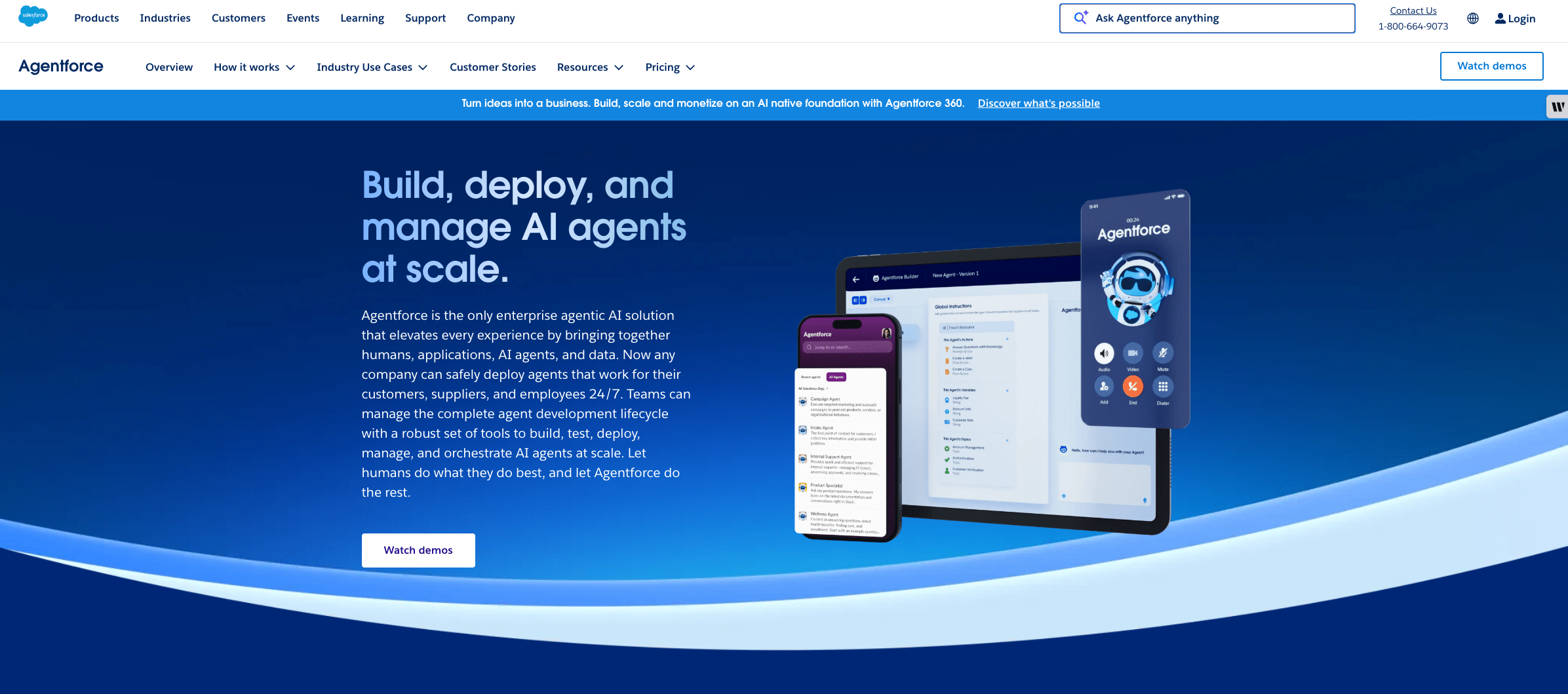
We see Agentforce top left corner, navigating the eye to the headers in the middle of the page where it states, “Build, deploy, and manage AI agents at scale.” We know who it is, what it does, and it even has a visual and a button ready to take you there – both clickable.
There is also an AI agent at the bottom of the page, ready to answer questions. The website is not only visually engaging, but also filled with knowledge so the visitor can learn on their own path.
The Guide to AI for Small Business
AI can transform your small business for the better. Get the guide below to learn how.


Develop a website with the right tools
Building a compelling website isn’t a quick process. But with a bit of knowledge and the help of smart tools, you can build an amazing website and let the design fall into place. Achieve all that, and you’ll create a site that attracts visitors and keeps them coming back. And we are here for it!
Start your journey with the Free or Starter Suite trial today. Looking for more? Explore Pro Suite. Already a Salesforce customer? Activate Foundations to try out Agentforce 360 today.
AI supported the writers and editors who created this article.
Frequently Asked Questions (FAQs)
No, not necessarily. While traditional web development requires coding knowledge (like HTML, CSS, and JavaScript), beginners can easily build functional and attractive websites using Content Management Systems (CMS) like Salesforce CMS.
A Content Management System (CMS), like WordPress or Salesforce CMS, offers greater flexibility and customization, often allowing access to the back-end code for experienced developers, but typically requires you to arrange your own web hosting.
The cost varies widely. You can start a basic site for free or very low cost using freemium website builders. However, a professional website for a small business will typically involve costs between $5 – $150 per month.
SEO stands for Search Engine Optimization. It is the process of optimizing your website to rank higher in search engine results (like Google) for relevant keywords. It is important because it helps potential customers find your business online when they are searching for products or services you offer.
The timeline depends entirely on the complexity of the site and the method you choose. A very simple site using a website builder might be ready in a day or two. A small business website using a CMS might take 2-4 weeks for planning, design, content creation, and testing. A large, highly customized, or ecommerce site could take several months.

