
Key takeaways
- Hootsuite Social OS includes AI-assisted features across scheduling, content creation, listening, customer care, and reporting that most users never fully explore.
- Wisdom, the AI layer inside Hootsuite Social OS, lets you ask questions in plain language and act on the answer without hopping between apps.
- Enterprise teams can use governance, compliance, and advocacy features to scale social safely across brands, regions, and channels.
- MCP connectors bring Hootsuite capabilities into AI tools like Claude, ChatGPT, and Microsoft Copilot, so teams can work where they already are.
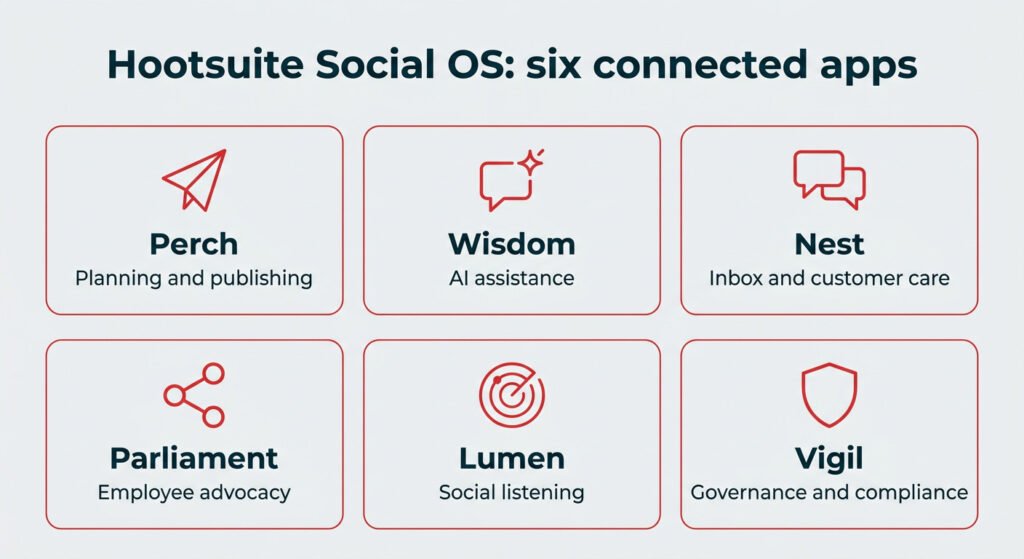
Which Hootsuite app does what?
Hootsuite Social OS is built from connected apps. Here is a quick map of which app handles what, and where to find the matching hacks in this guide.
|
App |
What it does |
Hacks in this article |
|---|---|---|
|
Perch |
Planning, publishing, and content creation |
1 to 8, 16 |
|
Wisdom |
AI assistance and orchestration across the platform |
9, 10, 11 |
|
Nest |
Inbox, engagement, and customer care |
12 to 15 |
|
Parliament |
Employee advocacy and internal content sharing |
17 |
|
Lumen |
Social listening and competitive intelligence |
18, 19, 20 |
|
Vigil |
Governance, approvals, and compliance controls |
26, 27 |
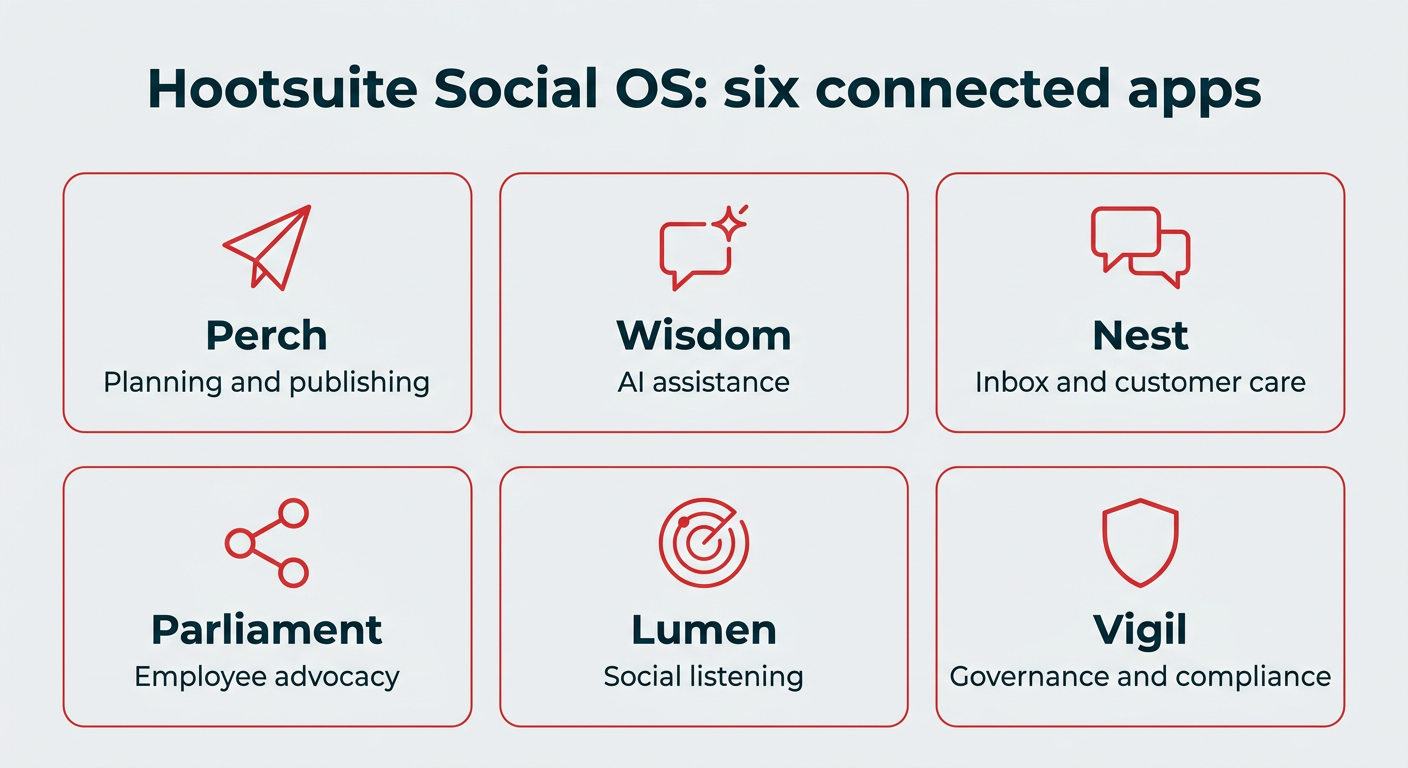
Hootsuite Social OS: six connected apps
Scheduling and publishing hacks
Publishing lives in Perch, and it is where most social teams spend the bulk of their day. These five hacks cut down the repetitive work, and if you tag your links with UTM parameters before you schedule, you will also get cleaner attribution later. Worth remembering as you scale: the average social media user visits 6.52 social platforms each month, and social media managers juggle far more than that.
1. Duplicate posts in Planner to repurpose content across channels
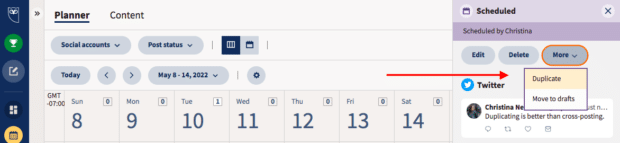
The duplicate button allows you to construct a series of similar or related posts without building each one from scratch. It’s the easiest way to repurpose content across your various social channels.
Rather than cross-posting the same content on every platform, you can edit handles, hashtags, language and links to make each post appropriate for its intended home. It’s also great for targeting different time zones, languages, regions or audiences.
If you’re running a big campaign, starting with duplicated posts can help keep your content consistent and aligned.
Find the duplicate button by selecting your post in Planner.
2. Collaborate on drafts before posting them
Sharing drafts with your team in Planner ensures everyone knows what’s coming up. Even better, editable drafts let teams pitch in in real-time to tweak and improve your social content without going through a more formal approval workflow. (Which is, of course, also a good idea.)
While a spreadsheet makes a perfectly good social media content calendar, workshopping your work-in-progress is a sure way to elevate content quality.
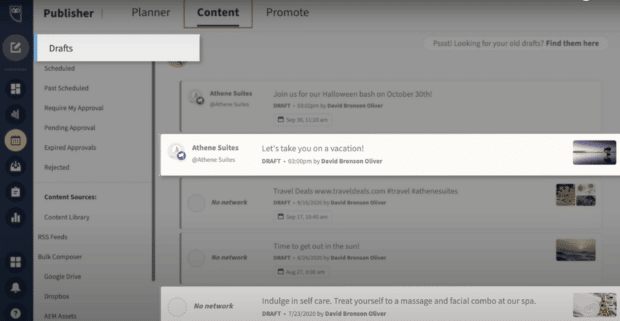
Find out more about using collaborative drafts in Hootsuite.
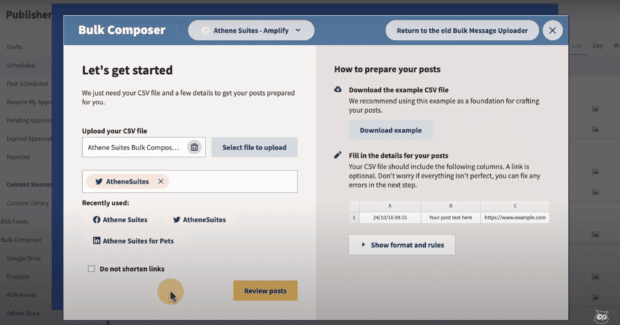
3. Bulk schedule up to 350 posts at once
According to our customer success team, social media managers who maintain high-volume accounts use bulk scheduling tools to get the worst of the uploading and scheduling grunt work out of the way.
With Hootsuite’s bulk scheduler, you can bulk schedule up to 350 posts at once, then just go through them to double-check the copy and links, and add any visuals or emoji.
Here’s our full guide on how to bulk schedule social media posts using Hootsuite.
4. Condense your entire week’s social calendar into one screen
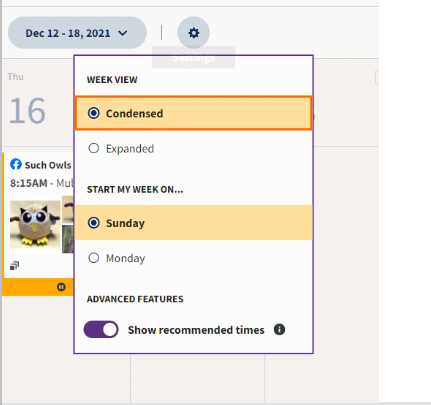
Here’s one more way to make it easier to stay on top of all your social content. With just a couple of clicks, you can condense your entire week’s list of social posts into one screen, no scrolling required.
This makes it much easier to review what’s going out and create a screengrab to share with anyone else who wants to know.
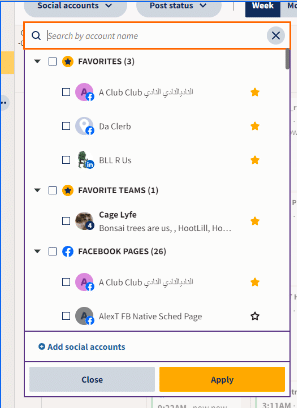
In Planner, choose the weekly view, then click the gear icon (Settings) to switch to Condensed view. You can also star your most important accounts and teams to pin them to the top of the list and filter your calendar by favorites.
5. Suspend scheduled posts during a crisis without deleting them
Sometimes you’ve got your social posts planned, polished, and scheduled well in advance. But then a brand crisis or a sensitive public event happens, and your upbeat tone suddenly reads as tone deaf. It’s time to pause.
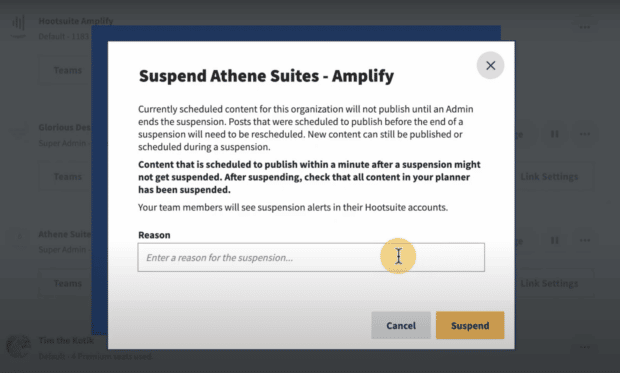
With Hootsuite, pausing your scheduled social media content is as simple as clicking the pause symbol on your organization’s profile and then entering a reason for the suspension.
This will keep all prescheduled posts from being published until you decide it is safe to resume. You can still publish and schedule new content during a publishing suspension with an extra layer of confirmation that you really want to do so.
Learn more about suspending posts with Hootsuite.
Content creation hacks
You don’t need a separate design tool or a blank-page staring contest to get a post out the door. Perch handles creation end to end, with AI assistance for copy and hashtags plus built-in design and asset management.
6. Use AI to generate post ideas, captions, and hashtags
Hootsuite’s AI writing tools live right inside Perch, so you can go from a rough topic to a scheduled post without opening another tab.
Here’s what you can use them for:
- Write a new social media caption in a specific tone, based on a prompt
- Write a post based on a link (e.g. a blog post or a product page)
- Generate post ideas based on a keyword or topic (and then write posts expanding on the idea you like best)
- Identify and repurpose your top-performing posts
- Create relevant captions for upcoming holidays
- Get hashtag recommendations based on your caption and uploaded images
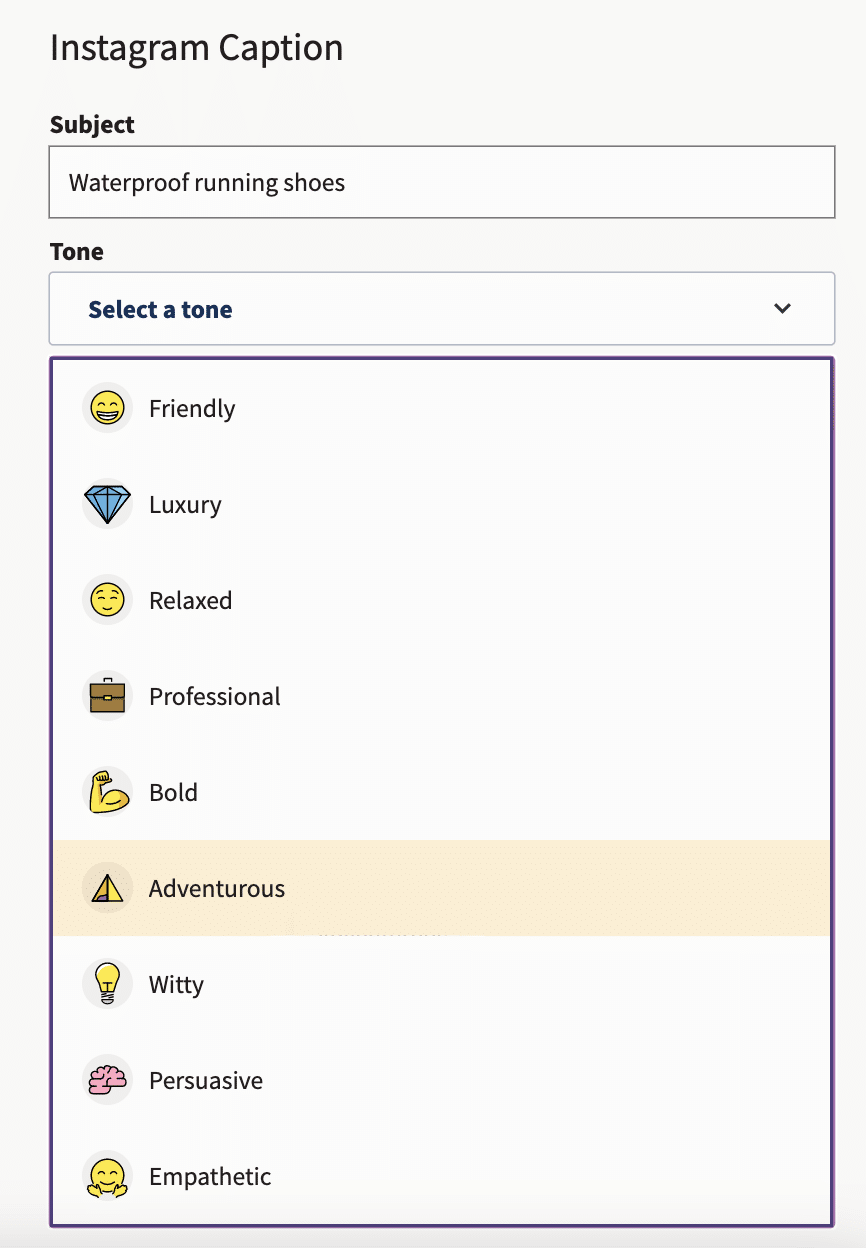
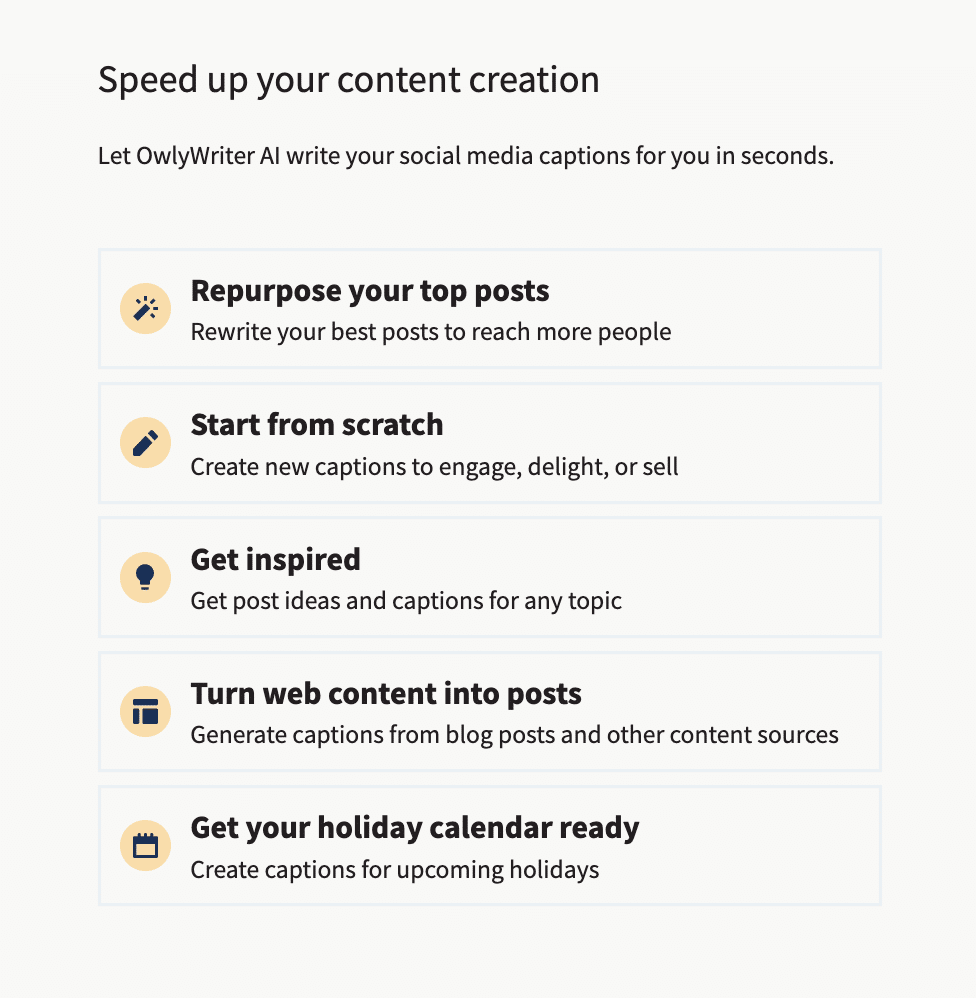
To get started, sign in to your Hootsuite account and head to the Inspiration section. Then, pick the type of help you need.
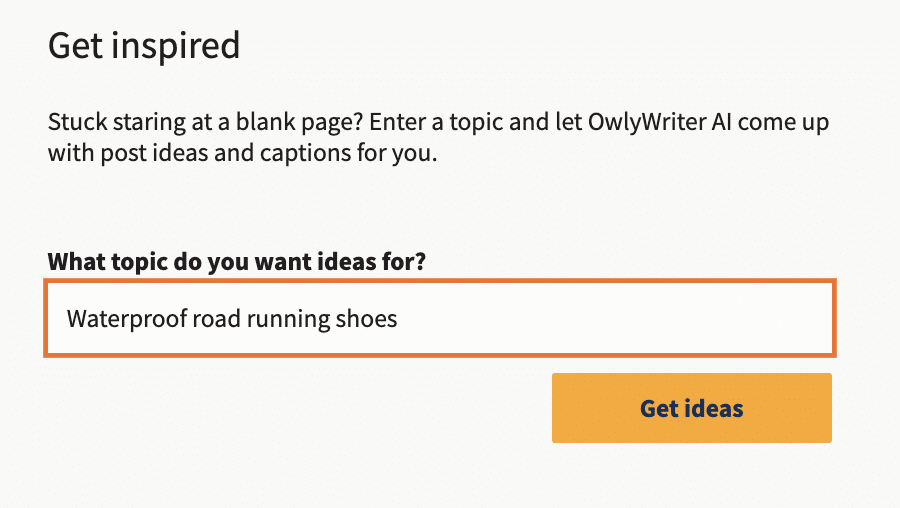
For example, if you’re not sure what to post, click on Get inspired. Then, type in the general, high-level topic you want to address and click Get ideas.
You’ll get a list of post ideas related to the topic:

Click on the one you like best to move to the next step, captions and hashtags.
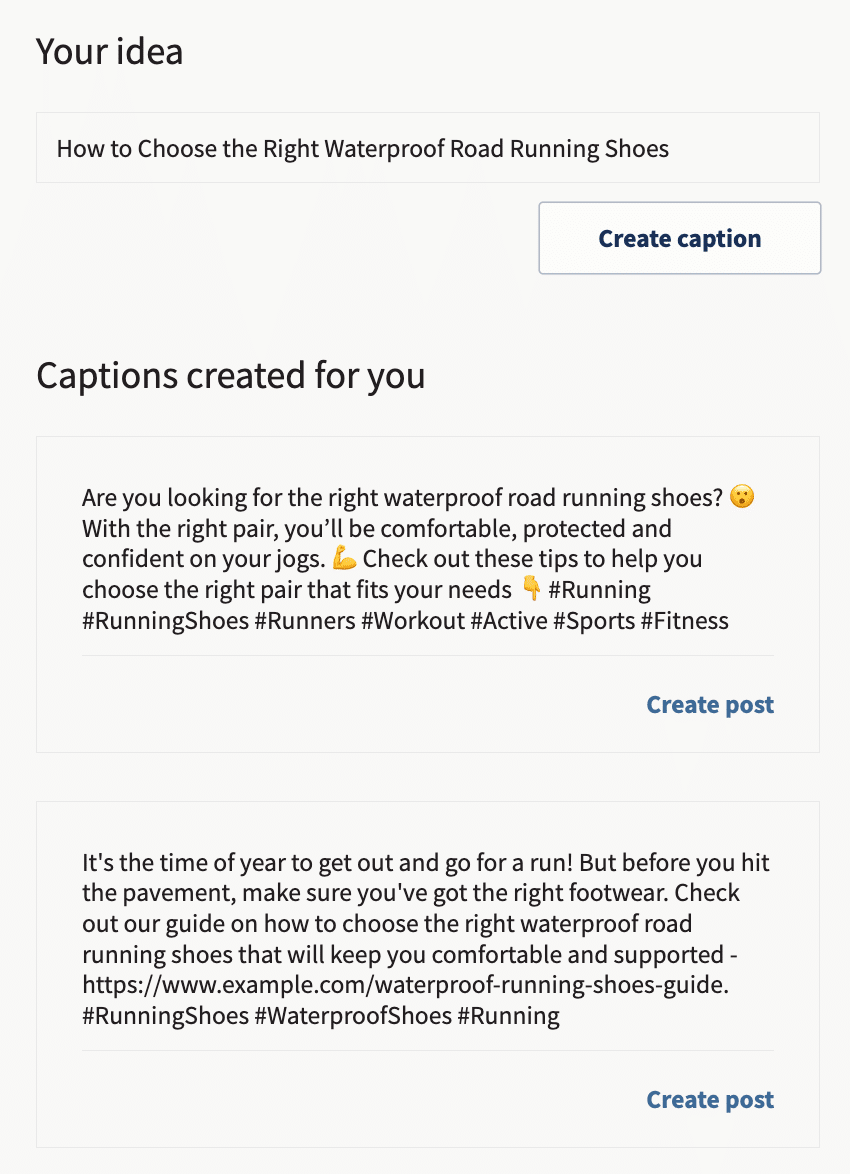
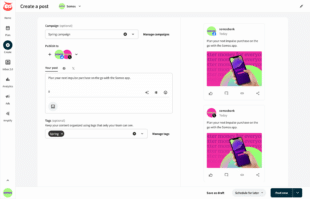
Pick the caption you like and click Create post. The caption opens in the content editor, where you can make edits, add media files and links, check the copy against your compliance guidelines, and schedule your post to go live later.
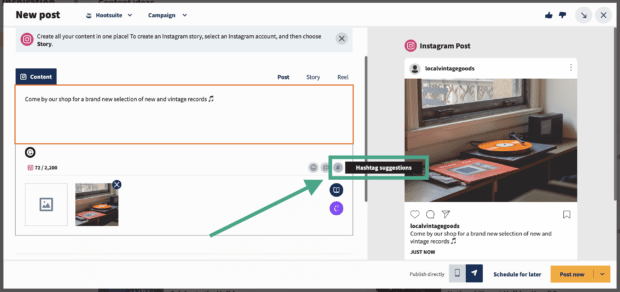
Hashtags work the same way. While you’re drafting, click the hashtag symbol below the text editor and Hootsuite will analyze both your caption and any uploaded images to suggest relevant tags.
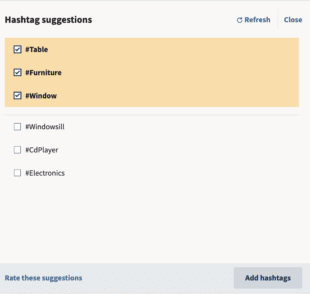
Check the boxes next to the hashtags you want and click Add hashtags. They’ll be appended to your post, ready to publish or schedule.
For anything more strategic than a single caption, Wisdom can ground its suggestions in your own live social data. More on that in the next section.
7. Design visuals with Canva directly inside Hootsuite
If you’ve got a professional designer (or two) on staff, great, their skills will make your content shine.
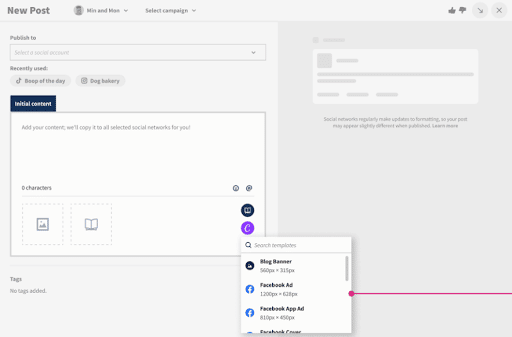
If you haven’t yet built up your team or you don’t have the budget to use professional designers for every post, we recommend a DIY design approach using Canva right inside Perch. No more switching tabs, digging through your “Downloads” folder, and reuploading files. You can access Canva’s library of templates and create visuals from start to finish without leaving the content editor.
To use Canva in Hootsuite:
- Log in to your Hootsuite account and open the content editor in Perch.
- Click on the purple Canva icon in the bottom right corner of the content editor.
- Select the type of visual you want to create. You can pick a network-optimized size from the drop-down list or start a new custom design.
- When you make your selection, a login pop-up window will open. Sign in using your Canva credentials or follow the prompts to start a new Canva account. (In case you were wondering, yes, this feature does work with free Canva accounts.)
- Design your image in the Canva editor.
- When you’re done editing, click Add to post in the top right corner. The image will automatically be uploaded to the social post you’re building.
8. Connect your content libraries from Google Drive, Dropbox, or Adobe Creative Cloud
Hootsuite’s native content library is a great tool for organizing all of your digital assets for social, and we highly recommend it.
However, if your organization is already devoted to a specific cloud storage platform, then using Hootsuite’s integrated Cloudview, Dropbox, and Adobe Creative Cloud apps may well be a shortcut that you can benefit from.
If your assets live somewhere else entirely, MCP connectors can bring additional sources into your workflow. See hack 28 for how that works.

AI and Wisdom hacks
Wisdom is the AI layer inside Hootsuite Social OS. Instead of clicking through menus to find an answer or build a report, you ask a question in plain language and Wisdom pulls from your connected social data to answer it, with sources you can check.
Three hacks worth knowing:
- Ask Wisdom a question instead of building a report from scratch.
- Build a custom agent for the tasks your team repeats every week.
- Use MCP connectors to reach Hootsuite from the AI tools you already use.
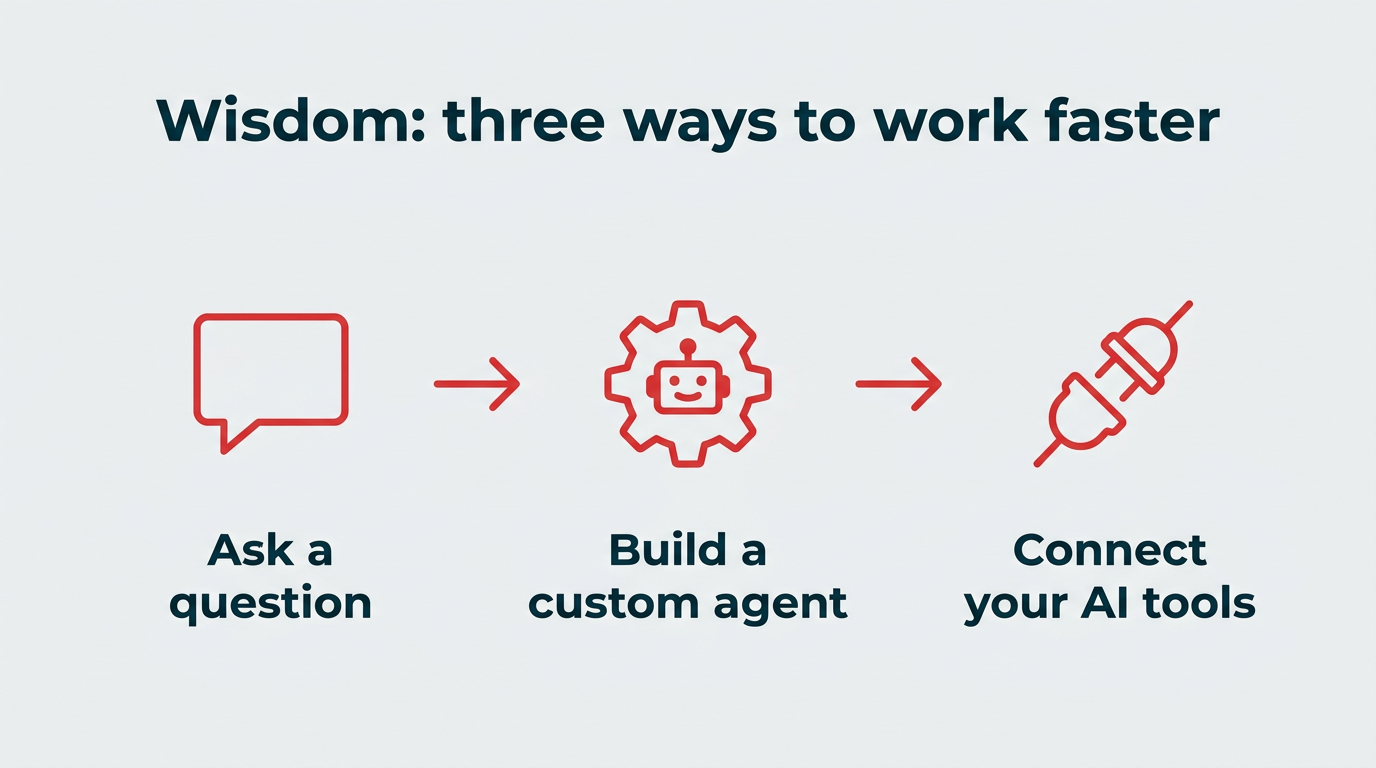
Wisdom: three ways to work faster
9. Ask Wisdom a question instead of building a report
The old way to answer a question about performance was to pick a date range, choose metrics, add accounts, export, and then interpret. Wisdom shortens that to a sentence.
Try asking things like:
- “How did our Instagram Reels perform last month compared to Stories?”
- “Which posts drove the most engagement in EMEA this quarter?”
- “What topics are our followers responding to that we aren’t posting about?”
Wisdom returns an answer with the underlying data cited, so you can verify the numbers before you put them in a deck. Because it draws on your connected accounts rather than a generic model, the answers reflect your actual performance rather than industry averages.
10. Build a custom Wisdom agent for your team’s recurring tasks
If you find yourself asking the same question every Monday, turn it into an agent. Wisdom Studio lets you create specialized agents with your own instructions, so the work happens without you prompting it each time.
A few practical examples:
- Weekly performance summary: Pulls top and bottom posts by channel and flags what changed week over week.
- Competitor mention alert: Surfaces spikes in competitor conversation so you hear about a launch before your CMO does.
- Content gap finder: Compares your posting themes against what your audience is actually discussing.
Give the agent clear instructions about tone, audience, and what to exclude, and the output gets sharper each time you refine it.
11. Use MCP connectors to bring Hootsuite into Claude, ChatGPT, or Copilot
Not everyone on your team logs into a social tool every day. MCP connectors let you reach Hootsuite capabilities from the AI assistants your organization already uses, including Claude, ChatGPT, Gemini, and Microsoft Copilot.
In practice, that means a product marketer can ask their AI assistant to pull the top-performing posts from last month’s launch campaign without ever opening Hootsuite. It’s a useful way to get social data in front of stakeholders who need the insight but won’t learn a new interface to get it.
Engagement and customer care hacks
Conversations happen in Nest, which pulls every message, comment, and review into one queue. These hacks are about answering faster without adding headcount.
12. Respond to all your DMs and comments in one place with Nest
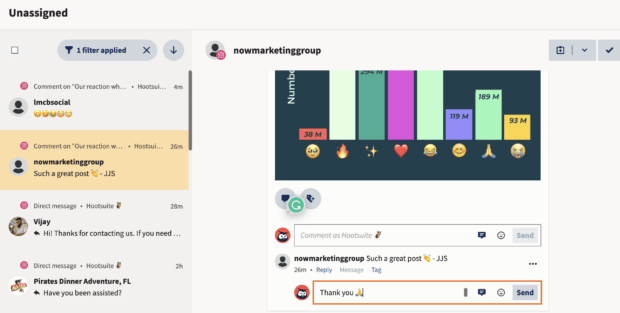
Keeping track of all your private and public conversations from multiple platforms is infinitely simpler if you can access them all in one place.
Nest is one of the easiest wins on this list: it aggregates all your DMs, comments and threads in one queue so that you don’t drop conversations, neglect customers, or miss sales opportunities.
13. Automatically assign messages using AI-powered routing
For larger teams and brands with a high volume of social queries, different messages often need attention from specific team members.
Automating assignments improves response rates and makes it more likely that queries will be resolved on the first try, resulting in happier customers.
With the right keywords in place, you can set up assignments that route sales inquiries to your business development team, billing questions to customer service, and troubleshooting queries to tech support. Nest can also factor in sentiment, so angry or urgent messages move to the top of the queue instead of sitting behind routine ones.

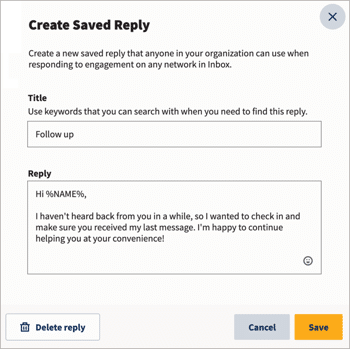
14. Speed up response times with saved replies and AI-assisted responses
Slow replies quietly erode trust. 76% of customers expect a response within one hour, and every minute past that is a minute a customer spends waiting. Our guide to social media customer service covers how to set expectations and meet them.
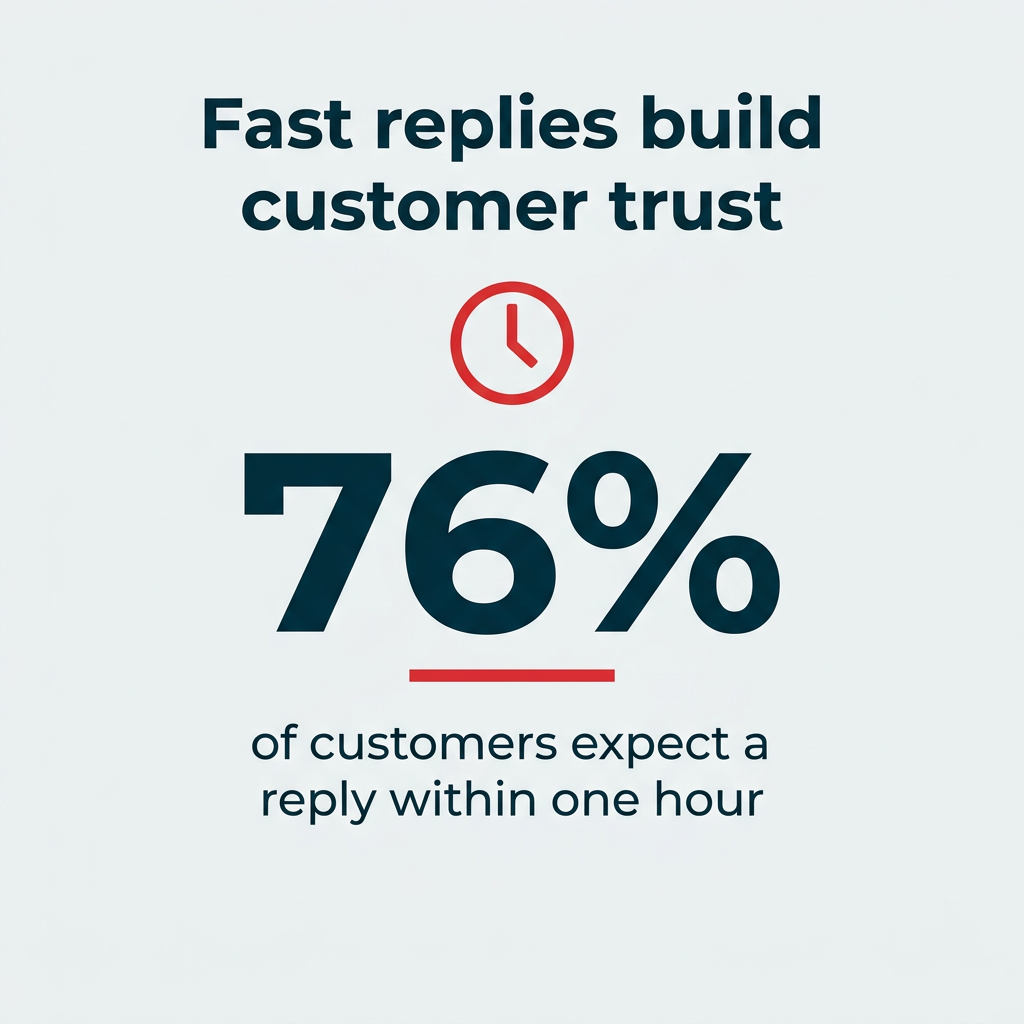
Fast replies build customer trust
Here are three of our favorite Hootsuite hacks to speed up response time:
- Saved FAQ assets: Store your standard answers in the content library, then drop them into chats with customers.
- Automated front-line replies: Use a chatbot or Facebook messenger bot with the handover protocol so customers get an instant response, with a human stepping in when the question gets complex.
- Reply templates: Build reusable replies in Nest so your team isn’t retyping the same sentence 40 times a day.
15. Automatically tag inbound messages for better customer service analytics
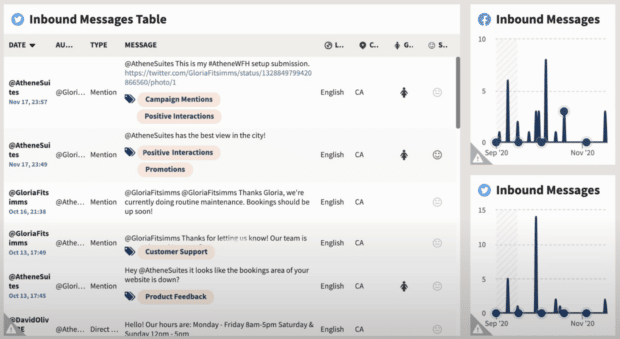
Tagging private DMs, public conversations and replies by type or content allows your analytics reports to provide a clearer picture of conversation volume and where your efforts might be best directed in the future.
When you know what types of messages take up the bulk of your team’s energy, you can adjust resources appropriately.
You can also use this information to guide your creation of FAQ documents in the content library, reply templates, or bots to help out.
16. Post at the perfect time for engagement, traffic, or awareness
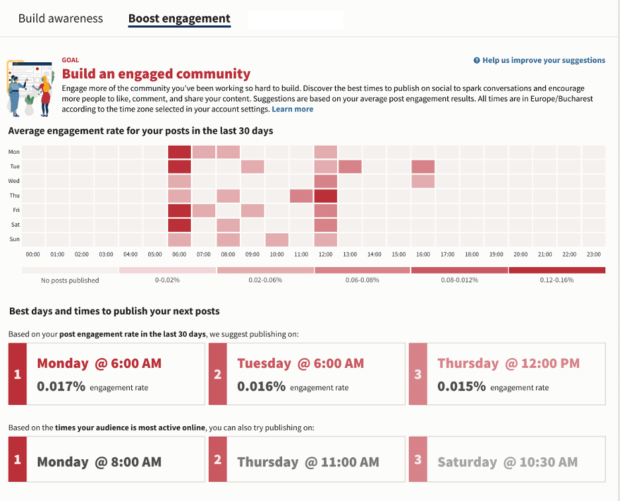
When’s the best time to post on social media? We get this question a lot. And the answer is, it depends on a lot of factors.
Our best time to post might not be yours. And your own best time to post might change, depending on how often you’re posting and how your audience changes over time.
Enter Hootsuite’s Best time to publish feature. It calculates your personalized best time to post on Facebook, X, LinkedIn, and Instagram accounts based on your content goals.
You can view the best time to publish in your analytics, or directly in Perch as you schedule.
Employee advocacy hacks
Your employees have larger combined networks than your brand account does. Employee-shared content earns roughly 8x the engagement of brand-page posts. The trick is making sharing so easy that they actually do it.
17. Turn your team into a growth channel with Parliament
Employee advocacy is a powerful way to expand your brand message on social. And the easier you make it for your team to share social content, the more likely they are to do so.
Parliament handles the whole workflow:
- Curate: Collect pre-approved posts, links, and suggested copy so nobody has to write from scratch.
- Distribute: Push content to employees where they already work. Parliament integrates with Slack so employees can view, filter, and share approved content without leaving the platform where they spend most of their day.
- Measure: Track shares, reach, and clicks by content type so you know what your team is comfortable posting and what falls flat.
Start with a small pilot group, learn which content they actually share, then expand. Advocacy programs stall when the content library feels like homework.
Social listening and intelligence hacks
Lumen is the listening and intelligence app inside Hootsuite Social OS. It’s where you find out what people say about your brand when they aren’t tagging you, and where you catch a competitor’s move or an emerging trend early enough to act on it.
18. Set up real-time brand monitoring across millions of sources
Most brand conversation happens without a tag or a mention. Lumen monitors social platforms, news sites, blogs, forums, and review sites in dozens of languages, so you see the full picture rather than just your notifications.
The setup hack is to start narrow. Build one query for your brand name and its common misspellings, one for your flagship product, and one for your category. Add sentiment tracking to each, then let them run for two weeks before you tune anything. You’ll learn more from a clean baseline than from a query with 30 keywords in it.
For a step-by-step walkthrough of the fundamentals, see our guide to social media listening.
19. Track competitor moves and industry trends automatically
Competitive intelligence is one of the most underused things you can do with a listening tool. Instead of manually checking competitor feeds, set up a dashboard that tracks their mentions, sentiment, and share of voice against yours, updating in real time.
Two things make this more useful than a quarterly manual audit. First, you see spikes as they happen, which tells you when a competitor has launched something or made a misstep. Second, share of voice trends over time give you a defensible number to put in a board deck when someone asks how you’re doing against the market.
20. Use an X Advanced Search stream for quick, targeted monitoring
Search streams are a lightweight complement to full Lumen listening, and they’re handy when you just want to keep an eye on a specific conversation.
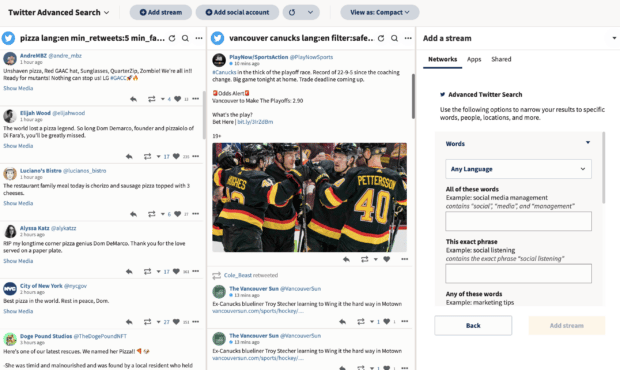
Set up an X search stream so that you’re always informed on keywords and hashtags relevant to your brand.
Better yet, set up an Advanced Search stream that allows you to use all the variables of X Advanced Search (which requires multiple steps to access on X itself).
You can also set up a geo-search stream to confine your searches to your local area, which is useful for retail locations and regional campaigns.
Paid social hacks
Organic reach only goes so far. These two hacks help you put budget behind the content that has already proven it works.
21. Automatically boost your best-performing posts
If you want more than a small slice of your followers to see your posts, ads are inevitably going to be part of the answer.
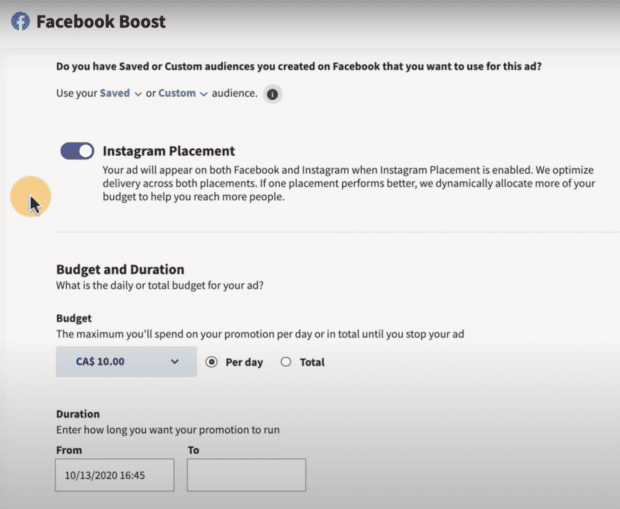
Hootsuite gives you a fast, simple way to access new audiences on Facebook, Instagram and LinkedIn. Review your engagement stats to find your top-performing posts, and allocate a budget to show them to a lookalike audience of platform users.
You can also automate this process, so that all of your most popular posts get shown to fresh eyes. For instance, you could create an auto-boost trigger that gives any video post with, say, 100 likes an ad budget of $10/day.
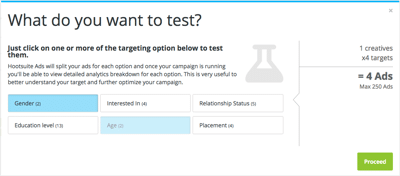
From there, you can create variations of a boosted ad in a click and let the platform optimize toward the winner. If you want to be more deliberate about what you’re testing, our guide to social media A/B testing covers which elements are worth isolating.
22. Plan, manage, and report on paid and organic posts together
Paid and organic social work best when they work together. So it only makes sense you’d want to manage your organic content and social ads in one place.
With Hootsuite Social Advertising, your paid and organic campaigns are fully integrated. You can plan and manage everything in one place, and compare paid and organic performance in unified analytics reports.

Reporting and analytics hacks
Hootsuite analytics pull from publishing, care, and listening, which means you can tell one story to leadership instead of stitching three exports together.
23. Check your social performance at a glance with Social Score
Think of it as the credit score for your social performance: Your daily updated Social Score is a social performance score that shows how you compare to top performers, based on factors like post consistency and engagement.

While detailed analytics are a necessary part of improving social performance, sometimes a quick snapshot is all you need. And it provides an early-warning system if things are starting to go sideways.
Along with your score, you’ll also see personalized recommendations to improve performance. If you want the narrative version, ask Wisdom for a performance summary and it will explain what moved and why.
24. Track response times and team performance
Team metrics can help you pinpoint where and how your customer service team is succeeding. These reports will measure metrics like volume, resolution speed, and first response time.
You can report by team (e.g., Customer Service, Editorial, Sales) or individual, so you know who’s the real Employee of the Month.
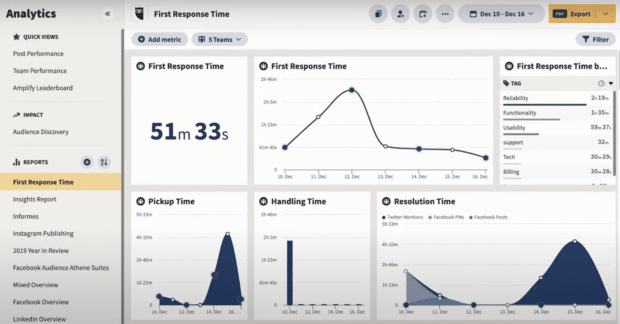
Here’s how to take a closer look at your social team’s performance.
25. Build custom reports that combine paid, organic, and listening data
Leadership rarely wants three separate reports. Custom reports let you pull publishing data from Perch, conversation data from Nest, and brand health data from Lumen into a single view.
The practical version of this hack: build one recurring report with three sections. Section one covers what you published and how it performed. Section two covers what customers asked and how fast you answered. Section three covers what the market said about you. Schedule it to export on the same day each month so the comparison is always apples to apples.
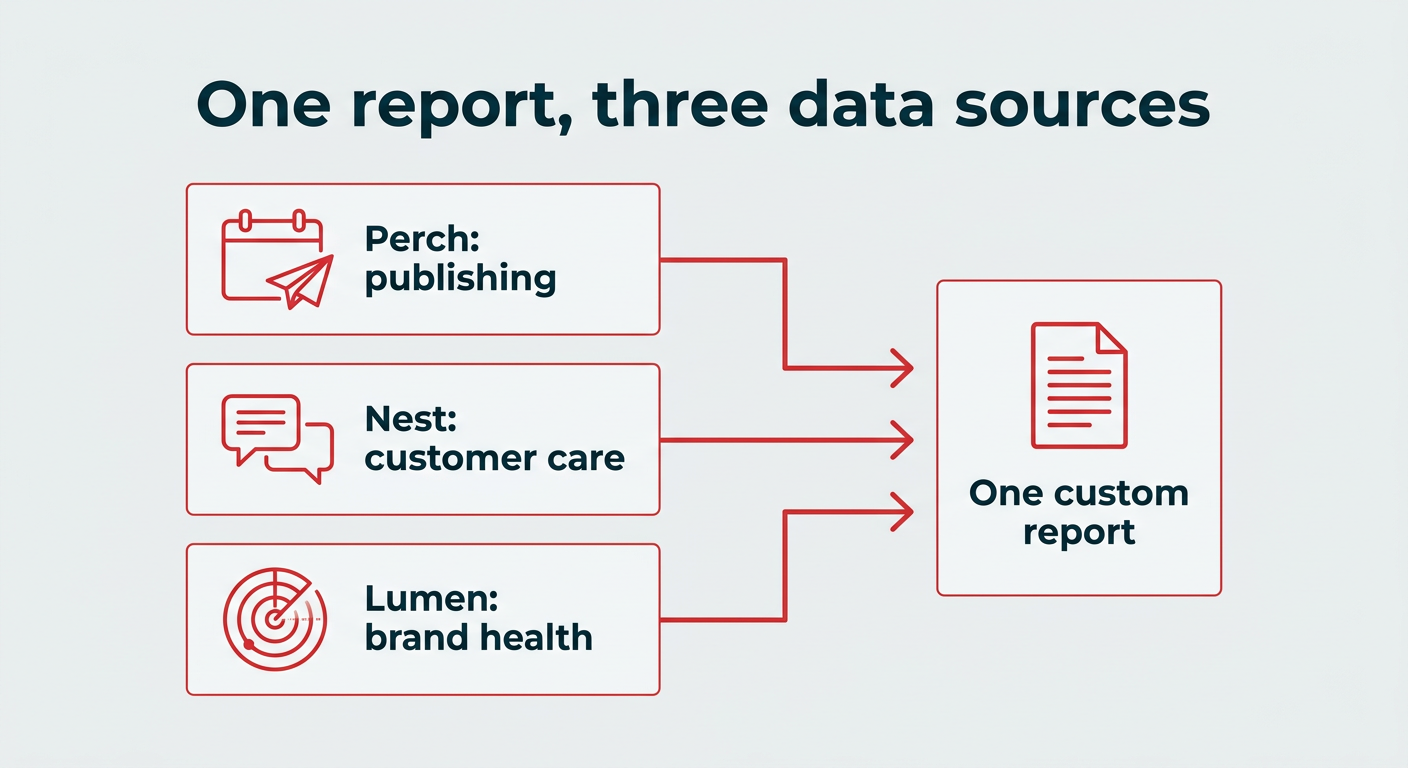
One report, three data sources
Governance and compliance hacks
As soon as more than a handful of people can post on behalf of your brand, governance stops being paperwork and starts being risk management. Vigil is the layer that handles it.
At a high level, it covers:
- Approval workflows: Control who can publish what, and when a second pair of eyes is required.
- Content traceability: Keep a record of who created, edited, and approved each post.
- Compliance controls: Apply your brand and regulatory guidelines before content goes live rather than after.
26. Set up approval workflows that move fast without breaking compliance
The mistake most teams make is applying the same approval process to everything, which means a routine reply waits as long as a product announcement. Vigil and Perch let you tier your workflows instead.
Try mapping content into three lanes. Low-risk content, like evergreen reposts, publishes with no approval. Standard campaign content gets one reviewer. Anything touching pricing, legal claims, or a live crisis requires a named approver from the relevant team. Set it up once and your team stops waiting on approvals that were never necessary.
27. Use Vigil to keep AI-generated content governed and traceable
AI speeds up content production, and with only 30% of CMOs reporting mature AI readiness, it can also speed up mistakes. Vigil applies the same governance to AI-generated content as it does to anything a human wrote, so every AI-assisted action is logged, reviewable, and attributable.
For regulated industries, this is the difference between AI being usable and being off limits. If your compliance team can see exactly what was generated, who reviewed it, and what was changed before publishing, AI becomes a tool they can sign off on rather than a liability they have to block.
Integration hacks
Social data is most useful when it reaches the systems your wider business already runs on.
28. Connect Hootsuite to your existing stack with integrations and MCP connectors
Hootsuite integrates across most of the categories a marketing team already uses:
- CRM and customer data: Connect social conversations to the customer records your sales and support teams work from.
- Content libraries: Pull assets from Google Drive, Dropbox, or Adobe Creative Cloud without downloading and reuploading.
- Collaboration tools: Share and approve content from Slack or Microsoft Teams.
- Ecommerce: Keep a stream of your Shopify products on hand so you always have current product shots, pricing, and approved copy when a customer asks.
- AI assistants: Use MCP connectors to reach Hootsuite from Claude, ChatGPT, Gemini, or Microsoft Copilot.
The hack here is to stop thinking of Hootsuite as a destination you visit. Wire it into the tools your team is already in, and the social work happens where the work happens.
Frequently asked questions
What are the most useful Hootsuite hacks for beginners?
Is Hootsuite still relevant in 2026?
What is Hootsuite Social OS?
How much does Hootsuite cost per month?
Which is better, Hootsuite or Buffer?
What are the downsides of using Hootsuite?
What is Wisdom in Hootsuite?
Can Hootsuite help with social listening?
Does Hootsuite work with other AI tools like ChatGPT or Claude?
How do I get started with Hootsuite hacks?
Save time managing your social media marketing strategy with Hootsuite. Publish and schedule posts, find relevant conversions, measure results, and more â all from one dashboard. Try it free today.
The post Hootsuite hacks: 28 tricks and features for 2026 appeared first on Social Media Marketing & Management Dashboard.