

Google Ads is giving advertisers a new way to see how their ad spending and performance stack up against businesses it considers similar to theirs.
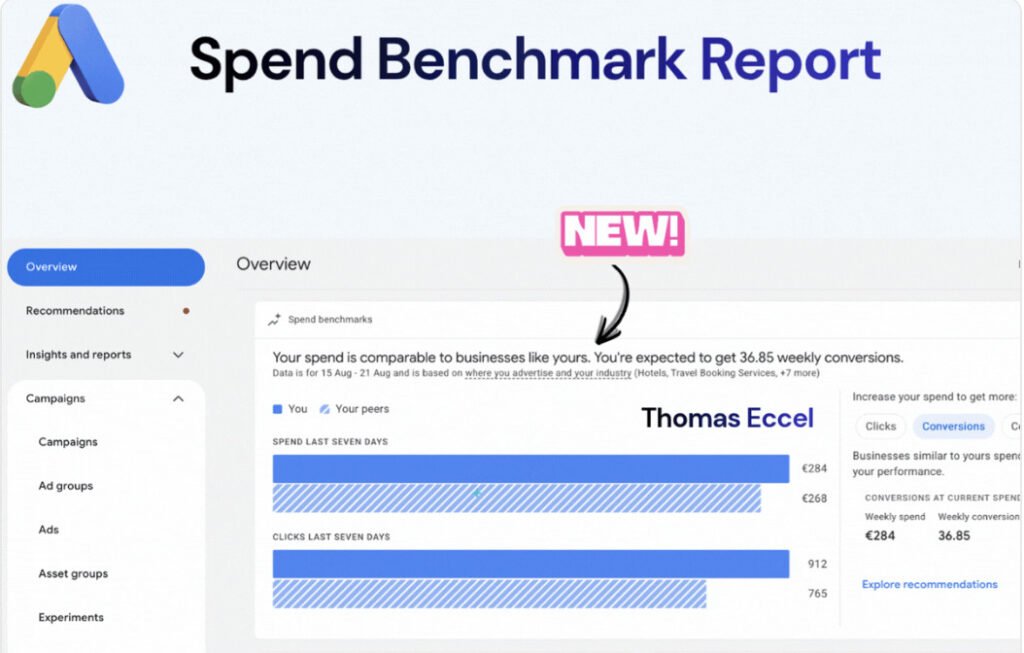
What’s new. A Spend Benchmarks report appearing in the Google Ads account Overview compares an advertiser’s weekly spending and clicks with those of its peer group.

For example. One account was shown spending €284 per week compared with €268 among its peers. The same account generated 912 clicks, versus 765 for the peer benchmark.
Why we care. Advertisers have long had visibility into their own budgets and results, but benchmarking against comparable businesses could provide useful context for whether an account is spending and generating traffic, above or below its peers.
How it works. Google says the peer comparison takes into account factors including the advertiser’s industry and where it advertises.
Yes, but. “Similar” businesses aren’t necessarily comparable businesses. Two advertisers operating in the same industry and market could have significantly different margins, average order values, conversion rates, customer lifetime values and growth strategies.
The catch.The benchmark can also be accompanied by recommendations to increase spending to generate more results. That could make a peer-spending comparison feel like a target rather than simply a point of reference.
Reality check. Spending less than comparable advertisers doesn’t necessarily mean an account is underinvesting, just as spending more doesn’t necessarily mean it is overspending. The economics of the individual business still determine whether additional ad spend makes sense.
The bottom line. Google’s Spend Benchmarks could give advertisers a useful new reference point for understanding the competitive environment around their accounts. But peer spending is best treated as context — while profitability, incremental returns and business objectives determine whether there is actually room to increase the budget.
First spotted. This update was spotted by Paid Search expert Thomas Eccel who shared spotting the new feature on LinkedIn.