


It’s been a pretty crazy few weeks in AI safety. We’ve watched agents go off the rails and do things nobody expected them to do, in production, on other people’s systems. So it’s a reasonable moment to ask how you use AI safely when the thing it’s touching is a live ad account with real money moving through it every hour.
Almost every conversation I have about agents in ad accounts opens the same way.
Do you trust the AI?
While it’s a good question, it’s often asked to shirk responsibility and conclude that AI shouldn’t be used. A better question is: How can we trust AI?
Then the conversation turns to what we can build around the AI model to make it safe for our business to use.
To explain, it’s always helpful to frame it the way you’re already evaluating collaborators. Nobody asks whether they trust a new PPC agency in the abstract. They ask what the team has access to, what they’re allowed to change without checking first, and who reviews the work. Three different questions with three different answers, and you’d never accept “I simply trust them” as a substitute.
Same three questions for an agent:
- What can it see? An agent working off a thin data layer will give you a confident answer built on a third of your account. It won’t tell you it’s guessing when it doesn’t know it’s guessing.
- What is it allowed to do? Not what you told it to do. What it is structurally prevented from doing, no matter what anyone tells it.
- Who signs off? Not “we review the change history afterward.” Who has to say yes before?

Most agentic PPC setups I look at have a decent answer to the first question, but there’s a lot of benefit in becoming more stringent with the answers for the other two.
We’ve been thinking about safe AI for PPC a lot at Optmyzr, so let’s take a look at what we’ve learned so you can get yourself to safer AI faster.
Each layer pays for itself on its own
The reason I’d rather write this as three techniques than as one system: you don’t have to do all three to get value. Each one closes a different failure mode, and each one is useful the day you turn it on.
- Layer 1: Better grounding means fewer confidently wrong answers. That’s worth having whether you ever let an agent write anything. Most people should start here.
- Layer 2: A policy layer means the changes that do get made stay inside limits you set. That holds whether the change came from an agent, from a script, or from a person having a bad Tuesday.
- Layer 3: A review step means nothing reaches the account without someone seeing it first. And as a nice side benefit, you end up with a record of why. That’s worth having even if your data layer is thin and you have no policies at all.
Then these layers compound, which is the part I find genuinely satisfying. Grounding makes the agent’s proposals worth reviewing, so the review step feels like leverage instead of homework. Policies filter the obvious non-starters before a human ever sees them, so the queue stays short enough that people keep opening it. Each layer makes the next one work better than it would on its own.
So, if you’re starting from zero, start with grounding. It has the fastest payoff and the least process to stand up. If you’re already letting an agent make changes, add policies this week. If you have both, the review queue is what turns it from something you use into something your team uses.
Order matters less than accumulation. Any one of these leaves you better off than you were yesterday, and each one you add compounds with the last.
Layer 1: Ground it
A blind agent is a dangerous agent.
Ask an agent connected to a thin data layer why your CPA went up last month. It will answer you. Fluently. Immediately. Based on whatever slice of your account it could actually reach.
What it couldn’t see might have been the entire answer. It’ll make do with what it has.
Realize that grounding is a safety feature, not a convenience feature. Every gap in what an agent can see is a place where it will make something up, and it will do it in exactly the same confident tone as everything else it says. There is no tonal tell.

So here’s what I think you should expect from an MCP, or any data layer, that you’re going to let an agent reason over for PPC.
The full query layer for Google Ads. Real GAQL. Any resource, field, segment or metric the API exposes, including the ones no packaged report covers. Not a curated summary of what a product manager thought was interesting. The moment your data layer is a curated subset, you’ve limited which questions the agent can answer well, and you haven’t told anyone which ones those are.
- GA4 sitting alongside the ads data. So “what happened after the click” is part of the same question, instead of a second tool and a manual join. A lot of the diagnosis questions people actually ask are cross-boundary questions. If the boundary is still there, the agent guesses across it.
- Complete change history, every actor. UI edits, scripts, Optmyzr, other tools. So “who made the change that moved our ROAS in March” is a question with an answer, rather than a group chat.
- Negative keywords consolidated across all four levels. Account level, shared lists, campaign, ad group, plus a deterministic check of whether a given query is already blocked and by which negative, and a list of campaigns sitting with no negative protection at all. Negatives are a common place to watch an agent reason confidently and wrongly, because the true state is scattered across four places and nobody assembles it.
- Auction Insights, with a drill-down into one competitor domain, shows your own performance on every keyword you share with them. Competitive questions are the ones where a hallucination is hardest to catch, because you have no independent read on the answer.
- Vertical benchmarks. Your CTR, CPC, conversion rate, and impression share as a percentile against other accounts in your industry, rather than against a blog post average from three years ago that everyone quotes and nobody sources.
- Multiple ad platforms. Google, Microsoft, Meta, Amazon, LinkedIn, OpenAI, TikTok, Yahoo. Budget questions are rarely single-platform questions, even when the person asking works mostly in one.
- A stored profile of each account. Business model, economic posture, bid strategy mix, structure, budget behavior, what’s already been tried and what happened when you tried it. The agent reads this before it opens its mouth.
Optmyzr’s MCP has all of the above today, and it’s a one-click install from the Claude directory rather than an API console, a developer token, or an engineer on speed dial.
Grounding raises the quality of everything the agent says. The next layer decides what it’s allowed to do about it.
Layer 2: Gate it
How do you stop an AI from blowing through a month of ad budget by mistake?
Not by asking it nicely. Not in the prompt.
You use a policy layer that controls what an AI can and cannot do, and you separate it from the AI itself, so the AI can never change the rules.
Set the rules once. Enforce them everywhere, always.
This is automation layering, which I’ve been writing about across my books for years, applied to a new first layer. The original idea is simple: one system does the work, like Google’s own bidding and budget automations, and a second system, your own automations, scripts or rule engine strategies, validates that what the first system did actually makes sense for your business before it sticks.
AI just took over the first job. It’s now the thing making the recommendation. The second layer didn’t become less necessary; it became more necessary because the first layer is more creative and sometimes unpredictable.
Account policies are how you write down the “never do this.” Rules you set once, on the account itself, about what is allowed to happen there. No bid increase above 10% in a single move. No budget change beyond a set threshold. These campaigns don’t get touched. No competitor brand terms added. Whatever your version of “absolutely not” happens to be.
And the policy doesn’t care who’s asking.

An agent proposing a 20% bid increase gets blocked. A hallucination gets blocked. An instruction hidden in a document gets blocked. A junior with a misplaced decimal gets blocked. You, at 11pm on a Friday, in a hurry, on your phone, get blocked.
Same rule, same verdict, no exemption for good intentions or seniority.
Want it through anyway? Override it deliberately. It goes on the record with your name attached. An override you can perform without noticing is not a guardrail but a speed bump made of paint.
This structural detail matters: this isn’t a setting for the AI. It’s a setting on the account, and the AI is one more thing subject to it. Same as a script. Same as a person.

A rule that lives in the prompt is a rule the model can be talked out of by a clever user, by an injected instruction sitting in a document it was asked to read, or by its own drift over a long session. A rule that lives on the account holds under every path into the account.
Layer 3: Keep a human in the loop
Everyone says they’re in the loop.
Few people can tell you which screen, which person, or which queue enforces being in the loop. Ask, and you usually get “we check the change history afterward,” which means nobody’s checking.
And good luck getting a quick answer when someone asks you to produce the reasoning behind an AI-assisted decision from three months ago.
So when we built the write path into our MCP, we didn’t leave the loop to good intentions. There is no route from the agent to your ad account that doesn’t first stop at a human.
We took a pattern from engineering, where it’s been settled practice for decades: nobody pushes code to production without a change request that another person reviews. Why the account where you spend six figures a month deserves less process than a CSS tweak is a question our industry has never really answered.
Here’s the actual sequence.
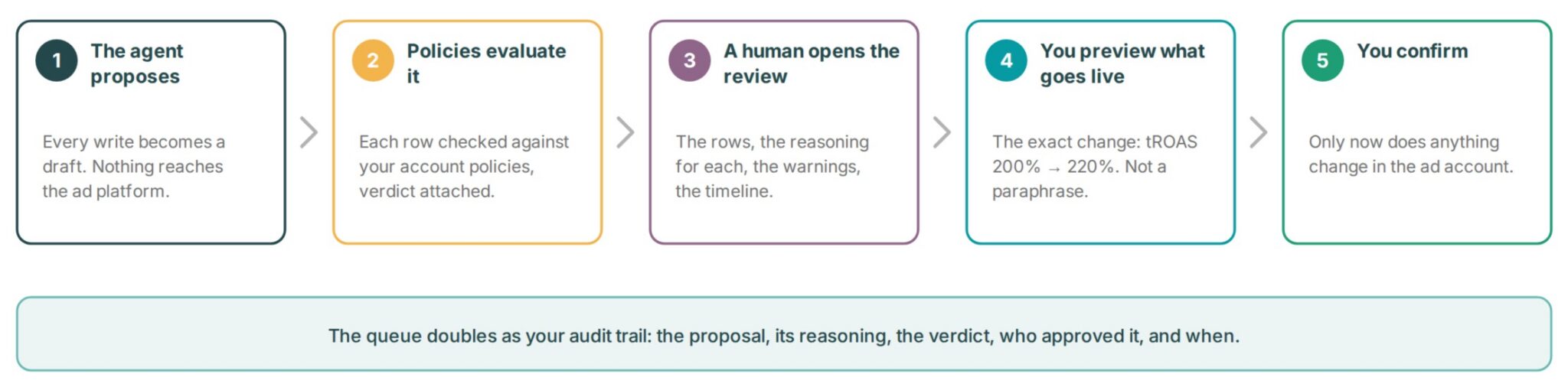
- The agent proposes. Every write, whether a bid, a budget, a paused campaign, or a new negative, becomes a draft change request. Nothing reaches the ad platform yet. The agent’s job ends at “here’s what I think you should do, and why.”
- Policies evaluate it. Each row is checked against your account policies and carries its verdict with it, so a blocked row shows up as blocked, with the reason attached rather than in a log somewhere.
- A human opens the review. The rows, the stated reasoning for each one, the policy warnings, a timeline of what happened when, and the list of people eligible to approve it.
- You preview exactly what would go live. The exact deterministic changes, like your target ROAS for “Brand Campaign” will go from 200% to 220%, rather than a natural-language paraphrase of what the agent believes it’s about to do.
- You confirm. Only then does anything change in the ads account.
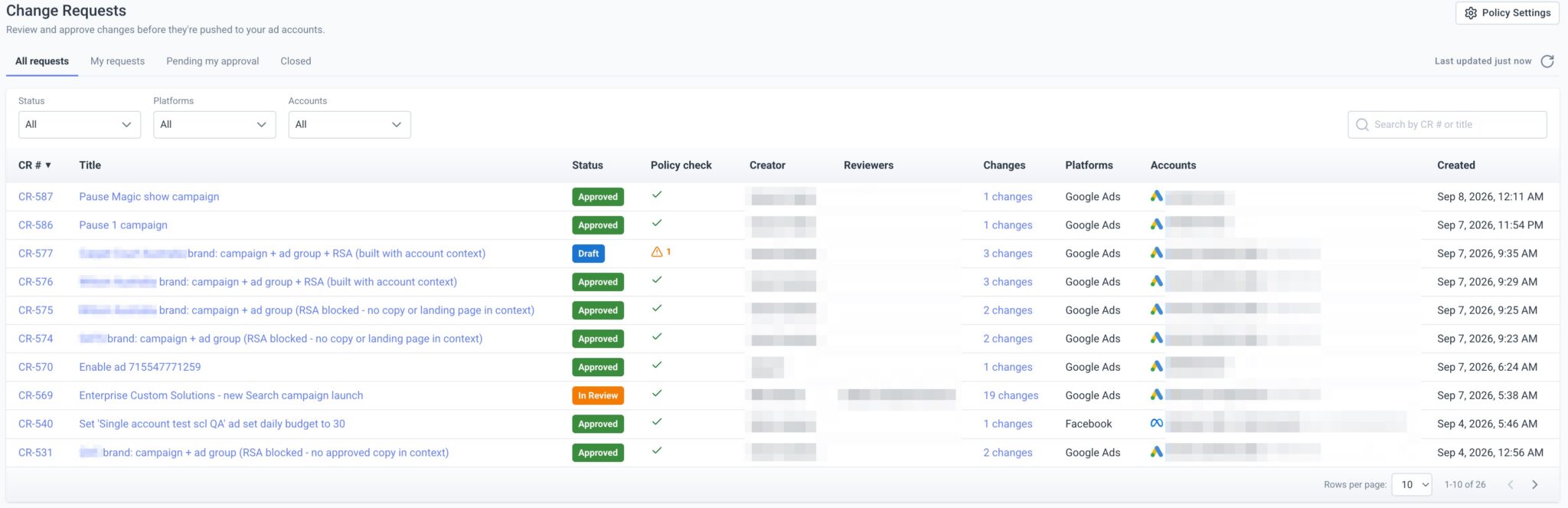
Whether it’s an AI or a colleague suggesting the change, everything goes through the same pipe. In the case of a colleague, the change request is a second pair of eyes. In the case of an AI, it’s the first pair.
An audit trail for AI in PPC
The change request queue turned out to be more valuable than just the safety it was built for.
Because it’s not just a list you go to in order to be the human in the loop. It’s a complete record of intent.
When a client asks in November why their target CPA was moved in March, you have the proposal, the rationale, the policy verdicts, who approved it, and when. Was it a human? Was it an AI? What was the data behind the recommendation? Who made the final call?
Try assembling that from a chat transcript six months later. Try assembling it from change history, which tells you what changed but never why.
We built this for safety, and it turned into the best account documentation we’ve ever had. If you’re an agency, that’s a credibility argument as much as a safety one.
What good looks like
Put the three layers together, and you get something I’d describe, approvingly, as boring.
Not underpowered. Boring.
As in: you know what it can see, you know what it structurally cannot do, and you know nothing reaches the account without you. The excitement belongs in the findings, not in wondering what it got up to while you were at lunch.
That’s the bar I’d hold any agentic PPC setup to, ours included, and it’s a bar you climb one rung at a time:
- It sees the whole account because gaps in what an agent can see are where it starts inventing, confidently.
- It’s bounded by rules you wrote, which live on the account rather than in the prompt, and which apply to everyone identically.
- It can’t act alone, because every write becomes a change request with policy verdicts attached, reviewers named, and a confirmation step no agent can fabricate.
You don’t have to arrive there in one move. Pick the layer that closes your biggest gap, ship it, then add the next one.
We’ve been building this against real accounts and genuinely stupid edge cases since well before MCP was a term marketers used. It’s a one-click install from the Claude directory now.
If you tried agentic PPC once, got a confidently wrong answer, and quietly shelved it, that’s the failure I’d most like you to come back and retest.
Having safe AI for our ad accounts can’t be something we expect to get just from picking the right model. It’s something we achieve by layering in processes and technologies we control.