
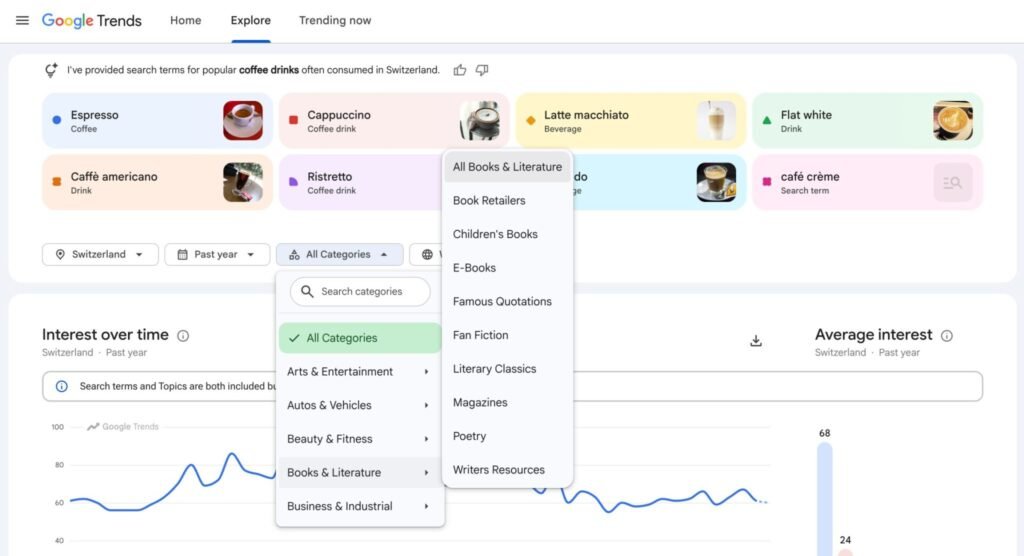
Google Trends now lets you filter the Explore page by pre-defined categories, without having to enter a query to see data for Google Trends. You can also use the categories to make sure your query is filtered by a specific category and does not overlap other categories of searches.
What Google said. Google announced on LinkedIn:
- “We’re excited to introduce Trends category filters on the new Explore page”
- “This update makes it easier to refine trends data more precisely for specific categories such as “All Books & Literature”.”
Google also added a tip, saying:
- “Apply the category filter without entering a query to explore category-specific top-searched terms across specific categories, regions, and timeframes.”
What it looks like. Here is a screenshot of this feature:

Why we care. If you are looking for new topics to write about in a specific category, this can help you with ideas. Although, I am never a fan of writing on a topic that you can’t come up with ideas on yourself but that is for a different blog post.
That being said, the ability to filter query trends by category can also be good in excluding irrelevant categories from your query.
Give it a try over here.
See where your brand appears in AI search, where competitors are winning, and what it takes to become the answer AI recommends.