

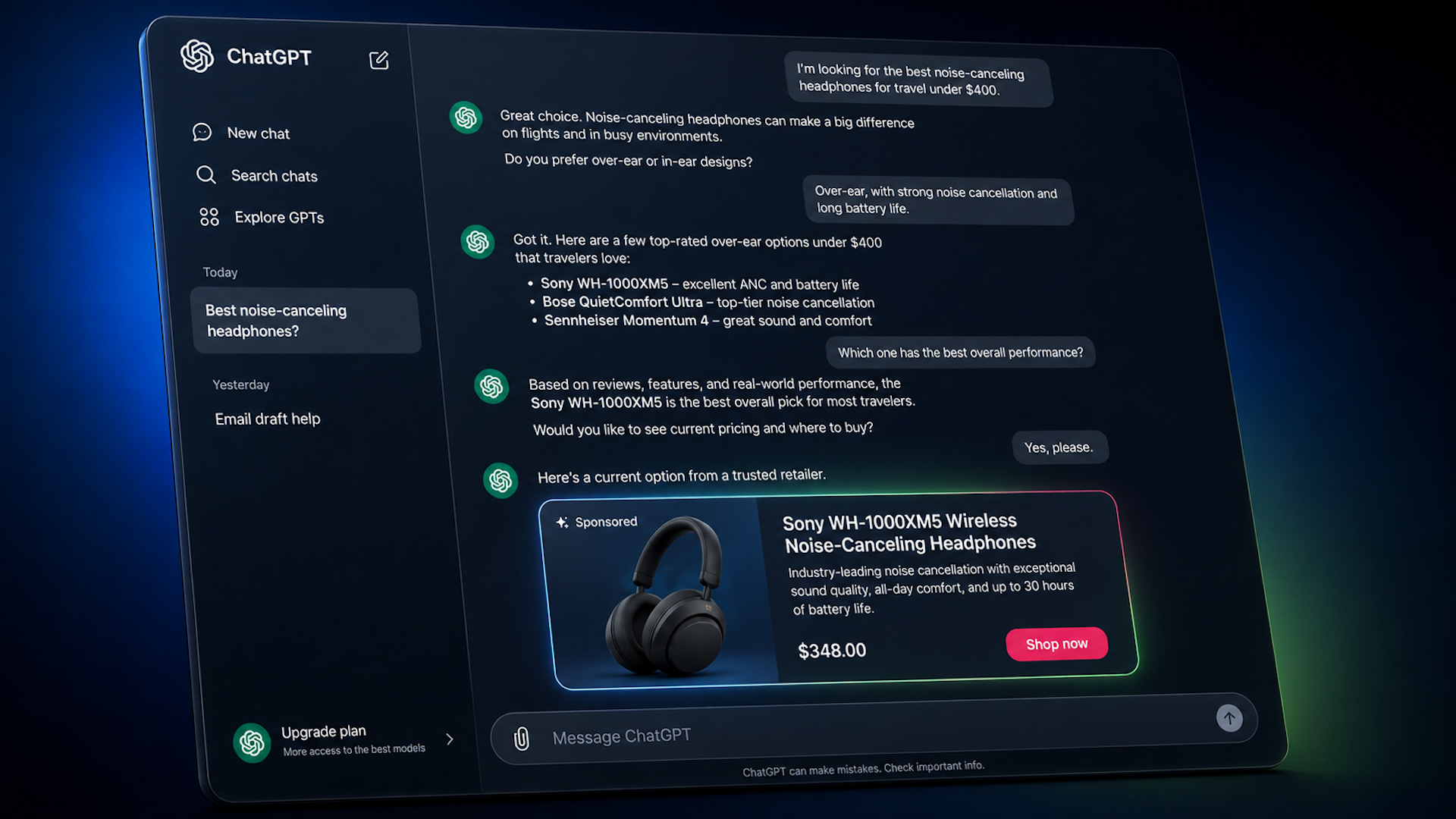
What could become one of the most important ad platforms of the next decade is live, and most advertisers still haven’t run a single campaign on it.
OpenAI’s self-serve ad platform opened to everyone in May 2026.
Advertisers can target ChatGPT user conversations that are relevant to their products or services and promote their brand at the very moment of interest, similar to Google Search ads.
This guide gives step-by-step instructions for launching your first ChatGPT Ads campaign, plus what we’ve learned spending our own and our clients’ money on the platform.
We won’t pretend to be ChatGPT Ads experts yet because the platform is simply too new and constantly evolving for anyone to accurately claim expertise.
Note: OpenAI frequently releases updates to the platform. This guide is accurate as of the time of writing.
Who can you target with ChatGPT Ads?
Your ads can only serve to users OpenAI believes are 18 or older, on the Free and Go tiers (including logged-out sessions).
You’ll have a hard time reaching your target audience if they’re primarily people who are paying for higher tiers of access to ChatGPT.
But if you’re looking for people who are using the tool cheaply or for free, ads could be a good fit.
Uncover the keywords, ads, landing pages, and strategies driving your competitors’ paid search success—and find your next opportunity to outperform them.
How much do ChatGPT Ads cost?
We’re seeing average CPCs in the $2-$5 range across industries.
If you set a max CPC lower than $3, the platform will tell you that your ad may not deliver. This appears to be a hard-coded threshold, not a dynamic assessment of competition or the strength of your creative and targeting.


Step 1: Confirm you’re eligible
Types of businesses allowed to advertise in ChatGPT
OpenAI restricts advertising in categories including adult content, alcohol, tobacco, financial services, gambling, and more. Read OpenAI’s ad policies to confirm your eligibility.
Some of the policies are self-contradictory.
For example, the policy page says “ads for legal advice, representation, or legal services offered to individuals or businesses are not permitted,” but the changelog says that some legal ads are allowed. Ads for lawyers have been running since at least May 2026.
Minimum budget for ChatGPT Ads
You can run ads with a daily budget as low as $25, a far cry from the $200,000 minimum commitments required during the pilot phase.

What countries can you target?
You can target the United States, Australia, Canada, Japan, New Zealand, South Korea, and the United Kingdom, with more countries likely coming soon.
Step 2: Set up your ad account
Collect this information before you start:
- Legal business name.
- Business Tax ID (e.g., EIN).
- Payment method (credit/debit card).
- Favicon.
Create your account at ads.openai.com.
OpenAI says that agencies should not create accounts on behalf of clients. Advertisers can add agencies as users to ad accounts. OpenAI does not yet have an equivalent to Google Ads Manager Accounts or Meta Business Managers.
A single user can access multiple ChatGPT Ads accounts, but we’re not aware of a way for one user to create multiple accounts.
Step 3: Structure your campaigns
You’ll instantly recognize the campaign structure options if you’ve used other major ad platforms such as Google or Meta Ads.
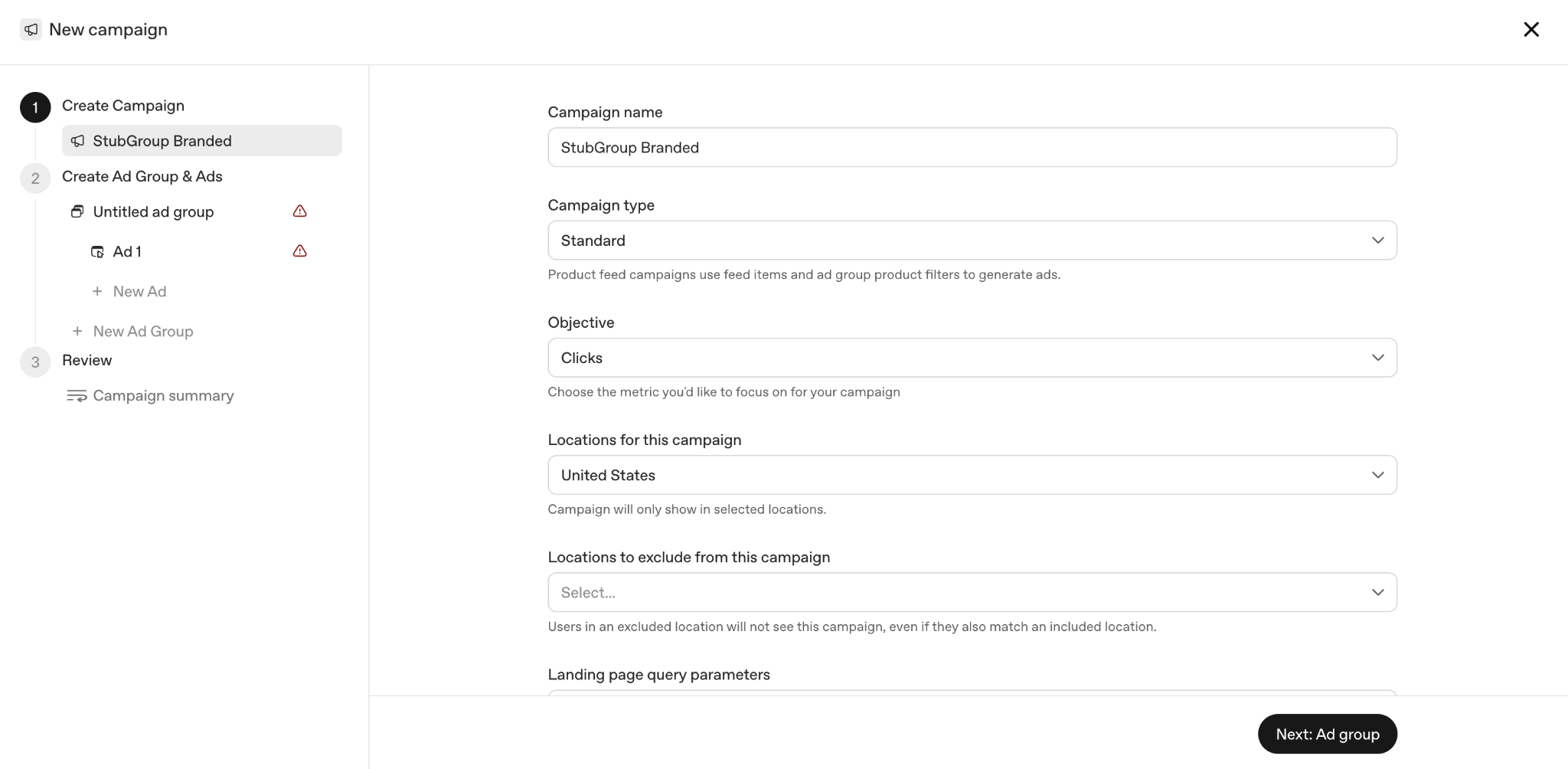
The structure is: Campaign > Ad group > Ad.
- Campaign
- Type (Standard or product feed)
- Objective (Reach, Clicks, or Conversions)
- Locations to target and/or exclude (country, region, DMA, or postal code)
- Custom audiences to target and/or exclude (first-party data upload)
- Budget (daily or total)
- Conversion event (optional)
- Start date
- End date (optional)
- Ad group
- Bid
- Default Ad Destination URL
- Context hints (more on this below)

- Ad
- Destination URL
- Headline (50-character max, can be truncated)
- Description (100-character max, can be truncated)
- Image (PNG or JPG, square, at least 256 x 256 px)

Bidding strategies
You can choose to bid for Clicks, Reach, or Conversions.
Most advertisers will start with “Clicks.” You set a maximum bid, similar to Google’s Manual CPC bidding, and you’ll be charged per click.
If you’re trying to maximize the number of people who see your ads, you can choose “Reach,” and you’ll be charged per 1,000 impressions (CPM).
If you have set up conversion tracking using OpenAI’s pixel, you can choose to optimize towards conversions. You will still be charged per click, and can set a bid cap.
How the auction works
OpenAI uses a “relevance-weighted, second-price auction to select among eligible ads.”
This works similarly to Google’s Ad Rank, which incorporates landing page relevance, ad quality, and bids to determine which ads win auctions.
There have also been reports of multiple ads serving at a single time.
Step 4: Choose your targeting (there are no keywords)
Advertisers coming from Google or Meta to ChatGPT Ads will have some adjustments to make when they think about targeting.
There are no keywords, no demographics, no in-market audiences.
Other than geography, first-party data, and the actual wording of your ad and landing page, the primary lever to control your ad targeting is called “context hints” and is at the ad group level.
You’ll see a freeform box where you can write whatever you want.
OpenAI gives this guidance:
- “Describe the conversations, topics, or keywords where your products or services may be relevant; these hints guide matching but aren’t exact-match targeting rules.”
You can leave this field blank, dump keywords in it, or write a carefully crafted prompt as you might enter into a conversation with ChatGPT.
This feature is ripe for testing.
Case study: A list of keywords vs. a list of complete questions
We created a campaign with two ad groups.
We added a list of keywords to the “Keywords” ad group similar to what you might find in a Google Ads Search campaign.
We added a list of complete questions that people might ask ChatGPT to the “Conversational” ad group.
We created an ad in each ad group with the exact same content.

In this particular test, ChatGPT showed the ad from the “Keywords” ad group far more often and it had a slightly higher CTR and lower Avg. CPC than the “Conversational” ad group.
- Example of keywords
- Lumber yard near me
- Buy 2x4s
- Cedar planks for decking
- Example of a list of questions
- Where is the closest lumberyard?
- What is the most cost-effective material to use for decking?
- How long do cedar decks last?
- Example of a conversational context hint
- I want to target DIY homeowners in the San Antonio, Texas area who are looking for a source for high-quality cedar planks to use for decking projects.
First-party data
You can target or exclude audiences built from your first-party data (customer emails and phone numbers), but the minimum of 25,000 matched users limits this feature for most SMBs.
Step 5: Create ads
Ads in ChatGPT appear at the bottom of a conversation with a label saying “Sponsored.”
There are two ad formats: static and product.
Static ads
Here is the anatomy of a static ad:

Product ads
Advertisers can submit a product feed to ChatGPT and serve ads using product data from that feed.
Initially, these ads looked identical to static ads, but OpenAI announced on July 24 that it’s updating the product card format to feature prices and star ratings.
Here is the anatomy of a product ad:

Here are instructions for submitting a product feed to ChatGPT.
The process is clunky and time-consuming at the moment, and we’ve run into multiple glitches. Expect OpenAI to improve this over time.
Step 6: Set up measurement before you launch
OpenAI has a pixel that works similarly to the Google Ads and Meta Ads pixels.
You can install the base code directly on your website and fire events based on specific actions, such as button clicks and page loads. You can also set dynamic values to track metrics such as order revenue.
OpenAI reports conversions in your ad account at the campaign, ad group, and ad level, and you can optimize towards conversions.
We strongly recommend adding UTM parameters to your ad URLs to track ChatGPT Ads traffic in third-party systems, including GA4.
Some third-party platforms, such as the call-tracking software CTM, integrate directly with ChatGPT Ads.
In addition to conversions, ChatGPT reports impressions, clicks, spend, CTR, Avg. CPC, and Avg. CPM.
Step 7: How to optimize with limited data
The key levers for optimizing ChatGPT Ads are the ads themselves and how you structure your campaigns and ad groups.
There is very little data available to you about what is actually driving your performance.
If you want to test how your ads perform in different geographic areas, you’ll have to create separate campaigns for each area because reporting can only be segmented by country, even though you can target more granular locations.
OpenAI matches ads using the current conversation and, for users who have ads personalization enabled, signals from their broader ChatGPT activity. None of that information is shared with the advertiser.
You cannot see any conversation data or even the keywords or conversation themes that may have triggered your ad.
Using ChatGPT Ads feels like the early days of Google’s Performance Max campaigns, where we largely had to trust that the system was showing ads to relevant people in relevant situations.
Case study: How engaged is ChatGPT Ads traffic?
Here is data from GA4 covering around 1,500 users who reached the same website via Google Ads versus ChatGPT Ads.
- Average engagement time per active user
- Google Ads: 41 seconds
- ChatGPT Ads: 17 seconds
- Engaged sessions per active user
- Google Ads: 1.13
- ChatGPT Ads: 0.88
- Conversion rate:
- Google Ads: 3.71%
- ChatGPT Ads: 0.21%
In this test, users coming via Google Ads were more engaged and converted at a significantly higher rate than users coming from ChatGPT Ads.
That said, we were able to reach people using ChatGPT Ads who weren’t necessarily searching for a solution on Google. While benchmarking against other channels is helpful, you should judge each channel by what it costs you to acquire a customer through it.
Where ChatGPT Ads fits in your channel mix
Because you’re serving ads to people while they’re researching and having a conversation with the LLM, ChatGPT Ads are more like Google Search ads than Facebook or Instagram ads.
If you are already getting good organic traffic to your website from ChatGPT, that’s a signal that ChatGPT Ads may be well worth testing.
That said, OpenAI makes it clear that running ads does not impact whether your brand will be mentioned organically, and vice versa.
See where competitors are investing, which keywords drive their results, and how to capture more of the market.
Should you test ChatGPT Ads?
Most advertisers should test ChatGPT Ads.
The cost of testing is relatively low and will only rise as the platform matures and more advertisers enter.
You should use in-platform and third-party tracking to understand how traffic converts.
Benchmark your ChatGPT Ads results against your Google search results, while factoring in that this is still a new platform and is constantly changing.
Because the platform is too new to have established best practices, be prepared to invest time and thought in testing a variety of approaches and creatives to find what works best for you.