Many Salesforce implementations start with the right intent, but over time, architectural shortcuts, unclear decisions, and evolving requirements can lead to fragile systems that are difficult to scale, maintain, or extend.
If you’ve ever dealt with inconsistent user experiences, performance bottlenecks, brittle integrations, or overcomplicated automation, you’ve likely encountered the downstream effects of poorly considered early architectural decisions.
Over more than a decade of working with enterprises on Salesforce projects, I’ve seen these architectural antipatterns emerge repeatedly across implementations. This post explores five of the most common mistakes, along with actionable strategies and design patterns to help address them.
Mistake 1: Treating Salesforce as a monolithic system
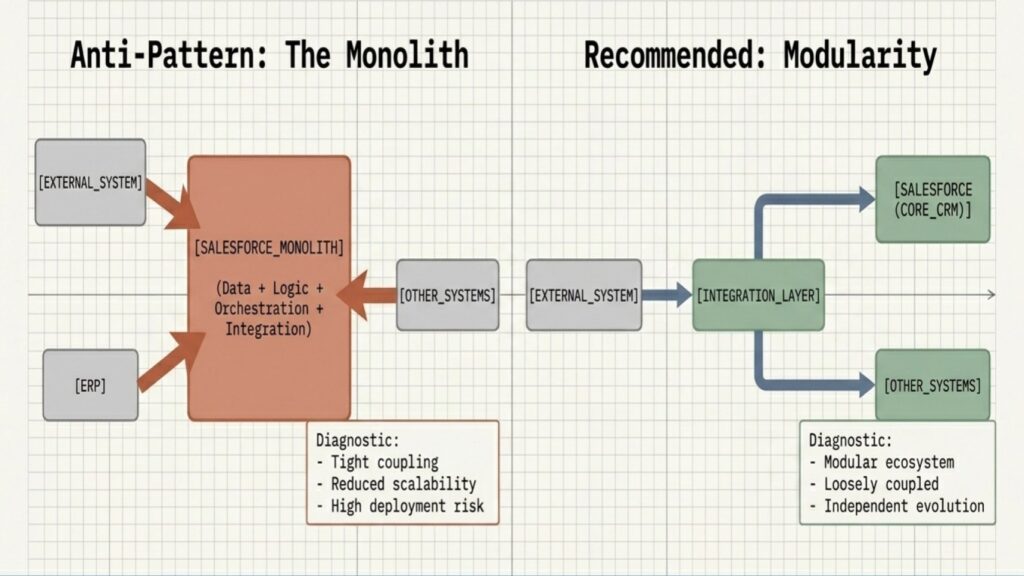
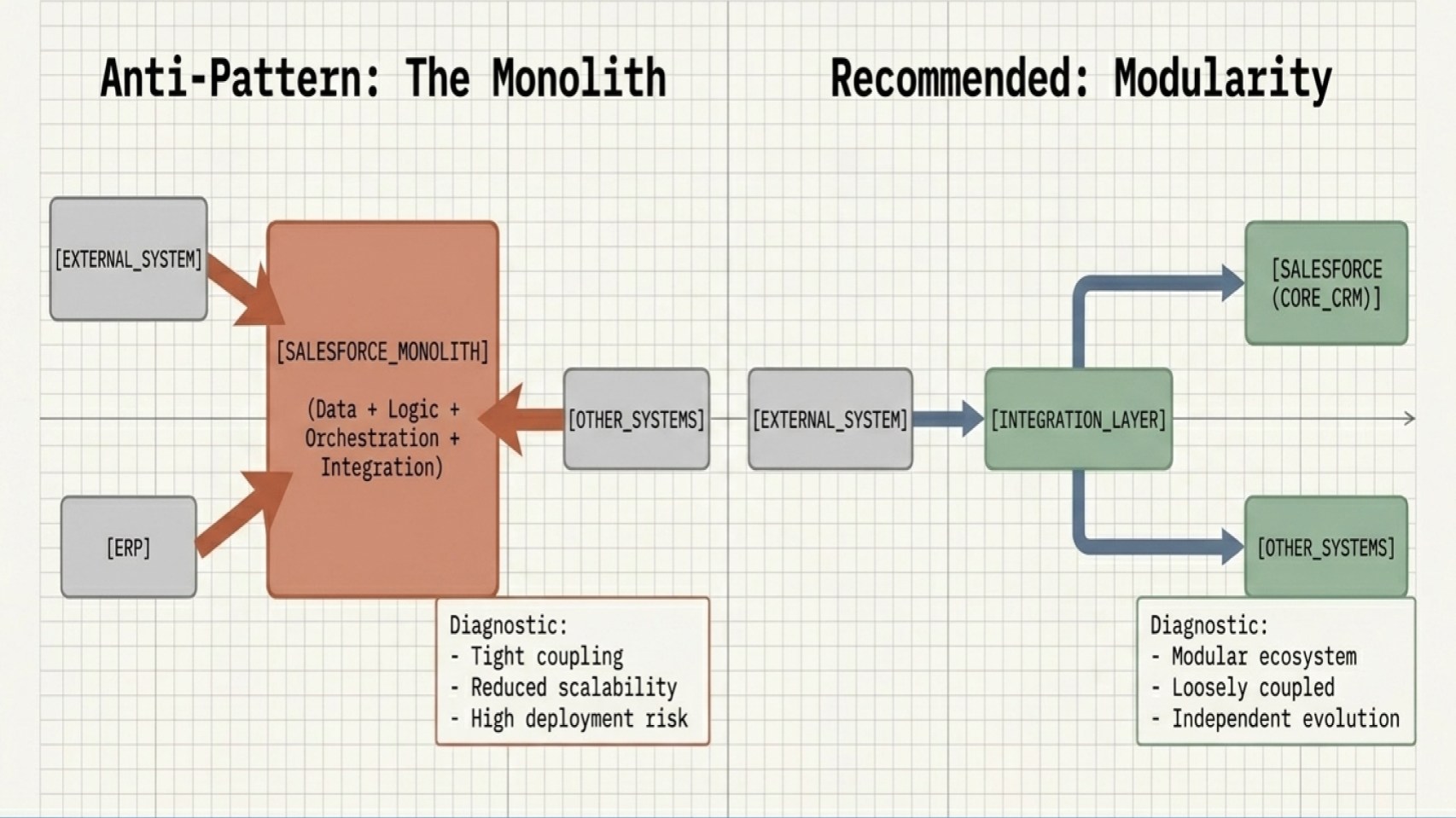
A common mistake is designing Salesforce as the single system responsible for everything, including data storage, business logic, orchestration, and integration.
Many business stakeholders expect the platform to address nearly every need because it supports such a wide range of capabilities. As a result, stakeholders can sometimes assume the platform should be the default home for every requirement. Under the pressure of tight timelines and budget constraints, it is easy for teams to give in and implement features directly within Salesforce that would be better handled outside the platform.
However, this monolithic approach leads to tight coupling between systems, reduced scalability, and increased risk during deployments.
While saying “yes” might solve a short-term problem, forcing Salesforce to handle every business function will prove significantly more costly in the long run.
I’m speaking from experience here. A long time ago, I found myself agreeing to a decision to calculate taxes inside Salesforce for a real estate customer. It was a decision that required stepping back and evaluating not whether Salesforce could support the capability, but whether it was the most appropriate place for that responsibility within the overall architecture, especially when planning to scale across multiple countries.
So why did I eventually agree with the approach? Tax calculation needed to happen during a critical process, and the stakeholders had already committed to keeping that process inside Salesforce with one phase already live in production. At that point, the architectural direction had already been set, and every downstream decision started depending on it. However, a dedicated external tax service would likely have provided better scalability, maintainability, and support for country-specific tax rules from the start.
The challenge with turning Salesforce into a monolithic system is that one decision can create a ripple effect across the entire architecture. Once business processes, integrations, and platform-specific logic become tightly coupled, even bringing in an expert later won’t undo the problem overnight. Reversing those choices can require untangling years of dependencies, processes, and assumptions built around them.
Instead of centralizing everything, adopt a modular, loosely coupled architecture:
- Use the Salesforce core platform primarily for core CRM capabilities.
- Externalize heavy processing where appropriate.
- Introduce integration layers or middleware to manage routing.
Architect for scalability and resilience
Learn how to architect your systems for better scalability and resilience with the The Salesforce Platform – Transformed for Tomorrow fundamentals.



Mistake 2: Overusing synchronous integrations
It is tempting to default to real-time, request-response integrations, but at scale this approach can introduce performance and reliability issues.
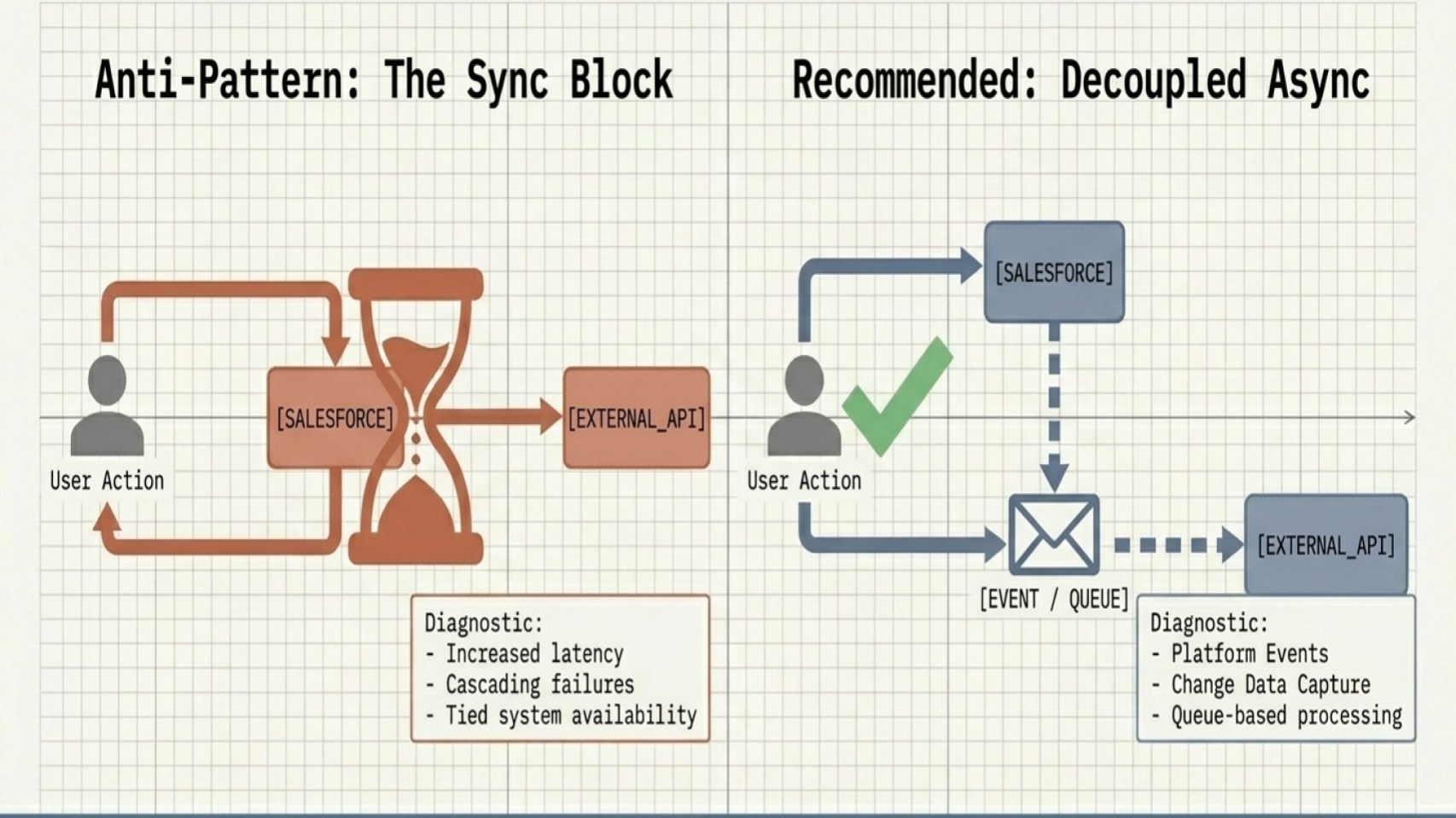
Synchronous patterns increase latency, create cascading failures, and cause upstream transactions to fail or stall based on downstream response times or availability.
Over the past few years, while auditing different Salesforce orgs, I’ve seen one integration pattern come up again and again. Teams often default to synchronous REST callouts because they’re familiar, easy to implement, and convenient. In many cases, teams simply are not aware of alternative integration patterns or middleware options that are better suited for scale and resiliency.
One example that has stuck with me involved a vacation club org. The team integrated their room reservation system with a global property reservation engine using synchronous REST API callouts. Every time a sales agent marked a membership Opportunity as Closed Won, the Salesforce transaction waited for the external reservation system to return a booking confirmation.
The integration worked fine under normal conditions, but during the busy holiday season, the external reservation engine started slowing down. Salesforce began hitting timeout errors, and sales agents suddenly couldn’t close deals at all. What initially seemed like a simple and convenient integration choice became a major business blocker at the worst possible time.
The key is to evaluate business use cases against timing and volume requirements when selecting an integration approach. Asynchronous and event-driven patterns often provide a more resilient and scalable architecture.
- Leverage Platform Events to broadcast messages decoupled from immediate responses.
- Use Change Data Capture (CDC) to stream record changes securely.
- Implement queue-based processing for external system updates.
Design Scalable Solutions with Asynchronous Processing
Explore how asynchronous processing works on the Salesforce Platform and learn how to choose the right technology for different architectural scenarios.
Mistake 3: Ignoring data ownership and duplication strategies
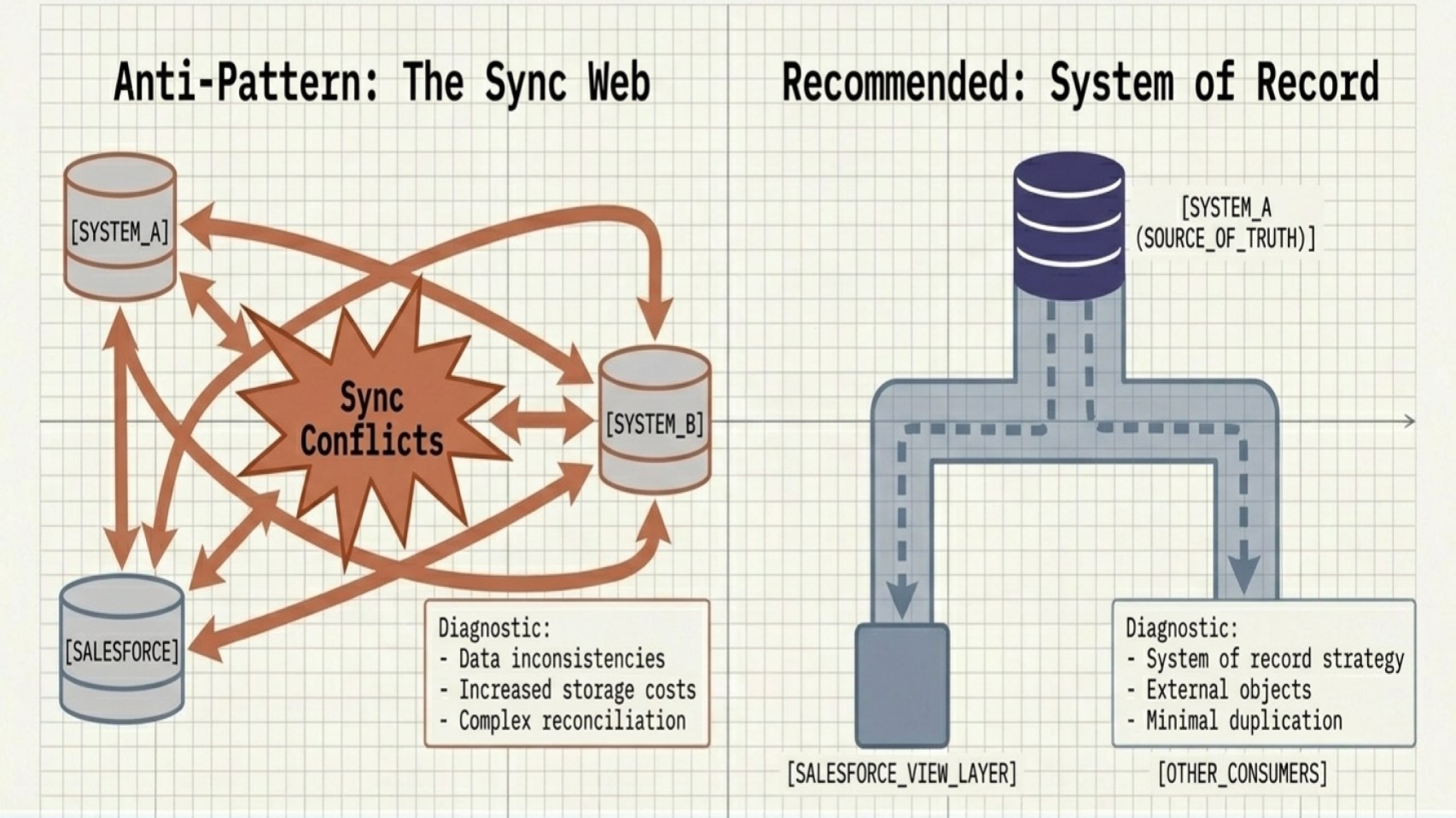
Successful architectures clearly define where data lives and which system owns it. Without that clarity, teams can fall into the anti-pattern of duplicating data across multiple systems, making a single source of truth impossible to maintain.
This approach often leads to data inconsistencies, sync conflicts, and increased storage costs. To help maintain data integrity, consider the following strategies:
- Identify authoritative sources for every critical data entity.
- Minimize unnecessary duplication across platforms.
- Use Salesforce Connect (external objects) or virtualization instead of copying data where possible. Salesforce Data 360 operationalizes this model through a zero-copy architecture built on Hyperforce.
I encountered this anti-pattern in a healthcare organization that was managing patient data through a legacy EHR system. As anyone who has dealt with legacy healthcare platforms knows, integrations can quickly become complicated, especially when there’s pressure to maintain accurate data in near real time.
The organization wanted service teams to view prescriptions, appointments, and healthcare records directly inside Salesforce while speaking with patients. To achieve this, the team built multiple integrations that continuously replicated patient data into Salesforce.
Over time, the approach became difficult to sustain. Integration maintenance continued to increase, Salesforce storage costs grew rapidly, and performance issues started appearing as more data accumulated in the org. What began as a convenient solution slowly turned into operational overhead.
Instead of continuing to move and store all data inside Salesforce, the team introduced a data virtualization approach using MuleSoft and OData endpoints. Rather than replicating large datasets, Salesforce accessed the required information on demand via data virtualization.
Mistake 4: Automating without governance
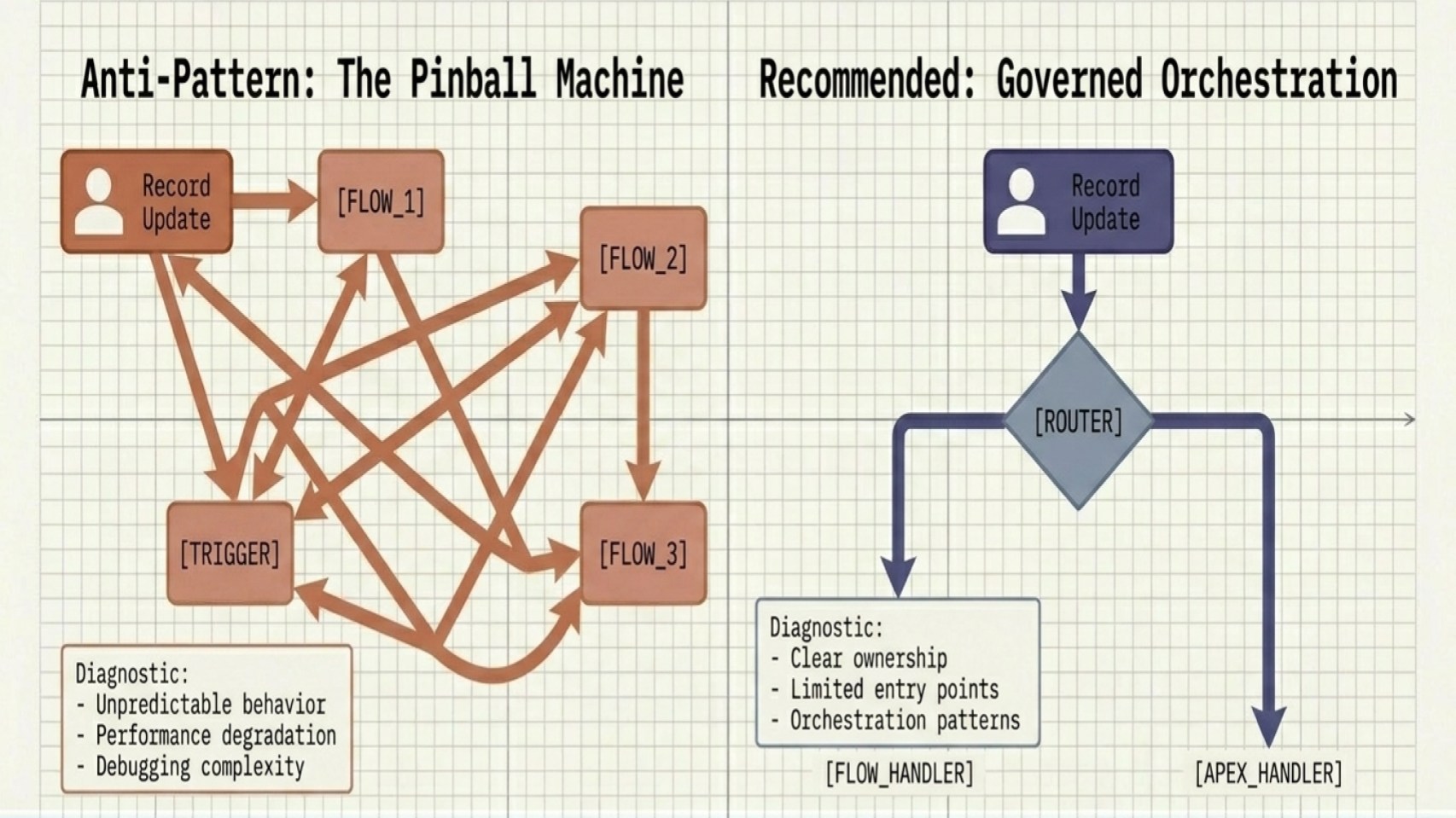
Automation is powerful, but without clear governance it becomes difficult to manage at scale. Overusing Flows, Apex triggers, and overlapping automations can lead to unpredictable behavior, performance degradation, and debugging complexity.
To avoid building automation through incremental additions and reactive fixes, adopt a governed automation strategy:
- Define clear ownership outlining exactly when to use Flow versus Apex.
- Limit entry points per object (for example, one record-triggered Flow per context).
- Use orchestration patterns to control the order of execution.
- Document automation behavior to ensure maintainability.
For me, a memorable example of this came from an agriculture enterprise. The team layered multiple custom record-triggered Flows on top of a managed package used for seasonal field service routing.
The issue started when Internet of Things (IoT) telemetry from a combine harvester updated an Asset record in Salesforce. That update triggered a Flow, which then updated a related Work Order. The Work Order update then fired an Apex trigger that published a Platform Event to an external logistics system. The external system acknowledgment synced back to the same Asset record and unintentionally triggered the entire execution chain all over again.
Because the architecture lacked a centralized bypass framework and a consistent trigger handler pattern, the org ended up in deep recursive loops, eventually hitting System.LimitException: Maximum trigger depth exceeded errors. During the peak harvest season, this disrupted automated dispatching operations when the business depended on it the most.
Automation needs governance, orchestration, and clear execution boundaries. Without these controls, even otherwise well-designed solutions can become operationally fragile.
Introducing the Salesforce Architecture Blog: Community Author Program
Explore how the new Community Author Program empowers Salesforce Architects to share real-world implementation expertise, architectural insights, and lessons learned. Submissions open June 1, 2026.



Mistake 5: Designing without scalability in mind
Even architectures that perform well initially may become difficult to scale as load and complexity increase. Without scalability planning, teams can encounter governor limit issues, slow performance, and the need for costly architectural rework later in the implementation cycle.
Common mistakes include high-volume synchronous transactions, inefficient queries, and a lack of bulk processing.
To minimize scalability issues:
- Apply bulkification principles in Apex and design flows for bulk-safe execution.
- Design specifically for large data volumes (LDV).
- Test with realistic load scenarios before deploying to production.
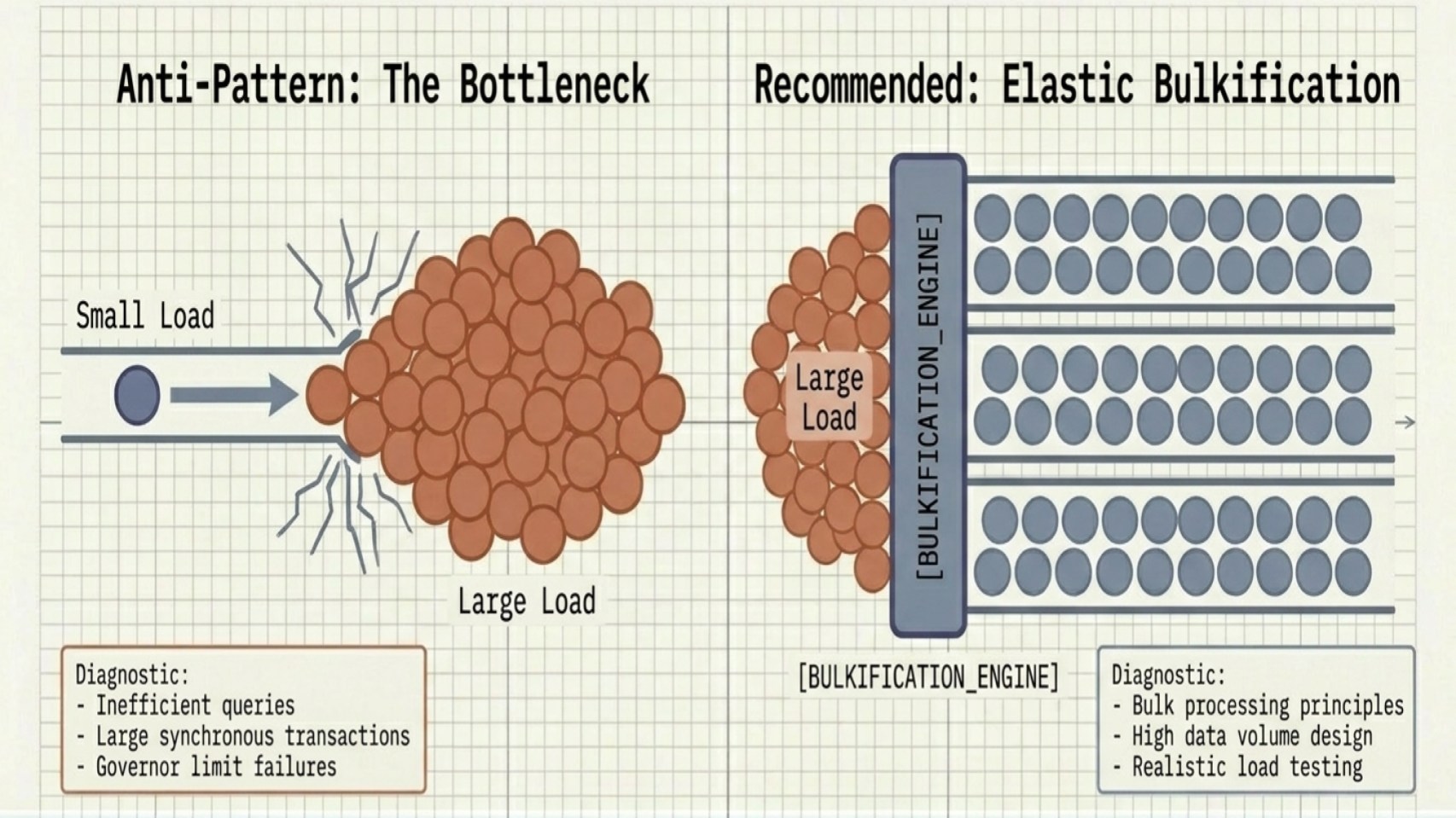
A common sign of scalability issues in a Salesforce org is recurring “Unable to Lock Row,” “CPU Time Limit Exceeded,” “Apex Heap Size Too Large,” and similar errors. These issues often stem from architectural decisions that do not fully account for LDV, high-concurrency operations, or parent data skew scenarios at scale.
In many cases, patterns that work well in lower environments begin to break down as transaction volumes and automation complexity grow in production. Resolving these issues typically requires more than code optimization; it calls for an architectural redesign. Teams may need to decouple skewed data relationships, reduce synchronous processing, and shift heavy operations, such as status rollups, to asynchronous batch or event-driven processing patterns.
Review your architecture and plan for the future
Great Salesforce architectures rarely fall into place on their own. Architects build them through intentional decisions, evaluating tradeoffs, and learning from experience. The systems that hold up best are the ones where teams make design decisions thoughtfully rather than under pressure.
By avoiding the common mistakes outlined in this post, you can build architectures that scale more smoothly, are easier to maintain, and adapt more effectively as business needs change.
Start by stepping back and reviewing your current architecture across a few key areas. Pick one area that feels risky or brittle, and focus on improving that first. Small, steady changes go a long way.
Architectural excellence isn’t about getting everything perfect upfront. It’s about continuously refining your approach and making better decisions as you go.
Read more about building trusted, easy, and adaptable systems in the Salesforce Well-Architected Framework.