Over 80% of enterprise data lives in unstructured form — PDFs, emails, reports, regulatory filings. Most of the time, such sources contain critical business information, yet they remain difficult to access and reason over at scale. Together, BigQuery Graph and Kineviz GraphXR give decision makers power over their unstructured data by creating a single, streamlined workflow that makes it much easier to uncover hidden business insights. BigQuery houses and builds the structures of the graph; Kineviz GraphXR lets analysts visually verify relationships, trace insights back to sources, and answer questions interactively.
Retrieval-augmented generation (RAG) and vector search have become the industry standard approach for working with unstructured data. When it comes to trend analysis, comparison across entities, multi-hop reasoning, and explainable decision support, graphs complement RAG by incorporating context and relationship mapping. Our “evidence-first” knowledge graph approach prioritizes preserving the nuance of the original evidence and maintaining the traceability of every single element in the graph, making the resulting analysis verifiable and trustworthy. In this post, we describe an example where BigQuery AI Functions, BigQuery Graph, and Kineviz GraphXR address business questions about Fortune 500 SEC filings without complex ETL pipeline, data duplication, or separate graph databases.
From fragmented to unified with BigQuery
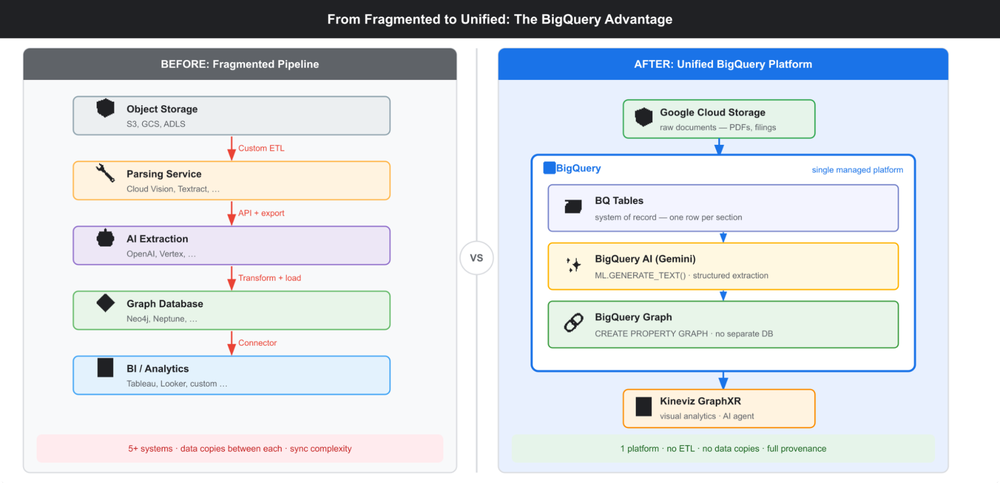
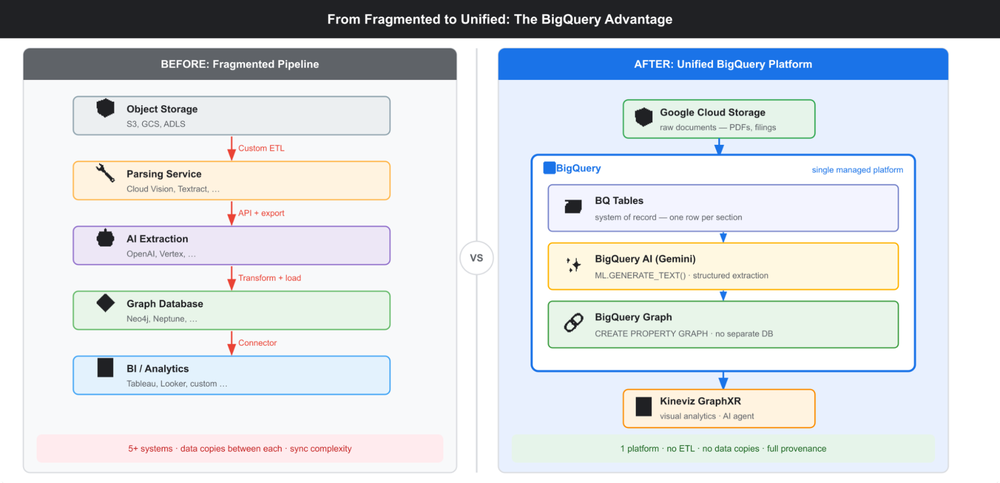
Traditional unstructured analytics pipelines can be complex and sprawling. They typically involve multiple steps, including: object storage for raw files, a custom parsing service, a separate AI extraction layer, a standalone graph database, and finally, a BI tool for analysis. This complex setup can be difficult to maintain, involving data duplication, synchronization overhead, introducing multiple potential points of failure.
BigQuery streamlines this process. Raw documents are stored in Google Cloud Storage, and text extraction, Gemini-powered inference, and graph creation all run directly within the same platform. This removes the need for data movement between systems, complex service orchestration, or the accumulation of out-of-sync data copies.
With its tight integration, the pipeline is simple and maintainable, allowing full provenance without bespoke infrastructure.
BigQuery pipeline: From unstructured to structured
We used BigQuery pipeline to explore SEC 10-K filings of Fortune 500 companies from 2020 to 2024. Each filing includes around 100 pages of detailed, descriptive information.
We designed a schema such that each Company connects to Competitors (COMPETES_WITH), Risks (FACES_RISK), and Markets (ENTERING / EXITING / EXPANDING), and followed the following four-step process.

1. Ingest and parse. Retrieve 10-K filings from SEC EDGAR, transform Standard Generalized Markdown Language (SGML) to Markdown while preserving hierarchical structure, and load the raw text into BigQuery via Cloud Storage.
2. Focus on key signal sections. Instead of processing complete 100-page filings, we focus extraction only on sections related to market moves, risks, and competitors (specifically the Business, Risk Factors, and MD&A sections). Every row in BigQuery preserves essential metadata, including the year, company, CIK, section ID, and the direct URL to the original source filing.
3. Gemini for extraction. Utilizing AI.GENERATE_TEXT() with Gemini 3 Pro, each section is processed to return structured JSON. This output details competitors, risks, market actions, and opportunities, with every element grounded by evidence text from the initial filing. This process is completed entirely within BigQuery, with no external orchestration or data movement.
4. Declaring the graph. The structured JSON data is then broken down into distinct tables for nodes and edges. These tables are subsequently mapped into a fully traversable graph using a single Data Definition Language (DDL) statement, as shown below, enabling graph queries without the need for joins.
- code_block
- <ListValue: [StructValue([(‘code’, ‘CREATE PROPERTY GRAPH sec_filings.SecGraphrn NODE TABLES (rn nodes_company, nodes_competitor, nodes_risk, nodes_market, nodes_opportunityrn )rn EDGE TABLES (rn edges_competes SOURCE nodes_company DESTINATION nodes_competitor LABEL COMPETES_WITH,rn edges_faces_risk SOURCE nodes_company DESTINATION nodes_risk LABEL FACES_RISK,rn edges_entering SOURCE nodes_company DESTINATION nodes_market LABEL ENTERINGrn — plus EXITING, EXPANDING, PURSUINGrn );’), (‘language’, ”), (‘caption’, <wagtail.rich_text.RichText object at 0x7f3d32eb87f0>)])]>
The process extracted 87,000 entities and over 20,000 mentions of competitors. After resolution and normalization, these mentions were consolidated into roughly 8,100 distinct competitors, turning unstructured SEC filings into a knowledge graph for competitive landscape.
Unlocking hidden insights with Kineviz GraphXR
GraphXR, by Kineviz, connects directly to BigQuery Graph, providing the environment for analysts to explore and analyze the data interactively. Analysts can visually navigate relationships and drill into subgraphs through low-code workflows, without needing to write any queries. This means strategy, compliance, and research teams can work directly with the data and refine their analyses themselves.
GraphXR’s AI-assisted workflows allow users to define analytical tasks using natural language, such as “show me Apple’s competitive trajectory over time”, generating dashboards linked to a live graph view. As the graph view changes, dashboard charts update dynamically. For example, structured data points extracted from SEC filings reveal that the number of companies that cited Apple as a competitor has remained relatively stable at around 14 over time, a pattern not apparent when examining individual filings.
Dashboard: Companies Citing Apple Over Time
The AI-powered Visual Analysis Agent enhances the accuracy and nuance of these assessments. For instance, after using GraphXR’s “trace neighbor” function to identify companies that cite Google as a competitor, the Agent’s analysis reveals complex cross-industry relationships. A key example is AES Corp., an energy utility, which appears in contexts indicating coopetition relationships, illustrating the broader market shift toward adopting cloud and AI infrastructure.
Competitive analysis with agent reasons over both graph structure and node properties
Our workflow places a strong emphasis on auditability. Every node in the graph is directly linked to its source within the original SEC filings. Analysts can trace insights back to their origin and validate findings in context. For example, in the image below, selecting a risk entity provides a URL link that takes the reader to the relevant location in the document where that specific risk was identified.
Risk analysis with a direct, clickable link to the precise location of the extracted information in the source document.
Why this matters
BigQuery Graph together with Kineviz GraphXR provide organizations with:
- Simplicity: Fewer systems, fewer copies — the pipeline runs in a fully-managed, integrated platform where data stored in BigQuery gets explored and analysed in GraphXR without data movement or duplication.
- Scalability: BigQuery handles millions of documents and billions of extracted facts without bespoke graph infrastructure.
- Explainability: Every insight traces back to source evidence; validation is one click.
- Flexibility: New questions or entity types don’t force you to rebuild the extraction model — you can just extend the schema.
The majority of enterprise knowledge is locked away. Together, BigQuery AI Functions, BigQuery Graph, and Kineviz BI tools provide an end-to-end solution that turns graph-based reasoning, evidence-first analytics, and interactive exploration into a single, streamlined pipeline that unlocks the intelligence trapped within unstructured data.
Get started
Learn more about BigQuery Graph here and get started here. Kineviz GraphXR is available on the Google Cloud Marketplace. You can find the Fortune 500 tutorial in the GitHub notebook or watch the video here.
Related blogs: