In support of our mission to accelerate the developer journey on Google Cloud, we built Dev Signal—a multi-agent system designed to transform raw community signals into reliable technical guidance by automating the path from discovery to expert creation
In the first part of this series for the Dev Signal, we laid the essential groundwork for this system by establishing a project environment and equipping core capabilities through the Model Context Protocol (MCP). We standardized our external integrations, connecting to Reddit for trend discovery, Google Cloud Docs for technical grounding, and building a custom Nano Banana Pro MCP server for multimodal image generation. If you missed Part 1 or want to explore the code directly, you can find the complete project implementation in our GitHub repository.
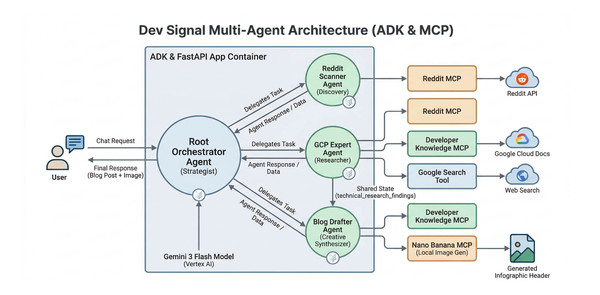
Now, in Part 2, we focus on building the multi-agent architecture and integrating the Vertex AI memory bank to personalize these capabilities. We will implement a Root Orchestrator that manages three specialist agents: the Reddit Scanner, GCP Expert, and Blog Drafter, to provide a seamless flow from trend discovery to expert content creation. We will also integrate a long-term memory layer that enables the agent to learn from your feedback and persist your stylistic preferences across different conversations. This ensures that Dev Signal doesn’t just process data, but actually learns to match your professional voice over time.
Infrastructure and Model Setup
First, we initialize the environment and the shared Gemini model.
Paste this code in dev_signal_agent/agent.py
- code_block
- <ListValue: [StructValue([(‘code’, ‘from google.adk.agents import Agentrnfrom google.adk.apps import Apprnfrom google.adk.models import Geminirnfrom google.adk.tools import google_search, AgentTool, load_memory_tool, preload_memory_toolrnfrom google.adk.tools.tool_context import ToolContextrnfrom google.genai import typesrnfrom dev_signal_agent.app_utils.env import init_environmentrnfrom dev_signal_agent.tools.mcp_config import (rn get_reddit_mcp_toolset, rn get_dk_mcp_toolset, rn get_nano_banana_mcp_toolsetrn)rnrnPROJECT_ID, MODEL_LOC, SERVICE_LOC, SECRETS = init_environment()rnrnrnshared_model = Gemini(rn model=”gemini-3-flash-preview”, rn vertexai=True, rn project=PROJECT_ID, rn location=MODEL_LOC,rn retry_options=types.HttpRetryOptions(attempts=3),rn)’), (‘language’, ‘lang-py’), (‘caption’, <wagtail.rich_text.RichText object at 0x7facb047e460>)])]>
Memory Ingestion Logic
We want Dev Signal to do more than just follow instructions – we want it to learn from you. By capturing your preferences, such as specific technical interests on Reddit or a preferred blogging style, the agent can personalize its output for future use. To achieve this, we use the Vertex AI memory bank to persist session history across different conversations.
Long-term Memory
We automate this through the save_session_to_memory_callback function. This callback is configured to run automatically after every turn, ensuring that session details are captured and stored in the memory bank without manual intervention.
How Managed Memory Works:
-
Ingestion: The
save_session_to_memory_callbacksends the conversation data to Vertex AI. -
Embedding: Vertex AI converts the text into numerical vectors (embeddings) that capture the semantic meaning of your preferences.
-
Storage: These vectors are stored in a managed index, enabling the agent to perform semantic searches and retrieve relevant history in future sessions.
-
Retrieval: The agent recalls this history using built-in ADK tools. The PreloadMemoryTool proactively brings in context at the start of an interaction, while the LoadMemoryTool allows the agent to fetch specific memories on an as-needed basis.
Paste this code in dev_signal_agent/agent.py
- code_block
- <ListValue: [StructValue([(‘code’, ‘async def save_session_to_memory_callback(*args, **kwargs) -> None:rn “””rn Defensive callback to persist session history to the Vertex AI memory bank.rn “””rn ctx = kwargs.get(“callback_context”) or (args[0] if args else None)rn rn # Check connection to Memory Servicern if ctx and hasattr(ctx, “_invocation_context”) and ctx._invocation_context.memory_service:rn # Save the session!rn await ctx._invocation_context.memory_service.add_session_to_memory(rn ctx._invocation_context.sessionrn )’), (‘language’, ‘lang-py’), (‘caption’, <wagtail.rich_text.RichText object at 0x7facb047e4c0>)])]>
Short-term Memory
The add_info_to_state function serves as the agent’s short-term working memory, allowing the gcp_expert to reliably hand off its detailed findings to the blog_drafter within the same session. This working memory and the conversation transcript are managed by the Vertex AI Session Service to ensure that active context survives server restarts or transient failures.
The boundary between session-based state and long-term persistence – It is important to note that while this service provides stability during an active interaction, this short-term memory does not persist between different sessions. Starting a fresh session ID effectively resets this working state, ensuring a clean slate for new tasks. Cross-session continuity, where the agent remembers your stylistic preferences or past feedback, is handled by the Vertex AI Memory Bank.
Paste this code in dev_signal_agent/agent.py
- code_block
- <ListValue: [StructValue([(‘code’, ‘def add_info_to_state(tool_context: ToolContext, key: str, data: str) -> dict:rn tool_context.state[key] = datarn return {“status”: “success”, “message”: f”Saved ‘{key}’ to state.”}’), (‘language’, ‘lang-py’), (‘caption’, <wagtail.rich_text.RichText object at 0x7facb047ec10>)])]>
Specialist 1: Reddit Scanner (Discovery)
The Reddit scanner is our “Trend Spotter,” it identifies high-engagement questions from the last 21 days (3 weeks) to ensure that all research findings remain both timely and relevant.
Memory Usage: It leverages load_memory to retrieve your past areas of interest and preferred topics from the Vertex AI memory bank If relevant history exists, the agent prioritizes those specific topics in its search to provide a personalized discovery experience.
Beyond simple retrieval, each sub-agent actively updates its memories by listening for new preferences and explicitly acknowledging them during the chat. This process captures relevant information in the session history, where an automated callback then persists it to the long-term Vertex AI memory bank for future use.
This memory management is supported by two distinct retrieval patterns within the Google Agent Development Kit (ADK). The first is the PreloadMemoryTool, which proactively brings in historical context at the beginning of every interaction to ensure the agent is fully briefed before addressing the current request. The second is the LoadMemoryTool, which the agent uses on an as-needed basis, calling upon it only when it decides that deeper past knowledge would be beneficial for the current step in the workflow.
Paste this code in dev_signal_agent/agent.py
- code_block
- <ListValue: [StructValue([(‘code’, ‘# Singleton toolsetsrnreddit_mcp = get_reddit_mcp_toolset(rn client_id=SECRETS.get(“REDDIT_CLIENT_ID”, “”),rn client_secret=SECRETS.get(“REDDIT_CLIENT_SECRET”, “”),rn user_agent=SECRETS.get(“REDDIT_USER_AGENT”, “”)rn)rnreddit_scanner = Agent(rn name=”reddit_scanner”,rn model=shared_model,rn instruction=”””rn You are a Reddit research specialist. Your goal is to identify high-engagement questions rn from the last 3 weeks on specific topics of interest, such as AI/agents on Cloud Run.rn rn Follow these steps:rn 1. **MEMORY CHECK**: Use `load_memory` to retrieve the user’s **past areas of interest** and **preferred topics**. Calibrate your search to align with these interests.rn 2. Use the Reddit MCP tools to search for relevant subreddits and posts.rn 3. Filter results for posts created within the last 21 days (3 weeks).rn 4. Analyze “high-engagement” based on upvote counts and the number of comments.rn 5. Recommend the most important and relevant questions for a technical audience.rn 6. **CRITICAL**: For each recommended question, provide a direct link to the original thread and a concise summary of the discussion.rn 7. **CAPTURE PREFERENCES**: Actively listen for user preferences, interests, or project details. Explicitly acknowledge them to ensure they are captured in the session history for future personalization.rn “””,rn tools=[reddit_mcp, load_memory_tool.LoadMemoryTool()],rn after_agent_callback=save_session_to_memory_callback,rn)’), (‘language’, ‘lang-py’), (‘caption’, <wagtail.rich_text.RichText object at 0x7facb047e910>)])]>
Specialist 2: GCP Expert (Grounding)
The GCP expert is our “The Technical Authority”. It triangulates facts by synthesizing official documentation from the Google Cloud Developer Knowledge MCP Server, community sentiment from Reddit, and broader context from Google Search.
Paste this code in dev_signal_agent/agent.py
- code_block
- <ListValue: [StructValue([(‘code’, ‘dk_mcp = get_dk_mcp_toolset(api_key=SECRETS.get(“DK_API_KEY”, “”))rnrnrnsearch_agent = Agent(rn name=”search_agent”,rn model=shared_model,rn instruction=”Execute Google Searches and return raw, structured results (Title, Link, Snippet).”,rn tools=[google_search],rn)rngcp_expert = Agent(rn name=”gcp_expert”,rn model=shared_model,rn instruction=”””rn You are a Google Cloud Platform (GCP) documentation expert. rn Your goal is to provide accurate, detailed, and cited answers to technical questions by synthesizing official documentation with community insights.rn rn For EVERY technical question, you MUST perform a comprehensive research sweep using ALL available tools:rn rn 1. **Official Docs (Grounding)**: Use DeveloperKnowledge MCP (`search_documents`) to find the definitive technical facts.rn 2. **Social Media Research (Reddit)**: Use the Reddit MCP to research the question on social media. This allows you to find real-world user discussions, common pain points, or alternative solutions that might not be in official documentation.rn 3. **Broader Context (Web/Social)**: Use the `search_agent` tool to find recent technical blogs, social media discussions, or tutorials.rn rn Synthesize your answer:rn – Start with the official answer based on GCP docs.rn – Add “Social Media Insights” or “Common Issues” sections derived from Reddit and Web Search findings.rn – **CRITICAL**: After providing your answer, you MUST use the `add_info_to_state` tool to save your full technical response under the key: `technical_research_findings`.rn – Cite your sources specifically at the end of your response, providing **direct links** (URLs) to the official documentation, blog posts, and Reddit threads used.rn – **CAPTURE PREFERENCES**: Actively listen for user preferences, interests, or project details. Explicitly acknowledge them to ensure they are captured in the session history for future personalization.rn “””,rn tools=[dk_mcp, AgentTool(search_agent), reddit_mcp, add_info_to_state],rn after_agent_callback=save_session_to_memory_callback,rn)’), (‘language’, ‘lang-py’), (‘caption’, <wagtail.rich_text.RichText object at 0x7facb04a1280>)])]>
Specialist 3: Blog Drafter (Creativity)
The blog drafter is our Content Creator. It drafts the blog based on the expert’s findings and offers to generate visuals.
Memory Usage: It checks load_memory for the user’s preferred writing style (e.g. “Witty”, “Rap”) stored in the Vertex AI memory bank.
Paste this code in dev_signal_agent/agent.py
- code_block
- <ListValue: [StructValue([(‘code’, ‘nano_mcp = get_nano_banana_mcp_toolset()rnrnrnblog_drafter = Agent(rn name=”blog_drafter”,rn model=shared_model,rn instruction=”””rn You are a professional technical blogger specializing in Google Cloud Platform. rn Your goal is to draft high-quality blog posts based on technical research provided by the GDE expert and reliable documentation.rn rn You have access to the research findings from the gcp_expert_agent here:rn {{ technical_research_findings }}rn rn Follow these steps:rn 1. **MEMORY CHECK**: Use `load_memory` to retrieve past blog posts, **areas of interest**, and user feedback on writing style. Adopt the user’s preferred style and depth.rn 2. **REVIEW & GROUND**: Review the technical research findings provided above. **CRITICAL**: Use the `dk_mcp` (Developer Knowledge) tool to verify key facts, technical limitations, and API details. Ensure every claim in your blog is grounded in official documentation.rn 3. Draft a blog post that is engaging, accurate, and helpful for a technical audience.rn 4. Include code snippets or architectural diagrams if relevant.rn 5. Provide a “Resources” section with links to the official documentation used.rn 6. Ensure the tone is professional yet accessible, while adhering to any style preferences found in memory.rn 7. **VISUALS**: After presenting the drafted blog post, explicitly ask the user: “Would you like me to generate an infographic-style header image to illustrate these key points?” If they agree, use the `generate_image` tool (Nano Banana).rn 8. **CAPTURE PREFERENCES**: Actively listen for user preferences, interests, or project details. Explicitly acknowledge them to ensure they are captured in the session history for future personalization.rn “””,rn tools=[dk_mcp, load_memory_tool.LoadMemoryTool(), nano_mcp],rn after_agent_callback=save_session_to_memory_callback,rn)’), (‘language’, ‘lang-py’), (‘caption’, <wagtail.rich_text.RichText object at 0x7facb04a12b0>)])]>
The Root Orchestrator
The root agent serves as the system’s strategist, managing a team of specialist agents and orchestrating their actions based on the specific goals provided by the user. At the start of a conversation, the orchestrator retrieves memory to establish context by checking for the user’s past areas of interest, preferred topics, or previous projects.
Paste this code in dev_signal_agent/agent.py
- code_block
- <ListValue: [StructValue([(‘code’, ‘root_agent = Agent(rn name=”root_orchestrator”,rn model=shared_model,rn instruction=”””rn You are a technical content strategist. You manage three specialists:rn 1. reddit_scanner: Finds trending questions and high-engagement topics on Reddit.rn 2. gcp_expert: Provides technical answers based on official GCP documentation.rn 3. blog_drafter: Writes professional blog posts based on technical research.rn rn Your responsibilities:rn – **MEMORY CHECK**: At the start of a conversation, use `load_memory` to check if the user has specific **areas of interest**, preferred topics, or past projects. Tailor your suggestions accordingly.rn – **CAPTURE PREFERENCES**: Actively listen for user preferences, interests, or project details. Explicitly acknowledge them to ensure they are captured in the session history for future personalization.rn – If the user wants to find trending topics or questions from Reddit, delegate to reddit_scanner.rn – If the user has a technical question or wants to research a specific theme, delegate to gcp_expert.rn – **CRITICAL**: After the gcp_expert provides an answer, you MUST ask the user: rn “Would you like me to draft a technical blog post based on this answer?”rn – If the user agrees or asks to write a blog, delegate to blog_drafter.rn – Be proactive in helping the user navigate from discovery (Reddit) to research (Docs) to content creation (Blog).rn “””,rn tools=[load_memory_tool.LoadMemoryTool(), preload_memory_tool.PreloadMemoryTool()],rn after_agent_callback=save_session_to_memory_callback,rn sub_agents=[reddit_scanner, gcp_expert, blog_drafter]rn)rnrnapp = App(root_agent=root_agent, name=”dev_signal_agent”)’), (‘language’, ‘lang-py’), (‘caption’, <wagtail.rich_text.RichText object at 0x7facb04a1d00>)])]>
Summary
In this part of our series, we built multi-agent architecture and implemented a robust, dual-layered memory system. We established a Root Orchestrator, managing three specialist agents: a Reddit Scanner for trend discovery, a GCP Expert for technical grounding, and a Blog Drafter for creative content creation.
By utilizing short-term state to pass information reliably between specialists and integrating the Vertex AI memory bank for long-term persistence, we’ve enabled the agent to learn from your feedback and remember specific writing styles across different conversations.
In part 3, we will show you how to test the agent locally to verify these components on your workstation, before transitioning to a full production deployment on Google Cloud Run in part 4. Can’t wait for Part 3? The full implementation is already available for you to explore on GitHub.
To learn more about the underlying technology, explore the Vertex AI Memory Bank overview or dive into the official ADK Documentation to see how to orchestrate complex multi-agent workflows.
Special thanks to Remigiusz Samborski for the helpful review and feedback on this article.