One of our favorite mottos in Google Site Reliability Engineering (SRE) is: “Eliminate Toil.”
You hear it in the microkitchens in Zurich and the hallways in Mountain View. This motto refers to the SRE mission of replacing repetitive, manual work with engineered systems. But as a senior SRE once explained, this doesn’t just mean writing a script to solve a problem once. It means building the automation that triggers that script at the exact right moment—often the hardest part.
AI has already revolutionized how we write code, but what about how we operate it? Can AI safely solve operational problems? Can it assist operators during a high-pressure outage without taking away control?
In this article, we’ll delve into real scenarios that Google SREs are solving today using Gemini 3 (our latest foundation model) and Gemini CLI—the go-to tool for bringing agentic capabilities to the terminal.
The Scenario: Fighting “Bad Customer Minutes”
Meet Ramón. Ramón is a Core SRE, meaning he works in the engineering group that develops the foundational infrastructure for all of Google’s products: safety, security, account management, and data backends for multiple services.
When infrastructure at this layer has a hiccup, it’s visible across a massive range of products immediately. Speed is vital, and we measure it in Bad Customer Minutes. Every minute the service is degraded burns through our Error Budget.
To combat this, we obsess over MTTM (Mean Time to Mitigation). Unlike Mean Time to Repair (MTTR), which focuses on the full fix, MTTM is about speed: how fast can we stop the pain? In this space, SREs typically have a 5-minute Service Level Objective (SLO) just to acknowledge a page, and extreme pressure to mitigate shortly after.
Our incident usually follows four distinct stages:
-
Paging: The SRE gets alerted.
-
Mitigation: We “stop the bleeding” to reduce Bad Customer Minutes, often before we even know why it broke.
-
Root Cause: Once users are happy, we investigate the underlying bug and fix it for good.
-
Postmortem: We document the incident and add extensive action items on engineering teams, that are prioritised to ensure it never happens again.
Let’s walk through a real (simulated) outage to see how Gemini CLI accelerates every step of this journey to keep MTTM low.
Step 1: Paging and Initial Investigation
Context: It’s 11:00 AM. Ramón’s pager goes off for incident s_e1vnco7W2.
When a page comes in, the clock starts ticking. Our first priority isn’t to fix the code—it’s to mitigate the impact on users. Thanks to the extensive work on Generic Mitigations by Google SREs, we have a defined, closed, set of standard classes of mitigations (e.g., drain traffic, rollback, restart, add capacity).
This is a perfect task for an LLM: classify the symptoms and select a mitigation playbook. A mitigation playbook is an instruction created dynamically for an agent to be able to execute a production mutation safely. These playbooks can include the command to run, but also instructions to verify that the change is effectively addressing the problem, or to rollback the change.
Ramón opens his terminal and uses Gemini CLI. Gemini immediately calls the fetch_playbook function from ProdAgent (our internal agentic framework). It chains together several tools to build context:
-
get_incident_details: Fetches the alert data from our Incident Response Management system (description, metadata, prior instances, etc). -
causal_analysis: Finds causal relations between different time series behaviour and generic mitigation labels. -
timeseries_correlation: Finds pairs of time series that are correlated, which may help the agent find root causes and mitigation -
log_analysis: Uses log patterns and volumetric analysis to determine anomalies on the stream of logs from the service.

Based on the symptoms, Gemini recommends the borg_task_restart playbook (analogous to a Kubernetes pod restart) as the immediate mitigation. It knows exactly which variables to fill based on the alert context.
Gemini proposes the following action:
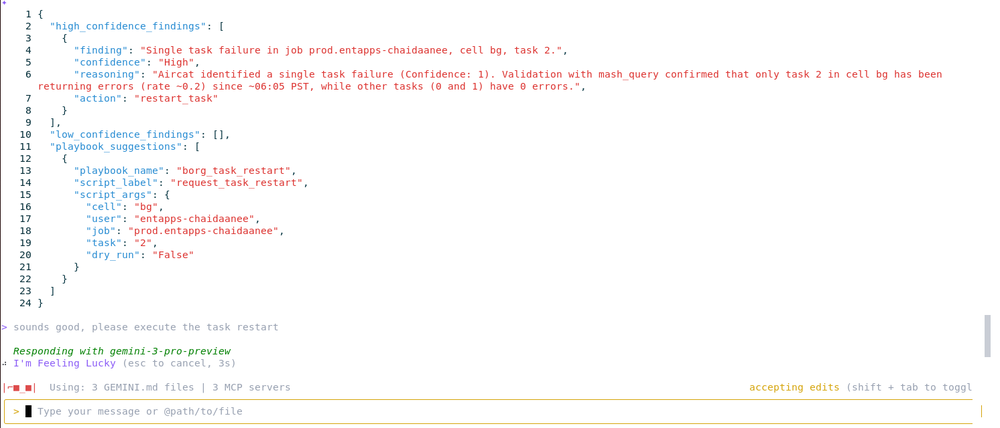
Ramón reviews the plan; it looks solid. He types:
"SGTM, execute the restart."
Keeping the human in the loop is important at the moment, to validate that mitigations that are going to be actuated make sense and are safe to apply to the system. In the future this will change, as we build confidence in the agents and their capabilities and new agentic safety systems.
Step 2: The Mitigation (Stopping the Bleeding)
Safety Check: Copilot, Not Autopilot
Before we execute, we need to address safety. We cannot simply let an autonomous agent operate autonomously on production infrastructure: a command that is safe under some conditions, or system state, may not be safe in other situations (for example: a binary rollback may generally be safe, but not when a service is receiving a configuration push).
This is where the CLI approach shines. It implements a multi-layer safety strategy to ensure the agent acts as a responsible copilot, not an autopilot.
-
Deterministic Tools: The agent doesn’t write random bash scripts; it selects from strictly typed tools (via Model Context Protocol) like
borg_task_restart. -
Risk Assessment: Every tool definition includes metadata about its potential impact (e.g., safe, reversible, destructive). The system automatically flags high-risk actions for stricter review.
-
Policy Enforcement: Even if the agent tries to execute a valid command, a policy layer checks if it’s allowed in the current context (e.g., “No global restarts during peak traffic” or “Requires 2-person approval”).
-
Human-in-the-Loop: Finally, the CLI forces a confirmation step. The agent proposes the mutation, but Ramón authorizes it. This allows us to move at AI speed while maintaining human accountability.
-
Audit Trails: Because every action is proxied through the CLI, we automatically log exactly what the AI proposed and what the human approved, satisfying compliance requirements.
The Execution
Moving from theory to practice is where things often get messy. In this instance, the restart fails.
In a manual world, this is where MTTM increases significantly. The operator has to context switch, open new dashboards, manually grep logs, and lose precious minutes while Bad Customer Minutes accumulate.
Instead, Gemini CLI catches the error and stays in the flow. It immediately analyzes the failure and notices a pattern: Our job is the only one in the cell failing; others are healthy.
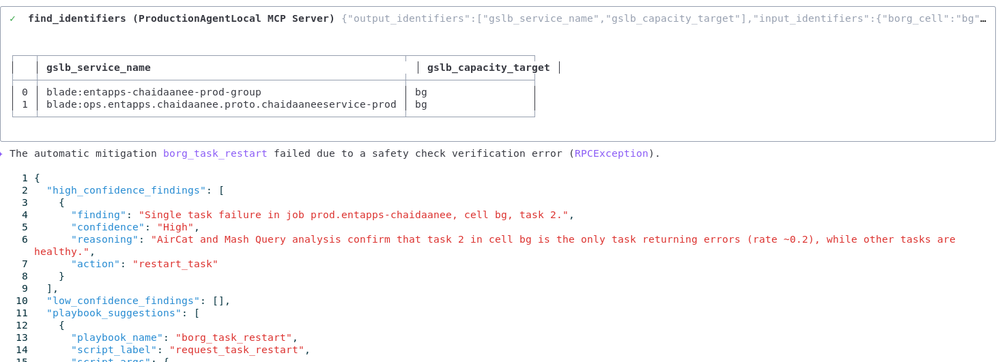
This insight is crucial. It suggests the issue isn’t the cluster, but our specific binary or configuration. Because Gemini surfaced in seconds rather than minutes, we avoid chasing red herrings. The “stop the bleeding” phase is paused, and we move to investigation with minimal time lost.
Step 3: Root Cause and Long-Term Fix
Now that we know a simple restart won’t work, we need to find the bug. Since the infrastructure is healthy, the defect must be in the application logic. Ramón points Gemini to the source code. Since Google uses a massive monorepo, being able to pass a specific folder as context is powerful.
“Check the changes in /path/to/service/…”


Gemini starts fetching files, analyzing recent changes, and cross-referencing them with the production logs it pulled earlier. In under two minutes, it finds the culprit: a logic error in a recent configuration push.
Ramón asks:
“Can you make a CL fixing that issue?”
(Note: A CL, or Changelist, is the Google equivalent of a GitHub Pull Request).
Gemini generates the patch, creating a CL that reverts the bad configuration and applies a safeguard.

Gemini provides the instructions:
-
Review and approve the CL.
-
Submit the CL.
-
Wait for the automated rollout.
The code is fixed, the rollout begins, and the service recovers.
Step 4: The Postmortem
The fire is out, but the work isn’t done. SRE culture is built on the Postmortem: a blameless document that analyzes what went wrong so we can learn from it.
Writing postmortems can be tedious—gathering timestamps, linking logs, and recalling specific actions. Gemini CLI automates this with a Custom Command.

Enter Riccardo: “Ricc” has worked with Google Cloud SREs for years, declared a few public outages and contributed to many Post Mortems; as a Developer Advocate, he also preaches about the Art of the Post Mortem , Art of SLOs, and Incident Management to Operators. He authored a Custom Command within ProdAgent which helps create Post Mortems, build timelines and Action Items.
Ramón runs his postmortem command. The tool:
-
Scrapes the conversation history, metrics, and logs from the incident.
-
Populates a CSV timeline of all relevant events.
-
Generates a Markdown document based on our standard SRE Postmortem template.
-
Suggests Action Items (AIs) to prevent reoccurrence.


Finally, Gemini uses the Model Context Protocol (MCP) to interact with our issue tracker:
-
Create Bugs: It files the Action Items as real bugs in the issue tracker.
-
Assign Owners: It assigns them to the relevant engineers.
-
Export Doc: It pushes the final Postmortem to Google Docs.

Conclusion
We just walked through a full incident lifecycle—from a chaotic 3 AM page to a finalized Postmortem—driven entirely from the terminal.
By using Gemini CLI, we connected the reasoning capabilities of Gemini 3 with real-world operational data. We didn’t just ask a chatbot for advice; we used an agent to execute tools, analyze live logs, generate a code patch, and roll it out to production. This direct integration is what allows us to aggressively reduce MTTM and minimize Bad Customer Minutes.
While this story used some Google-internal tools, the pattern is universal. You can build this workflow today:
-
Gemini CLI is open for everyone.
-
MCP Servers allow you to connect Gemini to your own tools (Grafana, Prometheus, PagerDuty, Kubernetes, ..).
-
Custom Commands let you automate your specific team workflows, just like our Postmortem generator.
The Virtuous Cycle
Perhaps the most exciting part is what happens next. That Postmortem we just generated? It becomes training data. By feeding past Postmortems back into Gemini, we create a virtuous loop of self-improvement: the output of today’s investigation becomes the input for tomorrow’s solution.
Check out geminicli.com to find extensions for your stack and start eliminating toil.