Every day, thousands of hours of new video content sits waiting to be discovered. Most of it lives in long-form, horizontal formats, while audiences are scrolling through vertical feeds on their phones.
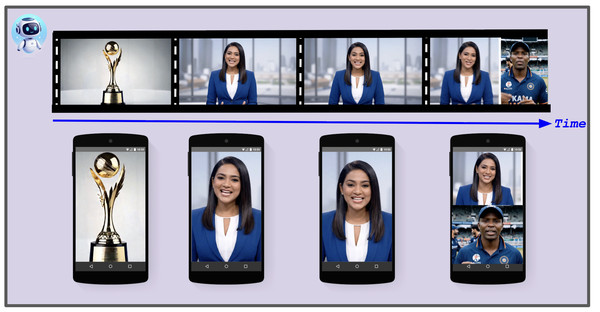
Glance, a mobile-first content platform, knows this challenge well. The company processes 1-2 hour videos from sources like podcasts, news reports, movies, and web series, and transforms them into 30 to 180-second vertical clips optimized for mobile lock screens. With daily volume projected to grow from 3,500 to over 10,000 videos per day, manual editing wasn’t a realistic path forward.
The solution also needed to go beyond simple cropping. It required the intelligence to identify and center the primary speaker, or dynamically split the screen to stack speakers vertically during conversations, preserving the context that makes content worth watching.
Here’s how Glance’s video generation solution works.
Building for the lock screen era
The goal was to create a complete pipeline that takes a long-form landscape video (16:9) and outputs multiple ready-to-publish short-form portrait videos (9:16). The solution needed to handle:
-
Key Moment Identification: Finding the most engaging 60-second segments within hours of long-form footage
-
Active Speaker Detection: Identifying who’s talking in each frame and positioning them at the top of a split screen. This includes distinguishing between a static image and a live person to ensure the crop focuses on the actual speaker.
-
Split Screen Detection: Recognizing interview layouts (common in news broadcasts) and stacking the frames vertically to preserve conversation context
-
Intelligent Reframing: Converting a multi-speaker, wide-screen shot into a focused, vertical frame without losing context
-
Dynamic Caption Highlighting: Generating word-level timestamps for “Karaoke-style” captions that increase engagement on silent-by-default mobile screens
-
Automated Branding: Applying masks, logos, and overlays programmatically to maintain brand consistency across all videos
The final technical solution uses Google Cloud Speech-to-Text v2, Gemini, and the Google Vision API, combined with custom video manipulation using Samurai (an open-source object tracking tool), OpenCV and MoviePy.
Architecture overview
The pipeline is divided into three distinct modules.
Fig. 2: High-level architecture
Module 1: Video clipping
This module converts long videos to transcripts, identifies key segments, and clips the video. Accuracy matters here: precise word-level timestamps ensure clips start and end exactly where they should.
Fig. 3: Video Clipping Workflow
The process involves audio extraction, speech-to-text transcription, and timestamp identification using generative AI. The module performs the following key functions:
-
Audio extraction: Extracting the audio from the original video file.
-
Speech-to-text transcription: Converting audio into text with precise timestamps for each word
-
Segment identification: Using Gemini 2.5 Flash (aka Nano Banana) to analyze transcripts text and identify optimal start and end timestamps for short video clips
-
Video clipping: Clipping the video into short segments based on the identified timestamps
-
Transcript validation: Using Gemini to verify phrases and words are accurately captured (this step does not validate word timing)
The output is a set of short video clips, each paired with its time-aligned transcript, ready for the next stage: the Intelligent Reframing Engine.
Module 2: Intelligent Reframing Engine
The core technical work here is converting a horizontal 16:9 frame into a compelling 9:16 vertical frame. A simple center crop often cuts out key speakers or action, so our solution uses a multi-stage scene analysis pipeline.
Fig. 4: Intelligent reframing engine
Active speaker detection
To know what to crop, we first need to know who’s talking. This happens on a frame-by-frame basis using the face detection capabilities of the Google Cloud Vision API.
Fig. 5: Active speaker detection
-
The liveness check: Differentiating a live speaker from a static image (like a photo on the wall or a graphic) is essential. This was achieved by tracking facial landmarks:
-
Mouth movement: Calculating the normalized distance between upper and lower lip landmarks
-
Head movement: Tracking changes in head pose angles (pan, roll, tilt)
-
A face must show consistent animation in these cues to be classified as a “live” participant
Quantifying engagement: Once confirmed as live, we calculate an activity score based on:
-
Mouth openness
-
Emotional fluctuation (changes in joy, surprise, etc., provided by Vision API)
Primary speaker identification: The final decision uses a liveness ratio:animated frames divided by total frames where the face appears. The person with the ratio closest to 1.0 (meaning they were consistently animated on screen) is designated as the primary speaker.
One edge case addressed during the development was a static background image appearing behind a live news anchor (as shown in Fig. 6). The liveness check handles this correctly because the static image shows no facial animation.
Fig. 6: Scenario with one active speaker and one static background image
Split-screen detection
This step addresses interview scenarios where two subjects appear on opposite sides of the landscape frame. The system detects split-screen layouts and stacks the two halves vertically to maintain conversation context.
Fig. 7: Video reformatting
With active speaker detection complete, the system uses the primary speaker’s location to identify split-screen segments. The goal is to find the precise dividing line between panels, enabling the video to be reformatted into a vertical, top-and-bottom layout. Two complementary approaches accomplish this:
Approach 1: Continuous face tracking with Samurai
This method uses Samurai, an open-source object tracking tool, to follow the primary speaker continuously. The trajectory is analyzed for split-screen layouts based on:
-
Consistent off-center positioning: The speaker remains on one side of the screen (e.g., left or right half), indicating a split panel rather than free movement across the frame.
-
Vertical dividing line detection: Image analysis identifies a persistent vertical line separating the two panels.
- Background discontinuity analysis: Differences in color, texture, and scenery between the speaker’s background and the opposite side confirm two separate video feeds.
Fig. 8: Background discontinuity analysis
Approach 2: Frame-by-frame detection with Google Cloud Vision API
This approach uses Cloud Vision API‘s face detection to identify split-screen layouts based on the primary speaker’s face location:
-
Off-center face: Consistent face detection in one region (such as the left 40% of the frame) flags a potential split screen.
-
Proximate dividing line: Vertical lines between the face and the screen center confirm a panel boundary.
-
Contrasting backgrounds: Inconsistent backgrounds between the speaker’s side and the far side confirm the split-screen layout.
The output: Vertical stacking
Once the system recognizes a split-screen, it performs a digital cut-and-paste. This preserves both speakers and their reactions in a mobile-native format.
Automated reformatting
With the scene analysis complete, the OpenCV2-based solution intelligently applies the appropriate reframing rule to each segment:
-
Single speaker crop: For scenes with one primary speaker, the system anchors the 9:16 frame to the speaker’s face, keeping them centered. -
Split screen: When a split is detected, the system slices the frame along the dividing line and stacks the panels vertically (left panel on top, right panel on bottom). -
Multi-speaker crop: For scenes with multiple people (not a formal split), the system focuses the crop on the most prominent speaker or the face closest to the center. -
Fallback: If no faces are detected (e.g., graphics or wide shots), the system applies a center crop or horizontal padding (letterboxing).
Two final techniques ensure a polished look:
-
Short scene merging: Segments shorter than a defined threshold merge with the preceding or following scene, eliminating flicker.
-
Camera smoothing: When focus shifts between speakers, a virtual camera effect creates a slow pan from one position to the next, rather than an abrupt cut.
Module 3: Finishing and branding
The final stage ensures the clips are ready for immediate publication, focusing on viewer engagement and brand reinforcement.
Dynamic caption highlighting
Using the word-level timestamps from the speech-to-text module, the system overlays highlighted captions with MoviePy. This involves:
Fig. 9: Dynamic caption highlighting
-
Sentence reconstruction: Grouping individual words into readable lines that adhere to character limits
-
Highlighting: The currently spoken word is highlighted in a distinct color (mustard yellow) against a black background, a proven method for increasing engagement when videos play without sound.
Masking and logo placement
Two overlay techniques maintain consistent branding across all videos:
-
Mask placement: A PNG mask with an alpha channel resizes the video to fit precisely into the transparent area. The mask’s opaque regions (such as colored bars) serve as a dedicated background for captions and persistent graphics.
- Logo overlay: The brand logo is placed onto the video based on configurable parameters for position (top-right, bottom-left, and so on), size, and margin.
Fig. 10: Mask and logo placement
Conclusion
Glance’s video pipeline demonstrates what becomes possible when AI handles the repetitive, judgement-intensive work of video editing. By combining speech-to-text transcription, computer vision, and generative AI, the system transforms thousands of long-form videos into mobile-ready clips each day, preserving narrative context while optimizing for vertical viewing.
The approach offers a template for any organization sitting on long-form video archives. Rather than choosing between scale and quality, automated pipelines can deliver both.
If you’re exploring similar video processing, content transformation, or media AI projects, the Google Cloud consulting team is eager to connect and explore the possibilities. For more on the AI products used in solutions Glance’s this, visit our AI & ML Products page.
This solution was a collaborative effort between Glance ( Pradeep Tiwari , Himanshu Aggarwal) and Google Cloud Consulting (Sharmila Devi, Jinyeong Yim, Rohit Sroch, Neeraj Shivhare and Kinjal Singh).