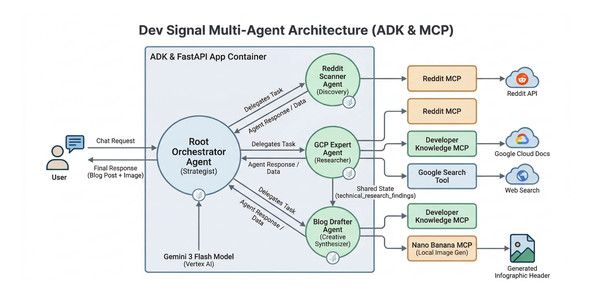
In support of our mission to accelerate the developer journey on Google Cloud, we built Dev Signal: a multi-agent system designed to transform raw community signals into reliable technical guidance by automating the path from discovery to expert creation.
In part 1 and part 2 of this series, we established the essential groundwork by standardizing the core capabilities through the Model Context Protocol (MCP) and constructing a multi-agent architecture integrated with the Vertex AI memory bank to provide long-term intelligence and persistence. Now, we’ll explore how to test your multi-agent system locally!
If you’d like to dive straight into the code and explore it at your own pace, you can clone the repository here.
Testing the agent Locally
Before transitioning your agentic system to Google Cloud Run, it is essential to ensure that its specialized components work seamlessly together on your workstation. This testing phase allows you to validate trend discovery, technical grounding, and creative drafting within a local feedback loop, saving time and resources during the development process.
In this section, you will configure your local secrets, implement environment-aware utilities, and use a dedicated test runner to verify that Dev Signal can correctly retrieve user preferences from the Vertex AI memory bank on the cloud. This local verification ensures that your agent’s “brain” and “hands” are properly synchronized before moving to deployment.
Environment Setup
Create a .env file in your project root. These variables are used for local development and will be replaced by Terraform/Secret Manager in production.
Paste this code in dev-signal/.env and update with your own details.
Note: GOOGLE_CLOUD_LOCATION is set as global because that is where Gemini-3-flash-preview is supported. We will use GOOGLE_CLOUD_LOCATION for the model location.
- code_block
- <ListValue: [StructValue([(‘code’, ‘# Google Cloud ConfigurationrnGOOGLE_CLOUD_PROJECT=your-project-idrnGOOGLE_CLOUD_LOCATION=globalrnGOOGLE_CLOUD_REGION=us-central1rnGOOGLE_GENAI_USE_VERTEXAI=TruernAI_ASSETS_BUCKET=your_bucket_namernrn# Reddit API CredentialsrnREDDIT_CLIENT_ID=your_client_idrnREDDIT_CLIENT_SECRET=your_client_secretrnREDDIT_USER_AGENT=my-agent/0.1rnrn# Developer Knowledge API KeyrnDK_API_KEY=your_api_key’), (‘language’, ”), (‘caption’, <wagtail.rich_text.RichText object at 0x7fadd045a070>)])]>
Helper Utilities
Create a new directory for your application utils.
- code_block
- <ListValue: [StructValue([(‘code’, ‘cd dev_signal_agentrnmkdir app_utilsrncd app_utils’), (‘language’, ”), (‘caption’, <wagtail.rich_text.RichText object at 0x7fadd045afd0>)])]>
Environment configuration
This module standardizes how the agent discovers the active Google Cloud Project and Region, ensuring a seamless transition between development environments. Using load_dotenv(), the script first checks for local configurations before falling back to google.auth.default() or environment variables to retrieve the Project ID. This automated approach ensures your agent is properly authenticated and grounded in the correct cloud context without requiring manual configuration changes.
Beyond basic project discovery, the script provides a robust Secret Management layer. It attempts to resolve sensitive credentials, such as Reddit API keys, first from the local environment (for rapid development) and then dynamically from the Google Cloud Secret Manager API for production security. By returning these as a dictionary rather than injecting them into environment variables, the module maintains a clean security posture.
The script further calibrates the environment by distinguishing between global and regional requirements for different AI services. It specifically assigns the “global” location for models to access cutting-edge preview features while designating a regional location, such as us-central1, for infrastructure like the Vertex AI Agent Engine. By finalizing this setup with a global SDK initialization, the module integrates these settings into the session, allowing the rest of your application to interact with models and memory banks without having to repeatedly pass project or location parameters.
Paste this code in dev_signal_agent/app_utils/env.py
- code_block
- <ListValue: [StructValue([(‘code’, ‘import osrnimport google.authrnimport vertexairnfrom google.cloud import secretmanagerrnfrom dotenv import load_dotenvrnrndef _fetch_secrets(project_id: str):rn “””Fetch secrets from Secret Manager and return them as a dictionary.”””rn secrets_to_fetch = [“REDDIT_CLIENT_ID”, “REDDIT_CLIENT_SECRET”, “REDDIT_USER_AGENT”, “DK_API_KEY”]rn fetched_secrets = {}rnrn # First, check local environment (for local development via .env)rn for s in secrets_to_fetch:rn val = os.getenv(s)rn if val:rn fetched_secrets[s] = valrnrn # If keys are missing (common in production), fetch from Secret Manager APIrn if len(fetched_secrets) < len(secrets_to_fetch):rn client = secretmanager.SecretManagerServiceClient()rn for secret_id in secrets_to_fetch:rn if secret_id not in fetched_secrets:rn name = f”projects/{project_id}/secrets/{secret_id}/versions/latest”rn try:rn response = client.access_secret_version(request={“name”: name})rn # DO NOT set os.environ[secret_id] here. rn # Keep it in this dictionary only.rn fetched_secrets[secret_id] = response.payload.data.decode(“UTF-8″)rn except Exception as e:rn print(f”Warning: Could not fetch {secret_id} from Secret Manager: {e}”)rnrn return fetched_secretsrnrndef init_environment():rn “””Consolidated environment discovery.”””rn load_dotenv()rn try:rn _, project_id = google.auth.default()rn except Exception:rn project_id = os.getenv(“GOOGLE_CLOUD_PROJECT”)rn rn model_location = os.getenv(“GOOGLE_CLOUD_LOCATION”, “global”)rn service_location = os.getenv(“GOOGLE_CLOUD_REGION”, “us-central1”)rn rn secrets = {}rn if project_id:rn vertexai.init(project=project_id, location=service_location)rn # Fetch secrets into a local variablern secrets = _fetch_secrets(project_id)rn rn return project_id, model_location, service_location, secrets’), (‘language’, ‘lang-py’), (‘caption’, <wagtail.rich_text.RichText object at 0x7fadd045aaf0>)])]>
Local testing script
The Google ADK comes with a built-in Web UI, This UI is excellent for visualizing agent logic and tool composition.
You can launch it by running in the project root:
- code_block
- <ListValue: [StructValue([(‘code’, ‘uv run adk web’), (‘language’, ”), (‘caption’, <wagtail.rich_text.RichText object at 0x7fadcf8e44f0>)])]>
However, the default Web UI will not test the long-term memory integration described in this tutorial because it is not pre-connected to a Vertex AI memory session. By default, the generic UI often relies on in-memory services that do not persist data across sessions. Therefore, we use the dedicated test_local.py script to explicitly initialize the VertexAiMemoryBankService. This ensures that even in a local environment, your agent is communicating with the real cloud-based memory bank to validate preference persistence.
The test_local.py script:
-
Connects to the real Vertex AI Agent Engine in the cloud for memory storage.
-
Uses an in-memory session service for local chat history (so you can wipe it easily).
-
Run a chat loop where you can talk to your agent.
Go back to the root folder dev-signal:
- code_block
- <ListValue: [StructValue([(‘code’, ‘cd ../..’), (‘language’, ”), (‘caption’, <wagtail.rich_text.RichText object at 0x7fadcf8e41f0>)])]>
Paste this code in dev-signal/test_local.py
- code_block
- <ListValue: [StructValue([(‘code’, ‘import asynciornimport osrnimport google.authrnimport vertexairnimport uuidrnfrom dotenv import load_dotenvrnfrom google.adk.runners import Runnerrnfrom google.adk.memory.vertex_ai_memory_bank_service import VertexAiMemoryBankServicernfrom google.adk.sessions import InMemorySessionServicernfrom vertexai import agent_enginesrnfrom google.genai import typesrnfrom dev_signal_agent.agent import root_agentrnrn# Load environment variablesrnload_dotenv()rnrnasync def main():rn # 1. Setup Configurationrn project_id = os.getenv(“GOOGLE_CLOUD_PROJECT”)rn # Agent Engine (Memory) MUST use a regional endpointrn resource_location = “us-central1″rn agent_name = “dev-signal”rn rn print(f”— Initializing Vertex AI in {resource_location} —“)rn vertexai.init(project=project_id, location=resource_location)rnrn # 2. Find the Agent Engine Resource for Memoryrn existing_agents = list(agent_engines.list(filter=f”display_name={agent_name}”))rn if existing_agents:rn agent_engine = existing_agents[0]rn agent_engine_id = agent_engine.resource_name.split(“/”)[-1]rn print(f”✅ Using persistent Memory Bank from Agent: {agent_engine_id}”)rn else:rn print(f”❌ Error: Agent Engine ‘{agent_name}’ not found. Please deploy with Terraform first.”)rn returnrnrn # 3. Initialize Servicesrn # We use InMemorySessionService for easier local testing (IDs are flexible)rn # BUT we use VertexAiMemoryBankService for REAL cloud persistencern session_service = InMemorySessionService()rn rn memory_service = VertexAiMemoryBankService(rn project=project_id,rn location=resource_location,rn agent_engine_id=agent_engine_idrn )rnrn # 4. Create a Runnerrn runner = Runner(rn agent=root_agent,rn app_name=”dev-signal”,rn session_service=session_service,rn memory_service=memory_service rn )rnrn # 5. Run a Test Looprn user_id = “local-tester”rn rn print(“\n— TEST SCENARIO —“)rn print(“1. Start a session, tell the agent your preference (e.g., ‘write in rhymes’).”)rn print(“2. Type ‘new’ to start a FRESH session (local state wiped).”)rn print(“3. Ask for a blog post. The agent should retrieve your preference from the CLOUD memory.”)rn rn current_session_id = f”session-{str(uuid.uuid4())[:8]}”rn await session_service.create_session(rn app_name=”dev-signal”,rn user_id=user_id,rn session_id=current_session_idrn )rn print(f”\n— Chat Session (ID: {current_session_id}) —“)rnrn while True:rn user_input = input(“\nYou: “)rn rn if user_input.lower() in [“exit”, “quit”]:rn breakrn rn if user_input.lower() == “new”:rn # Simulate starting a completely fresh sessionrn current_session_id = f”session-{str(uuid.uuid4())[:8]}”rn await session_service.create_session(rn app_name=”dev-signal”,rn user_id=user_id,rn session_id=current_session_idrn )rn print(f”\n— Fresh Session Started (ID: {current_session_id}) —“)rn print(“(Local history is empty, retrieval must come from Memory Bank)”)rn continuernrn print(“Agent is thinking…”)rn async for event in runner.run_async(rn user_id=user_id,rn session_id=current_session_id,rn new_message=types.Content(parts=[types.Part(text=user_input)])rn ):rn if event.content and event.content.parts:rn for part in event.content.parts:rn if part.text:rn print(f”Agent: {part.text}”)rn rn if event.get_function_calls():rn for fc in event.get_function_calls():rn print(f”?️ Tool Call: {fc.name}”)rnrnif __name__ == “__main__”:rn asyncio.run(main())’), (‘language’, ‘lang-py’), (‘caption’, <wagtail.rich_text.RichText object at 0x7fadcf8e4760>)])]>
Running the Test
First, ensure you have your Application Default Credentials set up:
- code_block
- <ListValue: [StructValue([(‘code’, ‘gcloud auth application-default login’), (‘language’, ”), (‘caption’, <wagtail.rich_text.RichText object at 0x7fadcf8e4d90>)])]>
Then run the script:
- code_block
- <ListValue: [StructValue([(‘code’, ‘uv run test_local.py’), (‘language’, ”), (‘caption’, <wagtail.rich_text.RichText object at 0x7fadcf8e4430>)])]>
Test Scenario
This scenario validates the full end-to-end lifecycle of the agent: from discovery and research to multimodal content creation and long-term memory retrieval.
Phase 1: Teaching & Multimodal Creation (Session 1)
Goal: Establish technical context and set a specific stylistic preference.
Discovery
Ask the agent to find trending Cloud Run topics.
Input: "Find high-engagement questions about AI agents on Cloud Run from the last 21 days."


Research
Instruct the agent to perform a deep dive on a specific result.
Input: "Use the GCP Expert to research topic #1."

Personalization
Request a blog post and explicitly set your style preference.
Input: "Draft a blog post based on this research. From now on, I want all my technical blogs written in the style of a 90s Rap Song."

Image generation
Ask the agent to generate an image that demonstrates the main ideas in the blog using the Nano Banana Pro tool. The image would be saved to your bucket in Google Cloud and you should get the path to see it which will look like this: https://storage.mtls.cloud.google.com/...

Phase 2: Long-Term Memory Recall (Session 2)
Goal: Verify the agent recalls preferences across a completely fresh session.
-
Type
newin the console to wipe local session history and start a fresh state. -
Retrieval) Inquire about your stored preferences to test the Vertex AI memory bank.
-
Input:
"What are my current topics of interest and what is my preferred blogging style?"
Verification: Confirm the agent successfully retrieves your “AI Agents on Cloud Run” interest and “Rap” style from the cloud.

Final Test: Ask for a new blog on a different topic (e.g., “GKE Autopilot”) and ensure it is automatically written as a rap song without being prompted.
Summary
In this part of our series we focused on verifying the agent’s functionality in a local environment before proceeding to cloud deployment. By configuring local secrets and utilizing environment-aware utilities, we used a dedicated test runner to confirm that the core reasoning and tool logic are properly integrated. We successfully validated the full lifecycle: from Reddit discovery to expert content creation, confirming that the agent correctly retrieves preferences from the cloud-based Vertex AI memory bank even in completely fresh sessions.
Ready to run the test scenario yourself? Clone the repository and try the test_local.py script to see ‘Dev Signal’ retrieve your preferences from the Vertex AI memory bank in real-time. For a deeper dive into the underlying mechanics of memory orchestration, check out this quickstart guide.
In the final part of this series, we will transition our prototype into production service on Google Cloud Run using Terraform for secure infrastructure and explore the roadmap to production excellence through continuous evaluation and security
Special thanks to Remigiusz Samborski for the helpful review and feedback on this article.