AI agents that can browse the web open powerful possibilities—from research automation to real-time data gathering. However, giving an AI agent unrestricted internet access raises security and compliance concerns. What if the agent accesses unauthorized websites? What if sensitive data is exfiltrated to external domains?
Amazon Bedrock AgentCore provides managed tools that enable AI agents to interact with the web (Browser), execute code (Code Interpreter), and host agents (Runtime). When deployed in an Amazon Virtual Private Cloud (Amazon VPC), you can control tool network access using AWS Network Firewall to implement domain-based filtering. AWS Network Firewall also provides you with managed rules to help reduce access to botnets, known-malware domains, and other high-risk resources.
In this post, we show you how to configure AWS Network Firewall to restrict AgentCore resources to an allowlist of approved internet domains. You can use this architecture to:
- Permit access only to specified domains (for example, wikipedia.org, stackoverflow.com)
- Explicitly block certain categories (e.g., social media sites) using rule templates
- Log the connection attempts for audit and compliance alignment
- Apply a default-deny policy for unspecified domains
This post focuses on domain-level filtering using SNI inspection — the first layer of a defense-in-depth approach. For DNS-level filtering and content inspection techniques, see Going further at the end of this post. For inbound access control (restricting who can invoke your agents), you can also see Resource-based policies for Amazon Bedrock AgentCore. These support conditions like aws:SourceIp, aws:SourceVpc, and aws:SourceVpce. These controls are complementary layers in a defense in depth strategy.
Why this matters: Enterprise security requirements
Customers deploying AI agents in regulated industries have consistent security requirements around network ingress and egress control:
Enterprise organizations with high security requirements
Customers in regulated industries conducting security reviews for AI agent deployments consistently ask about network isolation and egress control, requiring detailed explanations of how agent traffic is controlled and audited. These customers want assurance that agent runtime endpoints remain private, and that additional security controls like web application firewall protections are available.
Multi-tenant SaaS providers
Enterprise software as a service (SaaS) providers require DNS-level allowlisting and denylisting because their multi-tenant architectures need per-customer network policies. For example, Customer A might need to allow domains that Customer B blocks. Common requirements include:
- Execution-specific blocking (prevent access to certain domains during specific browser launches)
- Regional restrictions (block website categories in specific regions)
- Category-based rules (disable gambling or social media sites through pre-packaged rule sets)
Security vulnerability mitigation and compliance audit requirements
Security teams evaluating AI agents have identified that agents can be tricked into navigating to unintended sites through prompt injection attacks. Custom URL allowlists reduce the attack surface by restricting the browser to approved domains, regardless of what the agent is instructed to do. Domain-based egress filtering provides the logging and access control visibility that security teams often need for their security monitoring processes.
Solution overview
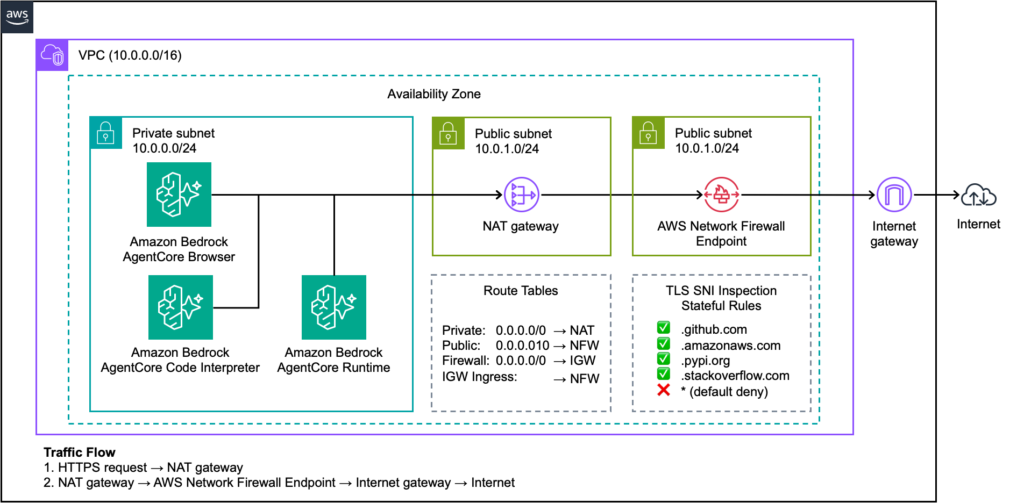
The solution deploys AgentCore Browser in a private subnet with no direct internet access. The outbound traffic routes through AWS Network Firewall, which inspects TLS Server Name Indication (SNI) headers to determine the destination domain and apply filtering rules. You can also monitor Network Firewall actions taken to restrict traffic through the native Network Firewall integration with Amazon CloudWatch metrics.
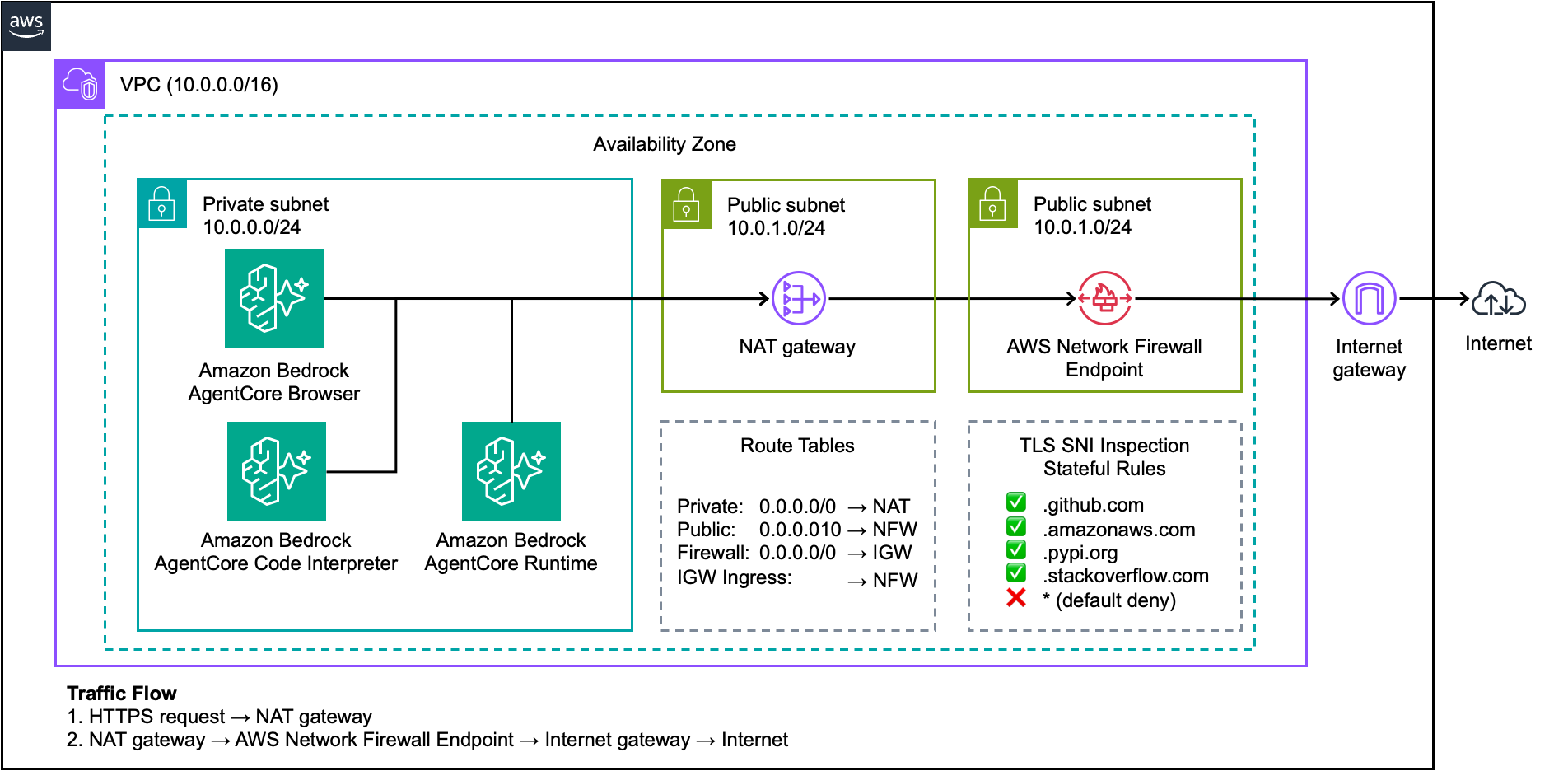
Figure 1: AgentCore deployment with AWS Network Firewall and domain-based egress filtering
The architecture includes:
- Private subnet: Hosts AgentCore Browser instances with no public IP addresses
- Public subnet: Contains the NAT Gateway for outbound connectivity
- Firewall subnet: Hosts the Network Firewall endpoint
- Four route tables: Control traffic flow through the firewall for both outbound requests and return traffic
Traffic flow
- AgentCore Runtime executes the agent and invokes the AgentCore Browser tool
- AgentCore Browser initiates an HTTPS request from the private subnet
- The private subnet route table directs traffic to the NAT Gateway in the public subnet
- The NAT Gateway translates the private IP address and forwards the request to the Network Firewall endpoint
- Network Firewall inspects the TLS SNI header to identify the destination domain
- If the domain matches an
allowlistrule, the firewall forwards traffic to the Internet Gateway - The Internet Gateway routes approved traffic to the external destination
- Return traffic follows the symmetric path back through the firewall to the agent
This architecture helps make sure that the browser traffic is inspected and filtered, regardless of the destination.
Note: SNI-based filtering helps control which domains agents connect to at the TLS layer. For DNS-level control, including controls to help prevent DNS tunneling and exfiltration, pair this with Amazon Route 53 Resolver DNS Firewall. DNS Firewall helps address a limitation of SNI inspection: an agent could potentially resolve a blocked domain through DNS and connect by IP address directly.
Prerequisites
Before you begin, make sure that you have:
- An AWS account with permissions to create VPC resources, Network Firewall, and IAM roles
- AWS Command Line Interface (AWS CLI) version 2.x configured with appropriate credentials
- Access to Amazon Bedrock AgentCore
- Basic familiarity with VPC networking concepts
Walkthrough
For the complete step-by-step VPC and Network Firewall setup, see the Amazon Bedrock AgentCore VPC configuration documentation.
This section highlights the AgentCore Browser-specific configuration.
Step 1: Deploy resources using the CloudFormation template
Launch the CloudFormation template from the repository. You can keep the stack default values. However, make sure to add a stack name (for example, “agentcore-egress“) to the “Stack name” field, choose an Availability Zone on the “Availability Zone” menu, and include a valid existing bucket name on the “BucketConfigForOutput” parameter. Wait for the stack creation to complete, which typically takes 10 minutes. Continue with the following steps after the stack status changes to CREATE_COMPLETE.
Step 2: Review the IAM execution role
AgentCore Browser requires an IAM role with a trust policy for the Amazon bedrock-agentcore.amazonaws.com service:
{
  "Version": "2012-10-17",
  "Statement": [
    {
      "Effect": "Allow",
      "Principal": {
        "Service": "bedrock-agentcore.amazonaws.com"
      },
      "Action": "sts:AssumeRole"
    }
  ]
}
Step 3: Configure the Network Firewall allowlist
Create a stateful rule group with your approved domains. Note the leading dot (.) to match subdomains:
cat > allowlist-rules.json << 'EOF'
{
  "RulesSource": {
    "RulesSourceList": {
      "Targets": [
        ".wikipedia.org",
        ".stackoverflow.com",
        ".docs.aws.amazon.com",
        ".amazonaws.com",
        ".pypi.org",
        ".pythonhosted.org"
      ],
      "TargetTypes": ["HTTP_HOST", "TLS_SNI"],
      "GeneratedRulesType": "ALLOWLIST"
    }
  },
  "StatefulRuleOptions": {
    "RuleOrder": "STRICT_ORDER"
  }
}
EOF

aws network-firewall create-rule-group
  --rule-group-name browser-allowed-domains
  --type STATEFUL
  --capacity 100
  --rule-group file://allowlist-rules.json
  --region us-east-2
Important: Include .amazonaws.com in your allowlist if the browser requires AWS service access or use VPC Endpoints as an alternative.
Security consideration: The .amazonaws.com domain is a broad allowlist that permits access to hosted endpoints on AWS, including public Amazon Simple Storage Service (Amazon S3) buckets, Amazon API Gateway endpoints, and AWS Lambda function URLs. For tighter control, use VPC Endpoints for AWS service access and allowlist only the specific external domains your agents need.
For Code Interpreter: Consider adding “.pypi.org” and “.pythonhosted.org” if you need a pip package installation. Most common packages are pre-installed, making these domains optional for your use case.
Step 4: Configure the firewall policy
The firewall policy must use aws:drop_established as the default action. This allows TCP handshakes to complete (required for TLS SNI inspection) while dropping connections to non-allowed domains:
cat > firewall-policy.json << 'EOF'
{
  "StatelessDefaultActions": ["aws:forward_to_sfe"],
  "StatelessFragmentDefaultActions": ["aws:forward_to_sfe"],
  "StatefulRuleGroupReferences": [
    {
      "ResourceArn": "arn:aws:network-firewall:us-east-2:ACCOUNT_ID:stateful-rulegroup/browser-allowed-domains",
      "Priority": 1
    }
  ],
  "StatefulEngineOptions": {
    "RuleOrder": "STRICT_ORDER"
  },
  "StatefulDefaultActions": ["aws:drop_established"]
}
EOF
Do not use aws:drop_strict because it blocks TCP SYN packets before the TLS handshake, preventing SNI inspection.
Step 5: Create the security group
Create a security group that allows outbound traffic. The Network Firewall handles domain filtering, so the security group permits the egress:
# Create security group
aws ec2 create-security-group
  --group-name agentcore-egress-sg
  --description "AgentCore tools - egress only, filtered by Network Firewall"
  --vpc-id vpc-XXXXXXXXX
  --region us-east-2

# Allow all outbound traffic (Network Firewall handles filtering)
aws ec2 authorize-security-group-egress
  --group-id sg-XXXXXXXXX
  --protocol -1
  --port -1
  --cidr 0.0.0.0/0
  --region us-east-2

# Remove default inbound rules if present (AgentCore tools don't need inbound)
aws ec2 revoke-security-group-ingress
  --group-id sg-XXXXXXXXX
  --protocol -1
  --port -1
  --cidr 0.0.0.0/0
  --region us-east-2
Step 6: Create the AgentCore Browser
Create the browser with VPC configuration pointing to your private subnet:
aws bedrock-agentcore-control create-browser
  --name my_secure_browser
  --execution-role-arn arn:aws:iam::ACCOUNT_ID:role/AgentCoreBrowserExecutionRole
  --network-configuration '{
    "networkMode": "VPC",
    "vpcConfig": {
      "securityGroups": ["sg-XXXXXXXXX"],
      "subnets": ["subnet-XXXXXXXXX"]
    }
  }'
  --region us-east-2
Step 6b: Create AgentCore Code Interpreter (Optional)
You can also deploy AgentCore Code Interpreter in the same VPC with the same firewall protection:
aws bedrock-agentcore-control create-code-interpreter
  --name my_secure_code_interpreter
  --network-configuration '{
    "networkMode": "VPC",
    "vpcConfig": {
      "securityGroups": ["sg-XXXXXXXXX"],
      "subnets": ["subnet-XXXXXXXXX"]
    }
  }'
  --region us-east-2
AgentCore Code Interpreter uses the same network path as Browser. If you need pip to install packages, make sure .pypi.org and .pythonhosted.org are in your allowlist.
Step 6c: Deploy agent on AgentCore Runtime (Optional)
For container-based agent deployments, use the same VPC configuration:
aws bedrock-agentcore-control create-agent-runtime
  --agent-runtime-name my_vpc_agent
  --role-arn arn:aws:iam::ACCOUNT_ID:role/AgentCoreRuntimeRole
  --agent-runtime-artifact '{
    "containerConfiguration": {
      "containerUri": "ACCOUNT_ID.dkr.ecr.us-east-2.amazonaws.com/my-agent:latest"
    }
  }'
  --network-configuration '{
    "networkMode": "VPC",
    "networkModeConfig": {
      "securityGroups": ["sg-XXXXXXXXX"],
      "subnets": ["subnet-XXXXXXXXX"]
    }
  }'
  --protocol-configuration '{"serverProtocol": "HTTP"}'
  --region us-east-2
AgentCore Runtime domain requirements depend on your model provider. Include .amazonaws.com for Amazon Bedrock model API calls or add the appropriate domains for other model providers your agent uses. Additionally, allow custom domains that your agent must access.
Step 7: Test the Configuration
Start a browser session and verify that the firewall rules work correctly:
# Start browser session
aws bedrock-agentcore start-browser-session
  --browser-identifier my_secure_browser-ABC123xyz
  --region us-east-2
Use the returned WebSocket URL with a browser automation tool like Playwright to test both allowed and blocked domains:
# test_firewall_rules.py

from playwright.sync_api import sync_playwright
import boto3
from botocore.auth import SigV4Auth
from botocore.awsrequest import AWSRequest

WEBSOCKET_URL = "wss://your-session-url"  # From start-browser-session response
REGION = "us-east-2"

# Sign the WebSocket URL with SigV4
session = boto3.Session(region_name=REGION)
credentials = session.get_credentials().get_frozen_credentials()
request = AWSRequest(method="GET", url=WEBSOCKET_URL.replace("wss://", "https://"))
SigV4Auth(credentials, "bedrock-agentcore", REGION).add_auth(request)
headers = dict(request.headers)

def test_domain(page, url, expected_success):
    try:
        response = page.goto(url, timeout=10000)
        success = response and response.status < 400
        status = "PASS" if success == expected_success else "FAIL"
        print(f"{status}: {url} - {'loaded' if success else 'blocked'}")
        return success == expected_success
    except Exception as e:
        success = False
        status = "PASS" if not expected_success else "FAIL"
        print(f"{status}: {url} - blocked ({type(e).__name__})")
        return not expected_success

with sync_playwright() as p:
    browser = p.chromium.connect_over_cdp(WEBSOCKET_URL, headers=headers)
    page = browser.new_page()

    # Test allowed domains (should load)
    test_domain(page, "https://wikipedia.org", expected_success=True)
    test_domain(page, "https://docs.aws.amazon.com", expected_success=True)

    # Test blocked domains (should timeout/fail)
    test_domain(page, "https://example.com", expected_success=False)
    test_domain(page, "https://twitter.com", expected_success=False)

    browser.close()
Expected results:
- Allowed domains (.wikipedia.org, .amazonaws.com) should load successfully.
- Blocked domains should time out after the TCP handshake or return connection errors.
Note: Some allowed domains like docs.aws.amazon.com depend on CDN resources from domains such as awsstatic.com and cloudfront.net. If pages on allowed domains fail to render fully, add the required CDN domains to your allowlist.
You can also check the firewall logs in CloudWatch for blocked connection attempts:
# View recent alert logs (blocked connections)
aws logs filter-log-events
  --log-group-name "/aws/network-firewall/agentcore-egress/alerts"
  --filter-pattern '{ $.event.alert.action = "blocked" }'
  --region us-east-2
  --start-time $(($(date +%s) - 300))000

# Verify firewall sync status before testing
aws network-firewall describe-firewall
  --firewall-name agentcore-egress-firewall
  --region us-east-2
  --query 'FirewallStatus.ConfigurationSyncStateSummary'
Troubleshooting: If allowed domains are blocked, verify:
- Firewall sync status shows IN_SYNC (rule changes take a few minutes)
- Domain entries include the leading dot (.wikipedia.org not wikipedia.org)
- Route tables are configured correctly for symmetric routing
- If you receive HTTP 403 errors on allowed domains, this is typically bot detection by the destination site, not a firewall block. Check CloudWatch ALERT logs to confirm—blocked connections will have explicit alert entries.
Best practices
- Use STRICT_ORDER evaluation: This facilitates predictable rule processing when combining
allowlistsanddenylists. - Include .amazonaws.com for AWS service access: Or use VPC Endpoints to avoid routing AWS API calls through the internet.
- Configure the IGW ingress route table: This is critical for symmetric routing. Without it, return traffic bypasses the firewall.
- Enable both ALERT and FLOW logs: ALERT logs capture blocked connections; FLOW logs provide connection metadata for the traffic.
- Wait for firewall sync: Rule changes take a few minutes to propagate. Verify ConfigurationSyncStateSummary: IN_SYNC before testing.
- Configure HOME_NET for multi-VPC architectures: By default, Network Firewall domain inspection only filters traffic originating from the deployment VPC’s Classless Inter-Domain Routing (CIDR) range. If you use a centralized firewall with AWS Transit Gateway to inspect traffic from multiple VPCs, you must configure the HOME_NET variable in your rule group to include the source CIDR ranges. Without this, traffic from other VPCs can bypass domain filtering.
Limitations and cost considerations
- Content inspection requires TLS inspection: By default, domain filtering operates on unencrypted TLS metadata (SNI headers) and can’t inspect encrypted request or response bodies. To inspect HTTPS content, enable TLS inspection on your Network Firewall and add Suricata rules that match on HTTP body content. SNI/Host header bypass risk: Network Firewall uses TLS SNI headers and HTTP Host headers—not IP addresses—to determine destination domains. If these headers are manipulated, traffic could bypass domain filtering. For high-security deployments, combine domain rules with IP-based rules for critical blocked destinations, or add DNS filtering as an additional layer. Additionally, consider pairing SNI-based rules with Route 53 DNS Firewall to help prevent agents from resolving blocked domains through DNS and connecting by IP address directly.
- HOME_NET scope in multi-VPC deployments: By default, Network Firewall domain inspection only applies to traffic originating from the deployment VPC’s CIDR range. If you use a centralized firewall with AWS Transit Gateway (multiple VPCs routing through a shared firewall), you must configure the HOME_NET variable in your rule group to include the source CIDR ranges. Without this, traffic from spoke VPCs bypasses domain inspection. See Stateful domain list rule groups for details.
- Costs will vary based on your usage. See NAT Gateway pricing and Network Firewall pricing for current rates.
Clean up
Delete resources in this order to avoid ongoing charges:
- Delete the AgentCore Browser
- Delete the Network Firewall (disable protection settings first)
- Delete the NAT Gateway
- Release the Elastic IP address
- Delete the subnets and route tables
- Detach and delete the Internet Gateway
- Delete the VPC
Note: AgentCore Browser and Code Interpreter create elastic network interfaces in your VPC. After deleting these resources, wait a few minutes for the network interface to release before deleting the security group, subnet, or VPC. If deletion fails, check for lingering network interfaces in the subnet and wait for them to detach.
Related resources
For more information, see the following resources.
- Amazon Bedrock AgentCore VPC configuration – VPC networking setup for AgentCore tools
- Deployment models for AWS Network Firewall – Architecture patterns for centralized and distributed firewall deployments
- Amazon Bedrock AgentCore documentation – Browser, Code Interpreter, and Agent Runtime configuration
- AWS Network Firewall rule groups – Domain list rule configuration reference
Going further
Domain filtering through SNI inspection is one layer of egress security. Depending on your requirements, consider these additional mitigations:
| Technique | What it does | Helps in scenarios where | Reference |
| Route 53 DNS Firewall | Helps block or allow DNS queries by domain and prevent DNS tunneling and exfiltration. | You need DNS-level filtering or protection against DNS-based data exfiltration. | Protect against advanced DNS threats |
| TLS inspection + Suricata DLP | Decrypt HTTPS, inspect request/response bodies with Suricata rules, help block sensitive data patterns (PII, credentials). | You need data loss prevention (DLP) for agent-generated traffic. | TLS inspection for encrypted egress traffic |
| Centralized inspection architecture | Route traffic from multiple VPCs through a shared inspection VPC with Network Firewall. | You run multiple AgentCore deployments and want centralized policy enforcement. | Deploy centralized traffic filtering |
When using TLS inspection, configure custom certificates on your AgentCore resources to trust the Network Firewall’s re-signing CA.
Conclusion
By combining Amazon Bedrock AgentCore tools with AWS Network Firewall, you can give AI agents controlled web access while maintaining security and compliance alignment. The domain-based filtering approach helps you define precisely which websites agents can access, block unwanted destinations, and log the connection attempts for audit purposes. This architecture addresses the security concerns raised by enterprise customers:
- FSI compliance: Provides the network isolation and audit logging required for CISO-level security reviews.
- Multi-tenant control: Enables per-customer or per-execution domain policies for SaaS providers.
- Prompt injection defense: Restricts agent navigation to approved domains, helping reduce the attack surface for prompt injection.
- Audit evidence: Generates CloudWatch logs that support compliance audit requirements.
For enterprises deploying AI agents that need internet access for research, data gathering, or API integrations, this pattern provides a production-ready approach to maintaining strict control over where that access leads. Rather than maintaining custom squid proxies or complex network infrastructure, you can use AWS managed services to implement enterprise-grade egress filtering in hours, not weeks.
For more information about AgentCore Browser, see the AgentCore Browser documentation.