
Exciting New Tools for Designers, June 2025
Another month, another roundup packed with design tools that use artificial intelligence features to supercharge your workflows.
Exciting New Tools for Designers, June 2025 Read More »
Another month, another roundup packed with design tools that use artificial intelligence features to supercharge your workflows.
Exciting New Tools for Designers, June 2025 Read More »

Developers building learning platforms like Udemy can save time and scale faster with a specialized file infrastructure. Here’s how it works. Continue reading The Developer’s Shortcut To Your Udemy-like Platform on SitePoint.
The Developer’s Shortcut To Your Udemy-like Platform Read More »
For years, I believed that drag-and-drop games — especially those involving rotation, spatial logic, and puzzle solving — were the exclusive domain of JavaScript. Until one day, I asked AI: “Is it possible to build a fully interactive Tangram puzzle game using only CSS?” The answer: “No — not really. You’ll need JavaScript.” That was all
Breaking Boundaries: Building a Tangram Puzzle With (S)CSS Read More »
Apple just resurrected skeuomorphism, but it’s hiding behind shiny buzzwords like “Liquid Glass.” Is this a stunning reinvention of UI or a glossy distraction from Siri’s ongoing failure? Either way, Apple’s new design looks incredible… until you try to read it.
How Apple Quietly Brought Skeuomorphism Back to Life Read More »
I recently came across an old jQuery tutorial demonstrating a “moving highlight” navigation bar and decided the concept was due for a modern upgrade. With this pattern, the border around the active navigation item animates directly from one element to another as the user clicks on menu items. In 2025, we have much better tools
Creating The “Moving Highlight” Navigation Bar With JavaScript And CSS Read More »
Gmail in 2025 should be more than an inbox—it should write your emails, follow up, and manage your communication for you. Why are we still typing replies when AI can understand tone, context, and intent better than ever? The future isn’t inbox zero—it’s email that handles itself.
The Future of Gmail Isn’t an Inbox—It’s an Assistant That Writes Your Emails for You Read More »
The HTML popover attribute transforms elements into top-layer elements that can be opened and closed with a button or JavaScript. Most popovers can be light-dismissed, closing when the user clicks or taps outside the popup. Currently, HTML popover lacks built-in auto-close functionality, but it’s easy to add. Auto closing popups are useful for user interfaces
Creating an Auto-Closing Notification With an HTML Popover Read More »
The “I Only Use Figma” designer is convinced Figma can solve all of life’s problems, from wireframes to world peace. They’ll flex their Figma files like a secret society, leaving you wondering if they could design a better universe—if only it were in vector format.
The Figma Fanboy: Designing with Passion, Judgment, and a Lot of Auto-Layouts Read More »

In a previous article, we looked at some practical examples of how to code SVG by hand. In that guide, we covered the basics of the SVG elements rect, circle, ellipse, line, polyline, and polygon (and also g). This time around, we are going to tackle a more advanced topic, the absolute powerhouse of SVG
Decoding The SVG path Element: Line Commands Read More »
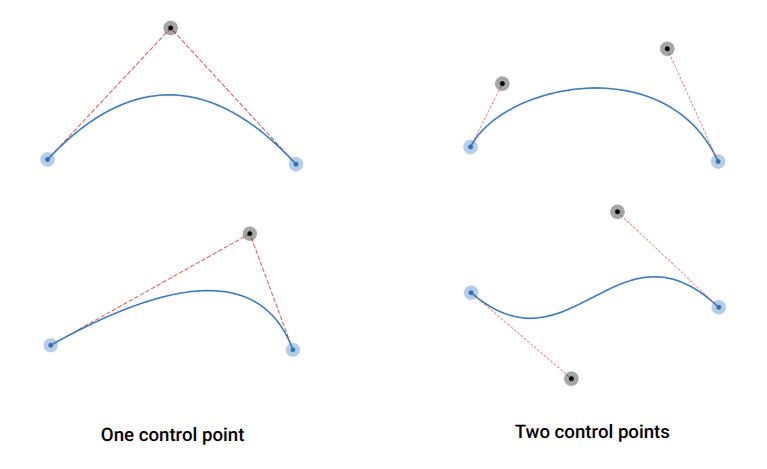
If you’re following along, this is the third post in a series about the new CSS shape() function. We’ve learned how to draw lines and arcs and, in this third part, I will introduce the curve command — the missing command you need to know to have full control over the shape() function. In reality,
Better CSS Shapes Using shape() — Part 3: Curves Read More »