Amazon Bedrock AgentCore is a managed service for running AI agents in production. You bring your agent code packaged as a container, and Bedrock AgentCore handles the operational concerns: scaling, session routing, health checking, and providing managed capabilities like conversation memory.
AWS.AgentCore.Hosting is the .NET library that connects your agent code to this service. It implements the HTTP communication, streaming responses, session management, and memory integration so you can focus on your agent’s logic rather than the infrastructure. Built on Microsoft Agent Framework, the library gives you access to the .NET AI ecosystem, such as tool calling, middleware, multi-agent workflows, and the Model Context Protocol (MCP), with a zero-friction path to production on AWS.
In this post, I’ll walk through building a customer support agent that can look up order status, remember what the customer already asked about, stream responses in real time, and deploy to production. Each section builds on the same agent and shows how to solve each piece of the problem.
What is a .NET Bedrock AgentCore application?
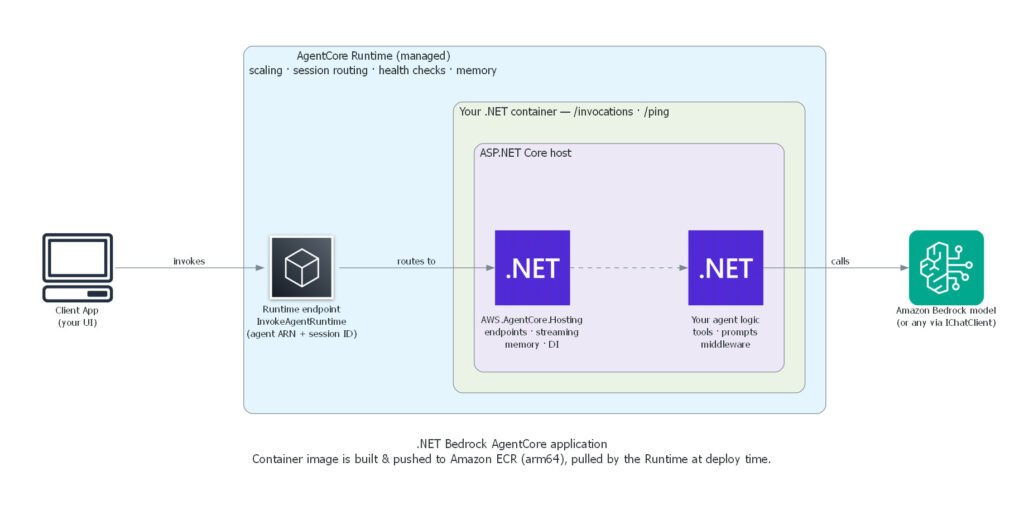
The following diagram shows how the pieces fit together at runtime:
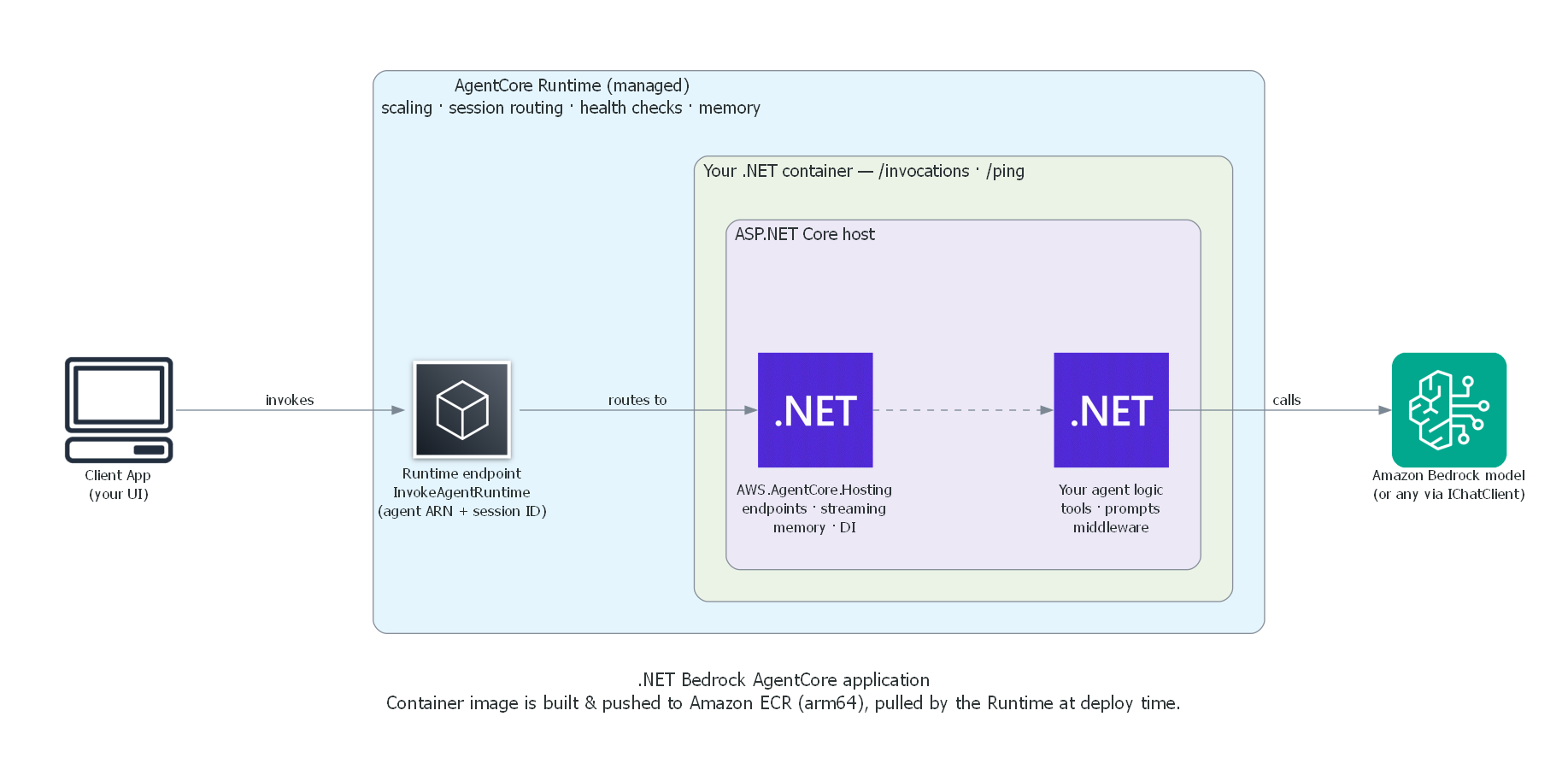 Your container hosts an ASP.NET Core application that includes AWS.AgentCore.Hosting as a dependency, which handles the HTTP communication the AgentCore Runtime expects. Your agent logic runs inside that host and calls out to Amazon Bedrock, or any other model provider, through the standard
 IChatClient interface.
Write your agent handler
AWS.AgentCore.Hosting provides two developer experiences:
- Source generator experience. This approach abstracts away the ASP.NET Core part of the application. Use it when you want to focus solely on your agent’s logic.
- Extension method experience. This approach provides extension methods to configure the application for Bedrock AgentCore. Use it when you want more control over the ASP.NET Core part of the application.
Source generator
After you annotate your classes, the source generator produces a Program.cs for you. The generated code creates a WebApplication, calls your ConfigureServices method, maps your handler to the AgentCore Runtime endpoint, and starts the host. You don’t need to write routing or hosting boilerplate. The following example shows a complete agent that uses the source generator:
using AWS.AgentCore.Hosting;
using Microsoft.Agents.AI;
using Microsoft.Extensions.AI;

[AgentCoreStartup]
public class Startup
{
    public void ConfigureServices(WebApplicationBuilder builder)
    {
        builder.AddAgentCore(options =>
        {
            options.ModelId = "global.anthropic.claude-sonnet-4-7";
            options.AgentOptions = new ChatClientAgentOptions
            {
                ChatOptions = new()
                {
                    Tools = [AIFunctionFactory.Create(GetOrderStatus)]
                }
            };
        });
    }

    [Description("Looks up the current status of a customer order.")]
    public static string GetOrderStatus([Description("The order ID.")] string orderId)
        => $"Order {orderId} shipped on July 3 and is expected to arrive tomorrow.";
}

public class Agent(AIAgent agent)
{
    [AgentCoreHandler]
    public async Task<string> HandleInvocation(
        PromptRequest request, AgentCoreRuntimeContext context, CancellationToken ct)
    {
        var session = await agent.CreateSessionAsync(cancellationToken: ct);
        var response = await agent.RunAsync(
            request.Prompt ?? "Hello!", session: session, cancellationToken: ct);
        return response.ToString();
    }
}

public record PromptRequest(string? Prompt);
A few rules to understand about this model:
- Discovery is by attribute, not naming convention. The source generator scans for
[AgentCoreStartup]and[AgentCoreHandler]at compile time. You can name your classes anything you want. - One handler per project. The generator expects exactly one method marked with
[AgentCoreHandler]. This is the single entry point the AgentCore Runtime invokes. - The handler supports DI parameter binding. Just like the extension method experience shown below, you can inject any registered service directly in the handler’s parameter list.
AIAgentin the example above is constructor-injected becauseAddAgentCore()automatically registers it (along withIChatClient,AgentCoreRuntimeContext, and the memory provider if configured). - Return type determines the response mode. Return
stringorTask<string>for a standard response. ReturnIAsyncEnumerable<string>for streaming (covered in the Stream responses section below).
Extension methods
If you prefer the Minimal API pattern or want more control over the ASP.NET Core application, use the extension method experience:
var builder = WebApplication.CreateBuilder(args);

builder.AddAgentCore(options =>
{
    options.ModelId = "global.anthropic.claude-sonnet-4-7";
    options.AgentOptions = new ChatClientAgentOptions
    {
        ChatOptions = new()
        {
            Tools = [AIFunctionFactory.Create(GetOrderStatus)]
        }
    };
});

[Description("Looks up the current status of a customer order.")]
static string GetOrderStatus([Description("The order ID.")] string orderId)
        => $"Order {orderId} shipped on July 3 and is expected to arrive tomorrow.";

var app = builder.Build();

app.MapAgentCore<PromptRequest>(async (PromptRequest request, AIAgent agent, CancellationToken ct) =>
{
    var session = await agent.CreateSessionAsync(cancellationToken: ct);
    var response = await agent.RunAsync(request.Prompt ?? "Hello!", session: session, cancellationToken: ct);
    return response.ToString();
});

app.Run();

public record PromptRequest(string? Prompt);
Both the preceding example and the source generator example produce an agent that listens on port 8080, accepts JSON at /invocations, and sends responses back to the AgentCore Runtime.
Select different models
The AddAgentCore() method supports three ways to provide the IChatClient from Microsoft.Extensions.AI. The precedence order is:
options.ChatClient(if provided)options.ModelId(if provided)- the
IChatClientalready registered in DI (if provided)
If several IChatClient instances are registered in DI, the most recently registered one is used, following standard dependency injection resolution. If none of the three are provided, AddAgentCore() throws an exception at startup so you get a clear error immediately rather than a null reference on first invocation.
The following example shows each of the three options:
// Option 1: Bedrock model ID (registers IAmazonBedrockRuntime automatically)
builder.AddAgentCore(options => { options.ModelId = "global.anthropic.claude-sonnet-4-7"; });

// Option 2: Explicit IChatClient (OpenAI, Anthropic, Ollama, etc.)
builder.AddAgentCore(options => { options.ChatClient = myOpenAIClient; });

// Option 3: Pre-register in DI (useful for custom pipelines)
builder.Services.AddSingleton<IChatClient>(myClient);
builder.AddAgentCore();
Resolve services with automatic DI
The handler supports dependency injection directly in its parameter list. The runtime resolves services from the container at invocation time:
app.MapAgentCore<PromptRequest>(async (
    PromptRequest request,
    AIAgent agent,
    AgentCoreRuntimeContext context,
    ILogger<Program> logger,
    IChatClient chatClient,
    CancellationToken ct) =>
{
    logger.LogInformation("SessionId={SessionId}, RequestId={RequestId}",
        context.SessionId, context.RequestId);

    var session = await agent.CreateSessionAsync(cancellationToken: ct);
    return (await agent.RunAsync(request.Prompt!, session: session, cancellationToken: ct)).ToString();
});
The AgentCoreRuntimeContext provides session and request metadata passed by the AgentCore Runtime, plus any custom headers configured on the runtime endpoint.
Stream responses
When a customer asks a detailed question like “what’s the return policy for my order?”, they shouldn’t have to wait while the model generates a full response. Return IAsyncEnumerable<string> to stream tokens as they’re produced:
app.MapAgentCore<PromptRequest>((PromptRequest request, AIAgent agent, CancellationToken ct) =>
{
    return StreamResponse(ct);

    async IAsyncEnumerable<string> StreamResponse([EnumeratorCancellation] CancellationToken ct = default)
    {
        var session = await agent.CreateSessionAsync(cancellationToken: ct);
        await foreach (var update in agent.RunStreamingAsync(
            request.Prompt ?? "Hello!", session: session, cancellationToken: ct))
        {
            if (!string.IsNullOrEmpty(update.Text))
                yield return update.Text;
        }
    }
});
Add conversation memory
When a customer asks “where’s my order?” and then follows up with “can you change the shipping address?”, they expect the agent to remember which order they’re talking about. You can add conversation context to your agent with AgentCore Memory, a managed service that stores and retrieves conversation history per session, so your agent maintains context across invocations and container restarts without you managing any storage infrastructure.
You provision a Memory resource through the AWS console, CLI, or CDK (see the AgentCore Memory documentation), which gives you a Memory ID. Pass that ID to your agent configuration:
builder.AddAgentCore(options =>
{
    options.MemoryId = "my-memory-id";
    options.ModelId = "global.anthropic.claude-sonnet-4-7";
});
With this single setting, the library automatically loads conversation history at the start of each invocation and saves new messages after the agent responds. Your agent code doesn’t need to handle history loading or storage.
The key to how this works is the SessionId on AgentCoreRuntimeContext. Each invocation from the AgentCore Runtime carries a session ID, set by the caller through the invoke API. The library combines that session ID with the Memory ID you configured to load and store history in the AgentCore Memory service. Two different users calling the same agent get separate sessions with separate histories. On the first invocation for a new session, the AgentCore Memory service returns empty history and the agent starts fresh.
If you deploy using dotnet aws deploy or with AWS’s Aspire integrations, the memory can also be provisioned for you as part of the deployment.
Add logging and guardrails with middleware
To get visibility into how your agent is performing, such as logging invocations, tracking latency, or adding guardrails, you can add middleware to the Microsoft Agent Framework pipeline:
builder.AddAgentCore(options =>
{
    options.ModelId = "global.anthropic.claude-sonnet-4-7";
    options.ConfigureAgent = agent => agent
        .AsBuilder()
        .Use((innerAgent, services) =>
        {
            var logger = services.GetRequiredService<ILogger<Program>>();
            return innerAgent.AsBuilder()
                .Use(async (messages, session, runOptions, next, ct) =>
                {
                    logger.LogInformation("Agent invoked. Message count: {Count}", messages.Count());
                    await next(messages, session, runOptions, ct);
                    logger.LogInformation("Agent completed.");
                })
                .Build();
        })
        .Build();
});
Middleware intercepts every agent invocation, letting you add logging, guardrails, caching, or custom pre/post-processing without modifying your agent’s core logic.
Aspire integration
With the agent logic in place, you need a way to run and test it alongside the frontend that customers will actually use. The Aspire.Hosting.AWS package provides AddAgentCoreRuntime<T>() for both local development and deployment to AWS.
Local development
During local development, AddAgentCoreRuntime<T>() runs the agent and its supporting services in-process so you can exercise the full experience on your machine:
var builder = DistributedApplication.CreateBuilder(args);

var agent = builder.AddAgentCoreRuntime<Projects.MyAgent>("my-agent")
    .WithAgentCoreStreaming()
    .WithAgentCoreMemory();

builder.AddProject<Projects.Frontend>("frontend")
    .WithReference(agent);

builder.Build().Run();
The preceding example starts three embedded in-process servers, with no Docker or separate processes required:
- Runtime emulator: mimics the AgentCore Runtime locally and invokes your agent
- Chat UI: provides a web interface for testing your agent interactively
- Memory emulator: provides an in-memory implementation of the AgentCore Memory APIs
Projects that call WithReference(agent) have their AgentCore SDK calls automatically routed to the local emulator. No additional configuration is required. Your agent handler is invoked the same way in local development and in production.
Deploying with Aspire
Recently AWS released preview support for deployment with Aspire, presented at Aspire Conf 2026. The deployment support was extended to include Bedrock AgentCore, building off of the local development workflow described in the preceding section. An advantage of the Aspire deployment is that it enables deployment of multiple connected projects as a single action.
When you run the aspire deploy CLI command with the Aspire sample from the preceding section, Aspire takes care of:
- Provisioning AgentCore Memory
- Deploying the “my-agent” app to Bedrock AgentCore, with the AgentCore Memory links set up so the agent automatically uses the provisioned memory
- Deploying the “frontend” to Amazon Elastic Container Service (Amazon ECS) and providing the deployed application with the agent’s ARN through the environment variable
AWS:Resources:<aspire-resource-name>:AgentRuntimeArn
You can customize the deployment to Bedrock AgentCore with the PublishAsAgentCoreRuntime extension method. The following example shows how to customize the request header allowlist:
builder.AddAgentCoreRuntime<Projects.AgentCore_StreamingAgent>("my-agent")
    .PublishAsAgentCoreRuntime(new Aspire.Hosting.AWS.Deployment.PublishAgentCoreRuntimeConfig
    {
        ConstructCfnRuntimeCallback = (construct, props) =>
        {
            props.RequestHeaderConfiguration = new CfnRuntime.RequestHeaderConfigurationProperty
            {
                RequestHeaderAllowlist = new string[] { "X-Custom-Header" }
            };
        }
    })
    .WithAgentCoreStreaming()
    .WithAgentCoreMemory();
Testing package
The AWS.AgentCore.Testing package provides the same emulator infrastructure that powers the Aspire integration, available as standalone servers for your integration tests. The runtime emulator bridges your test code and your agent, forwarding requests to your agent the same way the AgentCore Runtime does in production.
The following example shows how the pieces fit together in an integration test:
public class AgentIntegrationTest : IAsyncLifetime
{
    private WebApplication _agentApp;
    private WebApplication _runtimeEmulator;

    public async Task InitializeAsync()
    {
        // 1. Start your agent
        var builder = WebApplication.CreateBuilder();
        builder.AddAgentCore(options => { options.ModelId = "global.anthropic.claude-sonnet-4-7"; });
        _agentApp = builder.Build();
        _agentApp.MapAgentCore<PromptRequest>(async (PromptRequest req, AIAgent agent, CancellationToken ct) =>
        {
            var session = await agent.CreateSessionAsync(cancellationToken: ct);
            return (await agent.RunAsync(req.Prompt!, session: session, cancellationToken: ct)).ToString();
        });
        await _agentApp.StartAsync();

        // 2. Start the runtime emulator pointing at the agent
        var agentUrl = _agentApp.Urls.First();
        _runtimeEmulator = RuntimeEmulatorServer.Create(agentUrl, port: 0);
        await _runtimeEmulator.StartAsync();
    }

    [Fact]
    public async Task Agent_RespondsToPrompt()
    {
        // 3. Invoke through the emulator, same path as production
        var runtimeUrl = _runtimeEmulator.Urls.First();
        using var client = new HttpClient();
        var response = await client.PostAsJsonAsync($"{runtimeUrl}/invoke",
            new { prompt = "What is 2+2? Reply with just the number." });

        var body = await response.Content.ReadAsStringAsync();
        Assert.Contains("4", body);
    }

    public async Task DisposeAsync()
    {
        await _runtimeEmulator.StopAsync();
        await _agentApp.StopAsync();
    }
}
The preceding example lets you verify your agent’s behavior end-to-end without deploying to AWS.
Native AOT support
For minimal cold start times, deploy your agent as a Native AOT binary. Dependency injection parameter binding relies on reflection to resolve parameters at runtime, which isn’t available under Native AOT. For Native AOT, use the overload of MapAgentCore with a fixed handler signature, (TRequest, AgentCoreRuntimeContext, IServiceProvider, CancellationToken), instead of the flexible DI parameter binding from earlier sections. Your code can resolve services manually from IServiceProvider, and you pass a JsonSerializerContext so requests can be deserialized without reflection (Native AOT requires source-generated JSON serialization):
app.MapAgentCore<PromptRequest>(
    async (request, context, services, ct) =>
    {
        var agent = services.GetRequiredService<AIAgent>();
        var session = await agent.CreateSessionAsync(cancellationToken: ct);
        var response = await agent.RunAsync(
            request.Prompt ?? "Hello!", session: session, cancellationToken: ct);
        return response.ToString();
    },
    AppJsonContext.Default);

[JsonSerializable(typeof(PromptRequest))]
internal partial class AppJsonContext : JsonSerializerContext { }
If you prefer dependency injection similar to the source generator experience, the source generator annotations ([AgentCoreStartup], [AgentCoreHandler]) are Native AOT-compatible and handle the binding for you at compile time.
Deploying to AWS
Once your agent handles orders, streams responses, remembers context, and passes your integration tests, it’s ready for production. The AWS .NET deployment tool detects projects referencing AWS.AgentCore.Hosting and recommends deploying to Amazon Bedrock AgentCore Runtime:
dotnet aws deploy
The tool then recommends the Bedrock AgentCore Runtime deployment option:
Recommended Deployment Option
-----------------------------
1: ASP.NET Core App to Amazon Bedrock AgentCore Runtime (Experimental)
This deployment option handles:
- Building an
arm64container image and pushing to Amazon Elastic Container Registry (Amazon ECR) - Provisioning the AgentCore Runtime
- Optionally creating an AgentCore Memory resource
- Configuring Amazon Virtual Private Cloud (Amazon VPC) networking and security groups for agents that need to access private resources
- Displaying the runtime ARN after deployment
Next steps
Now that you’ve built, tested, and deployed a customer support agent, you can explore the samples and documentation to go further:
- Try the sample apps covering annotations, streaming, Native AOT, and Aspire integration
- Set up local development with Aspire.Hosting.AWS
- Deploy with
dotnet aws deployor integrate with your CI/CD pipeline - Read the full documentation
- File issues or contribute at github.com/aws/aws-dotnet-ai