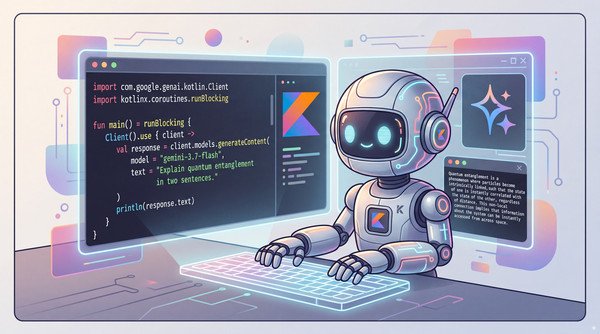
Integrating modern generative AI capabilities into Kotlin applications shouldn’t require juggling raw HTTP clients or bridging disparate Java libraries. Today, we’re excited to announce the 1.0 release of the Google Gen AI SDK for Kotlin (google-genai-kotlin). You can dive right into the code, explore runnable samples, and star the project today on GitHub at googleapis/kotlin-genai.
Built from the ground up as a Kotlin Multiplatform (KMP) library, the SDK brings idiomatic Kotlin paradigms (including first-class Coroutines, asynchronous Flow streaming, and immutable data classes with named and default parameters) to developers targeting both the JVM (backend services, serverless functions, desktop) and Android.
The SDK provides a unified surface to interact with both the Gemini Developer API (Google AI Studio) and the Gemini Enterprise Agent Platform (on Google Cloud) with minimal configuration tweaks.
1. Getting started: Adding the dependency
The SDK is published to Maven Central under com.google.genai:google-genai-kotlin.
Kotlin Multiplatform (KMP)
For multiplatform applications, add the dependency to your commonMain source set:
- code_block
- <ListValue: [StructValue([(‘code’, ‘// build.gradle.ktsrnkotlin {rn sourceSets {rn commonMain.dependencies {rn implementation(“com.google.genai:google-genai-kotlin:1.0.0″)rn }rn }rn}’), (‘language’, ”), (‘caption’, <wagtail.rich_text.RichText object at 0x7fadb1cd6c40>)])]>
Standard JVM or Android projects
For single-platform Kotlin projects, Gradle automatically selects the optimal variant via Gradle Module Metadata:
- code_block
- <ListValue: [StructValue([(‘code’, ‘// build.gradle.ktsrndependencies {rn implementation(“com.google.genai:google-genai-kotlin:1.0.0″)rn}’), (‘language’, ”), (‘caption’, <wagtail.rich_text.RichText object at 0x7fadb1cd6ee0>)])]>
2. Unary and streaming text generation and chat
The primary entry point is the Client class. It manages HTTP connections and authentication automatically based on your environment variables (GEMINI_API_KEY or GOOGLE_API_KEY for Google AI Studio, and GOOGLE_GENAI_USE_ENTERPRISE=true with standard Google Cloud Application Default Credentials).
Single prompt request with Gemini Flash
Using Kotlin’s use extension ensures the client’s underlying network engine and HTTP connections are released cleanly:
- code_block
- <ListValue: [StructValue([(‘code’, ‘import com.google.genai.kotlin.Clientrnimport kotlinx.coroutines.runBlockingrnrnfun main() = runBlocking {rn Client().use { client ->rn val response = client.models.generateContent(rn model = “gemini-flash-latest”,rn text = “Explain quantum entanglement in two sentences.”rn )rnrn println(response.text)rn }rn}’), (‘language’, ”), (‘caption’, <wagtail.rich_text.RichText object at 0x7fadb1cd6250>)])]>
Low-latency streaming with Coroutines Flow
For interactive UIs and responsive CLI tools, generateContentStream returns a cold Kotlin Coroutine Flow<GenerateContentResponse>, delivering token chunks in real time:
- code_block
- <ListValue: [StructValue([(‘code’, ‘import com.google.genai.kotlin.Clientrnimport kotlinx.coroutines.runBlockingrnrnfun main() = runBlocking {rn Client().use { client ->rn val responseFlow = client.models.generateContentStream(rn model = “gemini-flash-latest”,rn text = “Outline the key architectural patterns for microservices on Google Cloud.”rn )rnrn responseFlow.collect { chunk ->rn chunk.text?.let { print(it) }rn }rn println()rn }rn}’), (‘language’, ”), (‘caption’, <wagtail.rich_text.RichText object at 0x7fadb31ada90>)])]>
Multi-turn conversations (chat)
Managing conversation history manually across request turns can become tedious. The SDK includes a dedicated chats service that automatically maintains context, appends turns, formats conversation history, and handles function calling:
- code_block
- <ListValue: [StructValue([(‘code’, ‘import com.google.genai.kotlin.Clientrnimport com.google.genai.kotlin.types.Contentrnimport com.google.genai.kotlin.types.GenerateContentConfigrnimport kotlinx.coroutines.runBlockingrnrnfun main() = runBlocking {rn Client().use { client ->rn val config = GenerateContentConfig(rn systemInstruction = Content.fromText(“You are an expert Google Cloud Solutions Architect.”)rn )rnrn // Create a multi-turn chat sessionrn val chat = client.chats.create(rn model = “gemini-flash-latest”,rn config = configrn )rnrn // Turn 1rn val firstResponse = chat.sendMessage(“We are designing an event-driven ingestion pipeline on Google Cloud.”)rn println(“Gemini: ${firstResponse.text}\n”)rnrn // Turn 2: context from the first turn is included automaticallyrn val secondResponse = chat.sendMessage(“Which managed messaging service should we choose: Pub/Sub or Kafka?”)rn println(“Gemini: ${secondResponse.text}\n”)rn }rn}’), (‘language’, ”), (‘caption’, <wagtail.rich_text.RichText object at 0x7fadb31ad400>)])]>
You can also use chat.sendMessageStream(...) for streaming multi-turn chat responses.
3. Multimodal analysis grounded with Google Search
Gemini’s multimodal reasoning is especially effective when combined with external verification. For instance, when analyzing technical, medical, or scientific diagrams, you can attach Google Search Grounding to cross-check factual claims against live web sources.
- code_block
- <ListValue: [StructValue([(‘code’, ‘import com.google.genai.kotlin.Clientrnimport com.google.genai.kotlin.types.*rnimport java.io.Filernimport kotlinx.coroutines.runBlockingrnrnfun main() = runBlocking {rn Client().use { client ->rn val imageBytes = File(“src/main/resources/medical_diagram.png”).readBytes()rnrn val content = Content(rn parts = listOf(rn Part(inlineData = Blob(mimeType = “image/png”, data = imageBytes)),rn Part(text = “Is this anatomical diagram accurate? Verify labels against authoritative medical sources.”)rn )rn )rnrn // Enable Google Search as a grounding toolrn val config = GenerateContentConfig(rn tools = listOf(Tool(googleSearch = GoogleSearch()))rn )rnrn val response = client.models.generateContent(rn model = “gemini-flash-latest”,rn content = content,rn config = configrn )rnrn println(“=== Analysis ===”)rn println(response.text)rnrn // Inspect citations and search queriesrn val grounding = response.groundingMetadatarn println(“\n=== Search Queries Executed ===”)rn grounding?.webSearchQueries?.forEach { println(“- $it”) }rnrn println(“\n=== Grounding Sources ===”)rn grounding?.groundingChunks?.mapNotNull { it.web }?.forEach { source ->rn println(“- ${source.title}: ${source.uri}”)rn }rn }rn}’), (‘language’, ”), (‘caption’, <wagtail.rich_text.RichText object at 0x7fadb31ad7c0>)])]>
4. Visual generation and conversational editing: The Gemini 3 image family
The SDK provides full support for Google’s latest image generation models (popularly known as the Nano Banana series of models on leaderboards).
Generating and Saving an Image
Generated image bytes are delivered directly in the response parts as a Blob:
- code_block
- <ListValue: [StructValue([(‘code’, ‘import com.google.genai.kotlin.Clientrnimport java.io.Filernimport kotlinx.coroutines.runBlockingrnrnfun main() = runBlocking {rn Client().use { client ->rn val response = client.models.generateContent(rn model = “gemini-3.1-flash-image”, // Nano Banana 2rn text = “A photorealistic blueprint of an eco-friendly modern datacenter, isometric view, 4k”rn )rnrn val imagePart = response.parts?.firstOrNull { it.inlineData != null }rn imagePart?.inlineData?.data?.let { bytes ->rn File(“datacenter_blueprint.png”).writeBytes(bytes)rn println(“Image generated and saved successfully.”)rn }rn }rn}’), (‘language’, ”), (‘caption’, <wagtail.rich_text.RichText object at 0x7fadb31ad3a0>)])]>
Conversational image-to-image editing
You can pass existing images and conversational edit instructions in the same request:
- code_block
- <ListValue: [StructValue([(‘code’, ‘val originalImage = File(“input.png”).readBytes()rnrnval editPrompt = Content(rn parts = listOf(rn Part(inlineData = Blob(mimeType = “image/png”, data = originalImage)),rn Part(text = “Change the daylight illumination to a dramatic twilight skyline with illuminated windows.”)rn )rn)rnrnval editResponse = client.models.generateContent(rn model = “gemini-3-pro-image”, // Nano Banana Prorn content = editPromptrn)’), (‘language’, ”), (‘caption’, <wagtail.rich_text.RichText object at 0x7fadb31ad8b0>)])]>
5. Real-time bidirectional interaction with Gemini Live
For low-latency voice, audio, and live multimodal interactions, the SDK supports the Gemini Live API via persistent WebSocket connections using client.live.connect(...):
- code_block
- <ListValue: [StructValue([(‘code’, ‘import com.google.genai.kotlin.Clientrnimport com.google.genai.kotlin.types.AudioTranscriptionConfigrnimport com.google.genai.kotlin.types.LiveConnectConfigrnimport kotlinx.coroutines.launchrnimport kotlinx.coroutines.runBlockingrnrnfun main() = runBlocking {rn Client().use { client ->rn val model = if (client.enterprise) “gemini-live-2.5-flash-native-audio”rn else “gemini-3.1-flash-live-preview”rnrn val config = LiveConnectConfig(rn outputAudioTranscription = AudioTranscriptionConfig()rn )rnrn // Establish real-time bidirectional WebSocket sessionrn client.live.connect(model, config).use { session ->rn println(“Connected to Gemini Live session!”)rnrn // Launch collector for server messages (audio and text transcriptions)rn val receiveJob = launch {rn session.receive().collect { serverMessage ->rn serverMessage.serverContent?.outputTranscription?.text?.let { text ->rn print(text)rn }rn }rn }rnrn // Stream real-time text (or raw PCM audio blobs via session.sendRealtimeInput(audio = …))rn session.sendRealtimeInput(text = “Hello Gemini! Give me a 5-second motivational quote.”)rnrn // When finished, clean uprn receiveJob.cancel()rn session.closeSession()rn }rn }rn}’), (‘language’, ”), (‘caption’, <wagtail.rich_text.RichText object at 0x7fadb31add60>)])]>
6. Structured tool and function calling
When building agentic workflows or bridging LLMs with backend microservices, developers can pass structured JSON schemas via FunctionDeclaration. The model will intelligently select when to invoke the tool:
- code_block
- <ListValue: [StructValue([(‘code’, ‘val telemetryTool = FunctionDeclaration(rn name = “getDatacenterMetrics”,rn description = “Fetch real-time CPU and thermal telemetry for a Google Cloud region”,rn parameters = Schema(rn type = Type.OBJECT,rn properties = mapOf(“region” to Schema(type = Type.STRING)),rn required = listOf(“region”)rn )rn)rnrnval response = client.models.generateContent(rn model = “gemini-flash-latest”,rn text = “Check telemetry for europe-west1”,rn config = GenerateContentConfig(rn tools = listOf(Tool(functionDeclarations = listOf(telemetryTool)))rn )rn)rnrnresponse.functionCalls?.firstOrNull()?.let { call ->rn println(“Model triggered tool: ${call.name} with arguments: ${call.args}”)rn}’), (‘language’, ”), (‘caption’, <wagtail.rich_text.RichText object at 0x7fadb31ade50>)])]>
Additionally, when using the chats service, you can take advantage of Automatic Function Calling (AFC), which means that functions declared in the chat conversation can be invoked automatically and transparently by the SDK on your behalf, as you can see in the following example:
- code_block
- <ListValue: [StructValue([(‘code’, ‘fun main() = runBlocking {rn // A mocked functionrn val getWeather = callableFunction(“get_weather”, paramName = “city”) { city: String ->rn “18 degrees and sunny in $city”rn }rnrn Client().use { client ->rn val chat = client.chats.create(rn model = “gemini-flash-latest”,rn automaticFunctionCalling = AutomaticFunctionCalling(getWeather),rn )rnrn // SDK calls get_weather if needed in this conversationrn println(chat.sendMessage(“What is the weather in Zurich?”).text)rn }rn}’), (‘language’, ”), (‘caption’, <wagtail.rich_text.RichText object at 0x7fadb31adeb0>)])]>
What’s next?
With the 1.0 release of the Google Gen AI SDK for Kotlin, Kotlin developers across backend server ecosystems (Ktor, Spring Boot, Quarkus, Micronaut) and mobile applications now have a clean, multiplatform foundation for building generative AI applications.
To learn more and get started, check out the following resources:
-
GitHub Repository: Check out the source, stars, and discussions at github.com/googleapis/kotlin-genai.
-
Documentation and Samples: Explore the Kotlin Gen AI sample suite.
-
Feedback: File issues, suggest features, or submit pull requests directly on GitHub.
We look forward to seeing what you build with Kotlin and Gemini!