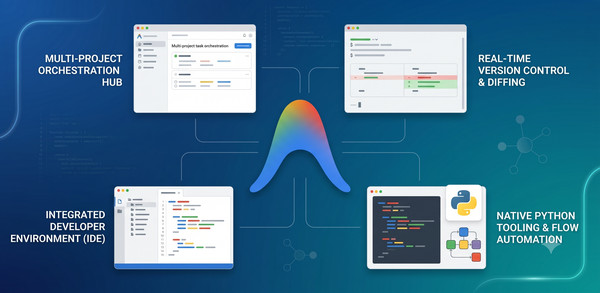
TL;DR:
- Antigravity 2.0: A desktop app to orchestrate multiple autonomous agents working in parallel across independent projects.
- Antigravity CLI: A terminal interface designed for command-line workflows and headless execution.
- Antigravity IDE: An editor for developers who want to write code directly alongside an agent.
- Antigravity SDK: A Python library for building and deploying your own custom agents that use the Antigravity Harness.
Quick Comparison
| Feature | Antigravity 2.0 | Antigravity CLI | Antigravity IDE | Antigravity SDK |
| Interface | Desktop App | Terminal (TUI) | Desktop App | Python Code |
| Best For | Multiple simultaneous tasks | Command-line / Headless | Directly editing code | Building custom agents |
The Four Surfaces of Antigravity
1. Antigravity 2.0
The default recommendation. Manages tasks across multiple projects at the same time.

Antigravity 2.0 is a standalone desktop application. It is designed to let you run multiple tasks without blocking your main workspace. You can easily switch between and monitor different projects from one screen. You can also schedule tasks to run on a regular schedule to check code quality or find outdated packages.
2. Antigravity CLI
For terminal workflows and headless execution.
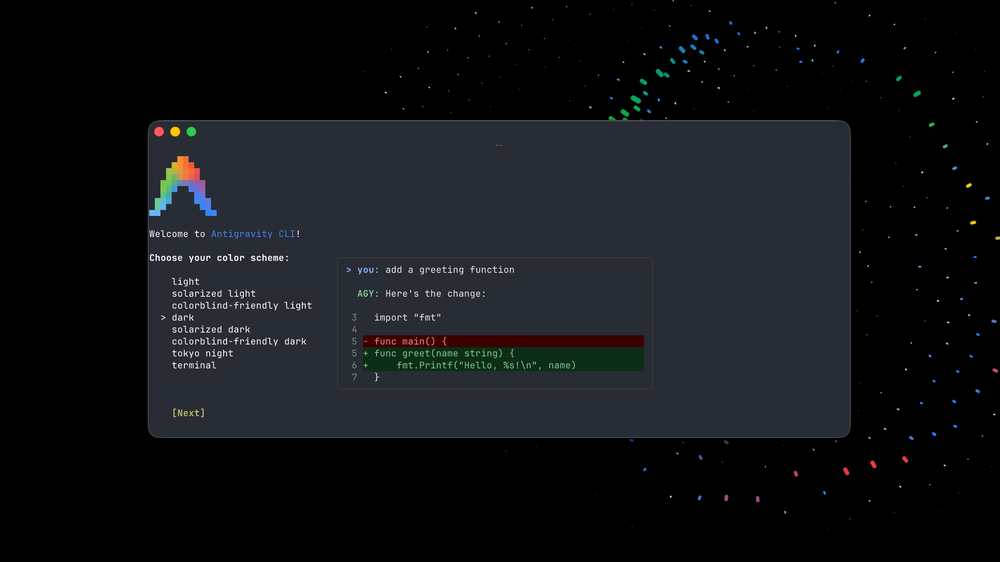
Built in Go for speed, the Antigravity CLI is for those who prefer to work in the terminal with fast, keyboard-driven navigation and simple shortcuts. You can start background agents using terminal commands without locking up your active command-line window. Choose the CLI if you need headless execution (such as working over SSH or inside remote containers).
3. Antigravity IDE
For developers who want to see and edit the code directly.

The IDE surface puts agents directly inside your current workspace. This is the best choice if you want to see exactly what code the agent is editing and accept or reject changes line-by-line. With built-in debugging, the agent can see runtime errors and offer a one-click fix right in your editor.
4. Antigravity SDK (Python)
Best for: Writing custom agent logic and automated pipelines.
- code_block
- <ListValue: [StructValue([(‘code’, ‘import asynciornfrom google.antigravity import Agent, LocalAgentConfigrnrnasync def main():rn config = LocalAgentConfig(rn system_instructions=”You are an expert assistant for codebase navigation.”,rn # api_key=”your_api_key_here”,rn )rn async with Agent(config) as agent:rn response = await agent.chat(“What files are in the current directory?”)rn print(await response.text())rnrnasync def run():rn await main()rnrnif __name__ == “__main__”:rn asyncio.run(run())’), (‘language’, ‘lang-py’), (‘caption’, <wagtail.rich_text.RichText object at 0x7f1c0405a9d0>)])]>
The Google Antigravity SDK is a Python library that lets you build your own custom agents from scratch. Because it runs on the same shared harness, you get direct access to the exact same tools and rules that power Google’s official Antigravity tools. You can write an agent locally and deploy it to Google Cloud with zero code changes.
Summary
While each interface looks different, they all run on the same underlying agent harness. No matter which of the Antigravity surfaces you choose, you get support for plugins, skills, and more. Your agents have access to the same core logic, so pick the one that works best for your project.
For guides and documentation, visit antigravity.google, and when you’re ready to get started, visit the Antigravity Download Page.