Backend developers and architects building high-throughput, low-latency applications increasingly rely on Valkey, an open-source, high-performance key-value datastore that supports a variety of workloads such as caching and message queues. At Google Cloud, we offer a fully managed version as part of Google Cloud Memorystore, and today, we’re excited to announce the general availability (GA) of Valkey 9.0, delivering both massive performance gains and powerful new developer capabilities.
During the preview, we saw remarkable uptake and excitement from customers who require the highest levels of performance. Organizations pushing the boundaries of scale and latency are putting Valkey 9.0 to the test for their most demanding workloads:
“A high-performance caching layer is critical to our infrastructure at Snap. We are excited to see the General Availability of Valkey 9.0 on Google Cloud Memorystore. The new architectural enhancements, including SIMD optimizations, offer strong performance benefits for throughput and latency. Having access to a managed service backed by an open standard gives us valuable flexibility in how we deploy and manage our caching workloads.” – Ovais Khan, Principal Software Engineer, Snap
This need for uncompromising speed and flexibility extends beyond social networking infrastructure into the financial sector, where real-time transaction processing and reliability are non-negotiable.
“In the financial services sector, milliseconds matter and data reliability is paramount. By utilizing Memorystore for Valkey on Google Cloud in the critical GPay stack powering the UPI Acquirer Switch for Top Indian Banks, Juspay is proud to leverage Memorystore to handle high-throughput transactional data with exceptionally low latency.
We are excited about the GA release of Valkey 9.0. The performance gains from features like pipeline memory prefetching, combined with the assurance of a fully managed, truly open-source solution, provide us with the scale and reliability necessary to securely serve all our customers.” – Arun Ramprasadh, Head of UPI, Juspay
Similarly, in the media and entertainment space, delivering uninterrupted experiences to massive audiences requires a caching layer capable of instantly absorbing traffic spikes.
“During the preview of Valkey 9.0 on Google Cloud Memorystore, we’ve experienced amazing performance and stability. Live streaming demands absolutely minimal latency and maximum throughput. The architectural enhancements in Valkey 9.0 allow us to scale our caching layer more efficiently to handle traffic spikes during major events. Relying on a fully managed, open-source solution ensures Fubo can deliver a seamless viewing experience to our audience.” – Kevin Anthony, Platform Engineering Manager, Fubo
Performance at scale: Speed without compromise
Valkey 9.0 is engineered for raw speed. By building upon the enhanced IO threading architecture introduced in Valkey 8.0, Valkey can handle significantly higher throughput and reduced latency on multi-core VMs. The performance gains are driven by several architectural enhancements as highlighted in the official Valkey 9.0 release announcement on the Valkey blog:
- Pipeline memory prefetching: This optimization increases throughput by up to 40% by improving memory access efficiency during pipelining.
- Zero copy responses: For large requests, this feature avoids internal memory copying, yielding up to 20% higher throughput.
- SIMD optimizations: By utilizing SIMD for BITCOUNT and HyperLogLog operations, Valkey 9.0 delivers up to 200% higher throughput for these common tasks. (Note: The figures above are based on open-source benchmarks; actual performance improvements will vary depending on your specific workloads.)
The mechanics of throughput: Pipelining
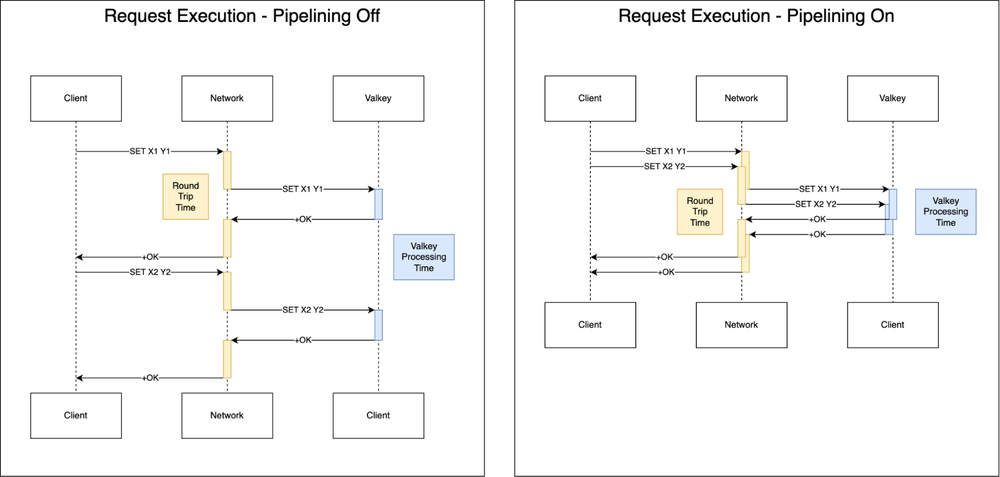
In Valkey, latency is largely constrained by network round-trip-time (RTT). If an application waits for each response before initiating the next request, total throughput remains bound by this round-trip latency. Pipelining addresses this by disaggregating latency and throughput, allowing multiple requests to be sent over a single connection without awaiting immediate responses.
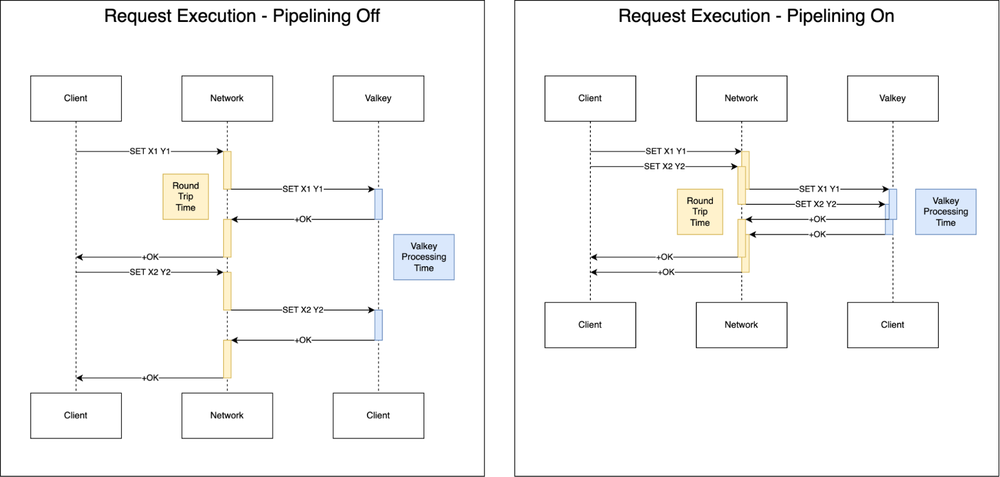
Most Valkey clients offer native support for pipelining, with some like valkey-go providing “auto-pipelining” capabilities that handle this optimization transparently for developers.
Valkey 8.0 unlocked significant performance leaps with background thread memory prefetching. This architectural optimization provides a hint to the hardware to move data from DRAM into CPU caches before the main thread requires it. While this allowed the main thread to execute operations with minimal delay, it was limited; in pipelined traffic, only the initial operation benefited from prefetching, leaving subsequent requests bottlenecked by CPU cache misses.
Building on this foundation, Valkey 9.0 re-architects command processing to specifically optimize for pipelined workloads. Rather than prefetching keys solely for the first operation, Valkey 9.0 prefetches all operations within a pipeline simultaneously.
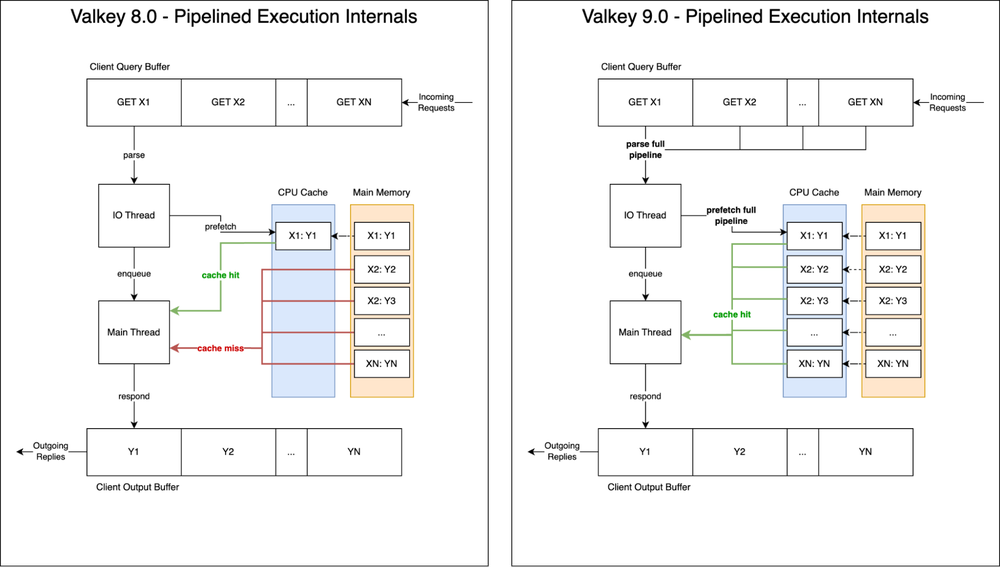
While seemingly incremental, the impact is profound, given that CPU caches are typically dozens of times faster than DRAM access. By maximizing CPU cache hits on the main thread, Valkey 9.0 delivers up to 40% higher overall throughput.
New capabilities for modern developers
Beyond raw performance, Valkey 9.0 addresses top feature requests from the community with powerful new commands that simplify application logic and data management.
Granular hash field expiration
A frequent request for in-memory stores is the ability to expire individual fields within a hash rather than the entire key. Valkey 9.0 introduces this capability, allowing for much more flexible data lifecycle management.
-
Real-world example: Imagine managing a “User Session” hash where you store authentication tokens, temporary preferences, and long-term settings. With HEXPIRE, you can set a 30-minute expiration on a temporary_session_token field while keeping the rest of the user’s profile data intact. This eliminates the need to break a single logical object into multiple keys just to handle different Time-To-Lives (TTLs).
-
New commands: This release adds full support for HEXPIRE, HEXPIREAT, HEXPIRETIME, HPERSIST, HTTL, and more.
Advanced geospatial and conditional logic
-
Polygon search for geospatial indices: You can now query location data by a specified polygon. For instance, a logistics application can define precise, non-circular delivery zones — like a specific neighborhood or industrial park — and query for all active assets currently within those exact boundaries.
To use this capability, simply add your coordinates to a geospatial index:
- code_block
- <ListValue: [StructValue([(‘code’, ‘> GEOADD gcp:regions -121.1851 45.5946 “us-west1 (Oregon)” -118.2437 34.0522 “us-west2 (Los Angeles)” -111.8910 40.7608 “us-west3 (Salt Lake City)” -115.1398 36.1699 “us-west4 (Las Vegas)” -95.8608 41.2619 “us-central1 (Iowa)” -77.4874 39.0438 “us-east4 (N. Virginia)”rnrn(integer) 6’), (‘language’, ”), (‘caption’, <wagtail.rich_text.RichText object at 0x7fbef75077f0>)])]>
Then use GEOSEARCH with the BYPOLYGON option:
- code_block
- <ListValue: [StructValue([(‘code’, ‘> GEOSEARCH gcp:regions BYPOLYGON 5 -125.00 49.00 -125.00 32.00 -114.00 32.00 -109.00 42.00 -116.00 49.00rnrn1) “us-west2 (Los Angeles)”rn2) “us-west4 (Las Vegas)”rn3) “us-west3 (Salt Lake City)”rn4) “us-west1 (Oregon)”‘), (‘language’, ”), (‘caption’, <wagtail.rich_text.RichText object at 0x7fbee1a7f6d0>)])]>

-
Conditional delete (DELIFEQ): This command deletes a key only if its current value matches a specified value. This is a game-changer for distributed locking. Now, a worker can safely release a lock only if it still holds the unique token it originally used to acquire it, ensuring it doesn’t accidentally delete a lock that has already expired and been re-assigned to another process. Previously, this kind of operation was only possible using Lua scripting.
To understand the usefulness of DELIFEQ, suppose two processes (Process A and Process B) need exclusive access to the lock.
Process A executes the following to acquire the distributed lock for 30 seconds:
- code_block
- <ListValue: [StructValue([(‘code’, ‘>SET distributed_lock process_A NX PX 30000rnOK’), (‘language’, ”), (‘caption’, <wagtail.rich_text.RichText object at 0x7fbee1a7f970>)])]>
If Process B attempts to do the same, it won’t succeed due to the NX option:
- code_block
- <ListValue: [StructValue([(‘code’, ‘> SET distributed_lock process_B NX PX 30000rn(nil)’), (‘language’, ”), (‘caption’, <wagtail.rich_text.RichText object at 0x7fbef54eafd0>)])]>
When Process A finishes, it can safely remove the lock with the new DELIFEQ command:
- code_block
- <ListValue: [StructValue([(‘code’, ‘> DELIFEQ distributed_lock process_Arn(integer) 1’), (‘language’, ”), (‘caption’, <wagtail.rich_text.RichText object at 0x7fbef54eabb0>)])]>
Now, Process B is free to acquire the lock:
- code_block
- <ListValue: [StructValue([(‘code’, ‘> SET distributed_lock process_B NX PX 30000rnOK’), (‘language’, ”), (‘caption’, <wagtail.rich_text.RichText object at 0x7fbef54ea940>)])]>
Enhanced visibility and debugging
The CLIENT LIST command now supports robust filtering options. Platform engineers can now quickly isolate clients by flags, name, library version, or even specific databases. This makes it significantly easier to identify and troubleshoot legacy clients or specific application instances that may be causing performance bottlenecks in a complex microservices environment.
|
New filtering option |
Description |
|
NAME <name>, NOT-NAME <name> |
Include or exclude clients by their specified name. |
|
IDLE <seconds> |
Include only clients that have been idle for over a number of seconds. |
|
FLAGS <flags>, NOT-FLAGS <flags> |
Include or exclude clients based on various flags (e.g., whether they are primary or replica connections). |
|
LIB-NAME <name>, LIB-VER <version>, NOT-LIB-NAME <name>, NOT-LIB-VER <version> |
Include or exclude clients based on their provided library version or name (e.g., only valkey-py version 6). |
|
DB <db>, NOT-DB <db> |
Include or exclude clients based on their current selected DB. |
|
CAPA <flags>, NOT-CAPA <flags> |
Include or exclude clients based on their declared capabilities (e.g., whether they support redirection or not). |
|
IP <ip>, NOT-IP <ip> |
Include or exclude clients based on their IP address. |
|
NOT-ID <id>, NOT-TYPE <type>, NOT-ADDR <address>, NOT-LADDR <local address>, NOT-USER <username> |
Many existing filters now support an inverse option. |
The extended CLIENT LIST capabilities are available in Memorystore for Valkey out of the box.
Enterprise-ready features
With this release, we are also introducing the clustered databases configuration, which facilitates complex use cases like blue-green caching patterns. This allows multiple services to utilize numbered databases to efficiently partition data and maintain logical namespace separation. You can now configure up to 100 numeric databases for namespacing your keyspace even when in cluster mode.
Configuration example: When creating your instance via the Google Cloud CLI, you can specify the number of databases:
- code_block
- <ListValue: [StructValue([(‘code’, ‘gloud memorystore instances create my-valkey-instance \rn–engine-version=VALKEY_9_0 \rn–replica-count=1 \rn–shard-count 10 \rn–engine-configs=cluster-databases=100’), (‘language’, ”), (‘caption’, <wagtail.rich_text.RichText object at 0x7fbef54ea310>)])]>
The clustered databases configuration lets you efficiently partition data across various services or environments within a single, scalable clustered instance. This provides the logical organizational benefits of multiple databases while leveraging the massive scale of a cluster. For many customers currently constrained by legacy non-clustered Redis instances, this capability removes the friction of complex application re-architecting, making it easier to modernize workloads that rely on multi-database structures.
Seamless upgrades
Existing Memorystore for Valkey customers can take advantage of these new features immediately through a simple, no-downtime, in-place upgrade path. As of today, Valkey 9.0 is available for both cluster-enabled and cluster-disabled instances, ensuring a smooth transition to the latest engine.
Looking ahead
The general availability of Valkey 9.0 represents a significant milestone in the evolution of open source databases. But we’re just getting started. We’re already hard at work engineering the next wave of innovation and will be unveiling even more enhancements for the Valkey ecosystem at Google Cloud Next 2026.
Ready to build?
The best way to experience the power of Memorystore for Valkey 9.0 is to try it out. Get started with the documentation or deploy your first Valkey instance. Don’t let having to self-manage Redis hold you back. Experience the simplicity and speed of Memorystore for Valkey today and see how it can power your applications, so you can focus on what matters: innovating and creating impactful applications for your business!